
DonationCoder.com forum
 
Read-only archive. This is a static copy of the DonationCoder.com forum. Reading and searching work as before; logging in, posting and private messages do not.
Archive of 2026-10-21 · About this archive · Main site

Author Topic: desktop divider / magnetic window border snapper tool - with draggable dividers?  (Read 9,370 times)

David.P

  • Ergonomics Junkie
  • Supporting Member
  • Joined in 2008
  • **
  • Posts: 208
Hi forum,

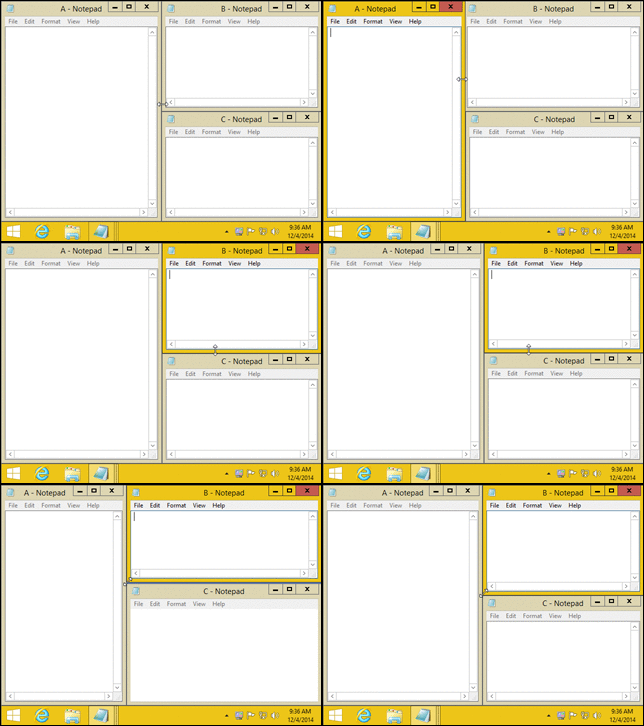
is there a good Windows desktop divider tool where you can live drag the divider (or, respectively, live drag adjoining window borders while keeping them snapped) in order to quickly adjust the window split ratio using the mouse?

Thanks for any tips
Cheers David.P
David.P

  • Ergonomics Junkie
  • Supporting Member
  • Joined in 2008
  • **
  • Posts: 208
Ahh, just found this:


http://www.nurgo-software.com/products/aquasnap

Any comments, experiences or alternatives?

MilesAhead

  • Supporting Member
  • Joined in 2009
  • **
  • Posts: 7,736
    • Coding Snacks
Ahh, just found this:


http://www.nurgo-software.com/products/aquasnap

Any comments, experiences or alternatives?

It may work fine for most.  Every time I try AquaSnap I get weird things happening.  No doubt due to the fact I have a lot of my own stuff running watching the active window and clipboard.  Although I may try it again as I changed one of my utilities so that it does not use clipboard on every click or arrow key as it used to.

David.P

  • Ergonomics Junkie
  • Supporting Member
  • Joined in 2008
  • **
  • Posts: 208
Thanks!

Actually, I can't get that feature called AquaGlue:

...to work at all (although activated)  :(

Do you know how to:
1.) quickly "maximize" two windows side by side; and then
2.) live drag the virtual divider between them?

David.P

  • Ergonomics Junkie
  • Supporting Member
  • Joined in 2008
  • **
  • Posts: 208
OK I think I got it now. AquaGlue only seems to work after windows have been arranged by AquaSnap (not manually or by using WIN+Arrow combinations).

MilesAhead

  • Supporting Member
  • Joined in 2009
  • **
  • Posts: 7,736
    • Coding Snacks
OK I think I got it now. AquaGlue only seems to work after windows have been arranged by AquaSnap (not manually or by using WIN+Arrow combinations).

Are you using the free or one of the other versions?

David.P

  • Ergonomics Junkie
  • Supporting Member
  • Joined in 2008
  • **
  • Posts: 208
Free for the moment.

MilesAhead

  • Supporting Member
  • Joined in 2009
  • **
  • Posts: 7,736
    • Coding Snacks
Free for the moment.

Cool. Let me know if you like it.  I have tried it a couple of times over the last year.  But the quirks could have been caused by bugs in one of my programs.  It may deserve another try.  :)

David.P

  • Ergonomics Junkie
  • Supporting Member
  • Joined in 2008
  • **
  • Posts: 208
Yeah but the AquaGlue feature costs a few bucks if you want to use it permantently.

MilesAhead

  • Supporting Member
  • Joined in 2009
  • **
  • Posts: 7,736
    • Coding Snacks
I could not get the installer to complete in ToolWiz TimeFreeze(which is how I test install these days.)

But the portable version worked ok.  I just tried it out for a bit. I haven't gotten into the multiple window sets etc..

What AquaSnap would have most importantly over my MoveIt utility that I use for sizing and positioning stuff on screen, is multi-monitor support.  But for my own use I think I'll end up with MoveIt.  Once I have a Window sized I can just hold down the middle mouse button and press a key 1 - 9 to move the window to that tic tac toe screen position.

It does not do docking per se though.

Original address: https://www.donationcoder.com/forum/index.php?topic=41144.0