DonationCoder.com forum
 
Read-only archive. This is a static copy of the DonationCoder.com forum. Reading and searching work as before; logging in, posting and private messages do not.
Archive of 2026-10-21 · About this archive · Main site

Last post Author Topic: pound symbol  (Read 30,004 times)

tomos

  • Charter Member
  • Joined in 2006
  • ***
  • Posts: 11,970
    • Gathering Badge
    • Participated in NANY Challenge Once
Re: pound symbol
« Reply #25 on: April 15, 2015, 10:24 PM »
[...] a simple AHK script:

Code
^1:: Send, £ ; Use Ctrl+1 to send the pound symbol.

added this to my AHK file, thanks :up:
works fine on a qwertz (german) laptop keyboard with Win.8.1

I added it too to my AHK, but it doesn't work  :tellme: :tellme: :tellme:

I think they've stolen the pound symbol from your laptop Kalos :P
would be interesting to see if it (or any of the other solutions) work on other US hardware
Tom

cyberdiva

  • Supporting Member
  • Joined in 2006
  • **
  • Posts: 1,041
Re: pound symbol
« Reply #26 on: April 15, 2015, 10:57 PM »
In the past, when I've used a laptop or a netbook, there were keys in the middle of the keyboard that could be used as a number keypad if paired with  the laptop or netbook's Function (Fn) key.  For example, on my old Toshiba netbook, Fn+M = the keypad's 0, Fn+J=1, Fn+K=2, Fn+L=3, Fn+U=4, Fn+I=5, Fn+O=6, Fn+7=7, Fn+8=8, Fn+9=9.  And so if I then hold down the ALT key and then Fn+m, Fn+j, Fn+o, and Fn+l, that would be the equivalent of ALT+0163 and it would produce a £ .  Frankly, I found this a PITA, but it did work without my having to change the keyboard.  However, I confess that the last time I bought a laptop, I made sure it had a regular numeric keypad, since I type a fair amount in Spanish and want to be able to use the numeric keypad to type characters like ñ, é, ¿, etc.  However, if all you need is a very occasional £, it might be worth giving the Fn key method a try, assuming your laptop has one.

ayryq

  • Supporting Member
  • Joined in 2009
  • **
  • Posts: 292
Re: pound symbol
« Reply #27 on: April 16, 2015, 12:19 AM »
I used to use Linux; the version I used had a nifty system of using a hotkey (right Alt, perhaps) followed by a sensible sequence to make a special character. For example the sequence Alt, "-", "-", "-" creates an em-dash (" — "). Or alt, "e", " ' " gives an "é"

I missed this setup moving to windows. I can intuitively guess e + '  but I can't guess Alt+0233.

I found a program called "WinCompose" that lets me get this function back. It used to run on AHK but I guess it doesn't anymore.

By default for £ I enter L (or "l") and dash "-", or backwards (dash first) works too. I have it set to use the windows "Menu" key next to right-ctrl on my keyboard.

Most of the special characters I need work without me looking them up, after noting a few rules (ö is o + double quotes, â uses the greater-than sign OR the caret), but there is a dictionary available in the system tray at any time.

WinCompose's last update was a couple weeks ago.

https://github.com/SamHocevar/wincompose

Edit: This is confusing to explain with all the quotes. To quote the website, "A compose key allows to easily write special characters such as é ž à ō û ø ☺ ¤ ∅ « ♯ ⸘ Ⓚ ㊷ ♪ ♬ using short and often very intuitive key combinations. For instance, ö is obtained using o + ", and ♥ is obtained using < + 3."

TaoPhoenix

  • 0 - 60 ... then back to 0 again!
  • Supporting Member
  • Joined in 2011
  • **
  • Posts: 4,642
    • Participated in NANY Challenge Three Times
Re: pound symbol
« Reply #28 on: April 16, 2015, 03:20 AM »
...
£

Okay ...

(Cheesy music!)
Low-Tek Bird has a suggestion!
Why not just copy and paste it from a text file? I've kept a text file of "widgets" before for this kind of stuff.
Since Curt gave you one, instead of all these complex things (and most of them didn't work for me either!), just save Curt's to a text file of "widgets" and just copy it!

£ for £ it is the fastest way for me!

Let's make some emoticons!    £: )
(Guy in a Roman Centurion hat?)

Use attachthumb=# to show an attached image as an expandable thumbnail, or attach=# to show full size. (With Brackets)

Curt

  • Supporting Member
  • Joined in 2006
  • **
  • Posts: 7,565
Re: pound symbol
« Reply #29 on: April 16, 2015, 06:58 AM »
AltGr+163 also gives me £  :up:

Actually Windows Character Map is saying Alt+163. But I guess that would be on a normal PC, because on my laptop I have to use AltGr instead.


tomos

  • Charter Member
  • Joined in 2006
  • ***
  • Posts: 11,970
    • Gathering Badge
    • Participated in NANY Challenge Once
Re: pound symbol
« Reply #30 on: April 16, 2015, 07:45 AM »
There used be a nice FARR plugin for this kind of thing: Character Table - but it got packaged with a bunch of other aliases/plugins that havent been supported in a couple of years (CZB pack).

If of interest, see
http://www.donationcoder.com/forum/index.php?topic=12173.0
and this and following posts:
http://www.donationcoder.com/forum/index.php?topic=17153.msg270834#msg270834
Tom

Curt

  • Supporting Member
  • Joined in 2006
  • **
  • Posts: 7,565
Re: pound symbol
« Reply #31 on: April 16, 2015, 12:26 PM »
AltGr+163 also gives me £  :up:
Actually Windows Character Map is saying Alt+163. But I guess that would be on a normal PC, because on my laptop I have to use AltGr instead.

-hey, kalos, this means you can use Ctrl+Alt+163 = £  :up:

You simply have to remember the number 163  ;)

kalos

  • Member
  • Joined in 2006
  • **
  • Posts: 1,824
Re: pound symbol
« Reply #32 on: April 16, 2015, 05:30 PM »
CTRL+RALT+163 types: ¡¼³

Curt

  • Supporting Member
  • Joined in 2006
  • **
  • Posts: 7,565
Re: pound symbol
« Reply #33 on: April 16, 2015, 08:04 PM »
throw that stupid machine into the bin!  :down:

tomos

  • Charter Member
  • Joined in 2006
  • ***
  • Posts: 11,970
    • Gathering Badge
    • Participated in NANY Challenge Once
Re: pound symbol
« Reply #34 on: April 16, 2015, 08:51 PM »
The
Alt 0163 using the numberpad works on this laptop.
Alt 163 give me a "ú"
None of the other Letter/Number combos work here.


Tom

xtabber

  • Supporting Member
  • Joined in 2007
  • **
  • Posts: 618
Re: pound symbol
« Reply #35 on: April 16, 2015, 10:28 PM »
I keep a cheat sheet of symbols and foreign characters that I frequently need in a text file.  When I need one of those characters,  I copy from that sheet and paste into whatever I am writing.

You can also use the Windows Character Map program, which includes the GBP character (£) and most anything else you are likely to need on any Western keyboard.  Character Map used to be in the Accessories group in the Start Menu, but disappeared in Windows 7.  However, it is still included with Windows and you can call it up by typing "Character Map" (without the quotes) in the Start Menu search box.  It's a little clunky, but it works.

TaoPhoenix

  • 0 - 60 ... then back to 0 again!
  • Supporting Member
  • Joined in 2011
  • **
  • Posts: 4,642
    • Participated in NANY Challenge Three Times
Re: pound symbol
« Reply #36 on: April 17, 2015, 04:09 AM »
I keep a cheat sheet of symbols and foreign characters that I frequently need in a text file.  When I need one of those characters,  I copy from that sheet and paste into whatever I am writing.

<--- sneaks a copy of xtabber's cheat sheet!

;D
Use attachthumb=# to show an attached image as an expandable thumbnail, or attach=# to show full size. (With Brackets)

lanux128

  • Global Moderator
  • Joined in 2005
  • *****
  • Posts: 6,277
    • Coding Snacks
    • Volunteers/Staff
    • Gathering Badge
    • Participated in NANY Challenge Once
    • Linux User
Re: pound symbol
« Reply #37 on: April 17, 2015, 05:27 AM »
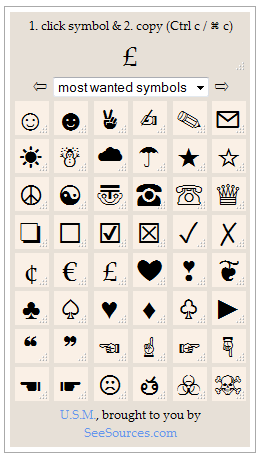
you can bookmark this page for future reference.


• http://panmental.de/symbols/info.htm

Curt

  • Supporting Member
  • Joined in 2006
  • **
  • Posts: 7,565
Re: pound symbol
« Reply #38 on: April 17, 2015, 05:55 AM »

f0dder

  • [Well, THAT escalated quickly!]
  • Charter Honorary Member
  • Joined in 2005
  • ***
  • Posts: 9,153
    • Participated in NANY Challenge Once
Re: pound symbol
« Reply #39 on: April 17, 2015, 08:21 AM »
CTRL+RALT+163 types: ¡¼³
Did you try Ctrl+RightAlt+Shift+3?
- carpe noctem

kalos

  • Member
  • Joined in 2006
  • **
  • Posts: 1,824
Re: pound symbol
« Reply #40 on: April 17, 2015, 04:50 PM »
CTRL+RALT+163 types: ¡¼³
Did you try Ctrl+RightAlt+Shift+3?

I tried Ctrl+Alt+Shift+4 and it worked!!!!!

£££££££!!!!

:tellme: :tellme: :tellme:

Curt

  • Supporting Member
  • Joined in 2006
  • **
  • Posts: 7,565
Re: pound symbol
« Reply #41 on: April 17, 2015, 05:51 PM »
-congratulation!  :up:


But I still think you should throw it away!  ;D
8)

4wd

  • Pedantic Old Bastard
  • Supporting Member
  • Joined in 2006
  • **
  • Posts: 5,652
    • Coding Snacks
Re: pound symbol
« Reply #42 on: April 18, 2015, 02:01 AM »
Character Map used to be in the Accessories group in the Start Menu, but disappeared in Windows 7.

IIRC, it got moved to Windows System menu group, (or something similar).
"I will not follow where the path may lead, but I will go where there is no path, and I will leave a trail." - Muriel Strode, 1903

Curt

  • Supporting Member
  • Joined in 2006
  • **
  • Posts: 7,565
Re: pound symbol
« Reply #43 on: April 18, 2015, 07:10 AM »
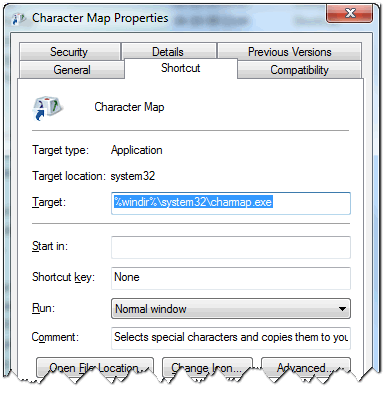
%windir%\system32\charmap.exe


[attachimg=#]

kalos

  • Member
  • Joined in 2006
  • **
  • Posts: 1,824
Re: pound symbol
« Reply #44 on: June 10, 2015, 09:28 PM »
I can't believe it, but the hotkey Ctrl+Alt+Shift+4 that displayed the pound symbol doesn't work anymore!

I even disabled my AHK script, but it doesn't work either!

:o :o :o

KynloStephen66515

  • Animated Giffer in Chief
  • Honorary Member
  • Joined in 2010
  • **
  • Posts: 3,772
    • Participated in NANY Challenge Three Times
    • Cody Award
    • Coding Snacks
    • Official Forum Clown
    • Volunteers/Staff
    • Writer
    • Hardware Hacker
    • DJ Badge - DJ
    • Linux User
Re: pound symbol
« Reply #45 on: June 10, 2015, 09:34 PM »
Character Map used to be in the Accessories group in the Start Menu, but disappeared in Windows 7.

IIRC, it got moved to Windows System menu group, (or something similar).

You can also just type "charmap" (without quotes) into "Run" and it will open.

SomebodySmart

  • Participant
  • Joined in 2015
  • *
  • Posts: 6
Re: pound symbol
« Reply #46 on: June 13, 2015, 06:29 PM »
My laptop has blue numbers on some of the letter keys.

I hold down ALT and the blue Fn key and the letters marked 0163 and I get this:
£

That is, Alt+Fn+mjol

The letters are 0=M, 1=J, 2=K, 3=L, 4=U, 5=I, 6=O, 7=7, 8=8, 9=9, /=0, *=P, -=;, .=., +=/

If you're writing a HTML page it's ampersand, tic-tac-toe, 163 semicolon.

For more see my page at http://easiest-website.com/special.html


hello!

how can I easily type the pound symbol in my american laptop?

I tried to hold down ALT and type the numbers, but nothing happened

thanks!

KynloStephen66515

  • Animated Giffer in Chief
  • Honorary Member
  • Joined in 2010
  • **
  • Posts: 3,772
    • Participated in NANY Challenge Three Times
    • Cody Award
    • Coding Snacks
    • Official Forum Clown
    • Volunteers/Staff
    • Writer
    • Hardware Hacker
    • DJ Badge - DJ
    • Linux User
Re: pound symbol
« Reply #47 on: June 14, 2015, 12:36 AM »
If you're writing a HTML page it's ampersand, tic-tac-toe, 163 semicolon.

tic-tac-toe....this is exactly how I am going to refer to the hash key from now on!

Original address: https://www.donationcoder.com/forum/index.php?topic=40646.0