DonationCoder.com forum
 
Read-only archive. This is a static copy of the DonationCoder.com forum. Reading and searching work as before; logging in, posting and private messages do not.
Archive of 2026-10-21 · About this archive · Main site

Author Topic: how to take a very long screenshot  (Read 8,113 times)

kalos

  • Member
  • Joined in 2006
  • **
  • Posts: 1,824
how to take a very long screenshot
« on: March 10, 2015, 08:44 AM »
hello!

I have a window that is seperated in three panes, like this:

http://www.ravenbrook.com/project/p4dti/release/1.5.3/ug/p4win-submitted-changelists.gif

basically, like Windows Explorer, where at the left, it has the treeview

I have expanded a long treeview and I want to make a screenshot of it (a long one)

is it possible?

thanks!

Ath

  • Supporting Member
  • Joined in 2006
  • **
  • Posts: 3,649
    • Participated in NANY Challenge Eleven Times
    • Coding Snacks
    • Linux User
    • Hardware Hacker
Re: how to take a very long screenshot
« Reply #1 on: March 10, 2015, 11:37 AM »
ScreenShotCaptor and check out/learn from the screencasts
/Ton
Ath's software collection, Quote: "A problem well stated is a problem half-solved." (Charles Kettering)

kalos

  • Member
  • Joined in 2006
  • **
  • Posts: 1,824
Re: how to take a very long screenshot
« Reply #2 on: March 13, 2015, 12:57 PM »
I tried to use screenshotcaptor, but it didn't realize that my window had a scroll bar, it said that there is nothing to scroll!
is there a fix for this, or this application just sometimes fail to scroll a window?
my scrolling window it is basically a part of a webpage, but it cannot also be identified as a frame, don't know why (I tried a script that opens frame in a new window and it couldn't detect it)
any help/workaround?

Ath

  • Supporting Member
  • Joined in 2006
  • **
  • Posts: 3,649
    • Participated in NANY Challenge Eleven Times
    • Coding Snacks
    • Linux User
    • Hardware Hacker
Re: how to take a very long screenshot
« Reply #3 on: March 13, 2015, 01:54 PM »
SC has a manual scroll option for the very difficult auto-scrollable 'windows'...
/Ton
Ath's software collection, Quote: "A problem well stated is a problem half-solved." (Charles Kettering)

illinoi

  • Participant
  • Joined in 2015
  • *
  • Posts: 3
Re: how to take a very long screenshot
« Reply #4 on: July 01, 2015, 07:22 AM »
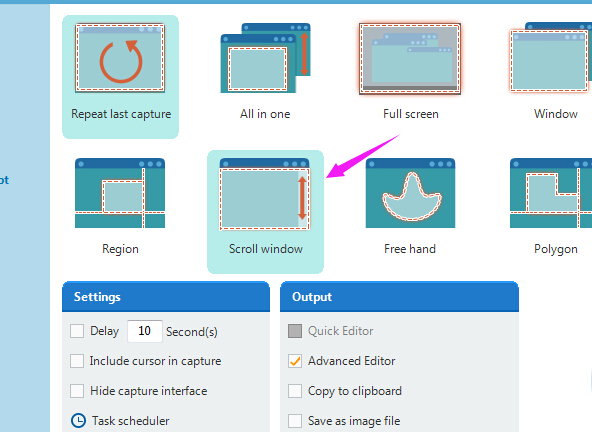
Try Apowersoft Free Screen Capture. It has a scroll window function which allows you to capture any scrolling window.[attach]

panzer

  • Participant
  • Joined in 2008
  • *
  • Posts: 941
Re: how to take a very long screenshot
« Reply #5 on: July 01, 2015, 08:05 AM »
Use FastStone Capture last freeware version:
http://www.321download.com/LastFreeware/page4.html

cyberdiva

  • Supporting Member
  • Joined in 2006
  • **
  • Posts: 1,041
Re: how to take a very long screenshot
« Reply #6 on: July 02, 2015, 03:06 AM »
My favorite screen capture program is <a href="http://www.hyperionics.com/index.asp">HyperSnap</a>. ; It's not free, but I've found it well worth its fairly modest price.  I especially like its ability to capture long screenshots.  It has several methods, including one that enables capturing especially wide shots.  Probably the method I use most is scroll region, where you set a width that's less than the entire window and then press the down arrow on the scroll bar to scroll down for as long as is needed.

mouser

  • First Author
  • Administrator
  • Joined in 2005
  • *****
  • Posts: 40,931
    • Gathering Badge
    • Plugin Coding Medal
    • Participated in NANY Challenge Seventeen Times
    • Cody Award
    • Coding Snacks
    • Volunteers/Staff
Re: how to take a very long screenshot
« Reply #7 on: July 02, 2015, 05:05 AM »
As others have said, my Screenshot Captor has several ways to capture any kind of scrolling window, including a powerful manual mode that will work in any scenario.
So if you failed to get it to work you might want to experiment a bit more and then ask for help in the Screenshot Captor section.

IainB

  • @Slartibartfarst
  • Supporting Member
  • Joined in 2008
  • **
  • Posts: 7,544
Re: how to take a very long screenshot
« Reply #8 on: July 02, 2015, 09:08 PM »
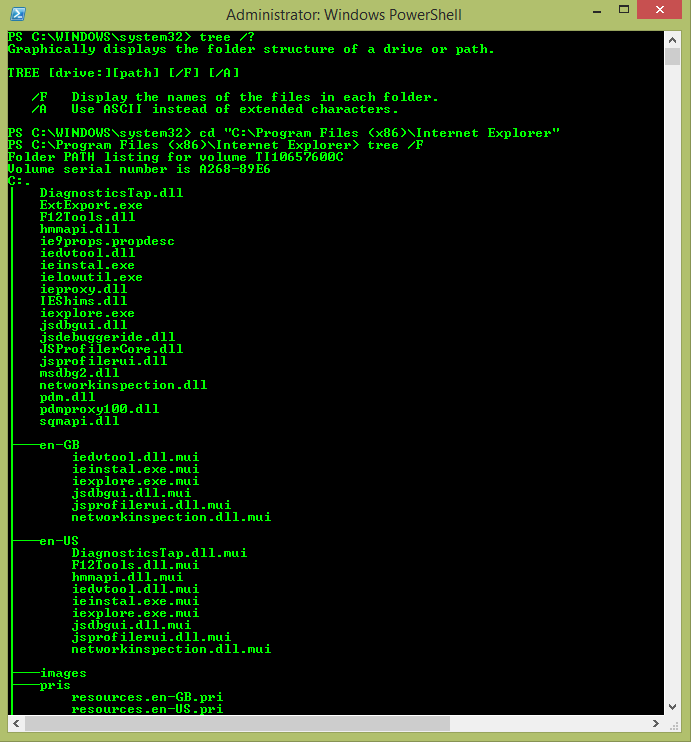
The system Tree command might be useful:

[attach]

Innuendo

  • Charter Member
  • Joined in 2005
  • ***
  • Posts: 2,266
Re: how to take a very long screenshot
« Reply #9 on: July 04, 2015, 03:05 PM »
I have to echo the recommendations of Screenshot Captor. I was a long-time HyperSnap user, later moved on to Snag-It, but Mouser has really put a lot of work into SC. It may not do a few of the things HyperSnap and Snag-It can do, but it can do a lot of things they can't.

Original address: https://www.donationcoder.com/forum/index.php?topic=40397.0