DonationCoder.com forum
 
Read-only archive. This is a static copy of the DonationCoder.com forum. Reading and searching work as before; logging in, posting and private messages do not.
Archive of 2026-10-21 · About this archive · Main site

Last post Author Topic: Need help guidance as a beginner of Android world  (Read 27,597 times)

anandcoral

  • Honorary Member
  • Joined in 2009
  • **
  • Posts: 802
    • Participated in NANY Challenge Thirteen Times
Need help guidance as a beginner of Android world
« on: March 10, 2015, 08:13 AM »
I got an Android phone, finally. It is Lenovo A6000.

Now I need help guidance as a beginner of Android world. I am using Nokia 5230 now and I have some must need apps installed in it. I looked for their alternatives in Google Play and was overwhelmed. GPlay do not have proper search filter like GMail. So it is best to ask the users directly to get the correct app.

1. Backup and Restore - At least photo, videos and contacts, if not sms and notes etc.
2. Undelete or Recycle option - To restore files deleted by mistake.
3. Call Recorder - Simple, record both in coming and out going, with playback. Need it for client job specifications done on phone.
4. Quick note taking - Simple, may or may not have voice note mode.
5. PDF reader - Small just for reading pdf files.
6. Calender task and reminder on home screen - This I found in Lenovo and looks like may do the job as of now.

If free better else paid one will also do. But they must not be very space and memory hogging. Reading the GPlay reviews and descriptions I bookmarked some but still can not say if they will work as advertised.

So I need the help from all Android users here to guide me to the right stuff. Thanks in advance.

Regards,

Anand

eleman

  • Spam Killer
  • Supporting Member
  • Joined in 2009
  • **
  • Posts: 413
Re: Need help guidance as a beginner of Android world
« Reply #1 on: March 10, 2015, 08:46 AM »
3. Call Recorder - Simple, record both in coming and out going, with playback. Need it for client job specifications done on phone.

I'm happy with this one. The free version does the job. But the thing with call recorders is that they don't work on all android phones. Hardware implementations vary, so some are incapable of recording your voice, or the other party's. You'll have to try and see.

Ath

  • Supporting Member
  • Joined in 2006
  • **
  • Posts: 3,649
    • Participated in NANY Challenge Eleven Times
    • Coding Snacks
    • Linux User
    • Hardware Hacker
Re: Need help guidance as a beginner of Android world
« Reply #2 on: March 10, 2015, 11:40 AM »
4. Quick note taking - Simple, may or may not have voice note mode.
Evernote ?
5. PDF reader - Small just for reading pdf files.
Adobe Reader works perfectly fine for me
/Ton
Ath's software collection, Quote: "A problem well stated is a problem half-solved." (Charles Kettering)

4wd

  • Pedantic Old Bastard
  • Supporting Member
  • Joined in 2006
  • **
  • Posts: 5,652
    • Coding Snacks
Re: Need help guidance as a beginner of Android world
« Reply #3 on: March 10, 2015, 11:43 AM »
2. Undelete or Recycle option - To restore files deleted by mistake.

Use ES File Explorer rather than whatever file manager comes with the device - it has a Recycle Bin.

Undeleting files on an Android device has never been successful for me, both from internal storage and MicroSD, (even when pulled and put in a card reader).

Quote
5. PDF reader - Small just for reading pdf files.

I use Xodo PDF Reader & Editor.
"I will not follow where the path may lead, but I will go where there is no path, and I will leave a trail." - Muriel Strode, 1903

ewemoa

  • Honorary Member
  • Joined in 2008
  • **
  • Posts: 2,922
    • Plugin Coding Medal
    • Participated in NANY Challenge Three Times
Re: Need help guidance as a beginner of Android world
« Reply #4 on: March 10, 2015, 01:23 PM »
For a simple PDF reader, MuPDF -- if you really want to, you can build it from source too :)

anandcoral

  • Honorary Member
  • Joined in 2009
  • **
  • Posts: 802
    • Participated in NANY Challenge Thirteen Times
Re: Need help guidance as a beginner of Android world
« Reply #5 on: March 10, 2015, 05:04 PM »
Hi eleman, thanks for the call recorder link. Yes hardware incompatibility is what I read at most places. So it is trial and error.

Thanks Ath, Evernote is on my list but it is very big with options I may not require. A smaller simple would be better for startup.

PDF readers suggestions are good. Thanks to Ath, 4wd and ewemoa, I will check them.

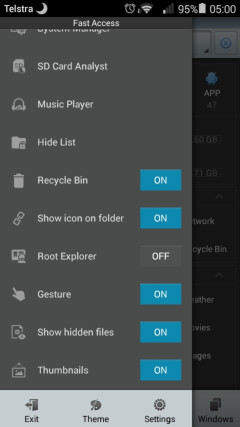
4wd, I checked ES File Explorer, but no where in its description or website it is mentioned about recycle feature. Also is root required ? as is mentioned in few reviews.

Regards,

Anand

4wd

  • Pedantic Old Bastard
  • Supporting Member
  • Joined in 2006
  • **
  • Posts: 5,652
    • Coding Snacks
Re: Need help guidance as a beginner of Android world
« Reply #6 on: March 10, 2015, 06:23 PM »
First On/Off option:

[attach]
"I will not follow where the path may lead, but I will go where there is no path, and I will leave a trail." - Muriel Strode, 1903
« Last Edit: March 10, 2015, 08:58 PM by 4wd »

dr_andus

  • Supporting Member
  • Joined in 2012
  • **
  • Posts: 851
    • Writer
Re: Need help guidance as a beginner of Android world
« Reply #7 on: March 10, 2015, 08:54 PM »
Evernote is on my list but it is very big with options I may not require. A smaller simple would be better for startup.

How about Google Keep?

rjbull

  • Charter Member
  • Joined in 2005
  • ***
  • Posts: 3,217
Re: Need help guidance as a beginner of Android world
« Reply #8 on: March 10, 2015, 09:52 PM »
4. Quick note taking - Simple, may or may not have voice note mode.
Halna outliner?

nite_monkey

  • Member
  • Joined in 2006
  • **
  • Posts: 753
Re: Need help guidance as a beginner of Android world
« Reply #9 on: March 11, 2015, 02:14 AM »
Evernote is on my list but it is very big with options I may not require. A smaller simple would be better for startup.

How about Google Keep?
I second Google Keep. I used to use and love it all the time, until I got my note 4. Now I use S Note.
[Insert really cool signature here]

Deozaan

  • Charter Member
  • Joined in 2006
  • ***
  • Posts: 9,827
    • Participated in NANY Challenge Eight Times
    • Cody Award
Re: Need help guidance as a beginner of Android world
« Reply #10 on: March 11, 2015, 02:27 AM »
1. Backup and Restore - At least photo, videos and contacts, if not sms and notes etc.

Titanium Backup (requires root).

I always root my device, and this is a very useful tool. But if you can't/don't want to root, you can also try Helium Backup which doesn't require root. I've never used it so I can't vouch for it, but I've used plenty of other apps by Koushik Dutta AKA ClockworkMod and he's a pretty good developer.


2. Undelete or Recycle option - To restore files deleted by mistake.

ES File Manager, as suggested by others.

4. Quick note taking - Simple, may or may not have voice note mode.

Google Keep or Evernote

5. PDF reader - Small just for reading pdf files.

Google Drive, Google Play Books, or I think even ES File Manager has a PDF reader.

6. Calender task and reminder on home screen

Google Calendar (use the widget to show it on your home screen).

Also, take a look at Chronus if your device allows you to customize your lock screen. It's nice to see the clock, the weather, and upcoming calendar items all at once.

ewemoa

  • Honorary Member
  • Joined in 2008
  • **
  • Posts: 2,922
    • Plugin Coding Medal
    • Participated in NANY Challenge Three Times
Re: Need help guidance as a beginner of Android world
« Reply #11 on: March 11, 2015, 04:38 AM »
If you aren't already familiar with it, I suggest also checking:

 https://f-droid.org/

AFAIU, almost everything there also has source code available.

eleman

  • Spam Killer
  • Supporting Member
  • Joined in 2009
  • **
  • Posts: 413
Re: Need help guidance as a beginner of Android world
« Reply #12 on: March 11, 2015, 06:00 AM »
Evernote is on my list but it is very big with options I may not require. A smaller simple would be better for startup.

How about Google Keep?

What will you do when Google decides to abandon it?

dr_andus

  • Supporting Member
  • Joined in 2012
  • **
  • Posts: 851
    • Writer
Re: Need help guidance as a beginner of Android world
« Reply #13 on: March 11, 2015, 10:44 AM »
Evernote is on my list but it is very big with options I may not require. A smaller simple would be better for startup.

How about Google Keep?

What will you do when Google decides to abandon it?

Nothing, really. I only use it to capture notes on an Android tablet, then open a browser on my PC and copy and paste the notes to my main notes database (ConnectedText), after which I delete the original notes in Google Keep.

But even if they were to abandon it at one point, normally they give you 6 months notice and a way to export your data.

For the longest time I didn't understand what Google Keep was for, as it looked really lame compared to competitors. But when recently I got my Android tablet, I realised it was specially designed for that. What I like about it is that it only takes one tap to launch the app and start taking a note, and that it syncs automatically, so the notes are available when I launch my browser on the PC.

anandcoral

  • Honorary Member
  • Joined in 2009
  • **
  • Posts: 802
    • Participated in NANY Challenge Thirteen Times
Re: Need help guidance as a beginner of Android world
« Reply #14 on: March 11, 2015, 05:05 PM »
Hi 4wd

I installed ES F.E. and enabled recycle bin, but it different from what I want. It will only put in bin those files deleted from ESFE and not from, say, photo gallery.

I want system wide recycle bin. Any suggestion ?

Regards,

Anand

Deozaan

  • Charter Member
  • Joined in 2006
  • ***
  • Posts: 9,827
    • Participated in NANY Challenge Eight Times
    • Cody Award
Re: Need help guidance as a beginner of Android world
« Reply #15 on: March 11, 2015, 09:54 PM »
I want system wide recycle bin. Any suggestion ?

Don't delete anything except when you're using ES File Explorer. (c:

4wd

  • Pedantic Old Bastard
  • Supporting Member
  • Joined in 2006
  • **
  • Posts: 5,652
    • Coding Snacks
Re: Need help guidance as a beginner of Android world
« Reply #16 on: March 12, 2015, 12:13 AM »
I installed ES F.E. and enabled recycle bin, but it different from what I want. It will only put in bin those files deleted from ESFE and not from, say, photo gallery.

I want system wide recycle bin. Any suggestion ?

AFAIK, there isn't any that will work 100% reliably, (having tried a few), and since you're running unrooted Android KitKat OS there isn't any at all, (again AFAIK).

Under an unmodified KitKat, (Android 4.4), any app that requires write access to external storage is severely restricted in that it can only write to folders it creates/controls - the OS dictates this.  Any form of Recycle Bin would need global write access to all storage in order to restore deleted items, KitKat doesn't allow this.  

If you require a global Recycle Bin that works across all your storage media then your options are limited:
  • Upgrade to Lollipop (Android 5)
  • Downgrade to Jelly Bean (Android 4.3)
  • Root your phone, (will generally void any warranty - depends how anal the manufacturer/retailer is), and modify the media write permissions (there are apps in the Play store to do the permission modification)

Given that it's a new phone and possible inclination against voiding the warranty, your best option is to wait to see if Lenovo release Android 5 for your phone.

NOTE: There may indeed be a Recycle Bin app that'll work globally under KitKat (I still can't see how it would without root) - you'd need to trawl the Play store to find it though.
"I will not follow where the path may lead, but I will go where there is no path, and I will leave a trail." - Muriel Strode, 1903

cyberdiva

  • Supporting Member
  • Joined in 2006
  • **
  • Posts: 1,041
Re: Need help guidance as a beginner of Android world
« Reply #17 on: March 12, 2015, 12:34 AM »
Your problem is that you have Android KitKat and under that you're severely limited in where apps can write to the SD card.  You'd either have to keep using the system default file manager, root the device to change the external media write policy, or upgrade to Android Lollipop.
One word of caution about upgrading to Lollipop.  I've been reading some of the Android Central forums, as well as some forums for specific Android apps, and there have been LOTS of complaints about Lollipop, including a number of people reporting that it rendered their tablets or phones useless.  It's true that some people are happy with Lollipop, but there were so many people reporting serious problems that I decided not to upgrade when I had the chance to do so.   When I say Lollipop, I'm referring to Android 5.0, 5.01, and 5.02.  There are reports that 5.1 will soon be available.  Given the reports on 5.0, 5.01, and 5.02, I'm planning to wait to see whether Google finally got it right with 5.1 before I install it.  You might be wise to wait as well.

xtabber

  • Supporting Member
  • Joined in 2007
  • **
  • Posts: 618
Re: Need help guidance as a beginner of Android world
« Reply #18 on: March 12, 2015, 02:29 AM »
There is no global undelete in Android and the Android OS is very aggressive about reclaiming memory and storage space.  If in doubt, don't delete things before you copy them somewhere.

You can backup photos and videos automatically by turning on auto-backup in the Google Photo app. See here for more information.

Google's backup service will automatically backup most apps and the data they own (but not external data you have worked on with an app like an editor or reader).  This is only useful if you do a factory reset, in which case your apps will be restored after the device has been wiped.  Check that "Backup My Data" is enabled under Settings/Backup and Reset.

For backing up data files in general, I recommend X-plore File Manager, a dual pane file manager that makes it very easy to copy files to and from other computers on your local network as well as backup data to various cloud services.

Deozaan

  • Charter Member
  • Joined in 2006
  • ***
  • Posts: 9,827
    • Participated in NANY Challenge Eight Times
    • Cody Award
Re: Need help guidance as a beginner of Android world
« Reply #19 on: March 12, 2015, 03:28 AM »
Your problem is that you have Android KitKat and under that you're severely limited in where apps can write to the SD card.  You'd either have to keep using the system default file manager, root the device to change the external media write policy, or upgrade to Android Lollipop.
One word of caution about upgrading to Lollipop.  I've been reading some of the Android Central forums, as well as some forums for specific Android apps, and there have been LOTS of complaints about Lollipop, including a number of people reporting that it rendered their tablets or phones useless.  It's true that some people are happy with Lollipop, but there were so many people reporting serious problems that I decided not to upgrade when I had the chance to do so.  When I say Lollipop, I'm referring to Android 5.0, 5.01, and 5.02.  There are reports that 5.1 will soon be available.  Given the reports on 5.0, 5.01, and 5.02, I'm planning to wait to see whether Google finally got it right with 5.1 before I install it.  You might be wise to wait as well.

Lollipop didn't render my tablet useless, but it removed some features (such as silent mode and automatically adjusting brightness) and made other things I access multiple times each day more cumbersome to deal with. The little annoyances with Lollipop added up and after a couple of months I'd had enough, so I reverted back to KitKat.

cyberdiva

  • Supporting Member
  • Joined in 2006
  • **
  • Posts: 1,041
Re: Need help guidance as a beginner of Android world
« Reply #20 on: March 12, 2015, 04:18 PM »
For backing up data files in general, I recommend X-plore File Manager, a dual pane file manager that makes it very easy to copy files to and from other computers on your local network as well as backup data to various cloud services.

When I clicked on the link above for X-plore File Manager, I got a Play Store error message saying "We're sorry, the requested URL was not found on this server."

Deozaan

  • Charter Member
  • Joined in 2006
  • ***
  • Posts: 9,827
    • Participated in NANY Challenge Eight Times
    • Cody Award
Re: Need help guidance as a beginner of Android world
« Reply #21 on: March 12, 2015, 04:27 PM »
Somehow the URL is missing an "s?" in the middle of it:

https://play.google.com/store/apps/details?id=com.lonelycatgames.Xplore

anandcoral

  • Honorary Member
  • Joined in 2009
  • **
  • Posts: 802
    • Participated in NANY Challenge Thirteen Times
Re: Need help guidance as a beginner of Android world
« Reply #22 on: March 12, 2015, 04:37 PM »
I searched for recycle bin and found that most blog and forums suggested Dumpster

I installed it and deleted one photo from gallery. It showed up in Dumpster and I was able to restore it.
If anyone had used it, please let me know of any problem in using it.

Also I need anti-virus and wifi firwall, need suggestion of apps being used by others.

I liked some of the apps at f-droid, thanks ewemoa, but is it safe to use apps from it ? Any users of it ?

Regards,

Anand

eleman

  • Spam Killer
  • Supporting Member
  • Joined in 2009
  • **
  • Posts: 413
Re: Need help guidance as a beginner of Android world
« Reply #23 on: March 12, 2015, 04:45 PM »
Also I need anti-virus.

No, you don't.

4wd

  • Pedantic Old Bastard
  • Supporting Member
  • Joined in 2006
  • **
  • Posts: 5,652
    • Coding Snacks
Re: Need help guidance as a beginner of Android world
« Reply #24 on: March 13, 2015, 12:46 AM »
I searched for recycle bin and found that most blog and forums suggested Dumpster

They must of updated it a bit from when I tried it.  Well done for finding one that works for you.

Quote
I installed it and deleted one photo from gallery.

Try it with a file deleted from the MicroSD card, (if you have one installed), since KitKat allows files operations on internal storage without too much in the way of problems.

And just as a matter of interest, what version of Android is it running, (Settings->About phone->Android version) ?

Quote
I liked some of the apps at f-droid, thanks ewemoa, but is it safe to use apps from it ? Any users of it ?

Yes, F-Droid is fine if you don't want to be dragged into the Play store all the time.

Also I need anti-virus.

No, you don't.

Agree with eleman here, but I do run a firewall mainly ensure apps do not access networks they're not supposed to, eg. VPN, LAN, Roam, Data.  The one I run is of limited use to you as it requires root access.

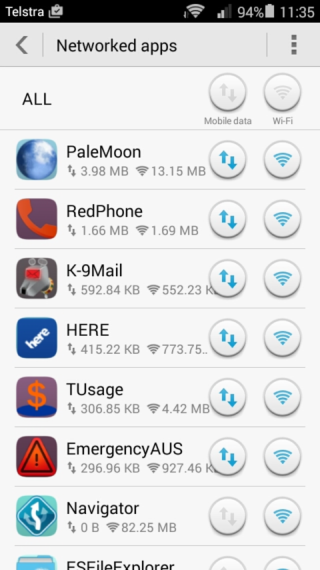
Don't know if it's specific to my phone, (which is basically the same as the A6000 with a lower screen resolution), but if you go to Settings->Networked apps you can set which apps you've downloaded have access to Mobile Data and/or Wi-Fi.

Screenshot_2015-03-13-11-35-57.png
"I will not follow where the path may lead, but I will go where there is no path, and I will leave a trail." - Muriel Strode, 1903

Original address: https://www.donationcoder.com/forum/index.php?topic=40396.0