DonationCoder.com forum
 
Read-only archive. This is a static copy of the DonationCoder.com forum. Reading and searching work as before; logging in, posting and private messages do not.
Archive of 2026-10-21 · About this archive · Main site

Author Topic: FARR - change in master hotkey  (Read 8,427 times)

gwcook

  • Supporting Member
  • Joined in 2008
  • **
  • Posts: 1
FARR - change in master hotkey
« on: March 08, 2015, 01:44 AM »
My Dell laptop does not have a [PAUSE/BREAK] key. I was thinking of using [WIN][F1].

I found the default hotkey in Program Options / Lists / Hotkeys. However, when I try and edit it is says the hotkey is locked so I cannot change it there.

Is there some other place or config file I can change the hotkey?

Thanks.

lanux128

  • Global Moderator
  • Joined in 2005
  • *****
  • Posts: 6,277
    • Coding Snacks
    • Volunteers/Staff
    • Gathering Badge
    • Participated in NANY Challenge Once
    • Linux User
Re: FARR - change in master hotkey
« Reply #1 on: March 08, 2015, 03:56 AM »
hello and welcome gwcook,

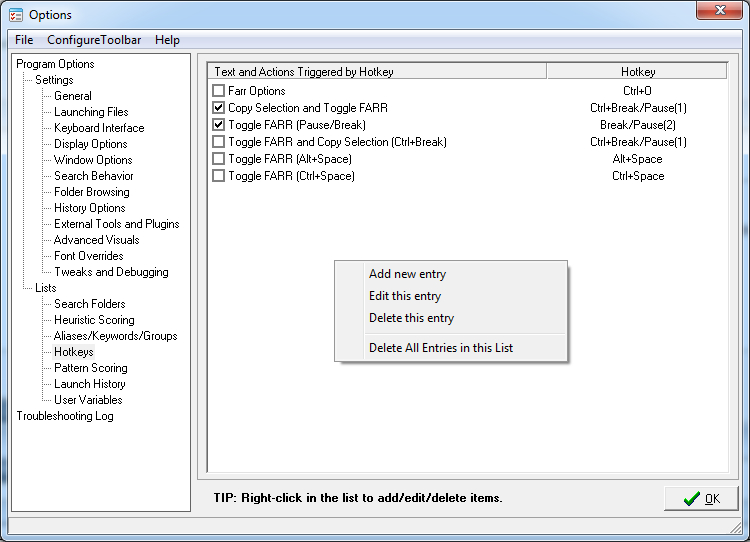
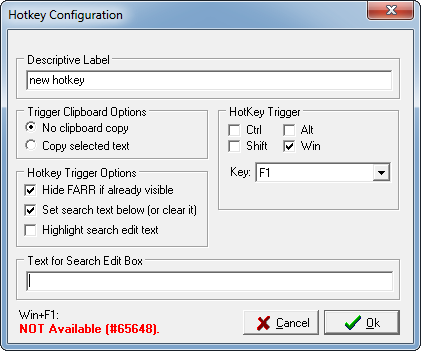
you can uncheck the default hotkey entry and add your own by right-clicking somewhere in the box (Fig.1) and as you can see in Fig.2, Farr even checks for you if the chosen hotkey is available or reserved for some other apps (as in my case).

Fig. 1
[attachthumb=#]

Fig. 2
[attach=#]

Original address: https://www.donationcoder.com/forum/index.php?topic=40385.0