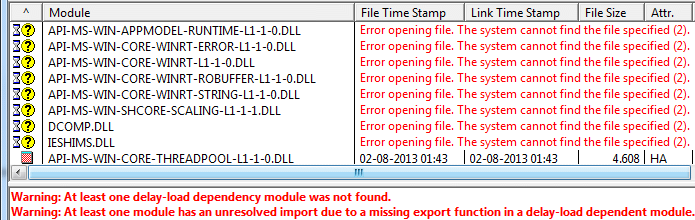
Dependency Walker [DW] ... giving these error messages: (see attachment in previous post)
On stackoverflow a user listed the exact same DLLs (as shown in above screenshot), as being named by Dependency Walker as missing. He then installed three OCX files, and voila his problem was gone - even though DW still listed the many DLLs as "missing"! Maybe a coincidence. He never came back to name the OCX files.
http://stackoverflow.com/questions/17023419/win-7-64-bit-dll-problemsQuote from: Stack Overflowdependency walker is telling me that the following DLLs are missing:
API-MS-WIN-CORE-COM-L1-1-0.DLL
API-MS-WIN-CORE-WINRT-ERROR-L1-1-0.DLL
API-MS-WIN-CORE-WINRT-L1-1-0.DLL
API-MS-WIN-CORE-WINRT-ROBUFFER-L1-1-0.DLL
API-MS-WIN-CORE-WINRT-STRING-L1-1-0.DLL
API-MS-WIN-SHCORE-SCALING-L1-1-0.DLL
DCOMP.DLL
GPSVC.DLL
IESHIMS.DL
Did you check via Dir command if the files are there? If they are it could just be a matter that somehow they got unregistered. If they are COM Dlls you may be able to put them back in use by running
regsvr32 DllName.dll
on each one. Maybe copy and paste all the dll names into a batch or something along those lines.