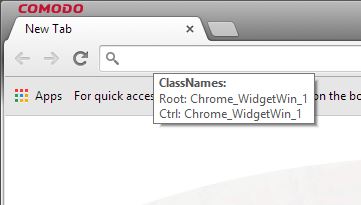
I've fiddled with the code a bit and I've got it working for IE, Explorer and Dragon, (Comodo' version of Chrome - so it should work with Chrome).
Basically, I did what I mentioned above - if the window and control classes match an entry in the ini file on a PMB down action, the default processing is blocked.
If the PMB up action occurs within the timeout period, then a MouseClick("primary") is sent. If a timeout occurs before a PMB up happens, then a MouseClick("secondary") is sent.
#Region ;**** Directives created by AutoIt3Wrapper_GUI ****
#AutoIt3Wrapper_Icon=favicon.ico
#AutoIt3Wrapper_Res_Description=Causes a Secondary Mouse Button click when Primary Mouse Button is held down for a predetermined time
#AutoIt3Wrapper_Res_Fileversion=0.0.0.5
#AutoIt3Wrapper_Res_Fileversion_AutoIncrement=y
#AutoIt3Wrapper_Res_LegalCopyright=Nobody
#EndRegion ;**** Directives created by AutoIt3Wrapper_GUI ****
#cs ----------------------------------------------------------------------------
Uses MouseOnEvent UDF by MrCreatoR
http://www.autoitscript.com/forum/topic/64738-mouseonevent-udf/
Icon by Martin Berube (http://www.how-to-draw-funny-cartoons.com/)
http://www.iconarchive.com/show/animal-icons-by-martin-berube/mouse-icon.html
LMB2R - Causes a SMB click after holding down the PMB for a secified time.
In comments: PMB = Primary Mouse Button
SMB = Secondary Mouse Button
#ce ----------------------------------------------------------------------------
#include <WinAPI.au3>
#include <Array.au3>
#include "MouseOnEvent.au3" ; MouseOnEvent UDF
HotKeySet("^+!x", "_Exit") ; Emergency Exit hotkey (Ctrl+Alt+Shift+x)
OnAutoItExitRegister(_Exit) ; Call the _Exit routine when the program is terminated somehow
; Set up the tray menu
Opt("TrayMenuMode", 3)
Opt("TrayOnEventMode", 1)
TrayCreateItem('Exit', -1, -1, 0)
TrayItemSetOnEvent(-1, '_Exit')
TraySetToolTip(StringLeft(@ScriptName, StringLen(@ScriptName) - 4))
; Set the .ini filename
$sIniFile = StringLeft(@ScriptFullPath, StringLen(@ScriptFullPath) - 3) & "ini"
; Time PMB should be held down before interpreting as a SMB click (milliseconds)
Global $iTime = IniRead($sIniFile, "Settings", "Time", "500")
; Max distance mouse can move while waiting for the above (pixels)
Global $iZone = IniRead($sIniFile, "Settings", "Zone", "5")
; List of Window Classes to delay PMB action on
Global $aWinClass = IniReadSection($sIniFile, "Windows")
Global $aMpos, $iStart = 0, $bBlocked = False
; Hook into the PMB events
_MouseSetOnEvent($MOUSE_PRIMARYDOWN_EVENT, "_PrimaryDown")
_MouseSetOnEvent($MOUSE_PRIMARYUP_EVENT, "_PrimaryUp")
While 1 ; Thumb twiddling loop
Sleep(10)
; If the PMB was pressed, check to see how long for
If $iStart > 0 And TimerDiff($iStart) >= $iTime Then
$aDeltaMPos = MouseGetPos()
; Check to see if mouse has moved outside defined limit
If Abs($aDeltaMPos[1] - $aMpos[1]) <= $iZone And _
Abs($aDeltaMPos[0] - $aMpos[0]) <= $iZone Then
; All OK then do a SMB click and reset the timer
MouseClick("secondary")
$iStart = 0
; Clear flag, (from cancelled PMB), so that if we cancel context menu by
; clicking elsewhere we don't get something weird happening from extra PMB click
$bBlocked = False
Else
; Mouse moved too far so just reset the timer
$iStart = 0
EndIf
EndIf
WEnd
Func _Exit()
; Release the event hooks and Exit
_MouseSetOnEvent($MOUSE_PRIMARYDOWN_EVENT)
_MouseSetOnEvent($MOUSE_PRIMARYUP_EVENT)
Exit
EndFunc ;==>_Exit
Func _PrimaryDown() ; PMB pressed
$aMpos = MouseGetPos() ; Get current mouse position
$iStart = TimerInit() ; Initialise the timer
Local $tPoint = _WinAPI_GetMousePos() ; Pointers to mouse position
Local $hWnd = _WinAPI_WindowFromPoint($tPoint) ; Get handle of control under mouse using coords
Local $ClassName = _WinAPI_GetClassName($hWnd) ; Get Control classname
Local $hParent = _WinAPI_GetAncestor($hWnd, $GA_ROOT) ; Get handle of the root window for the control
Local $sParent = _WinAPI_GetClassName($hParent) ; Get root window classname
; Search in array for matching window classname
Local $iIndex = _ArraySearch($aWinClass, $sParent, 1, 0, 0, 1, 1, 1)
Switch $iIndex
Case 0, -1 ; No matching Window class found
Return 0 ; Do not Block the default processing
Case Else ; Matching Window class found
; Search in string for matching control classname
Local $temp = StringInStr($aWinClass[$iIndex][1], "|" & $ClassName)
Switch $temp
Case 0, -1 ; No matching Control class found
Return 0 ; Do not Block the default processing
Case Else ; Matching Control class found
$bBlocked = True ; Set a flag for when the button is released
Return 1 ; Block the default processing
EndSwitch
EndSwitch
EndFunc ;==>_PrimaryDown
Func _PrimaryUp() ; PMB released
; If the timer is less than the timeout reset it otherwise it accumulates
; If it's longer than the timeout the Thumb Twiddling Loop will take care of it
If TimerDiff($iStart) < $iTime Then
$iStart = 0
If $bBlocked Then ; If PMB down was previously blocked, send PMB and clear flag
MouseClick("primary")
$bBlocked = False
EndIf
EndIf
Return 0 ; Do not Block the default processing
EndFunc ;==>_PrimaryUp
.ini now contains Window and Control classnames for recalcitrant windows.
[Settings]
Time=500
Zone=5
[Windows]
Window1=CabinetWClass|Edit
Window2=IEFrame|Edit
Window3=Chrome_WidgetWin_1|Chrome_WidgetWin_1
For any other windows just add a line:
Window(x)=<window classname>|<control classname> where (x) is the next number in the sequence (it actually doesn't matter what the key name is as only the value is used).
To help you get the Window & Control classname there's a small program called Classnames.exe, (source included), that will display the classname of the Window & Control class under the pointer, eg.
Exit it using the tray menu.
Modified my
original post above.


 LMB2R_0.5.7z