I keep backup copies of my Firefox Portable folder, and give the backups alpha-numerics like [Mozilla Firefox bkup 1] and [Mozilla Firefox bkup 2].
I rely on these backup copies to get me out of a jamb in case the active copy gets goofed up somehow.
Now I discover that anytime I delete or add something to [Mozilla Firefox], it gets automatically deleted or added to the backups.
I don't need my backups to be automatically screwed up like the main copy, but to stay pristine and unchanged in case of major goof-ups so I'll have something to fall back on.
What is doing this and how do I turn it off?
(edit) Okay yes it seems to be something called 'Sync' and I don't even have an account with Sync but it's 'synching' all my backup FF copies.
Do I have to start an account with Sync to turn it off?
Is there any file in FF folder I can just find and delete or rename with the suffix 'DISABLED' to shut it off?
I still want my passwords to work, I just want to shut off Sync somehow.
(edit) I found some advice but no answers yet:
"You need to go into the Sync Options in the Options/Preferences window and click "Deactivate this device"."
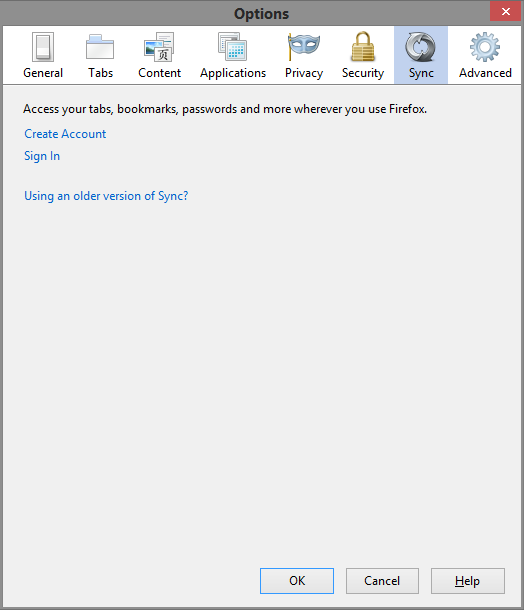
I checked, and my up-to-date FF version show no option to 'deactivate' Sync.
So far I see no file in the Mozilla FF folder named 'Sync' for me to delete or rename to disable it.
(edit) found this:
"How to Disable or Opt-Out of Firefox Sync
If at any time, you decide you no longer want to have the Firefox Sync Service, you may un-install the Firefox Sync add-on. Click on the “Tools” menu, then “Add-ons”, select Firefox Sync and click “Uninstall”."
There is no such option in my FF.
I rely on these backup copies to get me out of a jamb in case the active copy gets goofed up somehow.
Now I discover that anytime I delete or add something to [Mozilla Firefox], it gets automatically deleted or added to the backups.
I don't need my backups to be automatically screwed up like the main copy, but to stay pristine and unchanged in case of major goof-ups so I'll have something to fall back on.
What is doing this and how do I turn it off?
(edit) Okay yes it seems to be something called 'Sync' and I don't even have an account with Sync but it's 'synching' all my backup FF copies.
Do I have to start an account with Sync to turn it off?
Is there any file in FF folder I can just find and delete or rename with the suffix 'DISABLED' to shut it off?
I still want my passwords to work, I just want to shut off Sync somehow.
(edit) I found some advice but no answers yet:
"You need to go into the Sync Options in the Options/Preferences window and click "Deactivate this device"."
I checked, and my up-to-date FF version show no option to 'deactivate' Sync.
So far I see no file in the Mozilla FF folder named 'Sync' for me to delete or rename to disable it.
(edit) found this:
"How to Disable or Opt-Out of Firefox Sync
If at any time, you decide you no longer want to have the Firefox Sync Service, you may un-install the Firefox Sync add-on. Click on the “Tools” menu, then “Add-ons”, select Firefox Sync and click “Uninstall”."
There is no such option in my FF.