DonationCoder.com forum
 
Read-only archive. This is a static copy of the DonationCoder.com forum. Reading and searching work as before; logging in, posting and private messages do not.
Archive of 2026-10-21 · About this archive · Main site

Author Topic: flashplayer fix - is this safe?  (Read 5,877 times)

bit

  • Supporting Member
  • Joined in 2013
  • **
  • Posts: 686
flashplayer fix - is this safe?
« on: January 19, 2015, 01:24 AM »
I found this Flash Player Repair website and download, at http://www.fixflashplayer.com/.
Does anyone think this is safe to download and use?

4wd

  • Pedantic Old Bastard
  • Supporting Member
  • Joined in 2006
  • **
  • Posts: 5,652
    • Coding Snacks
Re: flashplayer fix - is this safe?
« Reply #1 on: January 19, 2015, 01:29 AM »
Quote
Registry errors are often a leading cause of Flash Player problems. It is highly recommended that you scan your PC using PC Cleaner. It will fix problematic registry entries that can cause Flash Player to malfunction and will prevent new errors from occurring.

Automatically tells me it isn't.

Why don't you just uninstall and then reinstall Flash Player ?
"I will not follow where the path may lead, but I will go where there is no path, and I will leave a trail." - Muriel Strode, 1903

bit

  • Supporting Member
  • Joined in 2013
  • **
  • Posts: 686
Re: flashplayer fix - is this safe?
« Reply #2 on: January 19, 2015, 01:33 AM »
Quote
Registry errors are often a leading cause of Flash Player problems. It is highly recommended that you scan your PC using PC Cleaner. It will fix problematic registry entries that can cause Flash Player to malfunction and will prevent new errors from occurring.

Automatically tells me it isn't.

Why don't you just uninstall and then reinstall Flash Player ?
How do I do that?
Do I have to uninstall/reinstall for the entire computer, or just the browser?
Yeah, the Comments there look like shills.

rgdot

  • Supporting Member
  • Joined in 2009
  • **
  • Posts: 2,197
Re: flashplayer fix - is this safe?
« Reply #3 on: January 19, 2015, 03:28 AM »
Haven't tried this in years but it's on Adobe's site so should be still applicable
http://helpx.adobe.com/flash-player/kb/uninstall-flash-player-windows.html

bit

  • Supporting Member
  • Joined in 2013
  • **
  • Posts: 686
Re: flashplayer fix - is this safe?
« Reply #4 on: January 19, 2015, 03:57 AM »
Wow, actually, the flashplayer for all my other browsers works okay, but not on this one browser, which is a separate, special use copy of Seamonkey Portable.
I'm really hesitant to uninstall flashplayer for the entire OS when it might just be a gliche in the one browser.
Maybe I'll just reinstall the browser.

Or actually, with flashplayer nonfunctional for the one special use browser, which isn't needed in that browser anyway, maybe it actually makes the browser safer from flash-based attacks.
Yeah, I know, 'sour grapes'; but maybe I don't need to fix it in the one browser after all.

There are so many PUPs lurking in the wild it isn't even funny.
DonationCoder is like a big comforting camp fire in the forest at night, with glowing pairs of evil eyes watching from all around in the outer darkness. o_O
« Last Edit: January 19, 2015, 04:05 AM by bit »

4wd

  • Pedantic Old Bastard
  • Supporting Member
  • Joined in 2006
  • **
  • Posts: 5,652
    • Coding Snacks
Re: flashplayer fix - is this safe?
« Reply #5 on: January 19, 2015, 05:07 AM »
Wow, actually, the flashplayer for all my other browsers works okay, but not on this one browser, which is a separate, special use copy of Seamonkey Portable.
I'm really hesitant to uninstall flashplayer for the entire OS when it might just be a gliche in the one browser.

It'd really help if you put this sort of information in your first post.

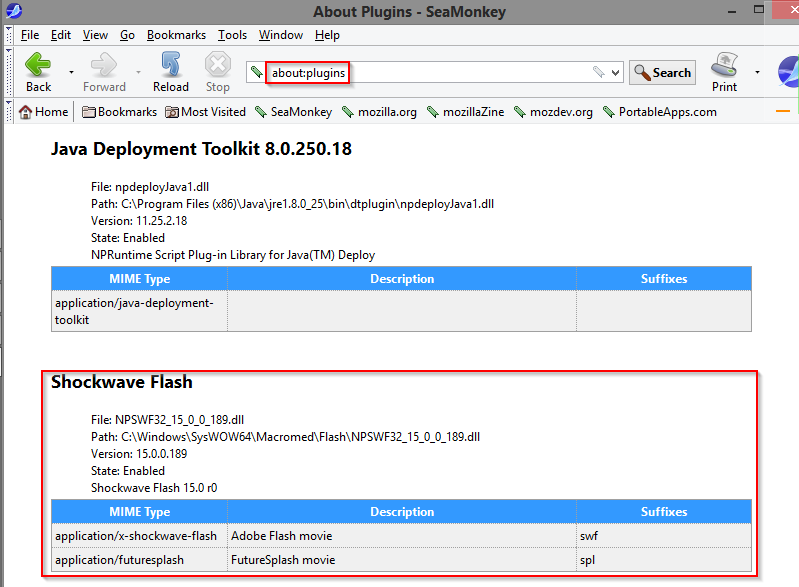
Does the Flash plugin show up if you go to the about:plugins page in the browser?

If it doesn't, then try reinstalling the browser.

2015-01-19 16_08_41.png

BTW, are we talking about an x86 system or x64?

If reinstalling the browser doesn't work, then try the following:

Search for NPSWF32*.dll on your system - it will either be in C:\Windows\System32\Macromed\Flash (x86 OS), or C:\Windows\SysWOW64\Macromed\Flash (x64 OS).

Copy the NPSWF32*.dll and FlashPlayerPlugin*.exe to <path to>\SeaMonkeyPortable\Data\plugins.

Restart the browser.
"I will not follow where the path may lead, but I will go where there is no path, and I will leave a trail." - Muriel Strode, 1903
« Last Edit: January 19, 2015, 05:22 AM by 4wd »

Original address: https://www.donationcoder.com/forum/index.php?topic=40050.0