DonationCoder.com forum
 
Read-only archive. This is a static copy of the DonationCoder.com forum. Reading and searching work as before; logging in, posting and private messages do not.
Archive of 2026-10-21 · About this archive · Main site

Author Topic: toggle read/unread view in outlook  (Read 15,510 times)

kalos

  • Member
  • Joined in 2006
  • **
  • Posts: 1,824
toggle read/unread view in outlook
« on: December 22, 2014, 10:54 PM »
hello!

is there a way to have a button to toggle view of read/unread only emails in Outlook?

thanks!

Ath

  • Supporting Member
  • Joined in 2006
  • **
  • Posts: 3,649
    • Participated in NANY Challenge Eleven Times
    • Coding Snacks
    • Linux User
    • Hardware Hacker
/Ton
Ath's software collection, Quote: "A problem well stated is a problem half-solved." (Charles Kettering)

Ath

  • Supporting Member
  • Joined in 2006
  • **
  • Posts: 3,649
    • Participated in NANY Challenge Eleven Times
    • Coding Snacks
    • Linux User
    • Hardware Hacker
/Ton
Ath's software collection, Quote: "A problem well stated is a problem half-solved." (Charles Kettering)

kalos

  • Member
  • Joined in 2006
  • **
  • Posts: 1,824
Re: toggle read/unread view in outlook
« Reply #3 on: December 23, 2014, 02:19 PM »
no you misunderstood

I don't want a button to mark selected emails as read/unread

I want a button that will display only unread emails or all emails (toggle) in the email list view

skwire

  • I eat Coding Snacks for breakfast...
  • Global Moderator
  • Joined in 2005
  • *****
  • Posts: 5,297
    • Participated in NANY Challenge Seventeen Times
    • Coding Snacks
    • Superboy Coder
    • Cody Award
    • Volunteers/Staff
    • Gathering Badge
Re: toggle read/unread view in outlook
« Reply #4 on: December 23, 2014, 02:41 PM »
Can this be done, currently, via some other method like a hotkey or menu item?

kalos

  • Member
  • Joined in 2006
  • **
  • Posts: 1,824
Re: toggle read/unread view in outlook
« Reply #5 on: December 23, 2014, 02:45 PM »
a button is the most convenient, as it's immediately accessible
just like in Thunderbird, but I need it in Outlook (not Office Online)
http://s16.postimg.org/jbgbv97th/Untitled.png

skwire

  • I eat Coding Snacks for breakfast...
  • Global Moderator
  • Joined in 2005
  • *****
  • Posts: 5,297
    • Participated in NANY Challenge Seventeen Times
    • Coding Snacks
    • Superboy Coder
    • Cody Award
    • Volunteers/Staff
    • Gathering Badge
Re: toggle read/unread view in outlook
« Reply #6 on: December 23, 2014, 02:48 PM »
Please answer my question: In Outlook, can this be done, currently, via some other method like a hotkey or menu item?

kalos

  • Member
  • Joined in 2006
  • **
  • Posts: 1,824
Re: toggle read/unread view in outlook
« Reply #7 on: December 23, 2014, 06:13 PM »
Please answer my question: In Outlook, can this be done, currently, via some other method like a hotkey or menu item?

I was searching for that and can't find any way really! maybe someone else know better?

skwire

  • I eat Coding Snacks for breakfast...
  • Global Moderator
  • Joined in 2005
  • *****
  • Posts: 5,297
    • Participated in NANY Challenge Seventeen Times
    • Coding Snacks
    • Superboy Coder
    • Cody Award
    • Volunteers/Staff
    • Gathering Badge

kalos

  • Member
  • Joined in 2006
  • **
  • Posts: 1,824
Re: toggle read/unread view in outlook
« Reply #9 on: December 23, 2014, 06:37 PM »

skwire

  • I eat Coding Snacks for breakfast...
  • Global Moderator
  • Joined in 2005
  • *****
  • Posts: 5,297
    • Participated in NANY Challenge Seventeen Times
    • Coding Snacks
    • Superboy Coder
    • Cody Award
    • Volunteers/Staff
    • Gathering Badge
Re: toggle read/unread view in outlook
« Reply #10 on: December 23, 2014, 06:49 PM »
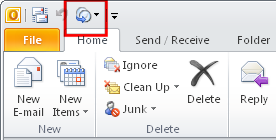
You can add the "Change View" button to the "Quick Access Toolbar" which would make this a two-click operation.  I don't think there is a way to add a discrete button for that type of action.  Here's a screenshot of it added to the "Quick Access Toolbar":

[attachimg=#]

kalos

  • Member
  • Joined in 2006
  • **
  • Posts: 1,824
Re: toggle read/unread view in outlook
« Reply #11 on: December 23, 2014, 07:54 PM »
You can add the "Change View" button to the "Quick Access Toolbar" which would make this a two-click operation.  I don't think there is a way to add a discrete button for that type of action.  Here's a screenshot of it added to the "Quick Access Toolbar":
(see attachment in previous post)

thanks!

kalos

  • Member
  • Joined in 2006
  • **
  • Posts: 1,824
Re: toggle read/unread view in outlook
« Reply #12 on: December 23, 2014, 09:26 PM »
is there maybe a keyboard shortcut maybe, faster than searching the menu entry which is two clicks?

skwire

  • I eat Coding Snacks for breakfast...
  • Global Moderator
  • Joined in 2005
  • *****
  • Posts: 5,297
    • Participated in NANY Challenge Seventeen Times
    • Coding Snacks
    • Superboy Coder
    • Cody Award
    • Volunteers/Staff
    • Gathering Badge
Re: toggle read/unread view in outlook
« Reply #13 on: December 24, 2014, 12:12 AM »
is there maybe a keyboard shortcut maybe, faster than searching the menu entry which is two clicks?

No clue.  I'm not an Outlook user.

Ath

  • Supporting Member
  • Joined in 2006
  • **
  • Posts: 3,649
    • Participated in NANY Challenge Eleven Times
    • Coding Snacks
    • Linux User
    • Hardware Hacker
Re: toggle read/unread view in outlook
« Reply #14 on: December 24, 2014, 07:29 AM »
You can add the "Change View" button to the "Quick Access Toolbar" which would make this a two-click operation.
That button can also be added to the Ribbon, but you'll have to create a new group for it in one of the Ribbon-tabs, you can't add it to an existing group.

Assigning hotkeys, or at least the closest to what Outlook allows/supports, is described here: http://www.howtogeek.com/forum/topic/custom-shortcuts-in-outlook-2010

Or a AutoHotKey solution: http://superuser.com/questions/203294/custom-one-key-keyboard-shortcuts-in-outlook-2010-or-2013
/Ton
Ath's software collection, Quote: "A problem well stated is a problem half-solved." (Charles Kettering)
« Last Edit: December 24, 2014, 07:50 AM by Ath »

Original address: https://www.donationcoder.com/forum/index.php?topic=39881.0