DonationCoder.com forum
 
Read-only archive. This is a static copy of the DonationCoder.com forum. Reading and searching work as before; logging in, posting and private messages do not.
Archive of 2026-10-21 · About this archive · Main site

Author Topic: Frames & Edges  (Read 6,384 times)

dluby

  • Charter Member
  • Joined in 2006
  • ***
  • Posts: 253
Frames & Edges
« on: June 09, 2006, 02:12 PM »
Hi,

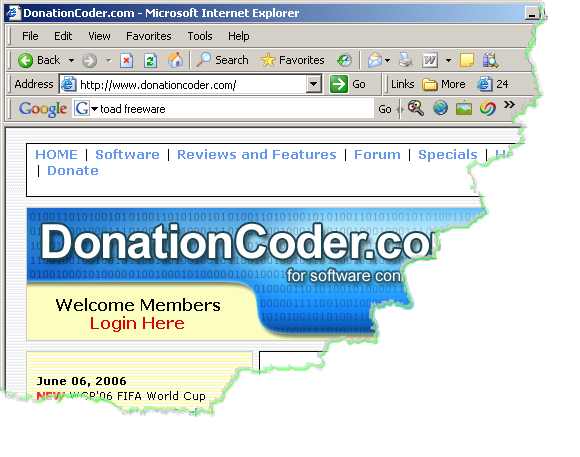
I captured a screenshot and applied a frame (RaggedBR2.png) to it, saved it (PNG format) and it still appears fine in ScreenCaptor.

Then I copied it and after pasting it into Lotus Notes (ver. 6.0) or Microsoft Word 2003 the image appears complete but with a jagged line through it, while it should have the lower right of the image missing.

Is this my misunderstanding of how this should work?

Thanks

Damian
app103

  • That scary taskbar girl
  • Global Moderator
  • Joined in 2006
  • *****
  • Posts: 5,888
    • Participated in NANY Challenge Six Times
    • Coding Snacks
    • Gathering Badge
    • Cody Award
    • Volunteers/Staff
Re: Frames & Edges
« Reply #1 on: June 09, 2006, 02:40 PM »
it's possible the application you pasted the image into doesn't support .png transparencies, if you can see the bottom right corner.

dluby

  • Charter Member
  • Joined in 2006
  • ***
  • Posts: 253
Re: Frames & Edges
« Reply #2 on: June 09, 2006, 03:02 PM »
I've just pasted the image into IrfanView (ver. 3.98) and its also showing the bottom right corner. I then tried to open the file from within IrfanView and its still the same (this was to avoid any possible problems with copying/pasting being the culprit).

dluby

  • Charter Member
  • Joined in 2006
  • ***
  • Posts: 253
Re: Frames & Edges
« Reply #3 on: June 09, 2006, 03:16 PM »
I've just saved the image as JPG and opened it IrFanView and its fine.  I then opened the PNG format image from Word and it opened fine (but not from IrfanView). It may be an issue with copying/pasting and maybe IrfranView doesn't automatically use transparencies? Ah sure not to worry!

Original address: https://www.donationcoder.com/forum/index.php?topic=3968.0
