NANY 2015 Entry Information
[attachimg=#1]| Application Name | The OEMer |
| Version | 1.0.0.97 11 14 2014 |
| Short Description | Use The OEMer to brand the computers you build with your company name, model name, company hours and a pictorial company logo |
| Supported OSes | Windows XP, Vista, 7, 8 |
| Web Page | ------------------------------- |
| Download Link | A link to the download file/Installer |
| System Requirements |
|
| Version History |
|
| Author | Promoted Pawn Productions |
Description
You have built a wonderful business for yourself. People buy the computers that you build and are very happy with them. How would you like to put information such as your company name, hours of operation, phone number, and a pictorial logo for your business?
The OEMer is your tool!
Features
- Program is designed to be run as a portable application. Just install to a flash drive.
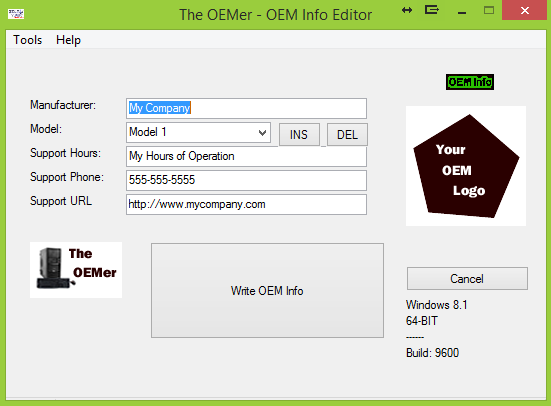
- Change Manufacturer, Model, Support Hours, Support Phone, Support URL and graphic logo to anything you want.
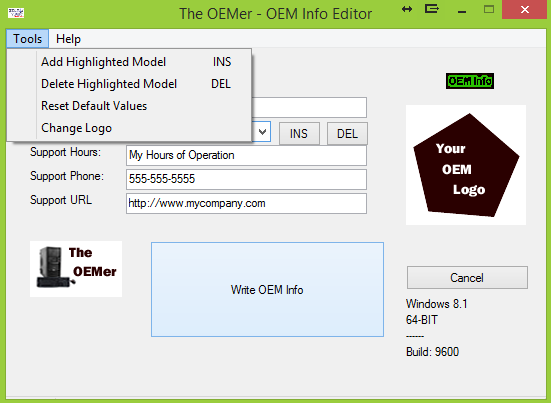
- Easily Add/Delete model names from the list.
Planned Features
- add a button to easily change the logo picture to any BMP that you like
- this program is going to be part of a larger 'suite' type program for doing a complete setup on newly built computers, including desktop background, screensaver, customer power settings and others.
Screenshots
The Main Screen
[attachimg=#2]
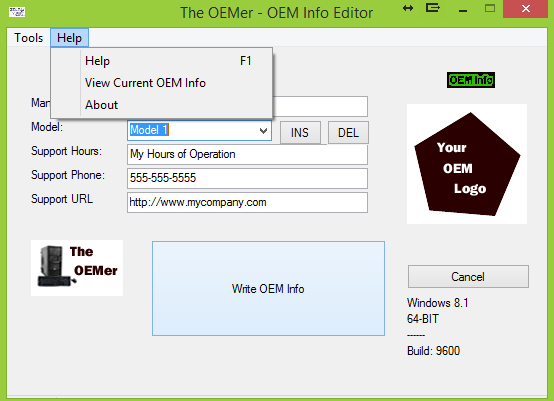
Some of the Menus
[attachimg=#3]
[attachimg=#4]
Usage
Installation
The OEMer is a portable application. Just unzip to a folder on your thumb drive and run it.
Using the Application
Using The OEMer is very intuitive. If you have any questions about how to use it, a help file is included in the base folder.
Uninstallation
Delete the Application folder. There are no registry entries created in the installation of The OEMer

 OEMer.zip