DonationCoder.com forum
 
Read-only archive. This is a static copy of the DonationCoder.com forum. Reading and searching work as before; logging in, posting and private messages do not.
Archive of 2026-10-21 · About this archive · Main site

Author Topic: Disable left mouse click only on start menu in windows 8.1 if Microsoft app Read  (Read 13,439 times)

-Huub-

  • Supporting Member
  • Joined in 2014
  • **
  • Posts: 18
Ok guys I have got a new question.
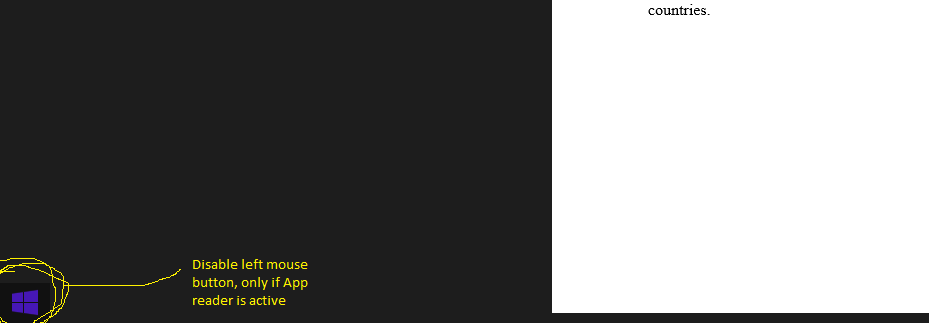
I would like to disable the left mouse button with a AHK script but only for the (left bottom) win 8.1 Start Button, and only if (within) the Microsoft App Reader (the MS app  that runs PDF documents full screen by default) is active.

A screenshot :

[attach=#]

So it should still be possible to use the left mouse button within the Microsoft App Reader for the top right corner, so that I can close the reader.
After the Reader app has been closed the left mouse button should have no restrictions..
skrommel

  • Fastest code in the west
  • Developer
  • Joined in 2005
  • ***
  • Posts: 933
    • Participated in NANY Challenge Twice
    • Coding Snacks
Just modify this script, it blocks the 100x100pixels of the bottom left corner of a maximized Notepad window.

Skrommel

Code: (autohotkey)
;PreventClick.ahk
;  Prevent clicking in the bottom left corner of Notepad when it is maximized
;Skrommel @ 2014

#SingleInstance,Force
SetWinDelay,0
SetKeyDelay,0

Hotkey,IfWinActive,ahk_class Notepad
Hotkey,LButton,NOTEPAD
Return


NOTEPAD:
WinGet,minmax,MinMax,ahk_class Notepad
WinGetPos,wx,wy,ww,wh,ahk_class Notepad
MouseGetPos,mx,my
If (minmax=1 And mx>=wx And mx<=wx+100 And my>=wy+wh-100 And my<=wy+wh)
{
  ToolTip,Click blocked
  Return
}
Click
Return


F12::
ExitApp

lanux128

  • Global Moderator
  • Joined in 2005
  • *****
  • Posts: 6,277
    • Coding Snacks
    • Volunteers/Staff
    • Gathering Badge
    • Participated in NANY Challenge Once
    • Linux User
hi there, skrommel! :) 8) :-*

mouser

  • First Author
  • Administrator
  • Joined in 2005
  • *****
  • Posts: 40,931
    • Gathering Badge
    • Plugin Coding Medal
    • Participated in NANY Challenge Seventeen Times
    • Cody Award
    • Coding Snacks
    • Volunteers/Staff
WAIT.
DID.
THAT.
JUST.
HAPPEN?

SKROMMEL?


SKROMMEL!!!!!!
SKROMMEL!!!!!!
SKROMMEL!!!!!!
SKROMMEL!!!!!!
SKROMMEL!!!!!!
SKROMMEL!!!!!!
SKROMMEL!!!!!!
SKROMMEL!!!!!!
SKROMMEL!!!!!!
SKROMMEL!!!!!!
SKROMMEL!!!!!!
SKROMMEL!!!!!!
SKROMMEL!!!!!!
SKROMMEL!!!!!!
SKROMMEL!!!!!!
SKROMMEL!!!!!!
SKROMMEL!!!!!!
SKROMMEL!!!!!!
SKROMMEL!!!!!!
SKROMMEL!!!!!!
SKROMMEL!!!!!!
SKROMMEL!!!!!!
SKROMMEL!!!!!!
SKROMMEL!!!!!!
SKROMMEL!!!!!!


-Huub-

  • Supporting Member
  • Joined in 2014
  • **
  • Posts: 18
Hi Skrommel thanks for your reply, but it doesn't work.. As mentioned I need it in win 8.1 with the standard Microsoft PDF viewer.
Also the untouched script doesn't work with notepad..
Do I do something wrong ?

Nod5

  • Supporting Member
  • Joined in 2006
  • **
  • Posts: 1,175
    • Coding Snacks
    • Participated in NANY Challenge Three Times
    • Plugin Coding Medal
Hehe, enthusiasm is contagious mouser!  :)

@ -Huub- this works when Reader app is fullscreen in Win 8.1
Code
#IfWinActive, Reader
Lbutton:: 
CoordMode, Mouse, Screen
MouseGetPos, mx, my
if (A_ScreenHeight - my > 101 or mx > 101 )
 click 
return
#IfWinActive
A drawback is that it breaks click and drag in Reader (multi word text selection). But you can still do ctrl+click and drag to select text.

Original address: https://www.donationcoder.com/forum/index.php?topic=39556.0