DonationCoder.com forum
 
Read-only archive. This is a static copy of the DonationCoder.com forum. Reading and searching work as before; logging in, posting and private messages do not.
Archive of 2026-10-21 · About this archive · Main site

Author Topic: java -version -> 'java' is not recognized as an internal or external  (Read 9,920 times)

kalos

  • Member
  • Joined in 2006
  • **
  • Posts: 1,824
hello

in cmd, I type java -version
and I get this:
'java' is not recognized as an internal or external command, operable program or batch file.

how do I fix this?
there are several dodgy solutions on the web, but I need a legit and tested one

thanks!

40hz

  • Supporting Member
  • Joined in 2007
  • **
  • Posts: 11,861
Re: java -version -> 'java' is not recognized as an internal or external
« Reply #1 on: November 09, 2014, 12:14 AM »
Check your PATH to see if Java is installed properly. If in doubt, try uninstalling, rebooting, and installing it again.

4wd

  • Pedantic Old Bastard
  • Supporting Member
  • Joined in 2006
  • **
  • Posts: 5,652
    • Coding Snacks
Re: java -version -> 'java' is not recognized as an internal or external
« Reply #2 on: November 09, 2014, 12:35 AM »
Java doesn't install itself into the PATH environment, at least not on any of my machines.

To get it from the CLI you'd need to CD to its installed directory or use the full path to the command.

I'm guessing Java compiled programs already know how to find it via the registry or other means.

EDIT: My bad, it does, you just have to open the CLI in Admin mode first :-[
"I will not follow where the path may lead, but I will go where there is no path, and I will leave a trail." - Muriel Strode, 1903
« Last Edit: November 09, 2014, 12:43 AM by 4wd »

kalos

  • Member
  • Joined in 2006
  • **
  • Posts: 1,824
Re: java -version -> 'java' is not recognized as an internal or external
« Reply #3 on: November 09, 2014, 10:35 AM »
sorry, how do I check the PATH?
what is CLI?

4wd

  • Pedantic Old Bastard
  • Supporting Member
  • Joined in 2006
  • **
  • Posts: 5,652
    • Coding Snacks
Re: java -version -> 'java' is not recognized as an internal or external
« Reply #4 on: November 09, 2014, 10:52 AM »
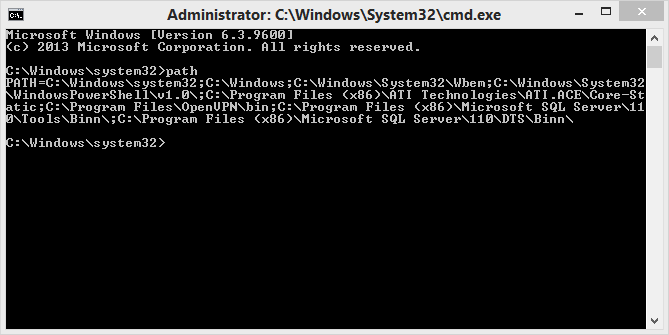
CLI = Command Line Interface

Run as Administrator

2014-11-09 21_50_33.png

NOTE: I don't have Java installed.
"I will not follow where the path may lead, but I will go where there is no path, and I will leave a trail." - Muriel Strode, 1903

kalos

  • Member
  • Joined in 2006
  • **
  • Posts: 1,824
Re: java -version -> 'java' is not recognized as an internal or external
« Reply #5 on: November 09, 2014, 11:32 AM »
C:\Users\Admin>path
PATH=C:\Program Files (x86)\Intel\iCLS Client\;C:\Program Files\Intel\iCLS Clien
t\;C:\WINDOWS\system32;C:\WINDOWS;C:\WINDOWS\System32\Wbem;C:\WINDOWS\System32\W
indowsPowerShell\v1.0\;C:\Program Files\Intel\Intel(R) Management Engine Compone
nts\DAL;C:\Program Files\Intel\Intel(R) Management Engine Components\IPT;C:\Prog
ram Files (x86)\Intel\Intel(R) Management Engine Components\DAL;C:\Program Files
(x86)\Intel\Intel(R) Management Engine Components\IPT;C:\Program Files (x86)\In
tel\OpenCL SDK\2.0\bin\x86;C:\Program Files (x86)\Intel\OpenCL SDK\2.0\bin\x64;C
:\Program Files (x86)\MiKTeX 2.9\miktex\bin\

I reinstalled java and there is nothing java in there

Ath

  • Supporting Member
  • Joined in 2006
  • **
  • Posts: 3,649
    • Participated in NANY Challenge Eleven Times
    • Coding Snacks
    • Linux User
    • Hardware Hacker
Re: java -version -> 'java' is not recognized as an internal or external
« Reply #6 on: November 09, 2014, 11:41 AM »
Did you restart your PC after the re-install, or at least re-open that CLI? If not then retry that first.
/Ton
Ath's software collection, Quote: "A problem well stated is a problem half-solved." (Charles Kettering)

kalos

  • Member
  • Joined in 2006
  • **
  • Posts: 1,824
Re: java -version -> 'java' is not recognized as an internal or external
« Reply #7 on: November 09, 2014, 11:46 AM »
Did you restart your PC after the re-install, or at least re-open that CLI? If not then retry that first.

yes now it works! thanks!
and I thought with Windows 8.1, we had eliminate the need to reboot!

Ath

  • Supporting Member
  • Joined in 2006
  • **
  • Posts: 3,649
    • Participated in NANY Challenge Eleven Times
    • Coding Snacks
    • Linux User
    • Hardware Hacker
Re: java -version -> 'java' is not recognized as an internal or external
« Reply #8 on: November 09, 2014, 02:27 PM »
To get java available in a common CLI the environment variable Path has to be set. The value is set by the Oracle Java installer, but not (as in: can not) propagated to any open CLI. Re-opening the CLI is the least that has to be done.
When running the CLI from something different than the Windows Explorer, that application usually has to be restarted to get the new environment available for child-processes. The easiest way to achieve that is to restart Windows.
/Ton
Ath's software collection, Quote: "A problem well stated is a problem half-solved." (Charles Kettering)

Stoic Joker

  • Honorary Member
  • Joined in 2008
  • **
  • Posts: 6,652
    • Cody Award
    • Participated in NANY Challenge Five Times
Re: java -version -> 'java' is not recognized as an internal or external
« Reply #9 on: November 09, 2014, 02:47 PM »
Granted this is a bad idea for beginners to try, but...

Re-opening the CLI is the least that has to be done.

I have used either path=%PATH% or path=%PATH%;C:\Add_Something_New to avoid restarting something when not wanting to lose the CLI session info or restart anything on a server a few times.

Original address: https://www.donationcoder.com/forum/index.php?topic=39510.0