DonationCoder.com forum
 
Read-only archive. This is a static copy of the DonationCoder.com forum. Reading and searching work as before; logging in, posting and private messages do not.
Archive of 2026-10-21 · About this archive · Main site

Author Topic: help making ctrl-O open 'options' from farr command window  (Read 9,941 times)

ottenm

  • Supporting Member
  • Joined in 2008
  • **
  • Posts: 93
help making ctrl-O open 'options' from farr command window
« on: October 26, 2014, 01:31 PM »
Back when we were all in grade school, if you typed "Ctrl-O" into farr it would open the options window.

I vaguely recall a post that it was conflicting with something else and had to get unplugged.

Is there a way for me to wire this back up in my own installation?  I still miss having a hotkey that would take me from the farr command window into the options window.

Thanks for any suggestions!

lanux128

  • Global Moderator
  • Joined in 2005
  • *****
  • Posts: 6,277
    • Coding Snacks
    • Volunteers/Staff
    • Gathering Badge
    • Participated in NANY Challenge Once
    • Linux User
Re: help making ctrl-O open 'options' from farr command window
« Reply #1 on: October 26, 2014, 01:55 PM »
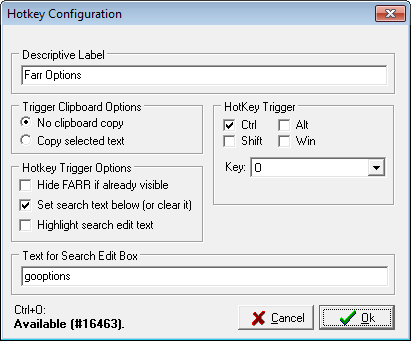
you can add your own hotkey to call up Farr's options (see pic below).

[attach=#]

ottenm

  • Supporting Member
  • Joined in 2008
  • **
  • Posts: 93
Re: help making ctrl-O open 'options' from farr command window
« Reply #2 on: October 26, 2014, 07:47 PM »
Thanks for the suggestion lanux128, but it makes a global ctrl-o that overrides all ctrl-o's in any app.  I should have been more clear.  I'd like to trigger farr, and then with the cursor inside the farr command window, be able to hotkey to the options page.

I use alt-j to trigger farr, and still can't burn it out of my skull: alt-j, alt-o.

lanux128

  • Global Moderator
  • Joined in 2005
  • *****
  • Posts: 6,277
    • Coding Snacks
    • Volunteers/Staff
    • Gathering Badge
    • Participated in NANY Challenge Once
    • Linux User
Re: help making ctrl-O open 'options' from farr command window
« Reply #3 on: October 27, 2014, 01:46 AM »
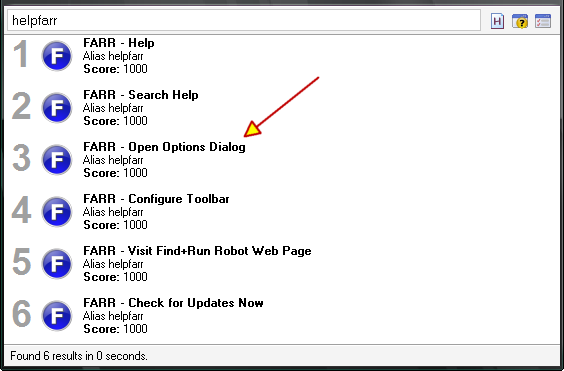
in that case, you can use an alias to invoke the options from Farr's main window. however instead of using Ctrl+O, you just type 'o' and press 'Enter'.


Code
1000>>>o>->Options | restartsearch gooptions /ICON=icons\Core-Farr.ico>+>^o$


more info
the above alias was adapted from the default 'helpfarr' alias.

[attach=#]

mouser

  • First Author
  • Administrator
  • Joined in 2005
  • *****
  • Posts: 40,931
    • Gathering Badge
    • Plugin Coding Medal
    • Participated in NANY Challenge Seventeen Times
    • Cody Award
    • Coding Snacks
    • Volunteers/Staff
Re: help making ctrl-O open 'options' from farr command window
« Reply #4 on: November 01, 2014, 11:24 AM »
I can't remember what the history was regarding the Ctrl+O hotkey inside FARR.. I'm going to have to go back and look..

lanux128

  • Global Moderator
  • Joined in 2005
  • *****
  • Posts: 6,277
    • Coding Snacks
    • Volunteers/Staff
    • Gathering Badge
    • Participated in NANY Challenge Once
    • Linux User
Re: help making ctrl-O open 'options' from farr command window
« Reply #5 on: November 01, 2014, 11:56 AM »
I can't remember what the history was regarding the Ctrl+O hotkey inside FARR.. I'm going to have to go back and look..

if i recall correctly, it was removed because it was causing problems for Polish users who needed to type the "ó" character.

mouser

  • First Author
  • Administrator
  • Joined in 2005
  • *****
  • Posts: 40,931
    • Gathering Badge
    • Plugin Coding Medal
    • Participated in NANY Challenge Seventeen Times
    • Cody Award
    • Coding Snacks
    • Volunteers/Staff
Re: help making ctrl-O open 'options' from farr command window
« Reply #6 on: November 01, 2014, 01:17 PM »
that was it! what a memory you have  :up:

lanux128

  • Global Moderator
  • Joined in 2005
  • *****
  • Posts: 6,277
    • Coding Snacks
    • Volunteers/Staff
    • Gathering Badge
    • Participated in NANY Challenge Once
    • Linux User
Re: help making ctrl-O open 'options' from farr command window
« Reply #7 on: November 01, 2014, 07:55 PM »
that was it! what a memory you have  :up:

Spoiler (click to show/hide)
;D

Original address: https://www.donationcoder.com/forum/index.php?topic=39399.0