DonationCoder.com forum
 
Read-only archive. This is a static copy of the DonationCoder.com forum. Reading and searching work as before; logging in, posting and private messages do not.
Archive of 2026-10-21 · About this archive · Main site

Last post Author Topic: The Best Way to handle finding and removiong Duplicate Files  (Read 79,533 times)

questorfla

  • Fighting Slime all the Time
  • Supporting Member
  • Joined in 2012
  • **
  • Posts: 570
In trying to create an all encompassing archive of all the company documents, i have ended up with an extremely bloated folder containing more redundant info than anything else.  There are probably 10 copies of the exact same file in all in different places.  I can't risk running a mass "delete all but one copy"(though i wold like to) and am looking for the best way to scan this huge repository maybe in small chunks the first time to try to remove as many as i can.  
Some of these files are backup copies of PST files over 5GB in size that I may have 3 or 4 copies of.

This has been a work in progress for some time and and as it all starts getting into a single location i am finding this more and more often.  The ability to scan for duplicates exceeding 500MB might be a good start.

Years ago I used to have a program i used a lot on MP3's and Photos but don;t remember the name and it may not even be Windows 8 compatible.  If you can point me anything at all right now, just cleaning out the duplicated PST files would be a huge help.

The more control the program offers for filters would probably be nice.  I doubt I would even throw away the extras but getting them out of the main reference area would be a big help.

4wd

  • Pedantic Old Bastard
  • Supporting Member
  • Joined in 2006
  • **
  • Posts: 5,652
    • Coding Snacks
Re: The Best Way to handle finding and removiong Duplicate Files
« Reply #1 on: October 26, 2014, 05:14 AM »
Well, up to 4GB in size you could use VBinDiff but HxD will handle files up to 8EB ... if you feel the need  :D

Possibly a good start would be to generate hashes on each file, (SHA-1, etc), then you need only compare those with matching hashes - you could probably whip up a command file to do it  ;)

EDIT: The inbuilt Windows fc command can apparently also handle files >4GB.

Do all these files resides in the same directory?

Maybe I'll look at a simple, (or not), command file.
"I will not follow where the path may lead, but I will go where there is no path, and I will leave a trail." - Muriel Strode, 1903
« Last Edit: October 26, 2014, 06:50 AM by 4wd »

IainB

  • @Slartibartfarst
  • Supporting Member
  • Joined in 2008
  • **
  • Posts: 7,544
Re: The Best Way to handle finding and removiong Duplicate Files
« Reply #2 on: October 26, 2014, 08:28 AM »
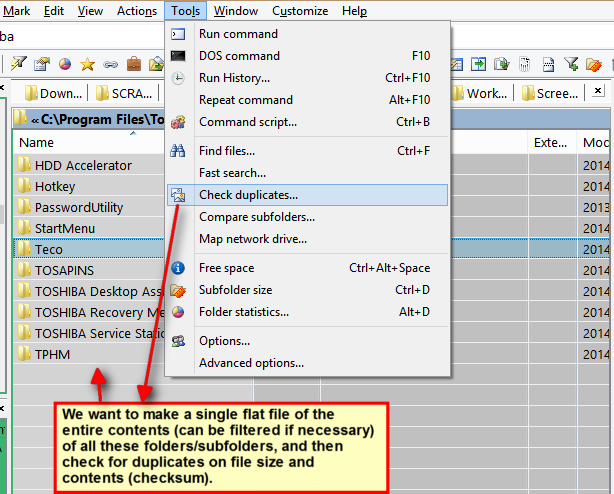
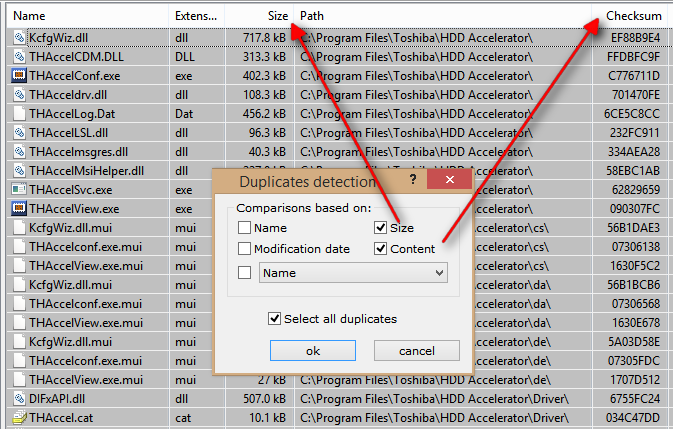
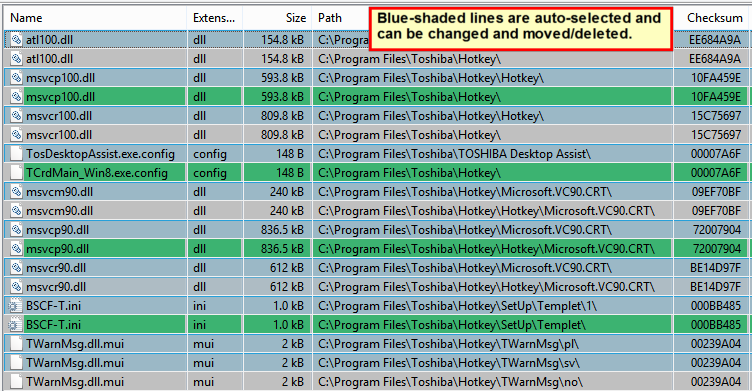
My exercises in comparing/selecting duplicates and removing/deleting them have usually tended to be of sub-folders nested within a folder/directory, whose contents have been treated as a "flat file" (i.e., the process has not necessitated documents being moved from their original holding folders first). I use xplorer² to do this, and it has an exceptionally powerful and handy duplicate checker.
Example:

Here is a partial screen clip of the duplicate checker being selected for the nested folders shown:
[attach]
« Last Edit: October 26, 2014, 11:21 PM by IainB »

4wd

  • Pedantic Old Bastard
  • Supporting Member
  • Joined in 2006
  • **
  • Posts: 5,652
    • Coding Snacks
Re: The Best Way to handle finding and removiong Duplicate Files
« Reply #3 on: October 26, 2014, 11:18 AM »
A modification of one of my other command files that's around here somewhere.

FCompare-GNU.cmd

REQUIREMENTS:
It requires the following three (3) files from the GNU DiffUtils for Windows packages, (because they're faster than the native Windows commands).  Put them in the same directory as the command file.

  • cmp.exe
  • libiconv2.dll
  • libintl3.dll

These are available from the following two archives, (they're both on SourceForge, both less than 1MB in size):
Binaries
Dependencies


RUNNING:
Just double-click on it, it'll prompt you for two directories and the extension type of the files to compare.

It'll output to both the console it opens and a log file, which you get the option to open at the end.

As a matter of interest, it did a compare of two 8.17GB ISOs in ~3:20 - the files were on separate HDDs for speed, otherwise you're going to get disk thrashing.

NOTES:
  • It recurses through both directories chosen looking for matching file extensions.
  • It performs a size comparison before it resorts to binary comparison, (seems logical).
  • Because it uses DisableDelayedExpansion it's not going to work properly if your filenames have ! in them - rename them.
  • Recommend you choose directories on different HDDs to avoid disk thrashing.

If you want, I can put up the native Windows command version but it is woefully slow by comparison.

Code: (generic)
@if (@CodeSection == @Batch) @then

    @echo off
    color 1a
    setlocal EnableExtensions
    setlocal DisableDelayedExpansion
    
    echo Select SOURCE folder
    for /F "delims=" %%S in ('CScript //nologo //E:JScript "%~F0"') do (
        set srce=%%S
    )
    if "%srce%"=="" goto :End2
    echo Selected folder: "%srce%"
    
    echo Select DESTINATION folder
    for /F "delims=" %%D in ('CScript //nologo //E:JScript "%~F0"') do (
       set dest=%%D
    )
    if "%dest%"=="" goto :End2
    
    echo Selected folder: "%dest%"
    
    if "%srce%"=="%dest%" goto :End1
    
    :GetExt
    echo.
    set /P ext=Please enter extension [eg. jpg] ENTER to exit: 
    if not defined ext goto :End2
    set /a totfiles=0
    set /a matchfiles=0
    set logfile="%~dp0%FCompare.log"
    
    echo --------------------------- >>"%logfile%"
    echo %date%  %time% >>"%logfile%"
    echo --------------------------- >>"%logfile%"

    for /r "%srce%" %%a in (*.%ext%) do (call :CheckSize "%dest%" %%~za "%%~fa")

    :End
    echo Total files:    %totfiles%
    echo Matching files: %matchfiles%
    if %matchfiles% equ 0 (echo Matching files: 0 >>"%logfile%")
    set totfiles=
    set matchfiles=
    set ext=
    if exist "%logfile%" call :ViewLog
    goto :GetExt
    :End1
    color 1c
    echo **** SOURCE and DESTINATION are the same! ****
    :End2
    set srce=
    set dest=
    pause
    exit

    :ViewLog
    set /p view=View logfile [y,n]
    if "%view%"=="y" (start notepad.exe "%logfile%")
    set view=
    goto :EOF

    :CheckSize
    set /a totfiles+=1
    for /r %1 %%b in (*.%ext%) do (
        if %2==%%~zb (
            echo.
            echo Comparing: "%~3" "%%~b"
            echo Sizes: %2   %%~zb
            .\cmp.exe -s "%~3" "%%~b"
            if errorlevel 0 (call :Matching "%~3" "%%~b")
        )
    )
    goto :EOF

    :Matching
    set /a matchfiles+=1
    echo - Match -
    echo Match: "%~1" --- "%~2" >>"%logfile%"
    goto :EOF

    endlocal

    End of Batch section
@end


// JScript section

// Creates a dialog box that enables the user to select a folder and display it.
var title = "Select a folder", rootFolder = 0x11;
var shl = new ActiveXObject("Shell.Application");
var folder = shl.BrowseForFolder(0, title, 0, rootFolder);
WScript.Stdout.WriteLine(folder ? folder.self.path : "");

Log file example:
Code: (generic)
--------------------------- 
Sun 26/10/2014  22:19:46.65 
--------------------------- 
Match: "R:\test\dir1\FC3 - Blood Dragon.iso" --- "D:\dir2\why.iso" 
"I will not follow where the path may lead, but I will go where there is no path, and I will leave a trail." - Muriel Strode, 1903
« Last Edit: October 26, 2014, 11:41 AM by 4wd »

x16wda

  • what am I doing in this handbasket?
  • Supporting Member
  • Joined in 2007
  • **
  • Posts: 888
    • Participated in NANY Challenge Once
Re: The Best Way to handle finding and removiong Duplicate Files
« Reply #4 on: October 26, 2014, 03:09 PM »
If you have everything in one location, it might be easier to use fsum to build a list of the MD5s of the files, then you can sort the result and see what is duplicated. Names and file extensions can be misleading.  ;)

Navigate to the top level and use "fsum -r *.* > checksums.txt"  and you'll get a nice report. Then you could "cat checksums.txt | sort | uniq -D -w 33 > dups.txt" to get a good list of just the duplicates. (You'd need unxutils for cat and uniq - and other useful stuff too.)

Both reports are attached here for a sample folder.
vi vi vi - editor of the beast

IainB

  • @Slartibartfarst
  • Supporting Member
  • Joined in 2008
  • **
  • Posts: 7,544
Re: The Best Way to handle finding and removiong Duplicate Files
« Reply #5 on: October 26, 2014, 11:15 PM »
NB: I have just modified the images in my last comment above, to make it clear that file size and contents (checksum) are being used for duplicate checking in the example given. I made the images a bit smaller (so no scrolling needed) and added some comments/arrows to them.

questorfla

  • Fighting Slime all the Time
  • Supporting Member
  • Joined in 2012
  • **
  • Posts: 570
Re: The Best Way to handle finding and removiong Duplicate Files
« Reply #6 on: October 27, 2014, 07:44 PM »
Well, up to 4GB in size you could use VBinDiff but HxD will handle files up to 8EB ... if you feel the need  :D

Possibly a good start would be to generate hashes on each file, (SHA-1, etc), then you need only compare those with matching hashes - you could probably whip up a command file to do it  ;)

EDIT: The inbuilt Windows fc command can apparently also handle files >4GB.

Do all these files resides in the same directory?

Maybe I'll look at a simple, (or not), command file.

I used to have a Duplicate remover for Photos that would have worked.  It shows you all the various files and where they are along with dates and sizes etc.  They you go to each group of duplicates and pick which one(s) to keep.  I used this back in the Windows XP days do do not remember the name.  But i am sure there are plenty out there like it.  The preference would be to move all but the ones I pick to another folder maintaining the directory structure of where they were removed from.
Seems like it was a pretty fast program (for that point in time)

I can see i need to review your proffered code as well, 4WD  :)  It might be all i need.
« Last Edit: October 27, 2014, 07:55 PM by questorfla »

questorfla

  • Fighting Slime all the Time
  • Supporting Member
  • Joined in 2012
  • **
  • Posts: 570
Re: The Best Way to handle finding and removiong Duplicate Files
« Reply #7 on: October 27, 2014, 07:54 PM »
Thanks IainB.    ;) I am looking at your choice as well.
This is a HUGE folder with multiple subdirectories and levels. So it isn't the size of the file that matters so much during the scanning phase.
And to be honest, if it had the ability to be selective about the compare fields, i would first wan to look for files of the same name, date, and size. 
This would at least allow me to clean out the "dead-wood".  After that, I can get more selective on subsequent scans.
I need to get it down to a reasonable size to be used with File Locator Pro.  Excellent program but it does not build any kind of Index on each run.  This uses a lot of time on each subsequent run and it is a feature that they wlll be adding in the next version.

Stoic Joker

  • Honorary Member
  • Joined in 2008
  • **
  • Posts: 6,652
    • Cody Award
    • Participated in NANY Challenge Five Times
Re: The Best Way to handle finding and removiong Duplicate Files
« Reply #8 on: October 27, 2014, 08:35 PM »
If they ever do let you upgrade that server, Server 2012 has a built-in deduplication feature that produced very promising results (like a 60% size reduction) in the tests I ran.

This approach can be helpful when dealing with users that chronically like to squirrel away common files to their own little stash ... And then freak out when is can't be found. Otherwise 6 months after you spend all that time cleaning up their mess they'll just recreate it and run you out of space again.

4wd

  • Pedantic Old Bastard
  • Supporting Member
  • Joined in 2006
  • **
  • Posts: 5,652
    • Coding Snacks
Re: The Best Way to handle finding and removiong Duplicate Files
« Reply #9 on: October 27, 2014, 08:38 PM »
If you want to just match on name, date (which one?), and size, I can modify the command file easily enough.  I'll look at it in a few hours.

Probably also get it to spit out a command file to do the moving of matching files.

Not far different from the original.

EDIT: New version, old one is still above.

Compares Size, Date, Name, and optionally compares binaries.
Generates a logfile that includes the commands to copy or move the duplicates to another directory using Robocopy, (duplicates folder tree).  Files from the 2nd chosen directory are the sacrificial victims.

Code: (generic)
@if (@CodeSection == @Batch) @then

    @echo off
    color 1a
    setlocal EnableExtensions
    setlocal DisableDelayedExpansion
    
    echo Select PRIMARY folder
    for /F "delims=" %%S in ('CScript //nologo //E:JScript "%~F0"') do (
        set srce=%%S
    )
    if "%srce%"=="" goto :End2
    echo Selected folder: "%srce%"
    
    echo Select folder to COMPARE
    for /F "delims=" %%D in ('CScript //nologo //E:JScript "%~F0"') do (
       set dest=%%D
    )
    if "%dest%"=="" goto :End2
    
    echo Selected folder: "%dest%"
    
    if "%srce%"=="%dest%" goto :End1
    
    echo.
    echo The following prompt asks you for a folder to move duplicates to.
    echo.
    echo ---- HOWEVER, THIS COMMAND FILE DOES NOT MOVE THEM ----
    echo.
    echo The path is written to the logfile so it can be run separately if
    echo required.
    echo.
    echo Select folder to MOVE duplicates to
    for /F "delims=" %%S in ('CScript //nologo //E:JScript "%~F0"') do (
        set mdest=%%S
    )
    if "%mdest%"=="" goto :End2
    echo Selected folder: "%mdest%"

    set /P como=Copy or Move Duplicates (Set in logfile) [ENTER = Copy]: 

    echo.
    echo If you just want to match on Size, Date, and Name just hit
    echo ENTER at the next prompt.
    echo If you want to do a binary compare also, enter any character.
    echo.
    set /P cbin=Do binary compare [ENTER = No]: 
        
    :GetExt
    echo.
    set /P ext=Please enter extension [eg. jpg, * = ALL] ENTER to exit: 
    if not defined ext goto :End2
    set /a totfiles=0
    set /a matchfiles=0
    call :SetLogfile %~dp0%
    
    echo @echo off >"%logfile%"
    echo echo %date%  %time% >>"%logfile%"

    for /r "%srce%" %%a in (*.%ext%) do (call :CheckSize "%dest%" %%~za "%%~fa")

    :End
    echo Total files:    %totfiles%
    echo Matching files: %matchfiles%
    if %matchfiles% equ 0 (echo Matching files: 0 >>"%logfile%")
    set totfiles=
    set matchfiles=
    set ext=
    if exist "%logfile%" call :ViewLog
    goto :GetExt
    :End1
    color 1c
    echo **** SOURCE and DESTINATION are the same! ****
    :End2
    set srce=
    set dest=
    pause
    rem exit

    :SetLogfile
    set "logfile=%~1FCompare-%time:~0,2%%time:~3,2%%time:~6,2%.cmd"
    goto :EOF

    :ViewLog
    set /p view=View logfile [y,n]
    if "%view%"=="y" (start notepad.exe "%logfile%")
    set view=
    goto :EOF

    :CheckSize
    set /a totfiles+=1
    for /r %1 %%b in (*.%ext%) do (
        if %2==%%~zb (
            echo.
            echo Comparing: "%~3" "%%~b"
            echo Sizes: Match
            call :CheckDate "%~3" "%%~b"
        )
    )
    goto :EOF

    :CheckDate
    if "%~t1" equ "%~t2" (
        echo Dates: Match
        call :CheckName "%~1" "%~2"
    )
    goto :EOF

    :CheckName
    if "%~nx1" equ "%~nx2" (
        echo Names: Match
        if not defined cbin (
            call :Matching "%~1" "%~2"
        ) else (
            call :CheckBin "%~1" "%~2"
        )
    )
    goto :EOF

    :CheckBin
    .\cmp.exe -s "%~1" "%~2"
    if errorlevel 0 (
        echo Binaries: Match
        call :Matching "%~1" "%~2"
    )
    goto :EOF

    :Matching
    set /a matchfiles+=1
    echo echo "%~1" matches "%~2" >>"%logfile%"
    set tdir=%~dp2
    set tdir=%tdir:~0,-1%
    set tdir2=%tdir:~2%
    if not defined como (
        echo robocopy "%tdir%" "%mdest%%tdir2%" "%~nx2" >>"%logfile%"
    ) else (
        echo robocopy "%tdir%" "%mdest%%tdir2%" "%~nx2" /MOV >>"%logfile%"
    )
    echo.
    goto :EOF

    endlocal

    End of Batch section
@end


// JScript section

// Creates a dialog box that enables the user to select a folder and display it.
var title = "Select a folder", rootFolder = 0x11;
var shl = new ActiveXObject("Shell.Application");
var folder = shl.BrowseForFolder(0, title, 0, rootFolder);
WScript.Stdout.WriteLine(folder ? folder.self.path : "");

Sample output with Move option.
Code: (generic)
@echo off 
echo Wed 29/10/2014  12:53:49.64 
echo "R:\test\Root\SimpleBackup.cmd" matches "D:\Root\SimpleBackup.cmd" 
robocopy "D:\Root" "D:\test\Root" "SimpleBackup.cmd" /MOV 
echo "R:\test\Root\fred h\1234\Hunters & Collecters - Holy Grail.mp3" matches "D:\Root\fred h\1234\Hunters & Collecters - Holy Grail.mp3" 
robocopy "D:\Root\fred h\1234" "D:\test\Root\fred h\1234" "Hunters & Collecters - Holy Grail.mp3" /MOV 
echo "R:\test\Root\fred h\34\cache\Don McLean - American Pie.mp3" matches "D:\Root\fred h\34\cache\Don McLean - American Pie.mp3" 
robocopy "D:\Root\fred h\34\cache" "D:\test\Root\fred h\34\cache" "Don McLean - American Pie.mp3" /MOV 


NOTE:
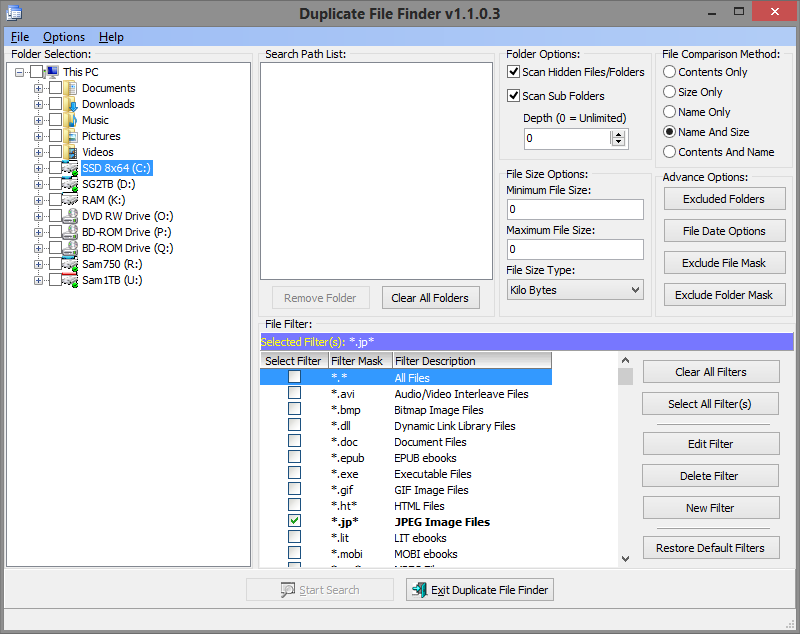
If you want another free program, I heartily recommend Duplicate File Finder by Rashid Hoda - it has best layout for a dupe checker I have ever seen, all the options are right in front of you without having to screw around in menus.

Hasn't been updated in years but the only problem I've found with it is if you have a rather large number of files to check, eg. 40k+
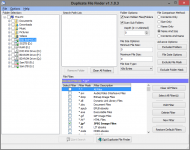
2014-10-29 13_34_21.png
"I will not follow where the path may lead, but I will go where there is no path, and I will leave a trail." - Muriel Strode, 1903
« Last Edit: October 29, 2014, 02:38 AM by 4wd »

questorfla

  • Fighting Slime all the Time
  • Supporting Member
  • Joined in 2012
  • **
  • Posts: 570
Re: The Best Way to handle finding and removiong Duplicate Files
« Reply #10 on: November 16, 2014, 02:35 AM »
OK.  Another pile of treasure!    My lucky night.
My own contribution to this would be "Yet Another Duplicate File Remover" <YADFR> on Source Forge.  (I hope no one chimes in now that they got that and it messed up their system :(.  )
While it seems slower than some, it also was very thorough and extremely simple to use, Wizard and all.  I have not yet tested 4WD's scripts but from past experience i trust them implicitly.
Today has been one surprise after the next (all good so far) so I am hoping for some home runs tonight on something.

tomos

  • Charter Member
  • Joined in 2006
  • ***
  • Posts: 11,970
    • Gathering Badge
    • Participated in NANY Challenge Once
Re: The Best Way to handle finding and removiong Duplicate Files
« Reply #11 on: November 16, 2014, 02:47 PM »
Good to get a couple of recommendations for duplicate file finders :up:

@questerflora, any chance you could change the title of the thread to something more topic-related?
That would be helpful :) (I think it needs to be changed in first post to stick)
Tom

MilesAhead

  • Supporting Member
  • Joined in 2009
  • **
  • Posts: 7,736
    • Coding Snacks
Re: The Best Way to handle finding and removiong Duplicate Files
« Reply #12 on: November 16, 2014, 03:59 PM »
@questorfla could you check the total number of files in the tree?

One way is just to right click the root folder and click Properties.  If it is 4096 or less, MD5Hash can do it.  Just drag and drop the folder on a running MD5Hash or use the ancillary program to install the shell extensions. Once that is done, right click the root folder and click MD5Hash.


When done you can cut the results to clipboard and paste it into any editor such as EditPad Lite 7 which does line sorting.  The results are shown as the MD%Sum string followed by white space, then the full file path.  One file per line.

Edit:  This assumes all the files are in a tree with a single root folder.  Hidden and system files are ignored.

Edit2:  During testing I calculated MD5 for folders with some video files over 6 GB thrown in.  It completed with correct results.


« Last Edit: November 16, 2014, 04:10 PM by MilesAhead »

questorfla

  • Fighting Slime all the Time
  • Supporting Member
  • Joined in 2012
  • **
  • Posts: 570
Re: The Best Way to handle finding and removiong Duplicate Files
« Reply #13 on: January 01, 2015, 10:01 PM »
First:  Happy New Year to all.
2nd.  Tomos:    I can't see a way to change th tile of an existing post?  Maybe here is one but nothing  I clicked on would get me there.
I appreciate everyone's good advice and even if it doesn't help ME, I am sure someone who reads these posts can use something of it.  Tough I agree I should have been more on topic when I named it :(

3rd:  Stoic.  This DE-duplicator in server 2012 sounds great and I can probably manage that.  I had looked at 2012 a while back but not sure what version.  Whatever it was, it seemed to be a command line only version of some sort, I am not sure I ever looked at a full GUI setup and probably should.
Thanks again to all.

tomos

  • Charter Member
  • Joined in 2006
  • ***
  • Posts: 11,970
    • Gathering Badge
    • Participated in NANY Challenge Once
Re: The Best Way to handle finding and removiong Duplicate Files
« Reply #14 on: January 01, 2015, 11:32 PM »
2nd.  Tomos:    I can't see a way to change th tile of an existing post?  Maybe here is one but nothing  I clicked on would get me there.
I appreciate everyone's good advice and even if it doesn't help ME, I am sure someone who reads these posts can use something of it.  Tough I agree I should have been more on topic when I named it :(

guess I'm being a fussy beggar, but when you click on 'unread posts' and each time you cant remember what a particular thread is about :-[ (and you are not alone in using vague titles...)
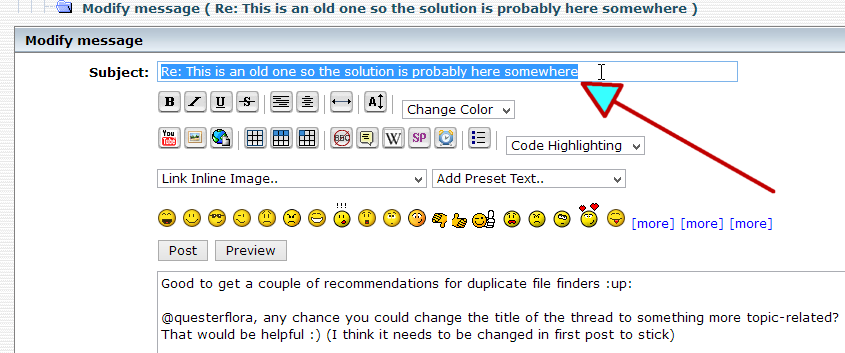
Click 'modify' on the first post in the thread, and edit title thus:

[attachimg=#]
Tom

questorfla

  • Fighting Slime all the Time
  • Supporting Member
  • Joined in 2012
  • **
  • Posts: 570
Re: The Best Way to handle finding and removiong Duplicate Files
« Reply #15 on: January 04, 2015, 12:17 AM »
THANK YOU TOMOS!
I fixed it I hope.  In the future I will try to be more on target as well.

arvin23

  • Participant
  • Joined in 2015
  • *
  • Posts: 5
Re: The Best Way to handle finding and removiong Duplicate Files
« Reply #16 on: October 13, 2015, 09:55 AM »
I use WinMerge, which is a free download. It allows you to look at two folders, side by side, and see if files are indeed identical, different, newer, older, etc... You can then select one file, either left or right side, and delete it. You can also copy a file from left to right or right to left, then delete the one you don't want.

mohanarun

  • Supporting Member
  • Joined in 2015
  • **
  • Posts: 2
    • Writer
    • Military Service Badge - US Army
Re: The Best Way to handle finding and removiong Duplicate Files
« Reply #17 on: October 21, 2015, 03:19 AM »
I am afraid I dont have a solution for company-wide "possibly" duplicate files in the same folder
except for a semi-automated process wherein the manual process you do diff. Scanning and
directory listing can be automated but you will need to be careful before choosing to delete something.

Manual:
Choosing carefully a selection of files that look like possible duplicates.
Diff them manually.
Delete the duplicates.

Automated:
Scan the directory fast.
Produce a large list of files that look like possible duplicates.

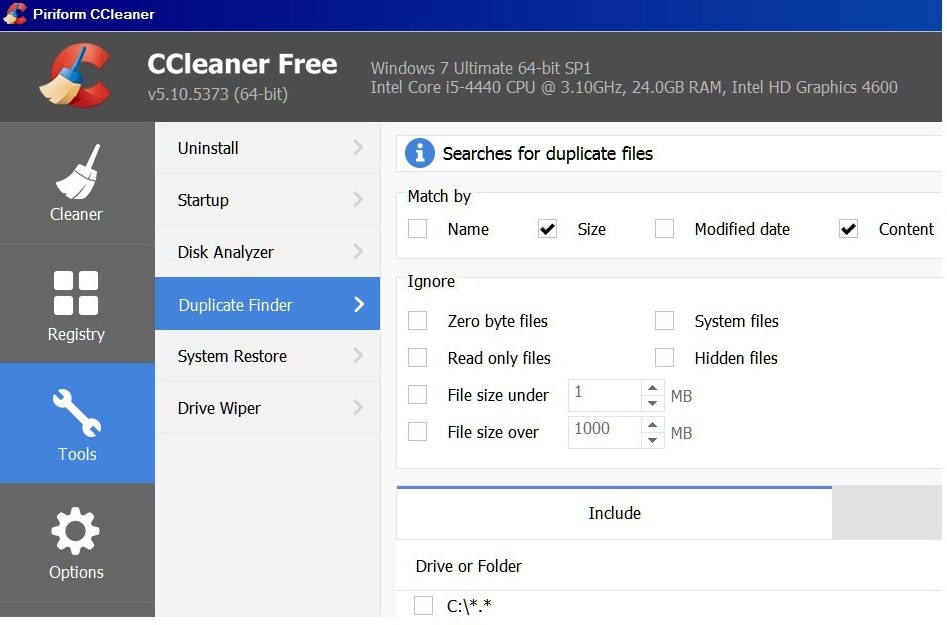
Here is how I do duplicate file detection for personal use. I use CCLEANER.
Click on Tools> Duplicate file finder...

Screenshot attached.
[attachthumb-=1]

David.P

  • Ergonomics Junkie
  • Supporting Member
  • Joined in 2008
  • **
  • Posts: 208
Re: The Best Way to handle finding and removing Duplicate Files
« Reply #18 on: March 16, 2019, 09:46 AM »
Hi forum,

is there any news on a possibly best duplicate finder?

I'm looking for a program where I can check a specific folder (typically like the "Downloads" folder...) to see if the files it contains already exist somewhere else on the computer -- possibly also under a different name.

Thanks for tips or experience!

David.P

  • Ergonomics Junkie
  • Supporting Member
  • Joined in 2008
  • **
  • Posts: 208
Re: The Best Way to handle finding and removiong Duplicate Files
« Reply #19 on: March 16, 2019, 08:37 PM »
Done. I am very confident that one does not have to look any further than to AllDup.

Akertyna

  • Participant
  • Joined in 2019
  • *
  • Posts: 9
Re: The Best Way to handle finding and removiong Duplicate Files
« Reply #20 on: June 26, 2019, 07:33 AM »
I tried searching on laptopmag and techgara how to use ccleaner to delete duplicate files but this way can only delete files with the same name.
Is there a way to delete duplicate files but have different names?

Curt

  • Supporting Member
  • Joined in 2006
  • **
  • Posts: 7,565

Akertyna

  • Participant
  • Joined in 2019
  • *
  • Posts: 9

ewemoa

  • Honorary Member
  • Joined in 2008
  • **
  • Posts: 2,922
    • Plugin Coding Medal
    • Participated in NANY Challenge Three Times
Re: The Best Way to handle finding and removiong Duplicate Files
« Reply #23 on: December 21, 2019, 07:54 PM »
I'm looking for something with source code because I'm a bit wary of using a program that's going to be scanning a lot of files -- though in this case it's for someone who is unlikely to be using a non-GUI solution.

My preliminary searches turned up a couple of candidates.

Are there any reasons to not consider the current incarnation of dupeguru or Duplicate Files Finder?

https://github.com/arsenetar/dupeguru
http://doubles.sourceforge.net/

Appreciate some opinions (informed or otherwise) :)

4wd

  • Pedantic Old Bastard
  • Supporting Member
  • Joined in 2006
  • **
  • Posts: 5,652
    • Coding Snacks
Re: The Best Way to handle finding and removiong Duplicate Files
« Reply #24 on: December 22, 2019, 07:27 AM »
I'm looking for something with source code because I'm a bit wary of using a program that's going to be scanning a lot of files -- though in this case it's for someone who is unlikely to be using a non-GUI solution.

My preliminary searches turned up a couple of candidates.

Are there any reasons to not consider the current incarnation of dupeguru or Duplicate Files Finder?

https://github.com/arsenetar/dupeguru

Appreciate some opinions (informed or otherwise) :)

Used dupeGuru reasonably recently to remove something like 400+GB of duplicate backup files for a friend, (a laborious undertaking - backups of backups of backups of .... ), worked well.

There's also AntiDupl if you want to find primarily image duplicates, (or close duplicates), including across different formats - my go to software for that instance.
"I will not follow where the path may lead, but I will go where there is no path, and I will leave a trail." - Muriel Strode, 1903

Original address: https://www.donationcoder.com/forum/index.php?topic=39397.0