DonationCoder.com forum
 
Read-only archive. This is a static copy of the DonationCoder.com forum. Reading and searching work as before; logging in, posting and private messages do not.
Archive of 2026-10-21 · About this archive · Main site

Author Topic: Screenshot Captor 4.8.7 beta feature: drop file onto current image to combine  (Read 25,375 times)

mouser

  • First Author
  • Administrator
  • Joined in 2005
  • *****
  • Posts: 40,931
    • Gathering Badge
    • Plugin Coding Medal
    • Participated in NANY Challenge Seventeen Times
    • Cody Award
    • Coding Snacks
    • Volunteers/Staff
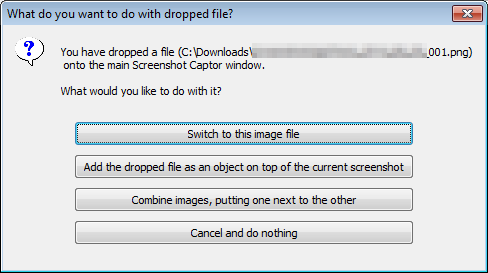
I've added a new feature to the latest beta of Screenshot Captor (4.8.7), which will let you "combine" images if you drop an image file onto the current image.
The "combine" options are fairly limited at this point -- essentially it will just lay out the dropped image on any side of the existing image, and let you choose how the images are resized.

This is a quick and easy way of combining images horizontally or vertically, and doing so in a visually appealing manner.

Download beta here: http://www.donationcoder.com/forum/index.php?topic=3474.0

For combination of many images, or for combining images into grids (as opposed to rows or columns) see the excellent standalone free tool "ImageGrid" made by dc member vlastimil: http://www.donationcoder.com/forum/index.php?topic=29464.0


Video screencast showing the feature in action:
Screenshot - 9_24_2014 , 12_55_36 PM_thumb001.png
www.donationcoder.com/screencasts/dc/3ds/sc30/sc30.html
« Last Edit: September 24, 2014, 05:56 PM by mouser »

lanux128

  • Global Moderator
  • Joined in 2005
  • *****
  • Posts: 6,277
    • Coding Snacks
    • Volunteers/Staff
    • Gathering Badge
    • Participated in NANY Challenge Once
    • Linux User
thanks for this feature, mouser! i had been wanting to do this in SC for a some time now. :up:

[attach=#]

dluby

  • Charter Member
  • Joined in 2006
  • ***
  • Posts: 253
I like this feature Mouser  :Thmbsup:

However when adding one image to the other, is there any chance you could allow to to add a smaller image at it's current size an existing larger image and say centre it?  Maybe the unused border could be set using transparency.

I have attached a screenshot where I have combined a smaller image onto a larger image and it doesn't look right.

Thanks

mouser

  • First Author
  • Administrator
  • Joined in 2005
  • *****
  • Posts: 40,931
    • Gathering Badge
    • Plugin Coding Medal
    • Participated in NANY Challenge Seventeen Times
    • Cody Award
    • Coding Snacks
    • Volunteers/Staff
yes, seems logical to add that.

mouser

  • First Author
  • Administrator
  • Joined in 2005
  • *****
  • Posts: 40,931
    • Gathering Badge
    • Plugin Coding Medal
    • Participated in NANY Challenge Seventeen Times
    • Cody Award
    • Coding Snacks
    • Volunteers/Staff
Redownload beta, there is a new option to not resize.

dluby

  • Charter Member
  • Joined in 2006
  • ***
  • Posts: 253
I downloaded the latest version and the option not to resize works great.

Dare I suggest another (minor) tweak?  Most times I think I would choose '3 Combine images, putting one next to the other' most times, so make this the default button for me.

Edit: Another option to maybe not show the 'WARNING: You have objects that may not resize properly' after the first time it is shown.

As always keep up the good work.

Thanks
« Last Edit: September 23, 2014, 10:11 AM by dluby »

mouser

  • First Author
  • Administrator
  • Joined in 2005
  • *****
  • Posts: 40,931
    • Gathering Badge
    • Plugin Coding Medal
    • Participated in NANY Challenge Seventeen Times
    • Cody Award
    • Coding Snacks
    • Volunteers/Staff
Good ideas, putting them on todo list.

tomos

  • Charter Member
  • Joined in 2006
  • ***
  • Posts: 11,970
    • Gathering Badge
    • Participated in NANY Challenge Once
very interesting idea :up:
Would you consider an option to not resize, but e.g. centre one image beside the other, using the existing option "transparent etc" to fill in the 'background' ?
(Resizing one image with text makes it blurry compared to the other...)
Tom

mouser

  • First Author
  • Administrator
  • Joined in 2005
  • *****
  • Posts: 40,931
    • Gathering Badge
    • Plugin Coding Medal
    • Participated in NANY Challenge Seventeen Times
    • Cody Award
    • Coding Snacks
    • Volunteers/Staff
Quote
Would you consider an option to not resize, but e.g. centre one image beside the other, using the existing option "transparent etc" to fill in the 'background' ?
already done. redownload beta.

tomos

  • Charter Member
  • Joined in 2006
  • ***
  • Posts: 11,970
    • Gathering Badge
    • Participated in NANY Challenge Once
Quote
Would you consider an option to not resize, but e.g. centre one image beside the other, using the existing option "transparent etc" to fill in the 'background' ?
already done. redownload beta.

lol, you're like roadrunner there -
did you just whip that up in 13 minutes ?? (is that a dc record ????)

Well done, works a treat :Thmbsup:
Tom

mouser

  • First Author
  • Administrator
  • Joined in 2005
  • *****
  • Posts: 40,931
    • Gathering Badge
    • Plugin Coding Medal
    • Participated in NANY Challenge Seventeen Times
    • Cody Award
    • Coding Snacks
    • Volunteers/Staff
dluby requested exact same feature as you yesterday so i added it overnight.

dluby

  • Charter Member
  • Joined in 2006
  • ***
  • Posts: 253
I have already used this new functionality three times (and I don't mean for testing), it's great!  It's something I didn't realise I needed.

mouser

  • First Author
  • Administrator
  • Joined in 2005
  • *****
  • Posts: 40,931
    • Gathering Badge
    • Plugin Coding Medal
    • Participated in NANY Challenge Seventeen Times
    • Cody Award
    • Coding Snacks
    • Volunteers/Staff
Glad to hear it  :Thmbsup:

mouser

  • First Author
  • Administrator
  • Joined in 2005
  • *****
  • Posts: 40,931
    • Gathering Badge
    • Plugin Coding Medal
    • Participated in NANY Challenge Seventeen Times
    • Cody Award
    • Coding Snacks
    • Volunteers/Staff
I've added a video demonstrating the feature to the first post.

Original address: https://www.donationcoder.com/forum/index.php?topic=39029.0