DonationCoder.com forum
 
Read-only archive. This is a static copy of the DonationCoder.com forum. Reading and searching work as before; logging in, posting and private messages do not.
Archive of 2026-10-21 · About this archive · Main site

Author Topic: Fully automate screen shot to image  (Read 5,395 times)

rp1428

  • Participant
  • Joined in 2014
  • *
  • Posts: 2
Fully automate screen shot to image
« on: August 21, 2014, 03:32 PM »
Is this possible, ie press a button and the screenshot is taken and written to an image file. ie no prompts at all? Thus repeatedly pressing the button results in separate unique files.

tomos

  • Charter Member
  • Joined in 2006
  • ***
  • Posts: 11,970
    • Gathering Badge
    • Participated in NANY Challenge Once
Re: Fully automate screen shot to image
« Reply #1 on: August 21, 2014, 03:45 PM »
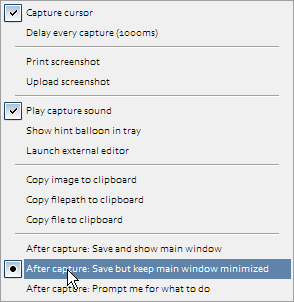
I guess the easiest way is via the quick-capture-bar which is docked on the top of the screen.
Click the button there with tooltip "Select post-capture options ..."
this menu will show:

[attachimg=#]

that should do it !
Tom

mouser

  • First Author
  • Administrator
  • Joined in 2005
  • *****
  • Posts: 40,931
    • Gathering Badge
    • Plugin Coding Medal
    • Participated in NANY Challenge Seventeen Times
    • Cody Award
    • Coding Snacks
    • Volunteers/Staff
Re: Fully automate screen shot to image
« Reply #2 on: August 21, 2014, 05:12 PM »
This is exactly what Screenshot Captor was designed for.

As Tomos says, you just have to go to the options (via tray, quick capture bar, on main options dialog on Interface tab) and tell it to stay minimized after capture.
Then SC will do what it always does, automatically save and name image files.
You can also customize how image files are named if you prefer something other than the default naming scheme of using the current date and time.

rp1428

  • Participant
  • Joined in 2014
  • *
  • Posts: 2
Re: Fully automate screen shot to image
« Reply #3 on: August 21, 2014, 06:07 PM »
This is exactly what Screenshot Captor was designed for.

As Tomos says, you just have to go to the options (via tray, quick capture bar, or on main options dialog on Interface tab, they all change the same setting) and tell it to stay minimized after capture.
Then SC will do what it always does, automatically save and name image files.
You can also customize how image files are named if you prefer something other than the default naming scheme of using the current date and time.

Thanks, I have it working now.
« Last Edit: August 21, 2014, 07:28 PM by mouser »

mouser

  • First Author
  • Administrator
  • Joined in 2005
  • *****
  • Posts: 40,931
    • Gathering Badge
    • Plugin Coding Medal
    • Participated in NANY Challenge Seventeen Times
    • Cody Award
    • Coding Snacks
    • Volunteers/Staff
Re: Fully automate screen shot to image
« Reply #4 on: August 21, 2014, 07:28 PM »
:up:

Original address: https://www.donationcoder.com/forum/index.php?topic=38765.0