DonationCoder.com forum
 
Read-only archive. This is a static copy of the DonationCoder.com forum. Reading and searching work as before; logging in, posting and private messages do not.
Archive of 2026-10-21 · About this archive · Main site

Author Topic: simple file (dll) searcher  (Read 15,182 times)

spacedad

  • full of poison
  • Supporting Member
  • Joined in 2008
  • **
  • Posts: 36
simple file (dll) searcher
« on: August 20, 2014, 08:55 PM »
I'm looking for an easy way to search my vst plugins folder for .dll's only.
so i just type in 'sam' and all the dlls with 'sam' in show up.
I'm using win7,and a sequencer called energyXT,but my vst folder is too big and is slowing down the program,so I've been searching in win7,then you can drag n drop the dll onto the sequencer,
but win7 search brings up all manner of files (txt,sem,wav etc) too.
I've been trying out various freeware searchers,but can't seem to make them search only for dlls.
they have 'filters' which exclude,but don't include file extentions.
it could be me not grasping the rules.
but a special vstplugin searcher would be cool,it could supply other useful info eg:developer/company name/instrument or effect/number of audio/midi ins and outs.
but a very simple window with a one-click search would be great.
rjbull

  • Charter Member
  • Joined in 2005
  • ***
  • Posts: 3,217
Re: simple file (dll) searcher
« Reply #1 on: August 20, 2014, 09:50 PM »
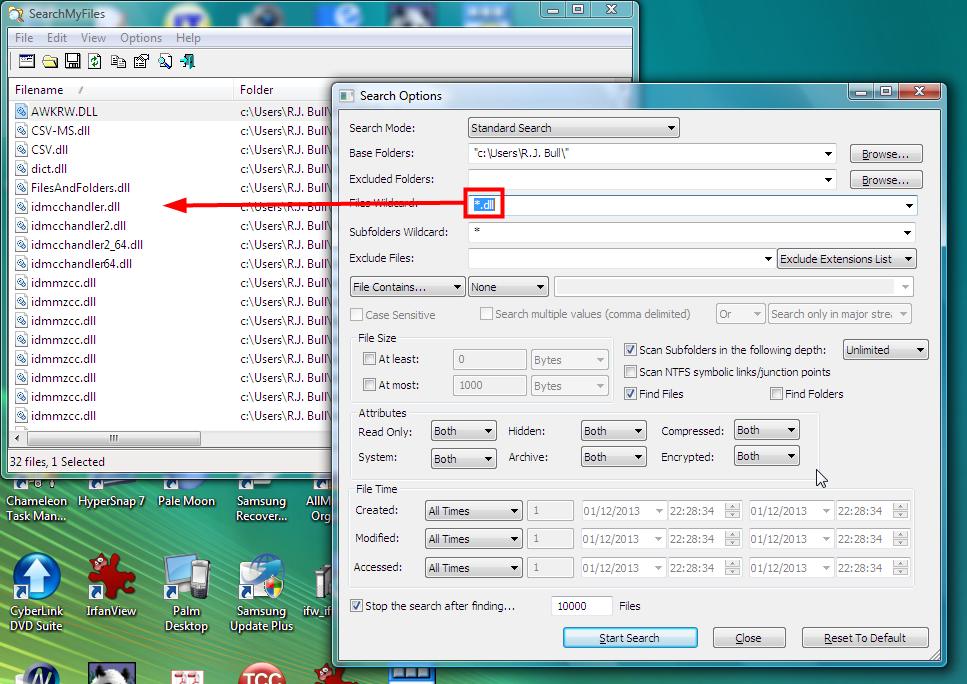
Here's an example using Nir Sofer's freeware SearchMyFiles, which uses separate windows for parameters and results:
Snap1.png

spacedad

  • full of poison
  • Supporting Member
  • Joined in 2008
  • **
  • Posts: 36
Re: simple file (dll) searcher
« Reply #2 on: August 20, 2014, 10:22 PM »
thanks,i just found that,thank you.
yes the 'wildcard' option works!
where do you put the filename you're searching for?

IainB

  • @Slartibartfarst
  • Supporting Member
  • Joined in 2008
  • **
  • Posts: 7,544
Re: simple file (dll) searcher
« Reply #3 on: August 21, 2014, 12:44 AM »
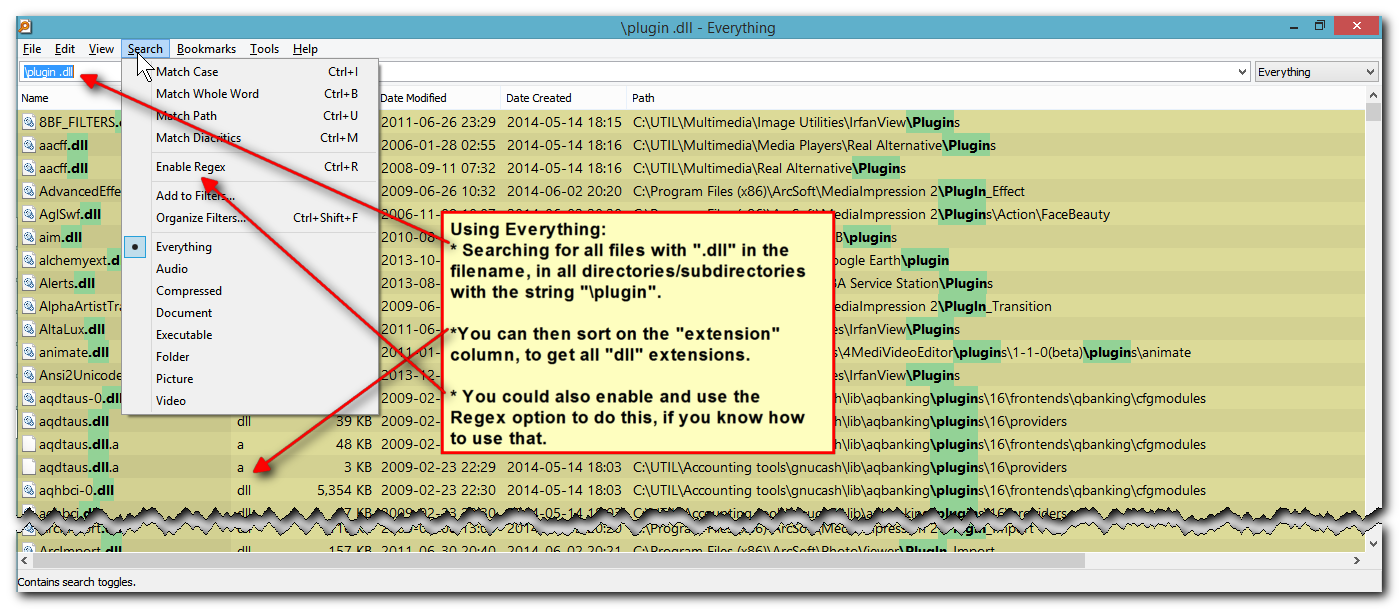
You might like to look at the Everything (FREE) search tool. It's very simple and straightforward, and fast. I use it all the time, for most of my file searches. (I use xplorer² and Windows Desktop Search when I'm not using Everything.)
Example screenshot:

[attachthumb=#]

spacedad

  • full of poison
  • Supporting Member
  • Joined in 2008
  • **
  • Posts: 36
Re: simple file (dll) searcher
« Reply #4 on: August 21, 2014, 10:48 AM »
thanks for the help,though i don't want to have to type in '.dll' everytime,only the name of the dll i am searching for.
and only in one location,my vstplugins folder and not to show folders or any other results.
and i need to be able to save that search to taskbar for a one-click search.
i'm finding the options in these apps a bit confusing.

mouser

  • First Author
  • Administrator
  • Joined in 2005
  • *****
  • Posts: 40,931
    • Gathering Badge
    • Plugin Coding Medal
    • Participated in NANY Challenge Seventeen Times
    • Cody Award
    • Coding Snacks
    • Volunteers/Staff
Re: simple file (dll) searcher
« Reply #5 on: August 21, 2014, 12:07 PM »
My Find and Run Robot (FARR) tool is perfectly suited for this kind of thing.

You would add a search folder entry pointing to your vstplugins folder(s), specifying that it should only display .dll files, and add a keyword like "vst".

Then to search for a dll in that folder containing "sam" you would hit the hotkey to bring up FARR, and then type "+vst sam" and it would instantly show you all matching dll files with sam in their name.
You could also create a custom hotkey so that as soon as you press it, it would launch FARR with the "+vst " part pre-filled in, showing all vst .dlls and waiting for you to type more to filter.

spacedad

  • full of poison
  • Supporting Member
  • Joined in 2008
  • **
  • Posts: 36
Re: simple file (dll) searcher
« Reply #6 on: August 21, 2014, 01:27 PM »
thanks,that is working,
is there a way to prevent the folders from showing up in the search,so just the .dll's show?

spacedad

  • full of poison
  • Supporting Member
  • Joined in 2008
  • **
  • Posts: 36
Re: simple file (dll) searcher
« Reply #7 on: August 21, 2014, 01:37 PM »
when i searched for 'midimon' 'nf_midimon' didn't show up.

spacedad

  • full of poison
  • Supporting Member
  • Joined in 2008
  • **
  • Posts: 36
Re: simple file (dll) searcher
« Reply #8 on: August 21, 2014, 01:43 PM »
sorry,yes it is finding 'nf_midimon',it was hidden.
had to press pagedown.
now need to figure out how to get all results to show without having to press pagedown,and without showing the folders.

spacedad

  • full of poison
  • Supporting Member
  • Joined in 2008
  • **
  • Posts: 36
Re: simple file (dll) searcher
« Reply #9 on: August 21, 2014, 02:06 PM »
and that was easily fixed in 'folder browsing' and 'display options' settings.
(sorry to keep answering myself!)
this is a great app,thanks very much! :) (just donated a small amount)

mouser

  • First Author
  • Administrator
  • Joined in 2005
  • *****
  • Posts: 40,931
    • Gathering Badge
    • Plugin Coding Medal
    • Participated in NANY Challenge Seventeen Times
    • Cody Award
    • Coding Snacks
    • Volunteers/Staff
Re: simple file (dll) searcher
« Reply #10 on: August 21, 2014, 03:01 PM »
Quote
is there a way to prevent the folders from showing up in the search,so just the .dll's show?

add -\ to the search bar.

you could make a custom hotkey that started your search with "+vst -\ " as I was describing before, HOWEVER in this case the best thing would probably be to create a new regex alias that used the "dosearch" command to do this behind the scenes.

so here's what your alias would look like:
Screenshot - 8_21_2014 , 9_57_14 AM.png
this regex alias will trigger any time you type "v something" and act as if you typed "+vst -\ something"


and here's what your search folder entry would look like:
Screenshot - 8_21_2014 , 9_58_12 AM.png

and here's what an optional custom hotkey would look like that brings up FARR with the "v " already in the search box:
Screenshot - 8_21_2014 , 10_01_01 AM.png


spacedad

  • full of poison
  • Supporting Member
  • Joined in 2008
  • **
  • Posts: 36
Re: simple file (dll) searcher
« Reply #11 on: August 21, 2014, 04:22 PM »
thanks,i'll try it.

i just unchecked 'show matching folders by default' and turned off other search folders in the list.
so now i can just type name in search and off it goes.

mouser

  • First Author
  • Administrator
  • Joined in 2005
  • *****
  • Posts: 40,931
    • Gathering Badge
    • Plugin Coding Medal
    • Participated in NANY Challenge Seventeen Times
    • Cody Award
    • Coding Snacks
    • Volunteers/Staff
Re: simple file (dll) searcher
« Reply #12 on: August 21, 2014, 05:13 PM »
Sure that will work too.  If you ever decide you want to use FARR to search other places (like the start menu), you might refer back to this thread for the easiest way to do so.

spacedad

  • full of poison
  • Supporting Member
  • Joined in 2008
  • **
  • Posts: 36
Re: simple file (dll) searcher
« Reply #13 on: August 21, 2014, 06:07 PM »
i added a keyword for the searches i may use less often,like startmenu pictures etc.
but i'll mark this thread for the future.
cheers!

spacedad

  • full of poison
  • Supporting Member
  • Joined in 2008
  • **
  • Posts: 36
Re: simple file (dll) searcher
« Reply #14 on: August 21, 2014, 06:21 PM »
is there any way to make the search window remember it's position?

mouser

  • First Author
  • Administrator
  • Joined in 2005
  • *****
  • Posts: 40,931
    • Gathering Badge
    • Plugin Coding Medal
    • Participated in NANY Challenge Seventeen Times
    • Cody Award
    • Coding Snacks
    • Volunteers/Staff
Re: simple file (dll) searcher
« Reply #15 on: August 21, 2014, 07:30 PM »
UN-check this option:
Screenshot - 8_21_2014 , 2_29_35 PM.png

spacedad

  • full of poison
  • Supporting Member
  • Joined in 2008
  • **
  • Posts: 36
Re: simple file (dll) searcher
« Reply #16 on: August 21, 2014, 07:32 PM »
ah,great thank you!

rjbull

  • Charter Member
  • Joined in 2005
  • ***
  • Posts: 3,217
Re: simple file (dll) searcher
« Reply #17 on: August 22, 2014, 08:29 PM »
yes the 'wildcard' option works!
where do you put the filename you're searching for?
That's where you'd put it, in the Files Wildcard box that I marked in the image.  But I see all is lost; you have been assimilated by FARR of Borg...

spacedad

  • full of poison
  • Supporting Member
  • Joined in 2008
  • **
  • Posts: 36
Re: simple file (dll) searcher
« Reply #18 on: August 22, 2014, 08:40 PM »
thanks a lot for your help,but yeah,i'm happy now.:)

Original address: https://www.donationcoder.com/forum/index.php?topic=38756.0