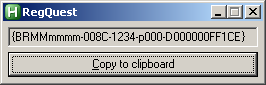
I say SIMPLE because this is something I need to be able to email out to a bunch of people who are definitely not technologically inclined. There is no way I would want them running regedit with a sheet of instructions on where to go. But:
On the specified page for How to Know Which Updates to Run on the Microsoft Website this is all they offer: Three different sites to go to depending on the value stored in a specific location of the entire value of a Specific Key.
That is enough to make even ME swear off all Office Products!
This is the key they give.
HKEY_LOCAL_MACHINE \Software\WOW6432Node\Microsoft\Windows\CurrentVersion\Uninstall
This is what it says about the procedure:
Each GUID uses the following format:
{BRMMmmmm-PPPP-LLLL-p000-D000000FF1CE}
In this format, <PPPP> represents the product ID.
To get the correct upgrade of all components: This is what is needed to determine the version of OneDrive for Business installed on your system. This next steps after this tell you where to go if you have "which version". Three different sites depending on what you find in that registry key at that location.
I almost cannot believe this is posted on the Microsoft Help Page!
•If "PPPP" is 008C, the Click-to-Run version of Office is installed on the computer.
•If "PPPP" is 00BA and "LLLL" is a nonzero value, the OneDrive for Business client is installed as part of the Office 2013 suite.
•If "PPPP" is 00BA and "LLLL" is 0000, the stand-alone OneDrive for Business client is installed.
I KNOW I will get a faster solution here than I will on the MS site is why I am asking.
Does anyone know of an easier way to do this as there is no way I can expe4ct the Users here to be able to follow this procedure.
On the specified page for How to Know Which Updates to Run on the Microsoft Website this is all they offer: Three different sites to go to depending on the value stored in a specific location of the entire value of a Specific Key.
That is enough to make even ME swear off all Office Products!
This is the key they give.
HKEY_LOCAL_MACHINE \Software\WOW6432Node\Microsoft\Windows\CurrentVersion\Uninstall
This is what it says about the procedure:
Each GUID uses the following format:
{BRMMmmmm-PPPP-LLLL-p000-D000000FF1CE}
In this format, <PPPP> represents the product ID.
To get the correct upgrade of all components: This is what is needed to determine the version of OneDrive for Business installed on your system. This next steps after this tell you where to go if you have "which version". Three different sites depending on what you find in that registry key at that location.
I almost cannot believe this is posted on the Microsoft Help Page!
•If "PPPP" is 008C, the Click-to-Run version of Office is installed on the computer.
•If "PPPP" is 00BA and "LLLL" is a nonzero value, the OneDrive for Business client is installed as part of the Office 2013 suite.
•If "PPPP" is 00BA and "LLLL" is 0000, the stand-alone OneDrive for Business client is installed.
I KNOW I will get a faster solution here than I will on the MS site is why I am asking.
Does anyone know of an easier way to do this as there is no way I can expe4ct the Users here to be able to follow this procedure.