The problem I'm having trying to understand your scenario is you still haven't described the methodology you use before you run the command file.
ie.
a) Do you run this from a CLI open at the required path, (in which case put the command file in the command PATH somewhere, or add to the PATH, and call it without using a hotkey).
b) Do you run this from Explorer somehow, (in which case use my program
here to copy the current path to the clipboard and then use
GetClip in your command file to retrieve it when you run it via hotkey).
c) Running it from the Start->Run prompt, (in which case use a
real CLI

).
Or the alternative is write something in a language that will let you do exactly what you want.
Addendum:
qExClip, a slightly modified version of ExClip.
#Region ;**** Directives created by AutoIt3Wrapper_GUI ****
#AutoIt3Wrapper_UseUpx=n
#EndRegion ;**** Directives created by AutoIt3Wrapper_GUI ****
; http://www.autoitscript.com/forum/topic/89833-windows-explorer-current-folder/page__st__40#entry973904
#include <Array.au3>

Local $oErrorHandler = ObjEvent("AutoIt.Error", "_ComErrFunc")

If $CmdLine[0] = 1 Then
	$sCmd = $CmdLine[1]
	_ExClip(True)
Else
	_ExClip(False)
EndIf


Func _ExClip($temp)
	$hExplr = WinActive("[REGEXPCLASS:(Explore|Cabinet)WClass]")
	If $hExplr <> '' Then
		$aSelection = _ExplorerWinGetSelectedItems($hExplr)
;~ 		_ArrayDisplay($aSelection)
		If $aSelection[0] = 0 Then
			If StringLeft($aSelection[1], 2) <> '::' Then
				If Not $temp Then
					ClipPut($aSelection[1])
				Else
					ShellExecute($sCmd, $aSelection[1], $aSelection[1])
				EndIf
			EndIf
		Else
			If Not $temp Then
				ClipPut($aSelection[2])
			Else
				ShellExecute($sCmd, $aSelection[2], $aSelection[2])
			EndIf
		EndIf
	EndIf
EndFunc   ;==>_ExClip


; ==========================================================================================================================

; Func _ObjectSHFolderViewFromWin($hWnd)
;
; Returns an 'ShellFolderView' Object for the given Window handle
;
; Author: Ascend4nt, based on code by KaFu, klaus.s
; ==========================================================================================================================

Func _ObjectSHFolderViewFromWin($hWnd)
	If Not IsHWnd($hWnd) Then Return SetError(1, 0, 0)
	Local $oShell, $oShellWindows, $oIEObject, $oSHFolderView

	; Shell Object
	$oShell = ObjCreate("Shell.Application")
	If Not IsObj($oShell) Then Return SetError(2, 0, 0)

	;   Get a 'ShellWindows Collection' object
	$oShellWindows = $oShell.Windows()
	If Not IsObj($oShellWindows) Then Return SetError(3, 0, 0)

	;   Iterate through the collection - each of type 'InternetExplorer' Object

	For $oIEObject In $oShellWindows
		If $oIEObject.HWND = $hWnd Then
			; InternetExplorer->Document = ShellFolderView object
			$oSHFolderView = $oIEObject.Document
			If IsObj($oSHFolderView) Then Return $oSHFolderView
			Return SetError(4, 0, 0)
		EndIf
	Next

	Return SetError(-1, 0, 0)
EndFunc   ;==>_ObjectSHFolderViewFromWin

; ==========================================================================================================================
; Func _ExplorerWinGetSelectedItems($hWnd)
;
;
; Author: klaus.s, KaFu, Ascend4nt (consolidation & cleanup, Path name simplification)
; ==========================================================================================================================

Func _ExplorerWinGetSelectedItems($hWnd)
	If Not IsHWnd($hWnd) Then Return SetError(1, 0, '')
	Local $oSHFolderView
	Local $iSelectedItems, $iCounter = 2, $aSelectedItems[2] = [0, ""]

	$oSHFolderView = _ObjectSHFolderViewFromWin($hWnd)
	If @error Then Return SetError(@error, 0, '')

	;   SelectedItems = FolderItems Collection object->Count
	$iSelectedItems = $oSHFolderView.SelectedItems.Count

	Dim $aSelectedItems[$iSelectedItems + 2] ; 2 extra -> 1 for count [0], 1 for Folder Path [1]

	$aSelectedItems[0] = $iSelectedItems
	;   ShellFolderView->Folder->Self as 'FolderItem'->Path
	$aSelectedItems[1] = $oSHFolderView.Folder.Self.Path

	;   ShellFolderView->SelectedItems = FolderItems Collection object
	$oSelectedFolderItems = $oSHFolderView.SelectedItems

	#cs
		; For ALL items in an Explorer Window (not just the selected ones):
		$oSelectedFolderItems = $oSHFolderView.Folder.Items
		ReDim $aSelectedItems[$oSelectedFolderItems.Count+2]
	#ce

	For $oFolderItem In $oSelectedFolderItems
		$aSelectedItems[$iCounter] = $oFolderItem.Path
		$iCounter += 1
	Next

	Return SetExtended($iCounter - 2, $aSelectedItems)
EndFunc   ;==>_ExplorerWinGetSelectedItems

Func _ComErrFunc($oError)
	ConsoleWrite("COM Error occurred:" & @CRLF & _
			"Number: " & @TAB & $oError.number & @CRLF & _
			"Windescription:" & @TAB & $oError.windescription & @CRLF & _
			"Description is: " & @TAB & $oError.description & @CRLF & _
			"Source is: " & @TAB & $oError.source & @CRLF & _
			"Helpfile is: " & @TAB & $oError.helpfile & @CRLF & _
			"Helpcontext is: " & @TAB & $oError.helpcontext & @CRLF & _
			"Lastdllerror is: " & @TAB & $oError.lastdllerror & @CRLF & _
			"Scriptline is: " & @TAB & $oError.scriptline & @CRLF & _
			"Retcode is: " & @TAB & $oError.retcode & @CRLF & @CRLF)
EndFunc   ;==>_ComErrFunc
Command file,
preload.cmd@echo off
echo.
rem preload.cmd [folder]
rem
rem Where [folder] = optional folder to create subfolder in
rem
rem If folder passed as arg, use it if it exists, assume it is run
rem from CLI in required folder if it does not.
if "%~1"=="" goto :Request
if not exist "%~1" (
echo Folder does not exist
echo.
goto :Request
)
pushd "%~1"
:Request
rem There is a SPACE at the end of the follwoing line
set /p newdir=Entername:
if "%newdir%"=="" goto :END
call :Extract "%newdir%"
goto :END
:Extract
set ndir="%~1"
md %ndir%
pushd %ndir%
7za.exe e preload.zip
cd > path.txt
goto :EOF
:END
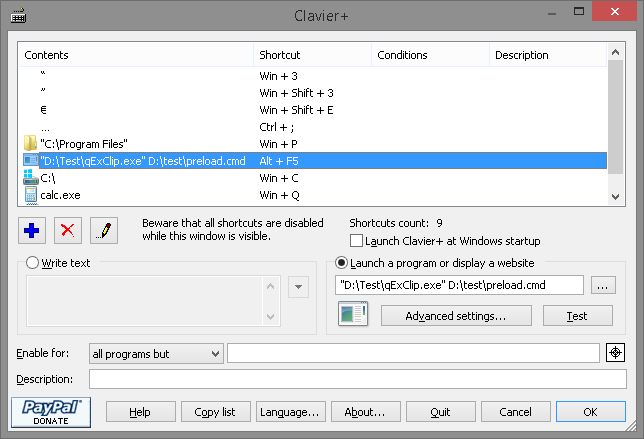
Clavier+ setup:
What it does:
ONLY works with Explorer, navigate to a folder or select one and then press the Clavier+ hotkey, (Alt+F5 in this case).
- Clavier+ calls qExClip.exe with the command file as an argument.
- qExClip.exe grabs either the path of the active Explorer window or the full path of the first selected item.
- This path is then passed as an argument to the command file, (preload.cmd in this case), to be used however. If no args were provided for qExClip then the path is copied to the clipboard.
- preload.cmd can be run from the CLI also, (with or without args), if passed an arg it will pushd to the folder before continuing with asking folder name, extracting, etc.
OK, the
WARNINGS bit:
- Haven't bothered to check whether any item selected is a file - you can do this easily enough in the command file if really necessary.
- Haven't bothered testing to see whether the arg passed to qExClip exists, (get it right).
- Fix any paths to executables/archives in the command file as necessary.
It worked here, doesn't hold that it'll work for you.


 create the subfolder properly before dumping about 1000 misc. files all over the place, it did so at root C:
 I usually end up looking for a similar but larger one I can shrink instead.


 But it might bear looking into.


 qExClip.7z
 (and gals if any are reading) As you can see, I have too much time on my hands because all my efforts are basically just trying to find different ways to do things when the normal ones work fine.
 a "daily grind"
  .
.


