DonationCoder.com forum
 
Read-only archive. This is a static copy of the DonationCoder.com forum. Reading and searching work as before; logging in, posting and private messages do not.
Archive of 2026-10-21 · About this archive · Main site

Last post Author Topic: [2014-09-17] GoogleTranslator+ | Translate Anything, from Anywhere  (Read 34,678 times)

ego.bizzin

  • Member
  • Joined in 2014
  • **
  • Posts: 50
Quote
Hi all DonationCoders,
I'd love to introduce to you my new DonationCoding project : Google Translator+

Some words about Google Translator+
✓ Last update : 2014-09-17

✓ Translate selected text from any window;
✓ Clipboard translation;
✓ Option to change from-to languages for translation;
✓ Auto-detect source language;
✓ Save three favorite pairs of languages
✓ Auto-save configurations on exit;
✓ Look up for definition;
✓ Instant translation;
✓ Translate text of objects in the active window, e.g. a MessageBox;
✓ Look up for definitions, for abbreviation (2014-09-17).

Links to Google Translator+
# http://221222968.info/eb-tm-release/GoogleTranslator+.zip #download_link
# http://221222968.info/eb-tm-release/GoogleTranslator-log.htm #log

Thank you for your consideration.

Quote
Installation Notes
✓ Portable
✓ DotNet Framework 4.0
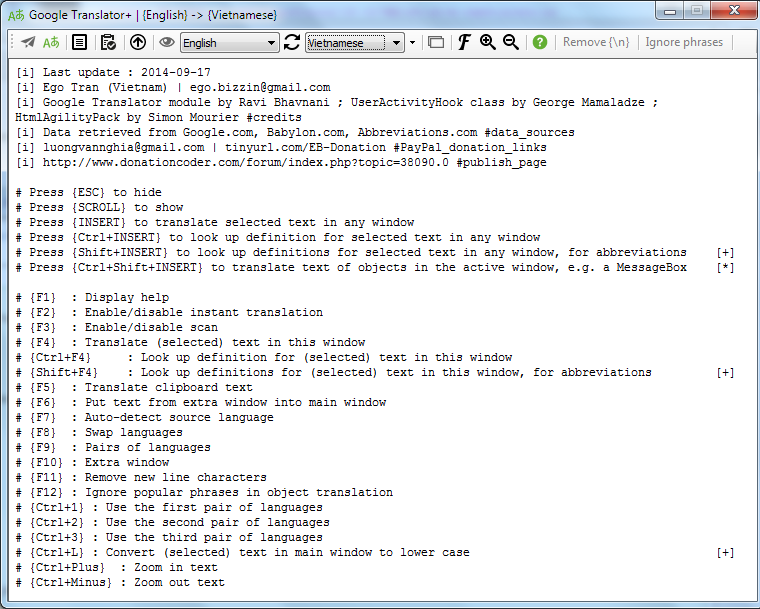
GoogleTranslator+.png
« Last Edit: September 17, 2014, 09:39 AM by ego.bizzin »

skwire

  • I eat Coding Snacks for breakfast...
  • Global Moderator
  • Joined in 2005
  • *****
  • Posts: 5,297
    • Participated in NANY Challenge Seventeen Times
    • Coding Snacks
    • Superboy Coder
    • Cody Award
    • Volunteers/Staff
    • Gathering Badge
Re: Translate Anything, from Anywhere with #GoogleTranslator+
« Reply #1 on: June 03, 2014, 06:52 PM »
Very nice.  Seems to work well.  As a suggestion, I'd add a toolbar for the basic functions, too.  Some folks won't remember the hotkeys.

Thanks for sharing!

mouser

  • First Author
  • Administrator
  • Joined in 2005
  • *****
  • Posts: 40,931
    • Gathering Badge
    • Plugin Coding Medal
    • Participated in NANY Challenge Seventeen Times
    • Cody Award
    • Coding Snacks
    • Volunteers/Staff
Re: Translate Anything, from Anywhere with #GoogleTranslator+
« Reply #2 on: June 03, 2014, 06:59 PM »
I can't wait to see what bizzi does for the next NANY event.

ego.bizzin

  • Member
  • Joined in 2014
  • **
  • Posts: 50
Quote
(f)ix | (n)ew feature | (r)emoved feature
#(n)#all#2014-06-04#Auto-detect source language {F7}
#(n)#all#2014-06-04#Restore translation window as foreground window when translation done
#(n)#all#2014-06-04#Press {ESC} to minimize

Quote from: skwire
As a suggestion, I'd add a toolbar for the basic functions, too.  Some folks won't remember the hotkeys.
Thank you for your suggestion, skwire.
I will do some (+) on GUI as soon as possible. I love to make things as simple as possible, too :)
« Last Edit: June 04, 2014, 03:23 PM by ego.bizzin »

tomos

  • Charter Member
  • Joined in 2006
  • ***
  • Posts: 11,970
    • Gathering Badge
    • Participated in NANY Challenge Once
Re: Translate Anything, from Anywhere with #GoogleTranslator+
« Reply #4 on: June 04, 2014, 09:31 AM »
Thanks ego!
I like it and it works well here too :up:


Would it be possible to have it automatically translate text in any language to a user-chosen default language? This default language would also automatically be translated according to the settings.
In your case, all languages could be translated to Vietnamese. Vietnamese could be translated to e.g. English.
You would then need two settings:
       1) [*] => [Vietnamese]
       2) [Vietnamese] => [English]


Also, to facilitate easier access:
  • could it minimise or close to the tray?
  • maybe a universal hotkey** to restore it's window. Or even better, a hotkey that will restore window and translate already selected text :-)

** would have to be customisable I guess
Tom

tomos

  • Charter Member
  • Joined in 2006
  • ***
  • Posts: 11,970
    • Gathering Badge
    • Participated in NANY Challenge Once
Re: Translate Anything, from Anywhere with #GoogleTranslator+
« Reply #5 on: June 04, 2014, 09:38 AM »
Bug:
it doesnt remember the F6 language setting on closing:
always starts with [English] <=> [Vietnamese]
Tom

ego.bizzin

  • Member
  • Joined in 2014
  • **
  • Posts: 50
[2014-06-04#2] Configuration File & Updates #Google Translator+
« Reply #6 on: June 04, 2014, 03:17 PM »
Quote
(f)ix | (n)ew feature | (r)emoved feature
#(n)#all#2014-06-04#Auto save on exit {font size, source language, target language} to configuration file (GoogleTranslator+.ini)
#(n)#all#2014-06-04#Comes with notification icon
#(n)#all#2014-06-04#Hot key to hide (ESC), show (SCROLL - global), enable scan (PAUSE - global)
#(f)#all#2014-06-04#Fix some display and window activation bugs

Many thanks to @skwire and @tomos for your suggestions and bug reports. I do love to keep my codes alive :)
« Last Edit: August 15, 2014, 05:56 AM by ego.bizzin »

tomos

  • Charter Member
  • Joined in 2006
  • ***
  • Posts: 11,970
    • Gathering Badge
    • Participated in NANY Challenge Once
Re: Translate Anything, from Anywhere with #GoogleTranslator+
« Reply #7 on: June 04, 2014, 07:20 PM »
Thanks for the speedy update :)

I do love to keep my codes alive :)
it's alive and kicking ;)

Comments, and a Couple of Queries (in Italics) below:
Quote
#(n)#all#2014-06-04#Auto save on exit {font size, source language, target language} to configuration file (GoogleTranslator+.ini)
it now remembers source and target languages :up:; it does not remember font size; could it remember window size?

Quote
#(n)#all#2014-06-04#Comes with notification icon
looking good :up:

Quote
#(n)#all#2014-06-04#Hot key to hide (ESC), show (SCROLL - global), enable scan (PAUSE - global)
1) Esc works well.
2) I dont have a Scroll key on my (qwertz Logitech) keyboard - but I have two 'Insert' keys - and the one near the Pause button works. I'm not crazy about the Insert key as it can change the typing behaviour in my word processor. But it does work.
3) Pause key is taken by mouser's FARR. I've been using Pause for that for years. It's one of the most popular apps here too... What does 'Enable scan' do anyway?
Tom

ego.bizzin

  • Member
  • Joined in 2014
  • **
  • Posts: 50
[2014-06-05] Answers & Updates & Fixes #GoogleTranslator+
« Reply #8 on: June 05, 2014, 10:26 AM »
Quote
(a)nswer | (f)ix | (n)ew feature | (r)emoved feature
#(f)#all#2014-06-05#Save window size, window location, Auto-as-source-language on exit
#(f)#all#2014-06-05#Prevent from running multiple instances
#(f)#all#2014-06-05#Prevent from stealing other process's control
#(f)#all#2014-06-05#Fix some display bugs
#(r)#all#2014-06-05#Remove universal {PAUSE} hot key -> {F3}

#(a)#tomos#2014-06-05#Font size not saving -> try to use {CTRL+OemPlus|Minus} instead of scrolling mouse (which changes zoom factor, not font size)
#(a)#tomos#2014-06-05#Disable auto scan prevents us from unwanted actions

Many thanks to @skwire and @tomos for your suggestions and bug reports.
« Last Edit: August 15, 2014, 05:56 AM by ego.bizzin »

tomos

  • Charter Member
  • Joined in 2006
  • ***
  • Posts: 11,970
    • Gathering Badge
    • Participated in NANY Challenge Once
Re: Translate Anything, from Anywhere with #GoogleTranslator+
« Reply #9 on: June 05, 2014, 11:42 AM »
^ thanks ego :up:


(will try it out later)
Tom

ego.bizzin

  • Member
  • Joined in 2014
  • **
  • Posts: 50
Quote
(n)ew feature
#(n)#all#2014-06-06#Look up definition : English -> English
#(n)#all#2014-06-06#Extra window for more convenient translation
#(n)#all#2014-06-06#Customize font from toolbar
#(n)#all#2014-06-06#Toolbar : {Enable scan} | {Look up mode} | {Languages}| {Auto-detect source language} | {Font} | {Extra window} | {Help}
« Last Edit: August 15, 2014, 05:56 AM by ego.bizzin »

tomos

  • Charter Member
  • Joined in 2006
  • ***
  • Posts: 11,970
    • Gathering Badge
    • Participated in NANY Challenge Once
Re: Translate Anything, from Anywhere with #GoogleTranslator+
« Reply #11 on: June 06, 2014, 01:46 PM »
Great progress :up:

eh, how do I get the "Look up definition" ?
I presumed it was just a case of clicking on the search icon - but nothing happens here.
I tried it with just one word in the box or with the word selected, without success.


EDIT// got it - press F4
Will work with it a bit
Tom

tomos

  • Charter Member
  • Joined in 2006
  • ***
  • Posts: 11,970
    • Gathering Badge
    • Participated in NANY Challenge Once
Re: Translate Anything, from Anywhere with #GoogleTranslator+
« Reply #12 on: June 06, 2014, 02:14 PM »
If the extra window has focus, it stays on top even when another window has focus - is this intentional? I find it confusing.

Esc will get rid of the window, but I tend to often just click in the background window I want to use. This normally doesnt work great for me: the GoogleTranslator+ window stays on top and becomes almost transparent. I dont think this is a good idea, it just gets in the way - I forget it's there and click on it unintentionally. I think it would be better if it just worked like a normal window. What do you think?

I find using the same hotkey for Translate and Look-up-definition not ideal. I realise that I can toggle the "Look-up-definition" via button first; but I think it would be easier to simply have two hotkeys - one for each (?)
=> would that mean having two buttons instead of a toggle button? Press the button for the action (e.g. Translate).
Currently the F4 hotkey does not have a button for the action. I think it would be good if it did.

Minor: when giving a definition, it would be nice if the defined word were shown at the beginning.
Tom

ego.bizzin

  • Member
  • Joined in 2014
  • **
  • Posts: 50
[2014-06-06#2] Happy Stable #GoogleTranslator+
« Reply #13 on: June 06, 2014, 05:46 PM »
Many thanks to @skwire, @mouser and @tomos for your consideration and suggestions.
I'm coming to new donating-coding projects before surviving on freelance-land :)
« Last Edit: August 15, 2014, 05:57 AM by ego.bizzin »

skwire

  • I eat Coding Snacks for breakfast...
  • Global Moderator
  • Joined in 2005
  • *****
  • Posts: 5,297
    • Participated in NANY Challenge Seventeen Times
    • Coding Snacks
    • Superboy Coder
    • Cody Award
    • Volunteers/Staff
    • Gathering Badge
Re: Translate Anything, from Anywhere with #GoogleTranslator+
« Reply #14 on: June 06, 2014, 06:45 PM »
Toolbar...yes.  Great job.  :Thmbsup:

tomos

  • Charter Member
  • Joined in 2006
  • ***
  • Posts: 11,970
    • Gathering Badge
    • Participated in NANY Challenge Once
Re: Translate Anything, from Anywhere with #GoogleTranslator+
« Reply #15 on: June 06, 2014, 10:08 PM »
Looking better all the time ego :up:
(looking forward to trying it out)
Tom

ego.bizzin

  • Member
  • Joined in 2014
  • **
  • Posts: 50
[2014-06-13] Updates #GoogleTranslator+
« Reply #16 on: June 10, 2014, 08:44 AM »
Quote
(f)ix | (n)ew feature
#(f)#all#2014-06-13#Fix ontop bug

#(f)#all#2014-06-10#Fix translate text in main window with new line characters, code here : https://github.com/egoBizzin/sharp-snippets/blob/master/getRichTextBoxLines.cs
#(f)#all#2014-06-10#Fix setForegroundWindow, code here : https://github.com/egoBizzin/sharp-snippets/blob/master/SetForegroundWindow.cs
#(n)#all#2014-06-10#{F9} to swap languages
« Last Edit: August 15, 2014, 05:57 AM by ego.bizzin »

tomos

  • Charter Member
  • Joined in 2006
  • ***
  • Posts: 11,970
    • Gathering Badge
    • Participated in NANY Challenge Once
F7 & F9 are great :up:


I'm a bit confused about the 'Auto' button - it always uses the destination language (the one on the right hand side).
Is there an advantage to using e.g. German=>English instead of Auto=>English ?
Tom

tomos

  • Charter Member
  • Joined in 2006
  • ***
  • Posts: 11,970
    • Gathering Badge
    • Participated in NANY Challenge Once
Would love if it could remember a few 'sets' of language choices.
Not sure how if might be possible to display them -
  • a key to cycle through them?
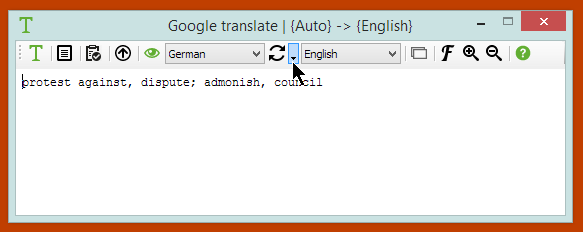
  • a drop-down arrow somewhere (e.g. as in screenshot below) showing pre-selected choices (?)
  • both :-)

[attachimg=#]
Tom

ego.bizzin

  • Member
  • Joined in 2014
  • **
  • Posts: 50
[2014-06-14] Favorite Pairs of Languages #GoogleTranslator+
« Reply #19 on: June 13, 2014, 06:32 PM »
Quote
(f)ix | (n)ew feature
#(f)#all#2014-06-14#Reset hot keys
#(n)#all#2014-06-14#Save three favorite pairs of languages

Thank you for your suggestions, @tomos.
« Last Edit: July 22, 2014, 02:32 AM by ego.bizzin »

tomos

  • Charter Member
  • Joined in 2006
  • ***
  • Posts: 11,970
    • Gathering Badge
    • Participated in NANY Challenge Once
^ trying this out today - many thanks!
Tom

ego.bizzin

  • Member
  • Joined in 2014
  • **
  • Posts: 50
[2014-08-06] GoogleTranslator+ Updates
« Reply #21 on: July 22, 2014, 02:33 AM »
Quote
(n)ew | (f)ix
#(n)#all#2014-08-06#{F2} to enable/disable instant translation
#(f)#all#2014-08-06#Minor display updates

#(f)#all#2014-07-21#Restore {scroll} state
#(f)#all#2014-07-21#Minor display updates
« Last Edit: August 15, 2014, 05:44 AM by ego.bizzin »

tomos

  • Charter Member
  • Joined in 2006
  • ***
  • Posts: 11,970
    • Gathering Badge
    • Participated in NANY Challenge Once
Re: [2014-08-06] GoogleTranslator+ | Translate Anything, from Anywhere
« Reply #22 on: August 13, 2014, 12:20 PM »
hi ego.bizzin !

I updated to latest version today -
I just copied everything over to my GoogleTranslator+ folder. Unfortunately I noticed too late that you had an ini file included, so I lost my previous settings :-(

I cant remember how it worked before, but would be better if ini file were not included (?)
Also: I dont think there is a link for this thread in the help file (?) - would be a good idea imo

Thanks for the update :Thmbsup:


Tom

ego.bizzin

  • Member
  • Joined in 2014
  • **
  • Posts: 50
Re: @tomos
« Reply #23 on: August 14, 2014, 03:32 PM »
Quote from: tomos
I cant remember how it worked before, but would be better if ini file were not included (?)
»» I've excluded the .ini file from the download.

Quote from: tomos
Also: I dont think there is a link for this thread in the help file (?) - would be a good idea imo
»» I'm sorry I don't understand what you meant (for my bad English). But please press {f1} to get a brief help on shortcuts.

Thank you for your consideration, @tomos.
« Last Edit: August 14, 2014, 03:34 PM by ego.bizzin »

tomos

  • Charter Member
  • Joined in 2006
  • ***
  • Posts: 11,970
    • Gathering Badge
    • Participated in NANY Challenge Once
Re: [2014-08-06] GoogleTranslator+ | Translate Anything, from Anywhere
« Reply #24 on: August 14, 2014, 05:24 PM »
Thanks!

#2) can you include this link in the help file?
Tom

Original address: https://www.donationcoder.com/forum/index.php?topic=38090.0