Here's something that might make it easier: gmMontage
It's a simple program that will generate a batch script to be used with the
GraphicsMagick program, (that means you need to install GraphicsMagick).
New v0.0.0.3:
Modified GUI
A few more colour choices for the separator
Generates the batch to call GM, just double-click it
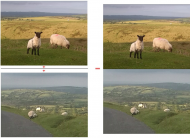
Can generate Horizontal or Vertical GM batch file, so for the OP, run it first as Vertical, then run it as Horizontal on the resultant images from the Vertical run, and you'll get:
AC
BD
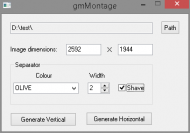
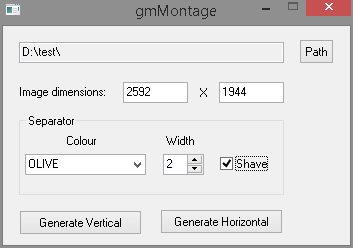
Use the
Path button to select an image in the folder you want to process, if Windows can read the image file the Width and Height values will be filled in along with the Path automatically. You can enter the Width and Height manually if necessary, (eg. Windows can't read the info from the file) -
any values you enter will be overwritten if you then choose another file.
Select a separator colour from the drop down list, (I can add more if necessary), set the separator width. The
Shave checkbox lets you remove the borders that get added at the top/bottom or left/right of the final image.
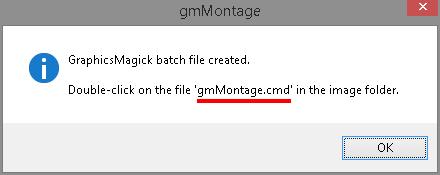
After it's finished you'll get the following window:
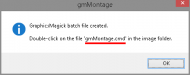 NOTES:
1) It outputs a PNG file, the file will be named
<image1>+<image2>.png. Thus the output is lossless but will result in larger file sizes - you can always recompress as JPG to a level that's acceptable.
2) If there's an odd number of images in the folder, the last one won't be used.
3)
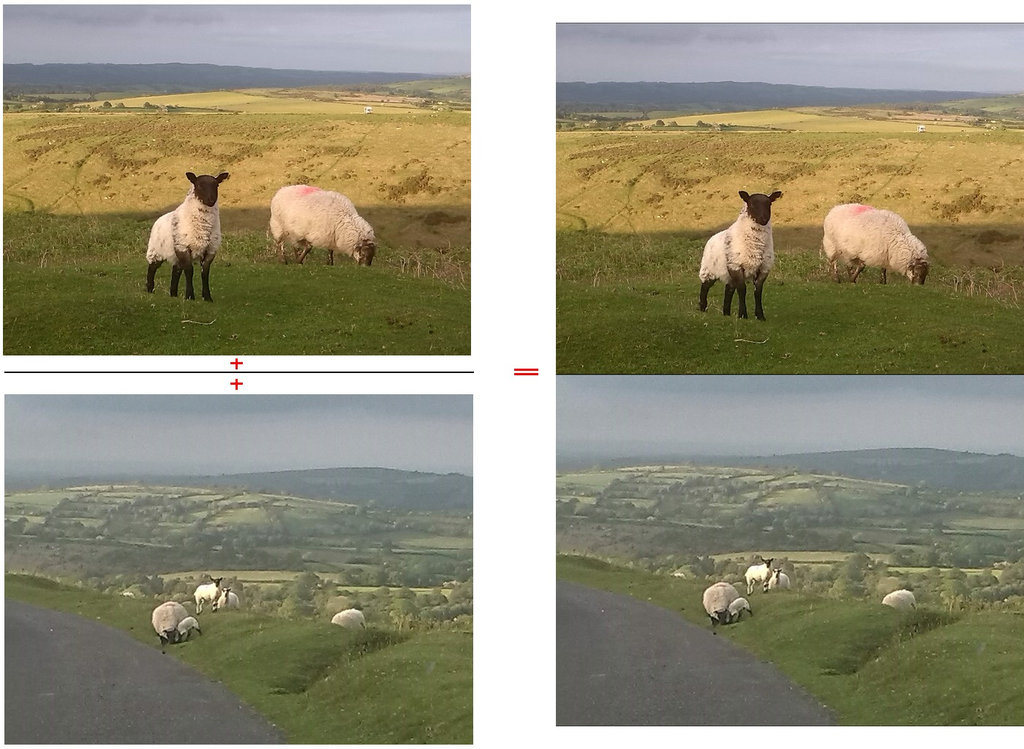
This was written with the constraints of the OP in mind, ie. images are all the same dimensions, orientation, and vertical/horizontal appending of two images was required.With any luck after executing the batch file you'll get the following result:
Here's the source, executable attached:
#Region ;**** Directives created by AutoIt3Wrapper_GUI ****
#AutoIt3Wrapper_Res_Fileversion=0.0.0.3
#EndRegion ;**** Directives created by AutoIt3Wrapper_GUI ****
#include <File.au3>
#include <FileConstants.au3>
#include <MsgBoxConstants.au3>
#include <GDIPlus.au3>
#include <ButtonConstants.au3>
#include <ComboConstants.au3>
#include <EditConstants.au3>
#include <GUIConstantsEx.au3>
#include <StaticConstants.au3>
#include <WindowsConstants.au3>

_GUISetup()
_Main()
_Exit()


Func _GUISetup()
	#Region ### START Koda GUI section ### Form=d:\docs\autoit\_coding snacks\gmmontage\gmmontage.kxf
	$Form1 = GUICreate("gmMontage", 347, 219, 335, 196)
	Global $Input1 = GUICtrlCreateInput("", 16, 16, 265, 21, BitOR($GUI_SS_DEFAULT_INPUT, $ES_READONLY))
	GUICtrlSetTip(-1, "Path to images to process")
	Global $Button1 = GUICtrlCreateButton("Path", 296, 13, 35, 25)
	GUICtrlSetTip(-1, "Select an image file in the folder to process")
	Global $Input2 = GUICtrlCreateInput("", 120, 56, 65, 21, BitOR($GUI_SS_DEFAULT_INPUT, $ES_NUMBER))
	GUICtrlSetTip(-1, "Width of the SOURCE images")
	Global $Input3 = GUICtrlCreateInput("", 216, 56, 65, 21, BitOR($GUI_SS_DEFAULT_INPUT, $ES_NUMBER))
	GUICtrlSetTip(-1, "Height of the SOURCE images")
	GUICtrlCreateLabel("X", 197, 60, 11, 17)
	Global $Button2 = GUICtrlCreateButton("Generate Vertical", 16, 184, 123, 25)
	GUICtrlSetTip(-1, "Generate batch file for GraphicsMagick (Append Vertical)")
	Global $Button3 = GUICtrlCreateButton("Generate Horizontal", 157, 183, 123, 25)
	GUICtrlSetTip(-1, "Generate batch file for GraphicsMagick (Append Horizontal)")
	GUICtrlCreateLabel("Image dimensions:", 16, 59, 91, 17)
	GUICtrlSetTip(-1, "Dimensions of the SOURCE images")
	$Group1 = GUICtrlCreateGroup("Separator", 16, 88, 265, 81)
	Global $Combo1 = GUICtrlCreateCombo("BLACK", 22, 128, 121, 25, BitOR($CBS_DROPDOWN, $CBS_AUTOHSCROLL))
	GUICtrlSetData(-1, "WHITE|YELLOW|GREEN|OLIVE|BLUE|DARKBLUE|GRAY42|ORANGE|RED")
	GUICtrlSetTip(-1, "Colour of the separator line between images")
	Global $Input4 = GUICtrlCreateInput("0", 160, 128, 41, 21, BitOR($GUI_SS_DEFAULT_INPUT, $ES_NUMBER))
	GUICtrlSetTip(-1, "Pixel width of separator line," & @CRLF & "line will be DOUBLE this value." & @CRLF & "Max value: 20")
	$Updown1 = GUICtrlCreateUpdown($Input4)
	GUICtrlSetLimit(-1, 20, 0)
	Global $Checkbox1 = GUICtrlCreateCheckbox("Shave", 217, 129, 52, 17)
	GUICtrlSetTip(-1, "Shave added pixels from unused borders")
	GUICtrlCreateLabel("Colour", 63, 108, 34, 17)
	GUICtrlCreateLabel("Width", 163, 108, 32, 17)
	GUICtrlCreateGroup("", -99, -99, 1, 1)
	GUISetState(@SW_SHOW)
	#EndRegion ### END Koda GUI section ###
EndFunc   ;==>_GUISetup


Func _Main()
	While 1
		$nMsg = GUIGetMsg()
		Switch $nMsg
			Case $Button1
				Local $sTemp = FileOpenDialog("gmMontage", "", "All (*.*)", $FD_FILEMUSTEXIST + $FD_PATHMUSTEXIST)
				If @error > 0 Then ContinueLoop
				Global $sSrce = StringLeft($sTemp, StringInStr($sTemp, "\", 0, -1))
				GUICtrlSetData($Input1, $sSrce)
				Local $sTempImage = $sSrce & StringMid($sTemp, StringInStr($sTemp, "\", 0, -1) + 1)
				Global $sExt = StringMid($sTempImage, StringInStr($sTempImage, ".", 0, -1))
				Global $iWidth = _GetDim($sTempImage, True)
				Global $iHeight = _GetDim($sTempImage, False)
				GUICtrlSetData($Input2, $iWidth)
				GUICtrlSetData($Input3, $iHeight)
			Case $Button2, $Button3
				Global $iWidth = GUICtrlRead($Input2)
				Global $iHeight = GUICtrlRead($Input3)
				If $iWidth = 0 Or $iHeight = 0 Or $sSrce = "" Then
					MsgBox($MB_ICONERROR, "gmMontage", "Check PATH, WIDTH or HEIGHT values")
					ContinueLoop
				EndIf
				If GUICtrlRead($Input4) > 20 Then GUICtrlSetData($Input4, "20")
				If $nMsg = $Button3 Then
					_GenBatch(True)
				Else
					_GenBatch(False)
				EndIf
			Case $GUI_EVENT_CLOSE
				Exit
		EndSwitch
	WEnd
EndFunc   ;==>_Main


Func _GenBatch($bTemp)
	Local $sGeometry = "1x2"
	Local $sOutfile = $sSrce & "gmBatch-V.txt"
	If $bTemp Then
		$sGeometry = "2x1"
		$sOutfile = "gmBatch-H.txt"
	EndIf
	Local $bShave = (GUICtrlRead($Checkbox1) = 1)
	Local $iSep = GUICtrlRead($Input4)
	Local $sColour = GUICtrlRead($Combo1)
	Local $sTempFile = $sSrce & "gmMontage.txt"
	Local $DOScmd = "dir /b /on *" & $sExt & " > " & $sTempFile
	RunWait(@ComSpec & " /c " & $DOScmd, $sSrce, @SW_HIDE)
	Local $aFiles = FileReadToArray($sTempFile)
	If @error > 0 Or Not IsArray($aFiles) Then
		MsgBox($MB_ICONERROR, "gmMontage", "No " & StringUpper(StringMid($sExt, 2)) & "s found")
		Return
	EndIf
	FileDelete($sTempFile)

	Local $iCount = UBound($aFiles)
	If Mod($iCount, 2) = 1 Then
		If MsgBox($MB_OKCANCEL + $MB_ICONWARNING, "gmMontage", "Odd number of " & StringUpper(StringMid($sExt, 2)) & "s found," & @CRLF & "skipping last image.") = $IDCANCEL Then Return
		$iCount -= 1
	EndIf

	Local $hFile = FileOpen($sOutfile, $FO_OVERWRITE)
	For $i = 0 To $iCount - 1 Step 2
		Local $sOutname = StringLeft($aFiles[$i], StringLen($aFiles[$i]) - 4) & "+" & StringLeft($aFiles[$i + 1], StringLen($aFiles[$i + 1]) - 4) & ".png"
		Local $sBatch = "montage -tile " & $sGeometry & " -background " & $sColour & " -geometry " & $iWidth & "x" & $iHeight
		If $bTemp Then
			$sBatch &= "+" & $iSep & "+0 " & $aFiles[$i] & " " & $aFiles[$i + 1]
		Else
			$sBatch &= "+0+" & $iSep & " " & $aFiles[$i] & " " & $aFiles[$i + 1]
		EndIf
		If $bShave And $iSep > 0 Then
			If $bTemp Then
				$sBatch &= " temp.bmp" & @CRLF & "convert -shave " & $iSep & "x0 temp.bmp " & $sOutname
			Else
				$sBatch &= " temp.bmp" & @CRLF & "convert -shave 0x" & $iSep & " temp.bmp " & $sOutname
			EndIf
		Else
			$sBatch &= " " & $sOutname
		EndIf
		FileWriteLine($hFile, $sBatch)
	Next
	FileClose($hFile)
	$hFile = FileOpen($sSrce & "gmMontage.cmd", $FO_OVERWRITE)
	FileWriteLine($hFile, StringLeft($sSrce, 2) & @CRLF & "cd " & StringMid($sSrce, 3) & @CRLF & _
			"gm batch -echo on -feedback on " & $sOutfile & @CRLF & _
			"del temp.bmp")
	FileClose($hFile)
	MsgBox($MB_OK + $MB_ICONINFORMATION, "gmMontage", "GraphicsMagick batch file created." & @CRLF & @CRLF & _
			"Double-click on the file 'gmMontage.cmd' in the image folder.")
EndFunc   ;==>_GenBatch


Func _GetDim($sTemp, $i = True)
	_GDIPlus_Startup()
	Local $hImage = _GDIPlus_ImageLoadFromFile($sTemp)
	If $i Then
		Return _GDIPlus_ImageGetWidth($hImage)
	Else
		Return _GDIPlus_ImageGetHeight($hImage)
	EndIf
	_GDIPlus_ImageDispose($hImage)
	_GDIPlus_Shutdown()
EndFunc   ;==>_GetDim


Func _Exit()
	Exit
EndFunc   ;==>_Exit


 gmMontage.7z


 ).
).