DonationCoder.com forum
 
Read-only archive. This is a static copy of the DonationCoder.com forum. Reading and searching work as before; logging in, posting and private messages do not.
Archive of 2026-10-21 · About this archive · Main site

Last post Author Topic: The AVE  (Read 47,689 times)

phitsc

  • Honorary Member
  • Joined in 2008
  • **
  • Posts: 1,198
    • Participated in NANY Challenge Seven Times
    • Plugin Coding Medal
Re: The AVE
« Reply #25 on: May 08, 2014, 06:25 AM »
And here's a short tutorial on find and replace:

http://www.thegeekstuff.com/2009/04/vi-vim-editor-search-and-replace-examples/

ewemoa

  • Honorary Member
  • Joined in 2008
  • **
  • Posts: 2,922
    • Plugin Coding Medal
    • Participated in NANY Challenge Three Times
Re: The AVE
« Reply #26 on: May 08, 2014, 09:25 AM »
Thanks for that -- it's nice to have a series of concrete examples.  Below are their titles:

1. Substitute all occurrences of a text with another text in the whole file
2. Substitution of a text with another text within a single line
3. Substitution of a text with another text within a range of lines
4. Substitution of a text with another text by visual selection of lines
5. Substitution of a text with another text only the 1st X number of lines
6. Substitute only the whole word and not partial match
7. Substitute either word1 or word2 with a new word using regular expression
8. Interactive Find and Replace in Vim Editor
9. Substituting all lines with its line number.
10. Substituting special character with its equivalent value.
11. Alter sequence number in a numbered list while inserting a new item
12. Substituting the sentence beginnings with upper case. ( i.e title case the entire document ).

ewemoa

  • Honorary Member
  • Joined in 2008
  • **
  • Posts: 2,922
    • Plugin Coding Medal
    • Participated in NANY Challenge Three Times
Re: The AVE
« Reply #27 on: May 08, 2014, 09:31 AM »
I hadn't known that macros were available.

From phitsc's tutorial link, found a link to an article with a couple of examples:

1. Sequence number generation inside a file using Vim Macro
2. Repeat Vim Macro with different arguments
« Last Edit: May 08, 2014, 10:00 AM by ewemoa »

Jibz

  • Cold Warrior
  • Developer
  • Joined in 2005
  • ***
  • Posts: 1,187
    • Programming School - Stage 1 Medal
    • Coding Snacks
    • Participated in NANY Challenge Four Times
Re: The AVE
« Reply #28 on: May 08, 2014, 10:27 AM »
And here's a short tutorial on find and replace:

http://www.thegeekstuff.com/2009/04/vi-vim-editor-search-and-replace-examples/

Thanks.

1. Sequence number generation inside a file using Vim Macro
2. Repeat Vim Macro with different arguments

Didn't know that was possible, nice.
"A problem, properly stated, is a problem on it's way to being solved" -Buckminster Fuller
"Multithreading is just one damn thing after, before, or simultaneous with another" -Andrei Alexandrescu

ewemoa

  • Honorary Member
  • Joined in 2008
  • **
  • Posts: 2,922
    • Plugin Coding Medal
    • Participated in NANY Challenge Three Times
Re: The AVE
« Reply #29 on: May 21, 2014, 07:17 AM »
Is there some trick to using visual mode to select lines? It seems if you do the obvious of pressing v and then moving down using j, it selects the lines plus the first character on the next line. If I have to select the lines up to the last and then press $ to get the last line, that's just hopeless :huh:.

Edit: Ah, found it with google while fiddling with this post. Apparently you can use Shift-V to enter visual line mode.

This made it through my thick skull via:

 http://www.cs.swarthmore.edu/help/vim/selection.html

:)


I noticed there's column selection too - Ctrl-v IIUC.
« Last Edit: May 24, 2014, 04:28 AM by ewemoa »

ewemoa

  • Honorary Member
  • Joined in 2008
  • **
  • Posts: 2,922
    • Plugin Coding Medal
    • Participated in NANY Challenge Three Times
Re: The AVE
« Reply #30 on: May 24, 2014, 04:42 AM »
Came across the following 12 min introductory video (indirectly via a tip from 40hz):

  http://www.linuxvoice.com/learn-to-love-vim/

Covers -- among other things -- gotchas, saving settings, basic operations, etc.

Wish I had seen this before my first encounter with vi.

ewemoa

  • Honorary Member
  • Joined in 2008
  • **
  • Posts: 2,922
    • Plugin Coding Medal
    • Participated in NANY Challenge Three Times
Re: The AVE
« Reply #31 on: June 07, 2014, 04:12 AM »
Was having a hard time reading comments (they were dark blue on a black background) while using vim.  The following was a quick help:

  http://unix.stackexchange.com/a/88880

Jibz

  • Cold Warrior
  • Developer
  • Joined in 2005
  • ***
  • Posts: 1,187
    • Programming School - Stage 1 Medal
    • Coding Snacks
    • Participated in NANY Challenge Four Times
Re: The AVE
« Reply #32 on: June 07, 2014, 08:35 AM »
If you don't mind, I'd like to once again mention my favorite color scheme, Solarized :-*.

It has what I feel is a very pleasant relationship between colors. The light theme is easy to read in daylight here, and the dark theme is comfortable at night. The amazing thing is that both themes consist of the same sixteen colors, with only the monotones swapped.
"A problem, properly stated, is a problem on it's way to being solved" -Buckminster Fuller
"Multithreading is just one damn thing after, before, or simultaneous with another" -Andrei Alexandrescu

ewemoa

  • Honorary Member
  • Joined in 2008
  • **
  • Posts: 2,922
    • Plugin Coding Medal
    • Participated in NANY Challenge Three Times
Re: The AVE
« Reply #33 on: June 07, 2014, 12:04 PM »
Looks nice :)

Tried some instructions on getting it working in a terminal, but didn't succeed.  Would be nice if it becomes trivial to set up in a future version for vim!

Jibz

  • Cold Warrior
  • Developer
  • Joined in 2005
  • ***
  • Posts: 1,187
    • Programming School - Stage 1 Medal
    • Coding Snacks
    • Participated in NANY Challenge Four Times
Re: The AVE
« Reply #34 on: June 22, 2014, 04:19 PM »
Some interesting criticism of Vim in Just Use Sublime Text (and HN discussion).
"A problem, properly stated, is a problem on it's way to being solved" -Buckminster Fuller
"Multithreading is just one damn thing after, before, or simultaneous with another" -Andrei Alexandrescu

Edvard

  • Coding Snacks Author
  • Charter Honorary Member
  • Joined in 2005
  • ***
  • Posts: 3,027
    • Participated in NANY Challenge Once
    • Coding Snacks
    • Linux User
Re: The AVE
« Reply #35 on: June 22, 2014, 06:52 PM »
Well, as long as the advice is to switch away from Vim, why Sublime Text?  There are SCADS of GUI text editors on the planet that have all sorts of nifty features, and they cost less than $70.

Besides, you miss out on these gems:

Code
:help 42

:help!

:Ni!

;D
All children left unattended will be given a mocha and a puppy.

ewemoa

  • Honorary Member
  • Joined in 2008
  • **
  • Posts: 2,922
    • Plugin Coding Medal
    • Participated in NANY Challenge Three Times
Re: The AVE
« Reply #36 on: June 23, 2014, 01:11 AM »
Cute!

technical note
I found the second one behaved differently depending on context -- if you do it right after the first, it doesn't appear particularly interesting, but done immediately after starting up the editor (and in some other contexts), it gives the "desired" effect :)

phitsc

  • Honorary Member
  • Joined in 2008
  • **
  • Posts: 1,198
    • Participated in NANY Challenge Seven Times
    • Plugin Coding Medal
Re: The AVE
« Reply #37 on: June 23, 2014, 06:51 AM »
Until now, I think I have fared very well with the combination of Sublime/Vintageous and Visual Studio/VsVim. I feel I get best of both worlds. E.g. I mostly do find&replace with the applications' built-in functionality instead of :s. But what I get from the respective VI-modes is what I miss most from the other apps, namely fast cursor movement / text manipulation within the current line!

Jibz

  • Cold Warrior
  • Developer
  • Joined in 2005
  • ***
  • Posts: 1,187
    • Programming School - Stage 1 Medal
    • Coding Snacks
    • Participated in NANY Challenge Four Times
Re: The AVE
« Reply #38 on: June 27, 2014, 08:05 AM »
Nice looking Vim plug-in resource (via HN):

http://vimawesome.com/
"A problem, properly stated, is a problem on it's way to being solved" -Buckminster Fuller
"Multithreading is just one damn thing after, before, or simultaneous with another" -Andrei Alexandrescu

Jibz

  • Cold Warrior
  • Developer
  • Joined in 2005
  • ***
  • Posts: 1,187
    • Programming School - Stage 1 Medal
    • Coding Snacks
    • Participated in NANY Challenge Four Times
Re: The AVE
« Reply #39 on: July 02, 2014, 09:04 PM »
Looks like a nice couple of blog posts introducing Vim:

http://benmccormick.org/2014/06/30/learning-vim-in-2014-the-basics/
http://benmccormick.org/2014/07/02/learning-vim-in-2014-vim-as-language/
"A problem, properly stated, is a problem on it's way to being solved" -Buckminster Fuller
"Multithreading is just one damn thing after, before, or simultaneous with another" -Andrei Alexandrescu

ewemoa

  • Honorary Member
  • Joined in 2008
  • **
  • Posts: 2,922
    • Plugin Coding Medal
    • Participated in NANY Challenge Three Times
Re: The AVE
« Reply #40 on: October 01, 2014, 12:47 PM »
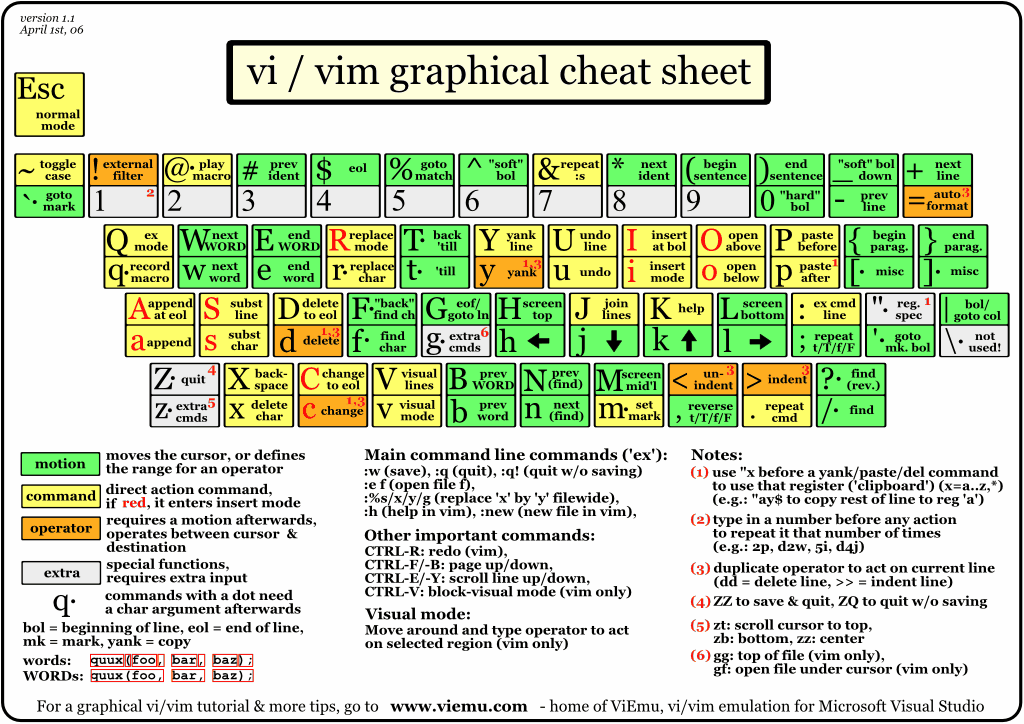
Came across:

vi-vim-cheat-sheet.gif

via Graphical vi-vim Cheat Sheet and Tutorial

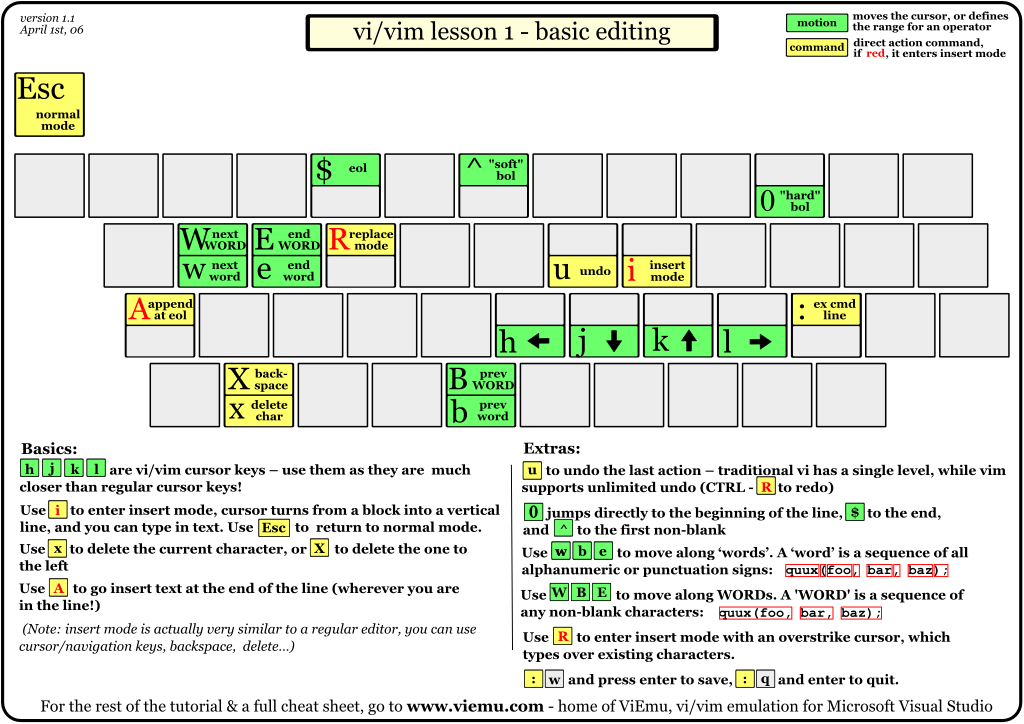
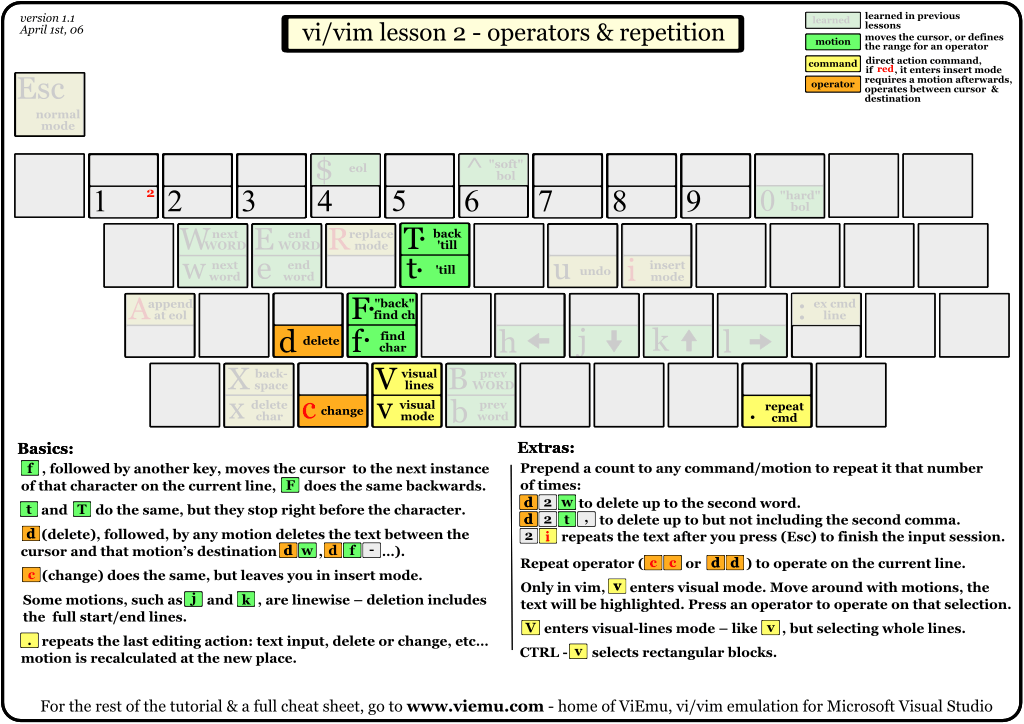
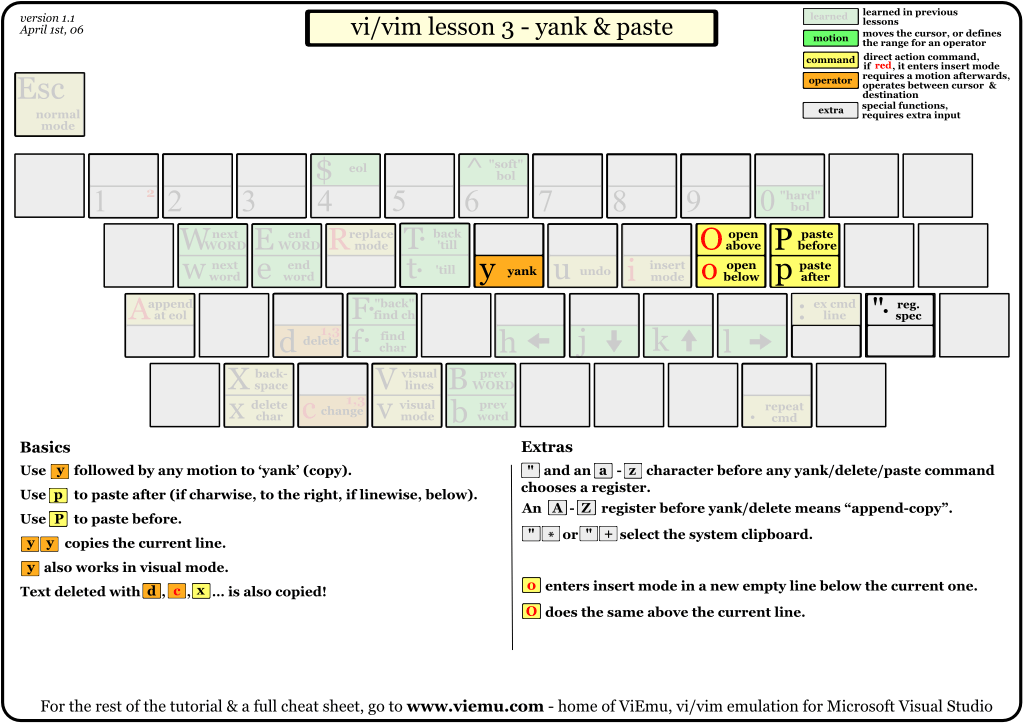
It's a multi-page thing, with pages 2 and onward focused on subsets -- some examples follow:

vi-vim-tutorial-1.gif
vi-vim-tutorial-2.gif
vi-vim-tutorial-3.gif
« Last Edit: October 02, 2014, 03:14 AM by ewemoa »

ewemoa

  • Honorary Member
  • Joined in 2008
  • **
  • Posts: 2,922
    • Plugin Coding Medal
    • Participated in NANY Challenge Three Times
Re: The AVE
« Reply #41 on: October 15, 2014, 12:01 AM »
One of my favorite features in programs / applications is the split view...here's a page that discusses it for the program(s) under discussion:

 Split screen in vi


A brief summary:

One kind of split:
Code
:split

Switching:
Code
Control W Control W

Closing:
Code
:q
« Last Edit: October 15, 2014, 12:52 AM by ewemoa »

Renegade

  • Tell me something you don't know...
  • Charter Member
  • Joined in 2005
  • ***
  • Posts: 13,291
    • Participated in NANY Challenge Three Times
    • Furry Fandom Badge - Furry Fandom
    • Linux User
Re: The AVE
« Reply #42 on: October 15, 2014, 12:19 AM »
Just how appropriate is x16wda's sig?  8)

Quote
vi vi vi - editor of the beast
Slow Down Music - Where I commit thought crimes...

Freedom is the right to be wrong, not the right to do wrong. - John Diefenbaker

ewemoa

  • Honorary Member
  • Joined in 2008
  • **
  • Posts: 2,922
    • Plugin Coding Medal
    • Participated in NANY Challenge Three Times
Re: The AVE
« Reply #43 on: October 15, 2014, 12:55 AM »
Perhaps it's three times appropriate ;)

phitsc

  • Honorary Member
  • Joined in 2008
  • **
  • Posts: 1,198
    • Participated in NANY Challenge Seven Times
    • Plugin Coding Medal
Re: The AVE
« Reply #44 on: October 15, 2014, 06:48 AM »
Just how appropriate is x16wda's sig?  8)

Quote
vi vi vi - editor of the beast
Good one. Took me a few seconds.

ewemoa

  • Honorary Member
  • Joined in 2008
  • **
  • Posts: 2,922
    • Plugin Coding Medal
    • Participated in NANY Challenge Three Times
Re: The AVE
« Reply #45 on: October 15, 2014, 11:16 AM »
Firefox users can gradually learn more vi-like commands via the likes of VimFx...AFAIU, it's not the only one of its kind.

Note: The key sequence to enable / disable was Control-Alt-v here -- not Shift-Alt-v as suggested via the link above.


Once accustomed to the key bindings, can even move on to the many browsers with vi-like key bindings :)
« Last Edit: October 15, 2014, 11:22 AM by ewemoa »

phitsc

  • Honorary Member
  • Joined in 2008
  • **
  • Posts: 1,198
    • Participated in NANY Challenge Seven Times
    • Plugin Coding Medal
Re: The AVE
« Reply #46 on: November 18, 2015, 01:04 PM »
A graphical 'cheat sheet' based on the QWERTY keyboard layout:

http://support.wasdkeyboards.com/customer/en/portal/articles/1973584-vim-layout

ewemoa

  • Honorary Member
  • Joined in 2008
  • **
  • Posts: 2,922
    • Plugin Coding Medal
    • Participated in NANY Challenge Three Times
Re: The AVE
« Reply #47 on: November 19, 2015, 10:53 PM »
Hmm...is there a practical way to get one of those on to a physical keyboard?

phitsc

  • Honorary Member
  • Joined in 2008
  • **
  • Posts: 1,198
    • Participated in NANY Challenge Seven Times
    • Plugin Coding Medal
Re: The AVE
« Reply #48 on: November 20, 2015, 07:34 AM »
On http://www.wasdkeyboards.com/ you can buy custom Cherry MX keycap sets. You can even create your own layout. I would assume that they have the VIM layout as a custom layout.
« Last Edit: November 20, 2015, 12:22 PM by phitsc »

ewemoa

  • Honorary Member
  • Joined in 2008
  • **
  • Posts: 2,922
    • Plugin Coding Medal
    • Participated in NANY Challenge Three Times
Re: The AVE
« Reply #49 on: November 20, 2015, 11:58 AM »
Ah...I see.  Thanks.  Hmm...I happen to have a suitable keyboard...

Original address: https://www.donationcoder.com/forum/index.php?topic=37747.0