DonationCoder.com forum
 
Read-only archive. This is a static copy of the DonationCoder.com forum. Reading and searching work as before; logging in, posting and private messages do not.
Archive of 2026-10-21 · About this archive · Main site

Author Topic: Working with excel row and columns  (Read 10,648 times)

rgdot

  • Supporting Member
  • Joined in 2009
  • **
  • Posts: 2,197
Working with excel row and columns
« on: April 07, 2014, 05:21 PM »
Spoiler (click to show/hide)
Posted this on stackoverflow but my initial question was confusingly worded and by the time I clarified I guess the question got lost in the maze there

I am trying to work with an Excel file (actually using Libreoffice) that is an export of a website content database. Since I am not even sure how to explain the problem I made a small version of what I am trying to do. The real file has many more records of course.

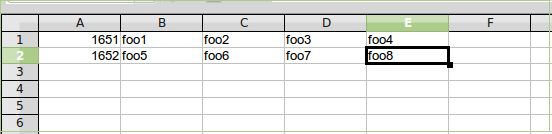
This is what I have:

[attachimg=#]

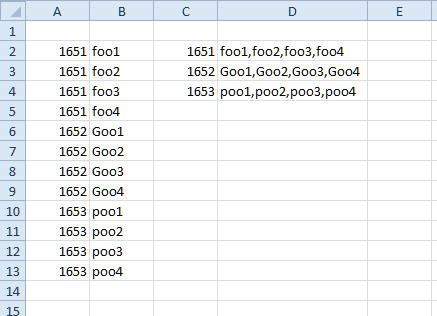
This is what I need:

[attachimg=#]

Any ideas on how I can do this?

Hardcopy

  • Participant
  • Joined in 2014
  • *
  • Posts: 1
Re: Working with excel row and columns
« Reply #1 on: April 07, 2014, 07:39 PM »
Take a look at pivot tables in excel. They will give you what you need.  
Open office has something similar. 

Hardcopy

kunkel321

  • Supporting Member
  • Joined in 2009
  • **
  • Posts: 626
    • Participated in NANY Challenge Once
Re: Working with excel row and columns
« Reply #2 on: April 08, 2014, 01:31 AM »
Also checkout a free Excel addin called ASAP-Utilities.  It lets you transpose like that.  

EDIT:  Yea, I guess ASAP won't do that. 
« Last Edit: April 09, 2014, 03:42 PM by kunkel321 »

Target

  • Honorary Member
  • Joined in 2006
  • **
  • Posts: 1,840
    • Coding Snacks
Re: Working with excel row and columns
« Reply #3 on: April 08, 2014, 02:25 AM »
it's not exactly transposing (that was my first thought)

and the transpose formula is built in to both excel and libreoffice (no need for an addin)

FWIW here's a bit of VBA I found on the web that does what you want, though the output is to a delimited string (pretty sure you can work it out from there)

Code
Function MYVLOOKUP(lookupval, lookuprange As Range, indexcol As Long)
Dim r As Range
Dim result As String
result = ""
For Each r In lookuprange
    If r = lookupval Then
        result = result & "," & r.Offset(0, indexcol - 1)
    End If
Next r
MYVLOOKUP = Right(result, Len(result) - 1)
End Function

paste it into your (excel) personal macro workbook, then call it as a user defined function from the FX dialog box (syntax is the same as a normal VLOOKUP)

myvlookup.png

credit for the code goes here - http://www.mrexcel.com/forum/excel-questions/280705-vlookup-return-multiple-values-one-cell-concatenate.html
Alcohol is photoshop, bottled
Askhole - someone who ask for advice, then ignores it
"Look wise, say nothing, and grunt. Speech was given to conceal thought" - Sir William Osler

IainB

  • @Slartibartfarst
  • Supporting Member
  • Joined in 2008
  • **
  • Posts: 7,544
Re: Working with excel row and columns
« Reply #4 on: April 08, 2014, 10:19 AM »
I don't know how you would be able to do that in a LibreOffice spreadsheet, but I would hazard a guess that a LibreOffice forum/discussion group might be able to help. This sort of requirement probably won't be a "new" one.

AndyM

  • Charter Member
  • Joined in 2006
  • ***
  • Posts: 616
Re: Working with excel row and columns
« Reply #5 on: April 08, 2014, 11:25 AM »
The real file has many more records of course.

How many records (rows)?

Is this a one-time task?

AndyM

  • Charter Member
  • Joined in 2006
  • ***
  • Posts: 616
Re: Working with excel row and columns
« Reply #6 on: April 08, 2014, 12:12 PM »
?

skwire

  • I eat Coding Snacks for breakfast...
  • Global Moderator
  • Joined in 2005
  • *****
  • Posts: 5,297
    • Participated in NANY Challenge Seventeen Times
    • Coding Snacks
    • Superboy Coder
    • Cody Award
    • Volunteers/Staff
    • Gathering Badge
Re: Working with excel row and columns
« Reply #7 on: April 08, 2014, 12:17 PM »
?

I banned the spammer (and his/her posts).

rgdot

  • Supporting Member
  • Joined in 2009
  • **
  • Posts: 2,197
Re: Working with excel row and columns
« Reply #8 on: April 08, 2014, 12:59 PM »
Thanks for the help/suggestions, will try/test them.

Pivot tables may be doable but I am not an expert. Not exactly a transpose.

@IainB I should post there, that's true. Not sure what to search for though, I mean what would be the search query, so yes post it is.
@AndyM. One time yes. ~40k rows.

TaoPhoenix

  • 0 - 60 ... then back to 0 again!
  • Supporting Member
  • Joined in 2011
  • **
  • Posts: 4,642
    • Participated in NANY Challenge Three Times
Re: Working with excel row and columns
« Reply #9 on: April 08, 2014, 01:28 PM »
Also checkout a free Excel addin called ASAP-Utilities.  It lets you transpose like that. 

I've used ASAP-Utilities and I was impressed, even though I didn't need 95% of what it did.
Use attachthumb=# to show an attached image as an expandable thumbnail, or attach=# to show full size. (With Brackets)

Original address: https://www.donationcoder.com/forum/index.php?topic=37679.0