DonationCoder.com forum
 
Read-only archive. This is a static copy of the DonationCoder.com forum. Reading and searching work as before; logging in, posting and private messages do not.
Archive of 2026-10-21 · About this archive · Main site

Author Topic: DONE: AutoHotKey solution for Desktop ListView  (Read 23,688 times)

guerillablood

  • Participant
  • Joined in 2013
  • *
  • Posts: 12
DONE: AutoHotKey solution for Desktop ListView
« on: March 23, 2014, 12:43 AM »
Hi all!

I'm looking for an a way to emulate the function of this freeware.

Preferably something that would run at the start of a script and could be toggled on and off. It'd also be great if I could integrate it into my own AHK script, if possible. I know there is already an AHK script called DesktopHomes that does this, even though I plundered through the source, I couldn't find the bit of code for the function that I want.

Thanks in advance!

skwire

  • I eat Coding Snacks for breakfast...
  • Global Moderator
  • Joined in 2005
  • *****
  • Posts: 5,297
    • Participated in NANY Challenge Seventeen Times
    • Coding Snacks
    • Superboy Coder
    • Cody Award
    • Volunteers/Staff
    • Gathering Badge
Re: DONE: AutoHotKey solution for Desktop ListView
« Reply #1 on: March 23, 2014, 06:11 PM »
Preferably something that would run at the start of a script and could be toggled on and off. It'd also be great if I could integrate it into my own AHK script, if possible.

Here you go.

Code: (autohotkey)
LV_VIEW_ICON      := 0 ; Default
LV_VIEW_DETAILS   := 1 ; Flat font and columns don't work right.
LV_VIEW_SMALLICON := 2 ; Correct font, columns are okay.
LV_VIEW_LIST      := 3 ; Flat font and columns are too far apart.
LV_VIEW_TILE      := 4 ; Flat font, columns are okay, and there is extra text detail.
LVM_SETVIEW       := 0x108E
LVM_GETVIEW       := 0x108F

#1::
{
    If ( Toggle ) ; LV_VIEW_SMALLICON & LV_VIEW_TILE work the best.
    {
        ControlGet, myDesktopWindow, HWND,, SysListView321, ahk_class Progman
        SendMessage, % LVM_SETVIEW, % LV_VIEW_SMALLICON, 0, , % "ahk_id " . myDesktopWindow
    }
    Else ; Set back to default.
    {
        ControlGet, myDesktopWindow, HWND,, SysListView321, ahk_class Progman
        SendMessage, % LVM_SETVIEW, % LV_VIEW_ICON, 0, , % "ahk_id " . myDesktopWindow
    }
    Toggle := !Toggle
}
Return

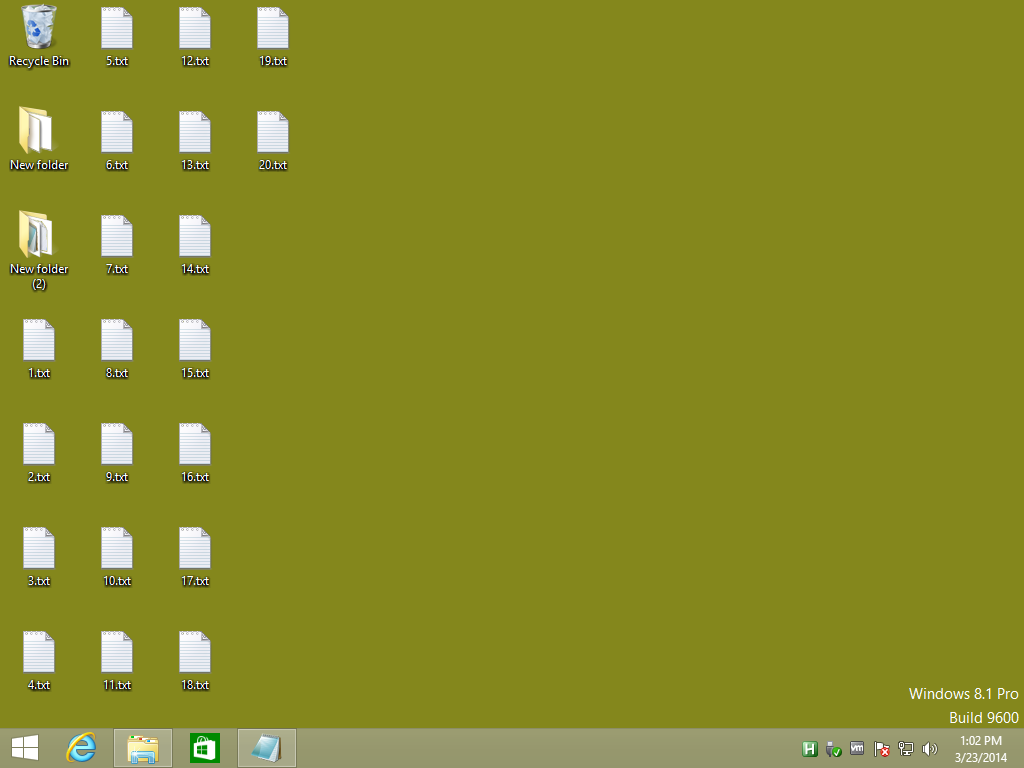
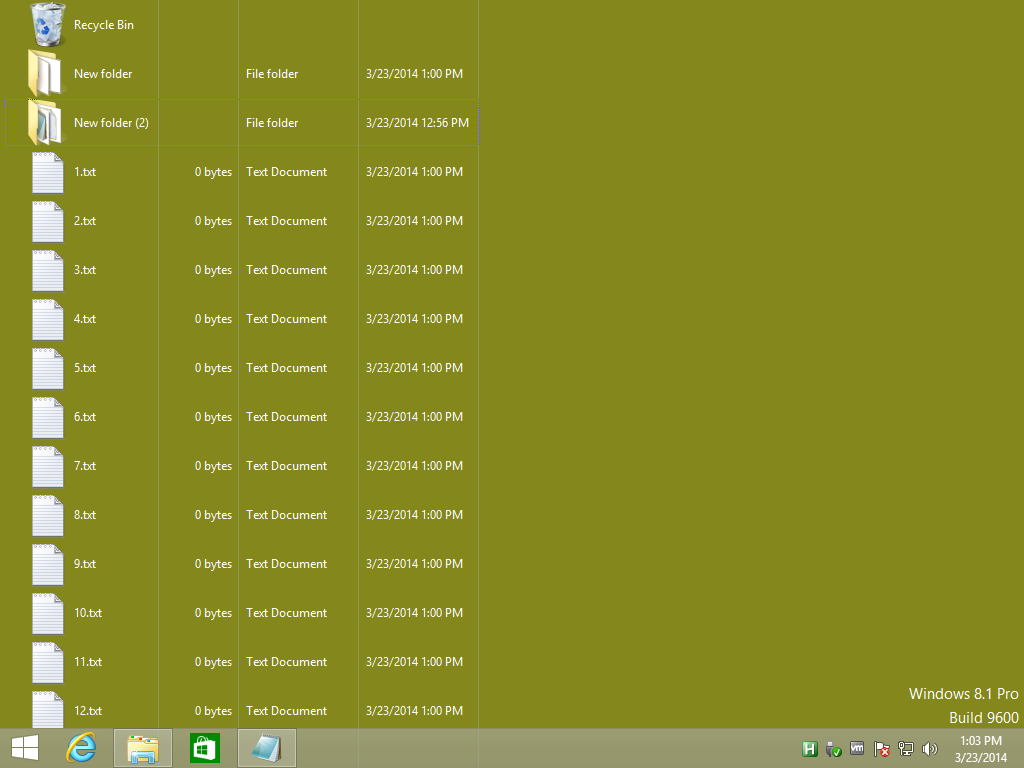
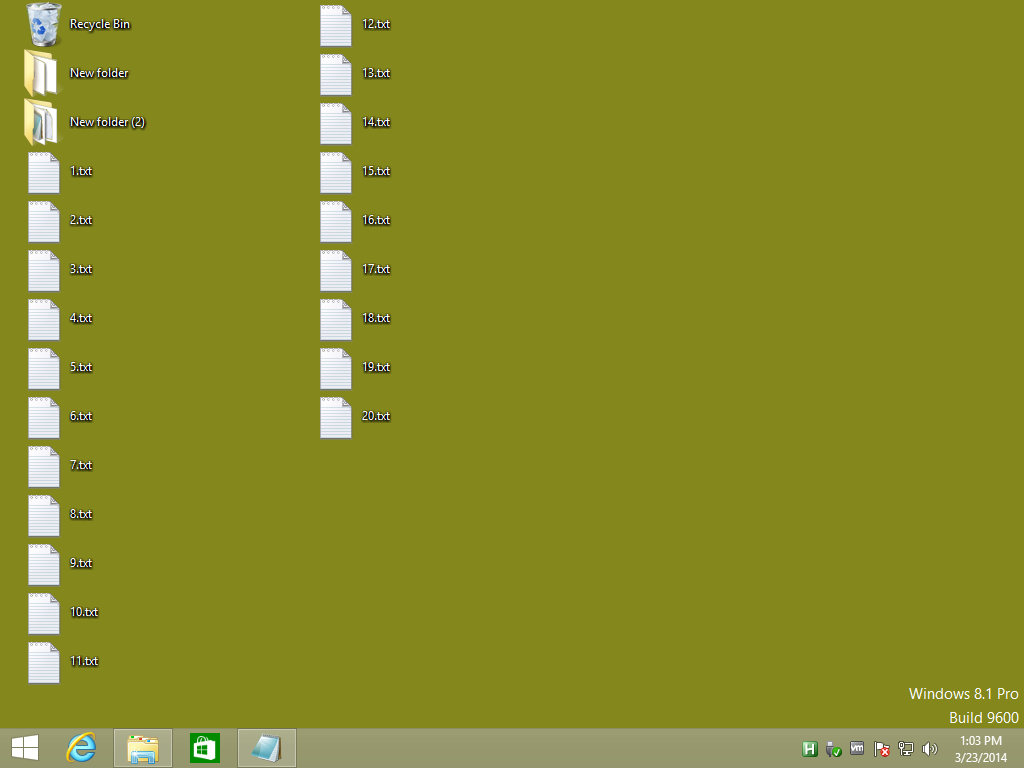
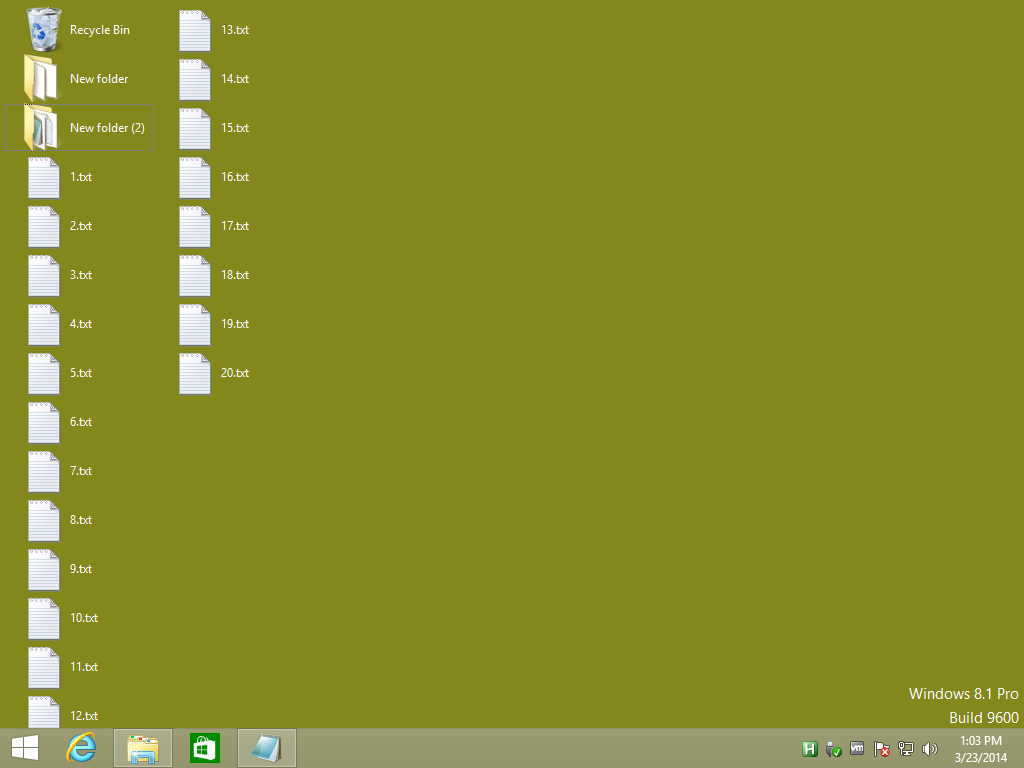
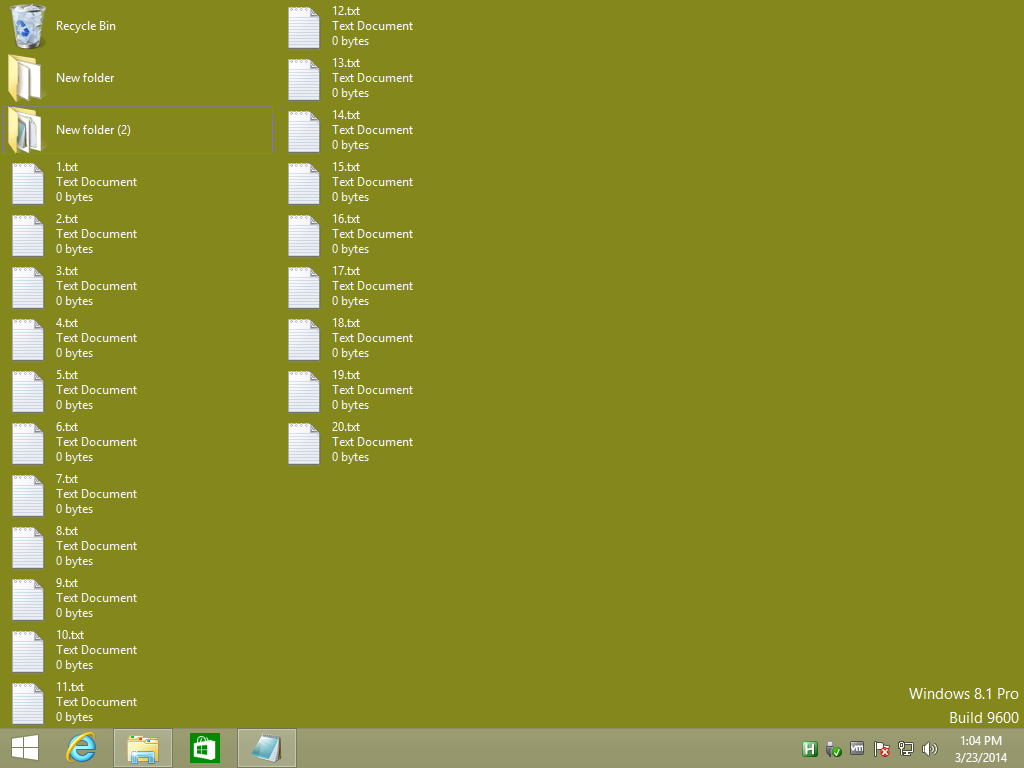
Here are some screenshots showing the different modes under a Windows 8 VM:

LV_VIEW_ICON
2014-03-23_130259.png

LV_VIEW_DETAILS
2014-03-23_130323.png

LV_VIEW_SMALLICON
2014-03-23_130339.png

LV_VIEW_LIST
2014-03-23_130356.png

LV_VIEW_TILE
2014-03-23_130410.png

IainB

  • @Slartibartfarst
  • Supporting Member
  • Joined in 2008
  • **
  • Posts: 7,544
Re: DONE: AutoHotKey solution for Desktop ListView
« Reply #2 on: March 23, 2014, 09:04 PM »
That's rather nifty.    :up:

guerillablood

  • Participant
  • Joined in 2013
  • *
  • Posts: 12
Re: DONE: AutoHotKey solution for Desktop ListView
« Reply #3 on: March 24, 2014, 04:50 AM »
Thank you so much Skwire! Your work never ceases to impress. It's a shame that LV_VIEW_DETAILS doesn't function properly, but LV_VIEW_SMALLICON functions perfectly, just as I wanted!

Skwire, I don't suppose you could provide an efficient method of having a scheme run at the start of the script and have the hotkey toggle be reversed so it reverts to the default setting, could you? Or just syntax to get the list view to execute with a script?

skwire

  • I eat Coding Snacks for breakfast...
  • Global Moderator
  • Joined in 2005
  • *****
  • Posts: 5,297
    • Participated in NANY Challenge Seventeen Times
    • Coding Snacks
    • Superboy Coder
    • Cody Award
    • Volunteers/Staff
    • Gathering Badge
Re: DONE: AutoHotKey solution for Desktop ListView
« Reply #4 on: March 24, 2014, 08:29 PM »
Thank you so much Skwire! Your work never ceases to impress. It's a shame that LV_VIEW_DETAILS doesn't function properly, but LV_VIEW_SMALLICON functions perfectly, just as I wanted!

Actually, when you think about it, LV_VIEW_DETAILS does function properly.  That is, in details mode in Windows Explorer, you only ever get one column.

Skwire, I don't suppose you could provide an efficient method of having a scheme run at the start of the script and have the hotkey toggle be reversed so it reverts to the default setting, could you? Or just syntax to get the list view to execute with a script?

Add the following at the top of your script before the first "Return":

Code: (autohotkey)
DesktopToggle := True
ToggleDesktopView( DesktopToggle )

Then add the following hotkey and function somewhere else in the script:

Code: (autohotkey)
#1::
{
    DesktopToggle := !DesktopToggle
    ToggleDesktopView( DesktopToggle )
}
Return

ToggleDesktopView( _Toggle )
{
    LV_VIEW_ICON      := 0 ; Default
    LV_VIEW_DETAILS   := 1 ; Flat font and columns don't work right.
    LV_VIEW_SMALLICON := 2 ; Correct font, columns are okay.
    LV_VIEW_LIST      := 3 ; Flat font and columns are too far apart.
    LV_VIEW_TILE      := 4 ; Flat font, columns are okay, and there is extra text detail.
    LVM_SETVIEW       := 0x108E
    LVM_GETVIEW       := 0x108F
    If ( _Toggle ) ; LV_VIEW_SMALLICON & LV_VIEW_TILE work the best.
    {
        ControlGet, myDesktopWindow, HWND,, SysListView321, ahk_class Progman
        SendMessage, % LVM_SETVIEW, % LV_VIEW_SMALLICON, 0, , % "ahk_id " . myDesktopWindow
    }
    Else ; Set back to default.
    {
        ControlGet, myDesktopWindow, HWND,, SysListView321, ahk_class Progman
        SendMessage, % LVM_SETVIEW, % LV_VIEW_ICON, 0, , % "ahk_id " . myDesktopWindow
    }
}

guerillablood

  • Participant
  • Joined in 2013
  • *
  • Posts: 12
Re: DONE: AutoHotKey solution for Desktop ListView
« Reply #5 on: March 25, 2014, 07:14 AM »
Absolutely perfect! Thank you so much Skwire! It assimilates right in with my existing master script.

Unrelated, but interestingly enough the first version would not play nicely with my alt dragging and window shading code in some manner depending on it's placement in the script. Placing it before or between either of those scripts would break the shading and cause the alt dragging to jump erratically. Placing it after them would prevent the listview from launching. Not quite sure why though.

At any rate, the script is functioning just as I want. The autostart toggle bit, along with it's initial purpose, fixed that entirely by me just splitting the autostart toggle up from the initial script around my other functions. No hiccups whatsoever.

Actually, when you think about it, LV_VIEW_DETAILS does function properly.  That is, in details mode in Windows Explorer, you only ever get one column.

Very true, but that doesn't *really* work in an environment where you don't have a scroll bar, unless you have a large vertical area or very few files on your desktop.  ;)

skwire

  • I eat Coding Snacks for breakfast...
  • Global Moderator
  • Joined in 2005
  • *****
  • Posts: 5,297
    • Participated in NANY Challenge Seventeen Times
    • Coding Snacks
    • Superboy Coder
    • Cody Award
    • Volunteers/Staff
    • Gathering Badge
Re: DONE: AutoHotKey solution for Desktop ListView
« Reply #6 on: March 25, 2014, 07:38 PM »
Absolutely perfect! Thank you so much Skwire! It assimilates right in with my existing master script.

Right on.  I'm glad it's working for you.  :Thmbsup:

Very true, but that doesn't *really* work in an environment where you don't have a scroll bar, unless you have a large vertical area or very few files on your desktop.  ;)

Agreed.  :)

I'll move this to the Finished section.

RonJon

  • Supporting Member
  • Joined in 2012
  • **
  • Posts: 2
Re: DONE: AutoHotKey solution for Desktop ListView
« Reply #7 on: May 25, 2014, 06:13 PM »
Would it be very difficult to make this into a windows program, not using autohotkey?

I would love to have the details view on my windows 7 desktop.

skwire

  • I eat Coding Snacks for breakfast...
  • Global Moderator
  • Joined in 2005
  • *****
  • Posts: 5,297
    • Participated in NANY Challenge Seventeen Times
    • Coding Snacks
    • Superboy Coder
    • Cody Award
    • Volunteers/Staff
    • Gathering Badge
Re: DONE: AutoHotKey solution for Desktop ListView
« Reply #8 on: May 25, 2014, 08:34 PM »
I think you're asking if I can compile this into an executable (a .exe file), right?  If so, sure, I can do that.

RonJon

  • Supporting Member
  • Joined in 2012
  • **
  • Posts: 2
Re: DONE: AutoHotKey solution for Desktop ListView
« Reply #9 on: May 25, 2014, 09:16 PM »
Yes, that is exactly what I am requesting.

skwire

  • I eat Coding Snacks for breakfast...
  • Global Moderator
  • Joined in 2005
  • *****
  • Posts: 5,297
    • Participated in NANY Challenge Seventeen Times
    • Coding Snacks
    • Superboy Coder
    • Cody Award
    • Volunteers/Staff
    • Gathering Badge
Re: DONE: AutoHotKey solution for Desktop ListView
« Reply #10 on: May 27, 2014, 12:54 AM »
Yes, that is exactly what I am requesting.

I incorporated the functionality shown in this thread with another tool I wrote in this thread.  Perhaps that will work for you? 

Original address: https://www.donationcoder.com/forum/index.php?topic=37576.0