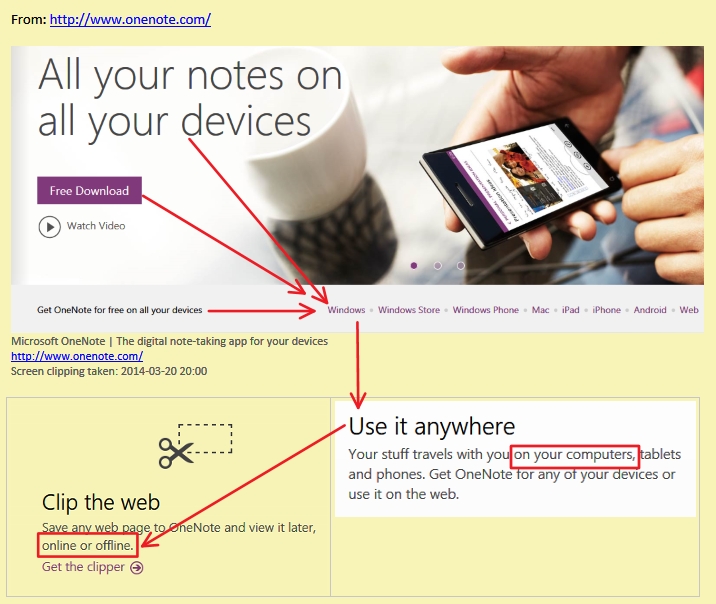
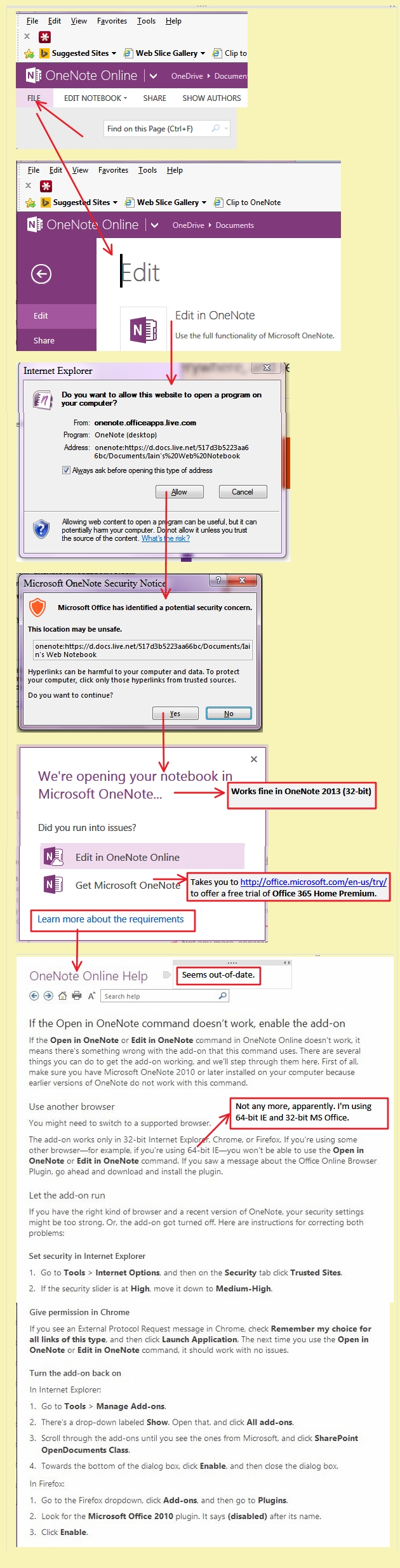
Not trying to be funny, but I don't get it. No offline notes at all or only in certain cases (created on PC?) it won't be available offline? Colour me confused 


 Topic: OneNote now on Mac as well, +FREE everywhere, + Cloud service powered. (Read 61,059 times)


Not trying to be funny, but I don't get it. No offline notes at all or only in certain cases (created on PC?) it won't be available offline? Colour me confused
 .
. .
.


Not trying to be funny, but I don't get it. No offline notes at all or only in certain cases (created on PC?) it won't be available offline? Colour me confusedI just tried creating a new notebook on my computer instead of the cloud like the default one, and got the same dialogue saying this version can only create notebooks on OneCloud
_________________________
I am starting to feel there is a lot of information about this free offer that would have been handy on the download page instead of all the stock photos of happy people
Why would they not be up-front about it? What would they expect to achieve otherwise? Wait for the unavoidable backlash when people realised that they had been conned? That doesn't make sense. It would be self-inflicted highly negative word-of-mouth advertising. This would be a stupid thing to do, from a marketing perspective alone. It would not make sense.
Has anyone following this discussion been able to use client-based "offline" OneNote Notebooks purely via this FREE install - i.e, without having, for example, MS Office 2013 or 2010 or 2007 installed as well?
Why would they not be up-front about it? What would they expect to achieve otherwise? Wait for the unavoidable backlash when people realised that they had been conned? That doesn't make sense. It would be self-inflicted highly negative word-of-mouth advertising. This would be a stupid thing to do, from a marketing perspective alone. It would not make sense.One of the news sites called it a freemiumw version, which I think looks to be more or less accurate.
_______________________
Perhaps if they had called it "OneNote Cloud", to differentiate it from the full version.
_______________________
Outliner Software: OneNote for Mac on the horizon...
Posted by Stephen Zeoli
Mar 18, 2014 at 05:36 PM
Ah, I knew there had to be a catch. I’ve been using OneNote 2010 on my Windows PC, which I paid for. I just downloaded the free 2013 edition, which was working just fine until I tried to create a new page in one of the notebooks that I keep on my computer (instead of on SkyDrive), and got a messages saying “Subscribe to Office to continue using this notebook.” From the “Learn more” link:QuoteAnyone can download and use the free version of OneNote. When you subscribe to Office 365 Home Premium for just $9.99 per month, you get the premium version of OneNote, which easily integrates with the other latest Office applications and comes with additional capabilities, including the ability to:
- Create notebooks on your PC. Create notebooks saved to your hard drive (offline) in addition to being saved to your OneDrive. Being able to work with notebooks offline as well as online is great for anyone with a spotty network connection or those who are always on the go.
- Support your business needs. Your notes are synced to your OneDrive for Business, so you and your teammates can collaborate easily. For added security, you can password-protect your notebooks. And with Office 365 you get the latest Office applications, which means you get a complete note-taking experience, with embedded Excel files and added Outlook tasks, meeting notes, and contacts.
- Record your notes. Why just write or type your notes when you can video- or audio-record them at the same time? That way you’re sure not to miss any important information. Perfect for students and for those important meetings.
Is this the deal breaker? Maybe. I don’t want or need all my work notebooks, which I keep on my PC at the office, floating around on SkyDrive or on my other devices. Indeed, there is no such thing as a free lunch.
Steve Z.


Well, I'm disgusted by this now, after reading this self-explanatory post in OutlinerSoftware.com:QuoteOutliner Software: OneNote for Mac on the horizon...QuoteIs this the deal breaker? Maybe. I don’t want or need all my work notebooks, which I keep on my PC at the office, floating around on SkyDrive or on my other devices. Indeed, there is no such thing as a free lunch.
Steve Z.


Still haven't seen any restriction so still confused by the original comment.... like I said it may be I have no clue
.Well, I'm disgusted by this now, after reading this self-explanatory post in OutlinerSoftware.com:QuoteOutliner Software: OneNote for Mac on the horizon...
Posted by Stephen Zeoli
Mar 18, 2014 at 05:36 PM
Ah, I knew there had to be a catch. I’ve been using OneNote 2010 on my Windows PC, which I paid for. I just downloaded the free 2013 edition, which was working just fine until I tried to create a new page in one of the notebooks that I keep on my computer (instead of on SkyDrive), and got a messages saying “Subscribe to Office to continue using this notebook.” From the “Learn more” link:QuoteAnyone can download and use the free version of OneNote. When you subscribe to Office 365 Home Premium for just $9.99 per month, you get the premium version of OneNote, which easily integrates with the other latest Office applications and comes with additional capabilities, including the ability to:
- Create notebooks on your PC. Create notebooks saved to your hard drive (offline) in addition to being saved to your OneDrive. Being able to work with notebooks offline as well as online is great for anyone with a spotty network connection or those who are always on the go.
- Support your business needs. Your notes are synced to your OneDrive for Business, so you and your teammates can collaborate easily. For added security, you can password-protect your notebooks. And with Office 365 you get the latest Office applications, which means you get a complete note-taking experience, with embedded Excel files and added Outlook tasks, meeting notes, and contacts.
- Record your notes. Why just write or type your notes when you can video- or audio-record them at the same time? That way you’re sure not to miss any important information. Perfect for students and for those important meetings.
Is this the deal breaker? Maybe. I don’t want or need all my work notebooks, which I keep on my PC at the office, floating around on SkyDrive or on my other devices. Indeed, there is no such thing as a free lunch.
Steve Z.


...Better late than never.
_____________________________

Looks like OneNote FREE for the Mac is a seriously hobbled version: OneNote now free… or is it? | Welcome to Sherwood
...Well, to be fair, one could argue that Macs are seriously hobbled versions of computers.
It is because it's main marketer had no interest in seeing anything but its own logo on their devices, extrapolate that way of thinking into other business decisions and Macs are exactly what he wanted.
Original address: https://www.donationcoder.com/forum/index.php?topic=37548.0