DonationCoder.com forum
 
Read-only archive. This is a static copy of the DonationCoder.com forum. Reading and searching work as before; logging in, posting and private messages do not.
Archive of 2026-10-21 · About this archive · Main site

Author Topic: How link to pix in Tumblr?  (Read 20,105 times)

bit

  • Supporting Member
  • Joined in 2013
  • **
  • Posts: 686
How link to pix in Tumblr?
« on: March 15, 2014, 04:46 AM »
All my browsers are unable to give me the ability to right-click on a picture in a Tumblr blog and grab a link to that one picture.
Other web sites can do this, or allow me to 'view image' in a new tab or same tab, but not on Tumblr.
Or can anyone tell me if there is a Donation Coder coding snack or other program that can do this, and what is a safe software host to download it from?

edit: found a 'tumblr ripper' (image downloader). tnx!
« Last Edit: March 15, 2014, 05:42 AM by bit »

Curt

  • Supporting Member
  • Joined in 2006
  • **
  • Posts: 7,565
Re: How link to pix in Tumblr?
« Reply #1 on: March 15, 2014, 11:13 AM »
hm... I didn't even know there could be limitations on Tumblr!

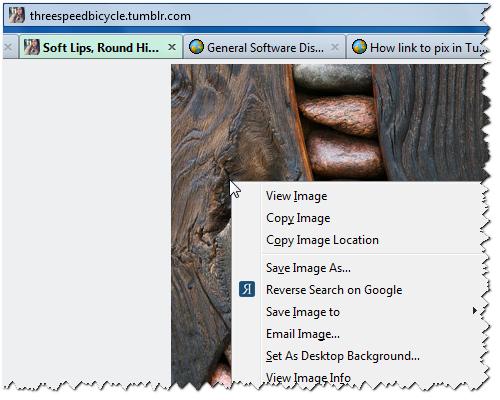
Firefox (Pale Moon):

[attachimg=#]

Or do you meet the limitations in some other contexts?
Please enlighten me, I know nothing about Tumblr.

bit

  • Supporting Member
  • Joined in 2013
  • **
  • Posts: 686
Re: How link to pix in Tumblr?
« Reply #2 on: March 16, 2014, 12:10 AM »
hm... I didn't even know there could be limitations on Tumblr!

Firefox (Pale Moon):

(see attachment in previous post)

Or do you meet the limitations in some other contexts?
Please enlighten me, I know nothing about Tumblr.
Yes, I think the context would be that I'm not a member of Tumblr.
Maybe copying is possible if one is a member, but not sure.

But the above program went at it like there was no tomorrow, downloading every pic on the page in minutes.
It did not however give me the ability to just right-click any pic and get a link to refer back to in posts elsewhere, and I tried IE, Chrome, Firefox, and Seamonkey; all failed to do that with or without the Tumblr ripper.

So I wonder do you have to be a member of Tumblr to be able to do it?

4wd

  • Pedantic Old Bastard
  • Supporting Member
  • Joined in 2006
  • **
  • Posts: 5,652
    • Coding Snacks
Re: How link to pix in Tumblr?
« Reply #3 on: March 16, 2014, 05:37 AM »
You're doing it wrong  :)

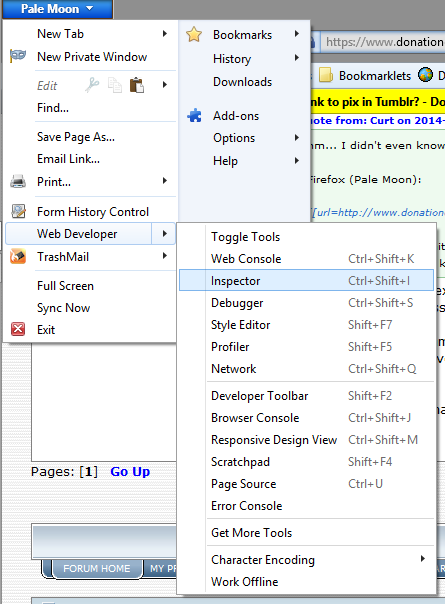
Firefox (Pale Moon/Waterfox):

Menu->Web Developer->Inspector:

2014-03-16 16_34_01.png

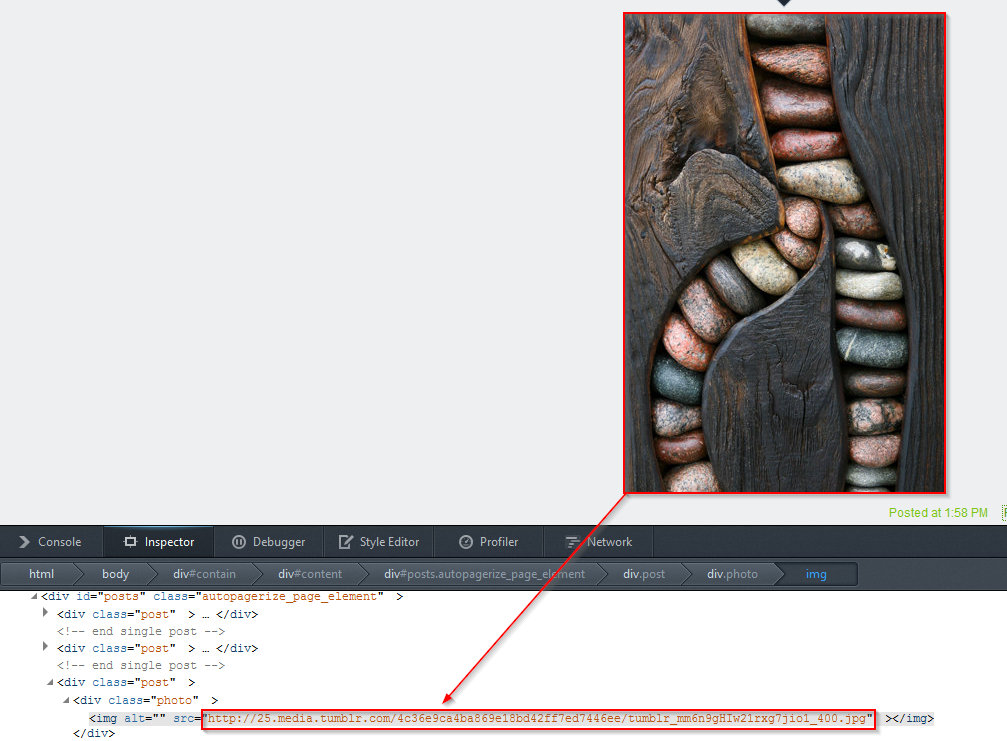
Click picture:

2014-03-16 16_31_49.png
"I will not follow where the path may lead, but I will go where there is no path, and I will leave a trail." - Muriel Strode, 1903

Curt

  • Supporting Member
  • Joined in 2006
  • **
  • Posts: 7,565
Re: How link to pix in Tumblr?
« Reply #4 on: March 16, 2014, 08:21 AM »
Argh!! forget this post!  :-[

["Copy Image Location" does not come from CoLT like I was claiming]
« Last Edit: March 16, 2014, 08:32 AM by Curt »

Curt

  • Supporting Member
  • Joined in 2006
  • **
  • Posts: 7,565
Re: How link to pix in Tumblr?
« Reply #5 on: March 16, 2014, 08:49 AM »
I see now that Copy Image Location is default part of the Firefox right-click context menu. So you already have it, whether you can find it or not ~ it can be broken.

4wd

  • Pedantic Old Bastard
  • Supporting Member
  • Joined in 2006
  • **
  • Posts: 5,652
    • Coding Snacks
Re: How link to pix in Tumblr?
« Reply #6 on: March 16, 2014, 12:08 PM »
^ That's way too simple ... I don't like it  :-[
"I will not follow where the path may lead, but I will go where there is no path, and I will leave a trail." - Muriel Strode, 1903

Curt

  • Supporting Member
  • Joined in 2006
  • **
  • Posts: 7,565
Re: How link to pix in Tumblr?
« Reply #7 on: March 16, 2014, 02:19 PM »
;D  I clearly must be suffering from some similar disease, since my first reaction was that it surely must come from some third party application.

But how can bit get Copy Image Location back, if it has been broken?  :tellme:

If I (still) had the problem, I think I would first create a list of links to the various extensions that I would want to keep, and then simply uninstall the Internet browser, reboot PC, and install the browser and the addons all over again.

keepers
- about:addons-memory
https://github.com/nmaier/about-addons-memory
- Adblock Plus
http://adblockplus.org/en/
- Add to Amazon Wish List Button
https://www.amazon.com/wishlist
- Add to Search Bar (Incompatible)
http://firefox.maltekraus.de/extensions/add-to-search-bar
- Auto Context (Incompatible)
https://addons.mozilla.org/firefox/addon/5714
- Auto-Sort Bookmarks
https://addons.mozilla.org/en-US/firefox/addon/auto-sort-bookmarks/?src=api
- Back to Top
http://softwarebychuck.com/
- Bulk Image Downloader
http://BulkImageDownloader.com
- CoLT
http://www.borngeek.com/firefox/colt/
- Context Search
http://www.cusser.net
- Copy Plain Text 2
https://addons.mozilla.org/en-US/firefox/addon/copy-plain-text-2/?src=api
- Copy Urls Expert
http://www.kashiif.com/firefox-extensions/copy-urls-expert/
- Download Statusbar
http://downloadstatusbarapp.com
- DownloadHelper
http://www.downloadhelper.net
- Downloads Context Menu
http://www.bm-productions.tk
- Easy Youtube Video Downloader Express
http://yourvideofile.com/
- Exit Button Firefox
http://www.linnhe.net/firefox/extensions.html
- Extension List Dumper
http://www.sogame.cat/
- FastestFox
http://smarterfox.com/
- Flagfox
https://flagfox.wordpress.com/
- FoxySpider
http://www.foxyspider.com/
- Google Reverse Image Search
http://barisderin.com/
- Greasemonkey
http://www.greasespot.net/
- IE View
http://ieview.roub.net/
- Image Toolbar
http://www.cusser.net
- InFormEnter
http://firefoxer.ru/
- Interclue
http://interclue.com/
- Lazarus: Form Recovery
http://getlazarus.com/
- Memory Restart
http://www.teamextension.com
- Mozilla Archive Format
http://maf.mozdev.org/
- MyBookmarks
http://www.catsyawn.net/ma2ten/soft/mybookmarks_en.html
- Nightly Tester Tools
https://wiki.mozilla.org/Auto-tools/Automation_Development/Projects/Addons/NightlyTesterTools
- Open In RegEdit (Incompatible)
https://addons.mozilla.org/firefox/4478/
- Pale Moon Commander
http://www.palemoon.org/commander.shtml
- QCLean - Remove Facebook Ads Suggested Pages and Posts
http://qcl.github.io/QCLean
- QuoteURLText
http://qoelabs.com/quoteurl.php
- RAM Tab
https://addons.mozilla.org/en-US/firefox/user/emadramlawi/
- Readability
http://www.readability.com/
- Restartless Restart
http://github.com/erikvold/restartless-restart-ffext
- Resurrect Pages
http://trac.arantius.com/wiki/Extensions/Resurrect
- RightToClick
http://nc.ddns.us/extensions.html
- Save File to
http://savefileto.googlecode.com/
- Save Session
http://diary.noasobi.net/
- Search Highlight
https://addons.mozilla.org/en-US/firefox/addon/search-highlight/?src=api
- Search Site
https://addons.mozilla.org/firefox/addon/search-site/
- Self-Destructing Cookies
https://addons.mozilla.org/en-US/firefox/addon/self-destructing-cookies/?src=api
- Stylish
http://userstyles.org/
- Tab Mix Plus
http://tmp.garyr.net
- Textarea Cache
https://addons.mozilla.org/en-US/firefox/addon/textarea-cache/
- TryAgain
http://getsatisfaction.com/tryagain/products/tryagain_tryagain_for_firefox
- Undo Bookmarks Menu
http://space.geocities.yahoo.co.jp/gl/alice0775
- Unsorted Bookmarks Folder Menu
http://space.geocities.yahoo.co.jp/gl/alice0775
- VTzilla
https://www.virustotal.com/documentation/browser-extensions/mozilla-firefox/
- WikiLook
https://addons.mozilla.org/en-US/firefox/addon/7675

But even reading about it, sounds wearying! Any easier solution for bit?
« Last Edit: March 16, 2014, 02:31 PM by Curt »

bit

  • Supporting Member
  • Joined in 2013
  • **
  • Posts: 686
Re: How link to pix in Tumblr?
« Reply #8 on: March 17, 2014, 12:09 AM »
You're doing it wrong  :)

Firefox (Pale Moon/Waterfox):

Menu->Web Developer->Inspector:
(see attachment in previous post)
Click picture:
(see attachment in previous post)
Okay so far that doesn't seem to bring up a link for me in Firefox.
Do you think I should install Pale Moon or Waterfox and try again?
Maybe I should try that.

4wd

  • Pedantic Old Bastard
  • Supporting Member
  • Joined in 2006
  • **
  • Posts: 5,652
    • Coding Snacks
Re: How link to pix in Tumblr?
« Reply #9 on: March 17, 2014, 12:17 AM »
You're doing it wrong  :)

Firefox (Pale Moon/Waterfox):

Menu->Web Developer->Inspector:
(see attachment in previous post)
Click picture:
(see attachment in previous post)
Okay so far that doesn't seem to bring up a link for me in Firefox.
Do you think I should install Pale Moon or Waterfox and try again?
Maybe I should try that.

Works fine here in Firefox 26.0 and Pale Moon 27.0 - so if you're not seeing it you're holding your tongue wrong.

You don't even have to click on the image on a page, just mouse over it and the relevant line in the source will be highlighted in the Inspector window.
"I will not follow where the path may lead, but I will go where there is no path, and I will leave a trail." - Muriel Strode, 1903

bit

  • Supporting Member
  • Joined in 2013
  • **
  • Posts: 686
Re: How link to pix in Tumblr?
« Reply #10 on: March 17, 2014, 12:23 AM »
You're doing it wrong  :)

Firefox (Pale Moon/Waterfox):

Menu->Web Developer->Inspector:
(see attachment in previous post)
Click picture:
(see attachment in previous post)
Okay so far that doesn't seem to bring up a link for me in Firefox.
Do you think I should install Pale Moon or Waterfox and try again?
Maybe I should try that.

Works fine here in Firefox 26.0 and Pale Moon 27.0 - so if you're not seeing it you're holding your tongue wrong.

You don't even have to click on the image on a page, just mouse over it and the relevant line in the source will be highlighted in the Inspector window.
In Firefox I run AdBlock Edge, Ghostery, and TrackMeNot, plus I don't know what else; maybe that's interfering?

Okay, with PaleMoon and Waterfox; in preview screens PaleMoon is a brighter overall look and Waterfox is darker and easier on my eyes.
The Waterfox official download page only shows 64-bit; but I see they do offer a Portable version which is far preferable to me.
Can I install Waterfox Portable 64-bit on my Win7 32-bit OS?

I found a 32-bit Waterfox but it's from Softonic, and I'm not sure if that's going to load me down with add-on crapware or not, which happened once and it's hard to remember which software hosts do that and which ones play fair.
« Last Edit: March 17, 2014, 12:33 AM by bit »

bit

  • Supporting Member
  • Joined in 2013
  • **
  • Posts: 686
Re: How link to pix in Tumblr?
« Reply #11 on: March 17, 2014, 12:34 AM »
BTW, when I originally went to install Windows 7 Pro, the 64-bit disc-install process would hang over and over again and again, so I finally had to install 32-bit.
Is there a way to just convert my OS from 32-bit to 64-bit, or do you have to start all over and reinstall and rebuild the entire OS from scratch?

bit

  • Supporting Member
  • Joined in 2013
  • **
  • Posts: 686
Re: How link to pix in Tumblr?
« Reply #12 on: March 17, 2014, 12:39 AM »
BTW, when I've got a million windows open and want to close them all at once, is there a shortcut command for that?

4wd

  • Pedantic Old Bastard
  • Supporting Member
  • Joined in 2006
  • **
  • Posts: 5,652
    • Coding Snacks
Re: How link to pix in Tumblr?
« Reply #13 on: March 17, 2014, 02:01 AM »
In Firefox I run AdBlock Edge, Ghostery, and TrackMeNot, plus I don't know what else; maybe that's interfering?

I run Ghostery, AdBlock Edge, RefControl, Request Policy, Self Destructing Cookies, and a couple of others - none of them interfere with the Inspector.

Quote
The Waterfox official download page only shows 64-bit; but I see they do offer a Portable version which is far preferable to me.
Can I install Waterfox Portable 64-bit on my Win7 32-bit OS?

Waterfox is only x64, and no you can't install 64-bit programs onto a 32-bit OS - unless you do so via a VM (which is beyond the scope of the problem).

Quote
I found a 32-bit Waterfox but it's from Softonic, ...

Only version on there that shows up in a search is Waterfox x64 v18.0.1 ?

Is there a way to just convert my OS from 32-bit to 64-bit, or do you have to start all over and reinstall and rebuild the entire OS from scratch?

A full re-install is required if you're changing architecture, x64<->x86.

BTW, when I've got a million windows open and want to close them all at once, is there a shortcut command for that?

From SuperUser:
Quote
Simultaneously close all open windows:

  •     While pressing the Ctrl key, successively click each of the task icons on the taskbar.
  •     Right-click the last task icon, and choose Close Group.

If you only want to minimize the windows, use the 'Show Desktop' shorcut.
"I will not follow where the path may lead, but I will go where there is no path, and I will leave a trail." - Muriel Strode, 1903

IainB

  • @Slartibartfarst
  • Supporting Member
  • Joined in 2008
  • **
  • Posts: 7,544
Re: How link to pix in Tumblr?
« Reply #14 on: March 17, 2014, 02:22 AM »
^^ Logoff would also do it!   ;)

...but seriously, I find VistaSwitcher is pretty good, because you can Al-Tab and then select all the windows you want to close, Right-Click and close them. If you learn how to use it, it's a very handy little tool, and FREE.     :Thmbsup:

4wd

  • Pedantic Old Bastard
  • Supporting Member
  • Joined in 2006
  • **
  • Posts: 5,652
    • Coding Snacks
Re: How link to pix in Tumblr?
« Reply #15 on: March 17, 2014, 02:28 AM »
^^ Logoff would also do it!   ;)

So does the small button on the front of the computer ... just below the power button ...
"I will not follow where the path may lead, but I will go where there is no path, and I will leave a trail." - Muriel Strode, 1903

bit

  • Supporting Member
  • Joined in 2013
  • **
  • Posts: 686
Re: How link to pix in Tumblr?
« Reply #16 on: March 18, 2014, 08:08 AM »
^^^;D
I would prefer something like VistaSwitcher's trick with Alt-Tab if only it would simply close all open windows without shutting down the computer.

Curt

  • Supporting Member
  • Joined in 2006
  • **
  • Posts: 7,565
Re: How link to pix in Tumblr?
« Reply #17 on: March 18, 2014, 08:30 PM »
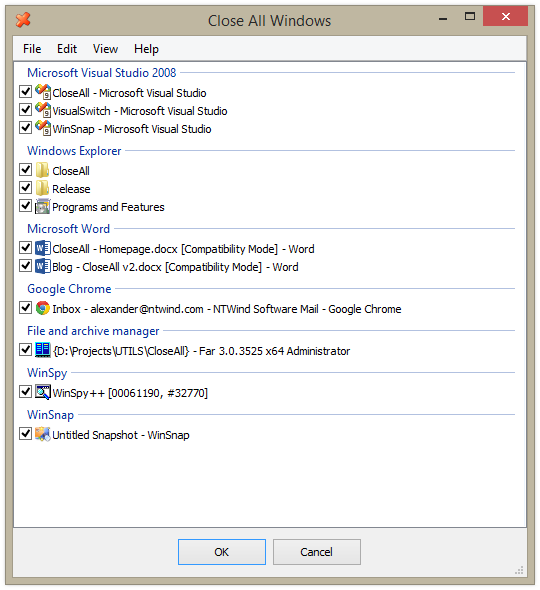
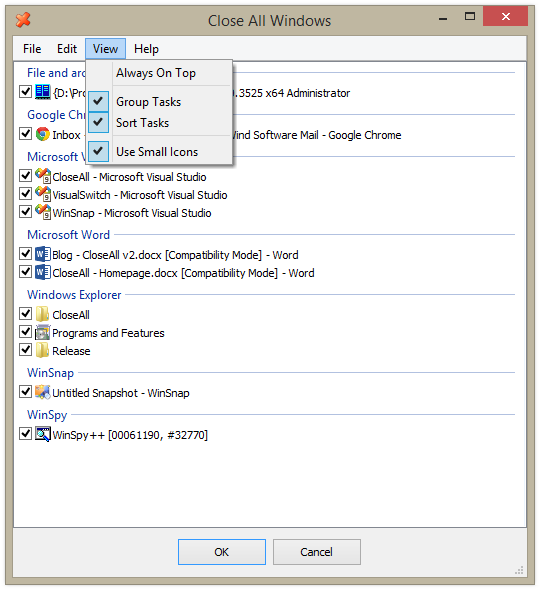
Your timing is quite okay:

Quote from: CloseAll
Changelog for CloseAll v2.0 (March 15, 2014):
  •    New fully redesigned user interface
  •    Added installer and uninstaller for your convenience
  •    Full support for Windows 8, 7, Vista and XP

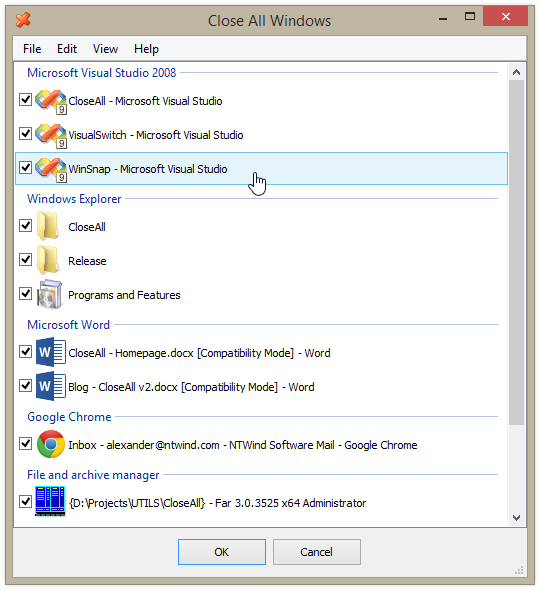
I’ve found that when multitasking I’m often looking for a “Close all except this and this” feature for application windows – something very simple, but more advanced than “Close other tabs” in modern internet browsers. That’s why I decided to re-write my old CloseAll.

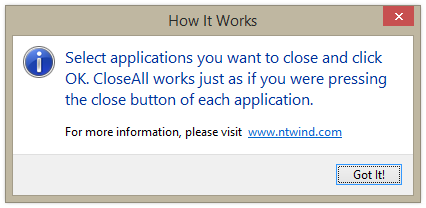
What can be easier than a task list with check boxes and OK button? Just select apps you want to close and click OK. It’s CloseAll v2.0

CloseAll (“Close all except this and this”) v. 2.0: http://www.ntwind.com/blog/closeall-v2.0-fresh-idea-and-clean-implementation.html
Freeware.


closeall-v2-main.png

closeall-v2-smallicons.png

closeall-v2-sorttasks.png

closeall-v2-help.png

Quote
NOTE: In order to display information about UAC elevated processes on Windows Vista and above, CloseAll requires to be installed in the system %ProgramFiles% directory.

app103

  • That scary taskbar girl
  • Global Moderator
  • Joined in 2006
  • *****
  • Posts: 5,888
    • Participated in NANY Challenge Six Times
    • Coding Snacks
    • Gathering Badge
    • Cody Award
    • Volunteers/Staff
Re: How link to pix in Tumblr?
« Reply #18 on: March 19, 2014, 04:06 AM »
In Firefox, Tools menu -> Page Info to open the info panel.

Then select the media icon from the top of it (looks like a film strip with a photo on top)

It will give you a list of urls for all the images on the page. When you select one, you'll see the image in the bottom of the panel to make sure you have the right one. When you find it, right click the entry in the list and select copy. (you can also save images from there, too)

Screenshot - 3_19_2014 , 12_02_50 AM.png

bit

  • Supporting Member
  • Joined in 2013
  • **
  • Posts: 686
Re: How link to pix in Tumblr?
« Reply #19 on: March 20, 2014, 10:42 AM »
Your timing is quite okay:

Quote from: CloseAll
Changelog for CloseAll v2.0 (March 15, 2014):
  •     New fully redesigned user interface
  •     Added installer and uninstaller for your convenience
  •     Full support for Windows 8, 7, Vista and XP

I’ve found that when multitasking I’m often looking for a “Close all except this and this” feature for application windows – something very simple, but more advanced than “Close other tabs” in modern internet browsers. That’s why I decided to re-write my old CloseAll.

What can be easier than a task list with check boxes and OK button? Just select apps you want to close and click OK. It’s CloseAll v2.0

CloseAll (“Close all except this and this”) v. 2.0: http://www.ntwind.com/blog/closeall-v2.0-fresh-idea-and-clean-implementation.html
Freeware.

(see attachment in previous post) (see attachment in previous post) (see attachment in previous post) (see attachment in previous post)
Quote
NOTE: In order to display information about UAC elevated processes on Windows Vista and above, CloseAll requires to be installed in the system %ProgramFiles% directory.
This works great! Reminds me of the old EndItAll, but works faster. Tnx!  :Thmbsup:

Stoic Joker

  • Honorary Member
  • Joined in 2008
  • **
  • Posts: 6,652
    • Cody Award
    • Participated in NANY Challenge Five Times
Re: How link to pix in Tumblr?
« Reply #20 on: March 20, 2014, 11:48 AM »
BTW, when I've got a million windows open and want to close them all at once, is there a shortcut command for that?

If you still have the default grouping enabled, you can right click the group stack is the taskbar and select 'Close group'. You will get a batch of 'Close all tabs?' prompts but can select 'Always close all tabs' to avoid that.

Curt

  • Supporting Member
  • Joined in 2006
  • **
  • Posts: 7,565
Re: How link to pix in Tumblr?
« Reply #21 on: March 20, 2014, 05:00 PM »
BTW, when I've got a million windows open and want to close them all at once, is there a shortcut command for that?
If you still have the default grouping enabled, you can right click the group stack is the taskbar and select 'Close group'. You will get a batch of 'Close all tabs?' prompts but can select 'Always close all tabs' to avoid that.

^seems what he was asking for in the first place. Where were you?  :P

Vurbal

  • Mostly harmless
  • Supporting Member
  • Joined in 2012
  • **
  • Posts: 653
    • Writer
Re: How link to pix in Tumblr?
« Reply #22 on: March 20, 2014, 06:03 PM »
If you still have the default grouping enabled, you can right click the group stack is the taskbar and select 'Close group'. You will get a batch of 'Close all tabs?' prompts but can select 'Always close all tabs' to avoid that.

I thought that's what the Big Red Switch was for.  :mrgreen:
I learned to say the pledge of allegiance
Before they beat me bloody down at the station
They haven't got a word out of me since
I got a billion years probation
- The MC5

Follow the path of the unsafe, independent thinker. Expose your ideas to the danger of controversy. Speak your mind and fear less the label of ''crackpot'' than the stigma of conformity.
- Thomas J. Watson, Sr

It's not rocket surgery.
- Me


I recommend reading through my Bio before responding to any of my posts. It could save both of us a lot of time and frustration.

Original address: https://www.donationcoder.com/forum/index.php?topic=37518.0