Tuxman: Sexist comments will not be tolerated. Your post has been edited and the offensive comment removed.
Re: *NIX: Relatively Minimal Host OS for VirtualBox Use
« Reply #25 on: March 09, 2014, 07:25 PM »


 Topic: *NIX: Relatively Minimal Host OS for VirtualBox Use (Read 119,668 times)


1.4. Supported host operating systems
Currently, VirtualBox runs on the following host operating systems:
Windows hosts:
Windows XP, all service packs (32-bit)
Windows Server 2003 (32-bit)
Windows Vista (32-bit and 64-bit[1]).
Windows Server 2008 (32-bit and 64-bit)
Windows 7 (32-bit and 64-bit)
Windows 8 (32-bit and 64-bit)
Windows Server 2012 (64-bit)
Mac OS X hosts:[2]
10.6 (Snow Leopard, 32-bit and 64-bit)
10.7 (Lion, 32-bit and 64-bit)
10.8 (Mountain Lion, 64-bit)
10.9 (Mavericks, 64-bit)
Intel hardware is required; please see Chapter 14, Known limitations also.
Linux hosts (32-bit and 64-bit[3]). Among others, this includes:
10.04 ("Lucid Lynx"), 10.10 ("Maverick Meerkat), 11.04 ("Natty Narwhal"), 11.10 ("Oneiric Oncelot"), 12.04 ("Precise Pangolin"), 12.10 ("Quantal Quetzal"), 13.04 ("Raring Ringtail"), 13.10 ("Saucy Salamander")
Debian GNU/Linux 6.0 ("squeeze") and 7.0 ("wheezy")
Oracle Enterprise Linux 5, Oracle Linux 6
Redhat Enterprise Linux 5 and 6
Fedora Core 6 to 19
Gentoo Linux
openSUSE 11.0, 11.1, 11.2, 11.3, 11.4, 12.1, 12.2
Mandriva 2010 and 2011
It should be possible to use VirtualBox on most systems based on Linux kernel 2.6 or 3.x using either the VirtualBox installer or by doing a manual installation; see Section 2.3, “Installing on Linux hosts”. However, the formally tested and supported Linux distributions are those for which we offer a dedicated package.
Note that starting with VirtualBox 2.1, Linux 2.4-based host operating systems are no longer supported.
Solaris hosts (64-bit only) are supported with the restrictions listed in Chapter 14, Known limitations:
Solaris 11 including Solaris 11 Express
Solaris 10 (u8 and higher)
Note that the above list is informal. Oracle support for customers who have a support contract is limited to a subset of the listed host operating systems. Also, any feature which is marked as experimental is not supported. Feedback and suggestions about such features are welcome.


 Please don't take my previous 'suggestion' as anything but a joke. (Life's too short for things like Solaris. )
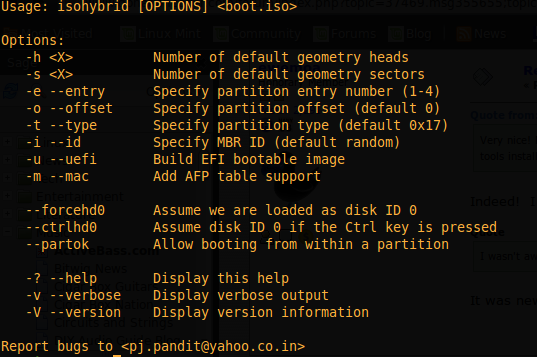
A further option appears to be to use Knoppix -- version 7.2 appears to come with a relatively recent version of VirtualBox (something in the 4.2.x series).
FWIW, I tried the following instructions for getting Knoppix on a USB stick with some success:
http://www.wgdd.de/2013/08/create-knoppix-usb-boot-stick-from.html
Very nice! Normally I'd just use USB Image Writer or something similar. But it's always good to know a command line way to do something just in case the PC you're using doesn't have all you favorite tools installed.
I wasn't aware of that isohybrid command.
FWIW, on Gentoo I found it in the syslinux package.

1. Boot from iso-on-USB (dd-ed to USB memory)I've never seen it, but somebody ought to host a forum just for installs with nothing installed and devoted to one job as you proposed. I knew what I was getting into, and I've run into a full dead-end in my startx, but I've learned a TON, and recalled a TON. I hadn't done much with linux command-line in about five years, and never had enough time to do very much with it anyway. At first I couldn't do without sudo, and found I wasn't on the internet when I went to install it. I'm very proud of my setting ifconfig (a new set of commands for me) manually for all the specs and getting eth0 up running on startup.
2. Run the text installer and at the tasksel step unselect everything
3. After rebooting, install the sudo package and add the non-root user to the sudo group (then relogin)
4. Tell apt-get to install the virtualbox and xinit packages and accept the installation of the additional packages
5. Add the non-root user to the vboxusers group
6. Reboot for the VirtualBox modules to load (modprobe might work instead)
7. Log in and use startx to start X
8. From an xterm, start VirtualBox
9. Test run a guest OS
For imaging, Clonezilla and DD are what I use. DD mostly if it's just for me. Clonezilla for clients and anybody else. Clonezilla can also install GRUB so that's a big plus when performing a disaster recovery. Clonezilla also has some nice features for use with Windows-based systems. (Check out their website for details.) And it's now UEFI (or 'URFU' as I like to think of it) bootable. So if you straddle multiple OSes, having one tool to learn and standardize on is really nice too.
...steps a shot with the debian net-install.
I knew what I was getting into, and I've run into a full dead-end in my startx, but I've learned a TON, and recalled a TON. I hadn't done much with linux command-line in about five years, and never had enough time to do very much with it anyway. At first I couldn't do without sudo, and found I wasn't on the internet when I went to install it. I'm very proud of my setting ifconfig (a new set of commands for me) manually for all the specs and getting eth0 up running on startup.
I get (what I imagine are) similar feelings when trying to follow the instructions to install Gentoo or Arch!

He he -- I'm about to try to use them again -- nice to have notes to consultThat must be contagious. This round I did the net-install of Debian non-advanced, and then did without sudo. I had to install gdm3 for my startx, but now all is working otherwise perfectly from your steps. I ruined my first try by uninstalling too much after adding the Desktop Environment. My startx would freeze with only a cursor on a black screen, but I wasn't going to tackle those forums. I'd almost be better off attempting Gentoo. Thanks ewemao.
 @Tuxman Thanks for the head's up!
For me, at least the Arch install was mainstream enough that it felt comprehensible and somewhat familiar. (The excellent docs helped a lot too!)
A stage-3 Gentoo install, on the other hand, will probably always look and feel weird to me.
In the meantime don't neglect to create a disk image backup of the install. It will easily fit on a DVD or a modest USB key too.
I ruined my first try by uninstalling too much after adding the Desktop Environment.
Original address: https://www.donationcoder.com/forum/index.php?topic=37469.0