DonationCoder.com forum
 
Read-only archive. This is a static copy of the DonationCoder.com forum. Reading and searching work as before; logging in, posting and private messages do not.
Archive of 2026-10-21 · About this archive · Main site

Author Topic: For monitor resolution above 1920x1080, you need a DUAL LINK DVI cable  (Read 31,328 times)

mouser

  • First Author
  • Administrator
  • Joined in 2005
  • *****
  • Posts: 40,931
    • Gathering Badge
    • Plugin Coding Medal
    • Participated in NANY Challenge Seventeen Times
    • Cody Award
    • Coding Snacks
    • Volunteers/Staff
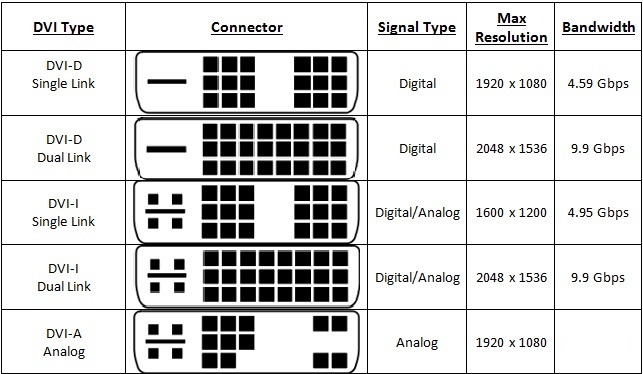
Just a tip for others like me who have managed to live under a rock for the last couple of years, that if you are using a monitor with resolution higher than 1920x1080, you need to make sure you have DUAL LINK DVI cables (not single-link DVI cables).

I mistakenly connected a higher resolution monitor with a SINGLE LINK DVI cable today and the image was all degraded, but there was no error or message telling me why.

For more: http://hexus.net/tech/tech-explained/displays/4455-dvi-single-dual-link/

Fishous

  • Participant
  • Joined in 2013
  • *
  • Posts: 4
Well, not exactly.

Single Link DVI is limited to 1920x1200 @ 60 Hz.

Dual Link DVI can support up to 2560x1600 @ 60 Hz.

With a lowering of refresh rate, you can go higher.

Future proof yourself and only buy dual link DVI cables.
Mike Dixon
Software Developer

mouser

  • First Author
  • Administrator
  • Joined in 2005
  • *****
  • Posts: 40,931
    • Gathering Badge
    • Plugin Coding Medal
    • Participated in NANY Challenge Seventeen Times
    • Cody Award
    • Coding Snacks
    • Volunteers/Staff
thanks for the clarification fishous.

Stoic Joker

  • Honorary Member
  • Joined in 2008
  • **
  • Posts: 6,652
    • Cody Award
    • Participated in NANY Challenge Five Times
Another thing to watch for is the DVI-I vs. DVI-D distinction. DVI-I has the 4 pin analog signal necessary for conversion to VGA, while DVI-D does not.

DVI-I vs. D.jpg

mouser

  • First Author
  • Administrator
  • Joined in 2005
  • *****
  • Posts: 40,931
    • Gathering Badge
    • Plugin Coding Medal
    • Participated in NANY Challenge Seventeen Times
    • Cody Award
    • Coding Snacks
    • Volunteers/Staff
now i remember why my brain shut down when trying to figure out what DVI cable to buy..

Innuendo

  • Charter Member
  • Joined in 2005
  • ***
  • Posts: 2,266
Newer is better...right?  ;)

Deozaan

  • Charter Member
  • Joined in 2006
  • ***
  • Posts: 9,827
    • Participated in NANY Challenge Eight Times
    • Cody Award
Just go for HDMI cables. That will end all your problems as long as you remember to get the HDMI 2.0+ cables! :P

Original address: https://www.donationcoder.com/forum/index.php?topic=37326.0