DonationCoder.com forum
 
Read-only archive. This is a static copy of the DonationCoder.com forum. Reading and searching work as before; logging in, posting and private messages do not.
Archive of 2026-10-21 · About this archive · Main site

Last post Author Topic: create a new entry in the main contextual menu : a new txt file  (Read 31,749 times)

Contro

  • Supporting Member
  • Joined in 2007
  • **
  • Posts: 3,947
I don't remember well.
I think sometime I make this with windows xp.
Now is for windows 7
How can I do this ?

Best Regards
:-*

4wd

  • Pedantic Old Bastard
  • Supporting Member
  • Joined in 2006
  • **
  • Posts: 5,652
    • Coding Snacks
Re: create a new entry in the main contextual menu : a new txt file
« Reply #1 on: February 05, 2014, 12:56 AM »
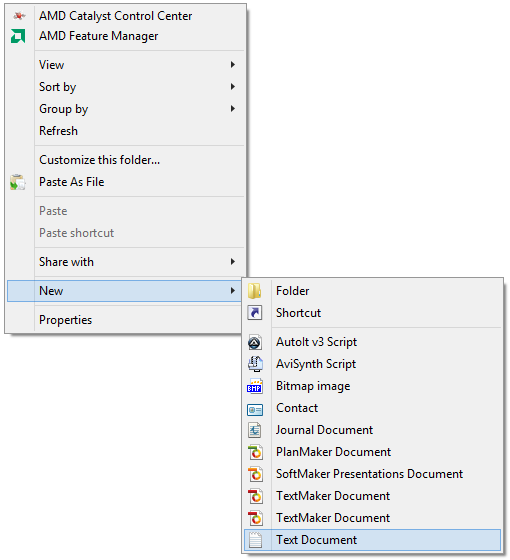
It's there by default:

2014-02-05 11_55_05.png
"I will not follow where the path may lead, but I will go where there is no path, and I will leave a trail." - Muriel Strode, 1903

Contro

  • Supporting Member
  • Joined in 2007
  • **
  • Posts: 3,947
Re: create a new entry in the main contextual menu : a new txt file
« Reply #2 on: February 05, 2014, 01:30 AM »
;D
Yeahhhhh
By I would like under new by command, and mantain in the submenu optional.....
Is it possible
I think it is possible
:-*

Contro

  • Supporting Member
  • Joined in 2007
  • **
  • Posts: 3,947
Re: create a new entry in the main contextual menu : a new txt file
« Reply #3 on: February 07, 2014, 02:00 AM »
Is not possible ?
I remember it was not possible in windows xp, but I think is possible in seven ......

:-[

Contro

  • Supporting Member
  • Joined in 2007
  • **
  • Posts: 3,947
Re: create a new entry in the main contextual menu : a new txt file
« Reply #4 on: February 07, 2014, 02:02 AM »
Finally I found the post . It seemed to me that I did this question before :

http://www.donationcoder.com/forum/index.php?topic=31439

I continue investigating

mouser

  • First Author
  • Administrator
  • Joined in 2005
  • *****
  • Posts: 40,931
    • Gathering Badge
    • Plugin Coding Medal
    • Participated in NANY Challenge Seventeen Times
    • Cody Award
    • Coding Snacks
    • Volunteers/Staff
Re: create a new entry in the main contextual menu : a new txt file
« Reply #5 on: February 07, 2014, 05:20 PM »
Check out also FileMenuTools: http://www.lopesoft.com/en/filemenutools

Curt

  • Supporting Member
  • Joined in 2006
  • **
  • Posts: 7,565
Re: create a new entry in the main contextual menu : a new txt file
« Reply #6 on: February 07, 2014, 11:01 PM »
Finally I found the post . It seemed to me that I did this question before : http://www.donationcoder.com/forum/index.php?topic=31439

-back then the answer was Notepad++.
What has changed, if Notepad++ no longer is the answer?

Contro

  • Supporting Member
  • Joined in 2007
  • **
  • Posts: 3,947
Re: create a new entry in the main contextual menu : a new txt file
« Reply #7 on: February 08, 2014, 12:38 AM »
Check out also FileMenuTools: http://www.lopesoft.com/en/filemenutools


I think is the past i renounce to this target because using a more powerful script to create even list of txt files in a folder with the hotkey win+y.
I am using filemenu tools for years, now in seven.

Contro

  • Supporting Member
  • Joined in 2007
  • **
  • Posts: 3,947
Re: create a new entry in the main contextual menu : a new txt file
« Reply #8 on: February 08, 2014, 12:41 AM »
Finally I found the post . It seemed to me that I did this question before : http://www.donationcoder.com/forum/index.php?topic=31439

-back then the answer was Notepad++.
What has changed, if Notepad++ no longer is the answer?

I don't understand what you are trying to tell me. But I have to understand.
At the present moment when i open a txt file does with pspad. It's the default. But I use notepad++ too.

Contro

  • Supporting Member
  • Joined in 2007
  • **
  • Posts: 3,947
Re: create a new entry in the main contextual menu : a new txt file
« Reply #9 on: February 08, 2014, 12:47 AM »
I am trying with filemenu tools.
Seems easy, but I don't know how to put in the parameters to create a new empty notepad++
I only open the program.
How can i do that ?
:-*

P.D. I will explore the submenus, specially the new submenu for ideas...... meanwhile....
:P

Contro

  • Supporting Member
  • Joined in 2007
  • **
  • Posts: 3,947
Re: create a new entry in the main contextual menu : a new txt file
« Reply #10 on: February 08, 2014, 12:52 AM »
really i am lost. I don't discover exactly the structure or operation way or configuration of the program. I don't know the structure indeed. I don't know how to locate any icon present in the contextual menu.

Except those properly from lopesoft......

« Last Edit: February 08, 2014, 01:09 AM by Contro »

Contro

  • Supporting Member
  • Joined in 2007
  • **
  • Posts: 3,947
Re: create a new entry in the main contextual menu : a new txt file
« Reply #11 on: February 08, 2014, 01:10 AM »
I think i need the line from the command line to create an empty notepad++ txt file
:-*

Running to try

Contro

  • Supporting Member
  • Joined in 2007
  • **
  • Posts: 3,947
Re: create a new entry in the main contextual menu : a new txt file
« Reply #12 on: February 13, 2014, 01:48 AM »
I am here after a little virus on my pc, but I haven't discovered how to add that entry.

Some help '

:-*

Contro

  • Supporting Member
  • Joined in 2007
  • **
  • Posts: 3,947
Re: create a new entry in the main contextual menu : a new txt file
« Reply #13 on: February 16, 2014, 01:26 AM »
Ejem.
I need a little "rempujoncito" with this post to create the option in the contextual menu
How can i finally create ?
;D

Contro

  • Supporting Member
  • Joined in 2007
  • **
  • Posts: 3,947
Re: create a new entry in the main contextual menu : a new txt file
« Reply #14 on: February 17, 2014, 07:56 PM »
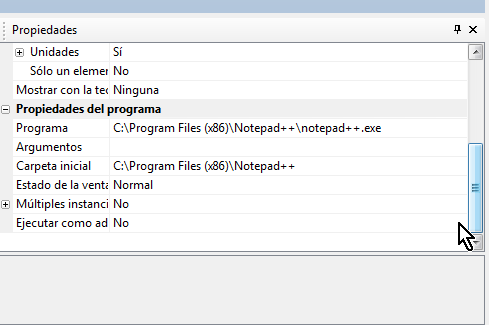
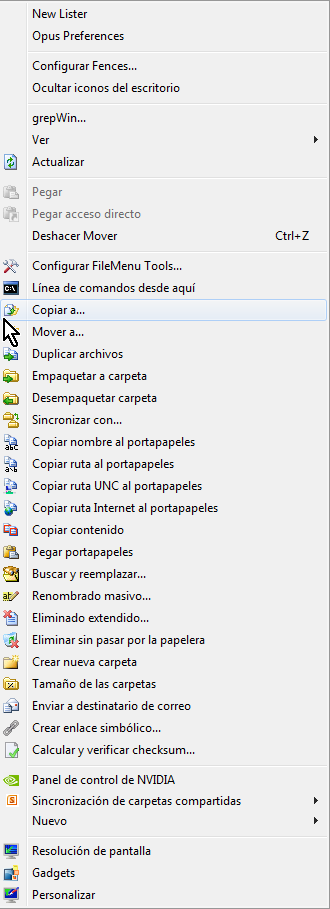
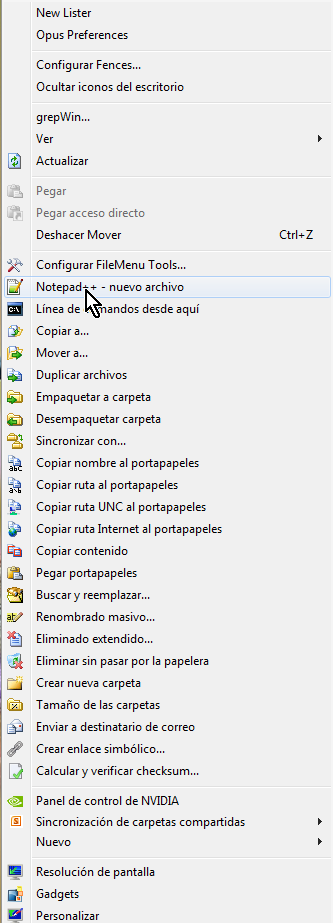
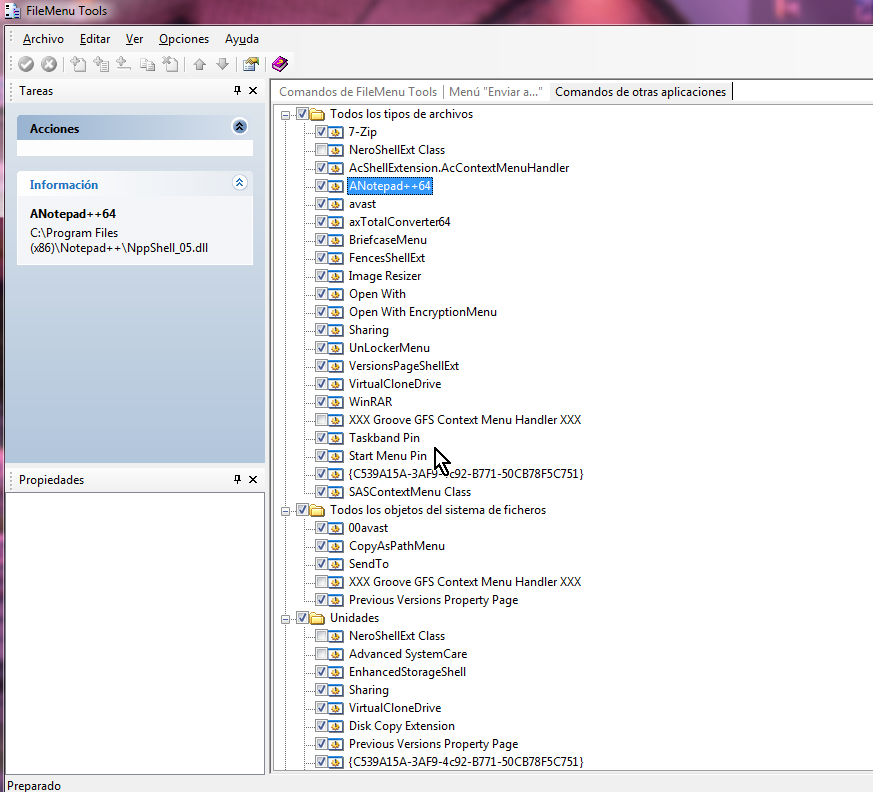
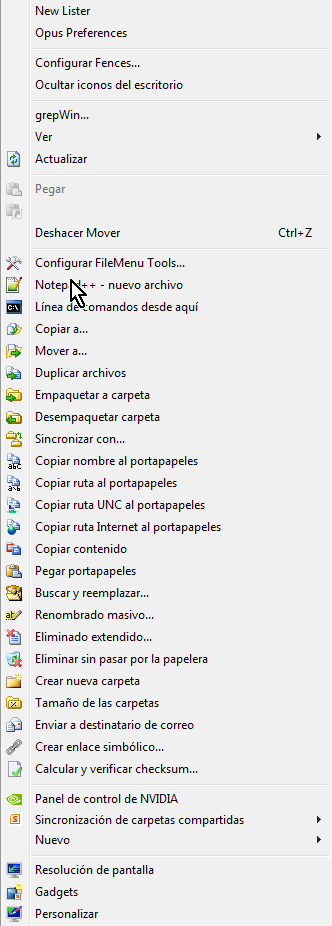
I put two screenshots of my attemps until this moment :

How can i propose a new empty txt file ?
what i am doing is launche notepad++  .......

:-*

Contro

  • Supporting Member
  • Joined in 2007
  • **
  • Posts: 3,947
Re: create a new entry in the main contextual menu : a new txt file
« Reply #15 on: February 19, 2014, 12:29 PM »
Probably is a question of arguments in the corrresponding line, but how can i do that.
It's like propose a command from the command line i think
Best Regards

Contro

  • Supporting Member
  • Joined in 2007
  • **
  • Posts: 3,947
Re: create a new entry in the main contextual menu : a new txt file
« Reply #16 on: February 21, 2014, 12:23 PM »
Is the main menu also a folder ?
likes the sendto folder ? C:\Users\JOSE\AppData\Roaming\Microsoft\Windows\SendTo
Can i do something ?
:-*

Curt

  • Supporting Member
  • Joined in 2006
  • **
  • Posts: 7,565
Re: create a new entry in the main contextual menu : a new txt file
« Reply #17 on: February 21, 2014, 04:26 PM »
I forgot the question.

« Last Edit: February 21, 2014, 11:49 PM by Curt »

MilesAhead

  • Supporting Member
  • Joined in 2009
  • **
  • Posts: 7,736
    • Coding Snacks
Re: create a new entry in the main contextual menu : a new txt file
« Reply #18 on: February 21, 2014, 09:33 PM »
http://www.techrepublic.com/article/techrepublic-tutorial-add-file-types-to-windows-new-command-menu/

At least in AutoIt and AHK they use the name Template.au3 or .ahk.  I think you can do the same with a text file.  Have it start with some default text.  But I think you have to put the name of the template file in the reg key.  For example C:\Windows\ShellNew\Template.txt

I tried just creating that file with some text in it.  Didn't work.  So it must need the registry key.

tomos

  • Charter Member
  • Joined in 2006
  • ***
  • Posts: 11,970
    • Gathering Badge
    • Participated in NANY Challenge Once
Re: create a new entry in the main contextual menu : a new txt file
« Reply #19 on: February 21, 2014, 09:47 PM »
Did you get Dopus that time Contro (I know you gave it a trial), or are you using Windows Explorer?
(I ask cause, AFAIK, it's easy to add to Dopus context menu)
Tom

Contro

  • Supporting Member
  • Joined in 2007
  • **
  • Posts: 3,947
Re: create a new entry in the main contextual menu : a new txt file
« Reply #20 on: February 23, 2014, 02:01 AM »
I am using windows explorer tomos. I am very used to addons collected along the years and adapted when change system.

At the present moment i prefer to try with a explorer related tool.

continue trying with lopesoft.

Do you know if exist a forum of this tool ?

Best Regards
:-*

Contro

  • Supporting Member
  • Joined in 2007
  • **
  • Posts: 3,947
Re: create a new entry in the main contextual menu : a new txt file
« Reply #21 on: February 23, 2014, 02:03 AM »
It must be easy. Some day i will get.
I note down this post to not forget.
:P

lanux128

  • Global Moderator
  • Joined in 2005
  • *****
  • Posts: 6,277
    • Coding Snacks
    • Volunteers/Staff
    • Gathering Badge
    • Participated in NANY Challenge Once
    • Linux User
Re: create a new entry in the main contextual menu : a new txt file
« Reply #22 on: February 23, 2014, 02:28 AM »
have you tried running this command via a batch file? fsutil file [createnew]

• https://www.microsoft.com/resources/documentation/windows/xp/all/proddocs/en-us/fsutil.mspx

MilesAhead

  • Supporting Member
  • Joined in 2009
  • **
  • Posts: 7,736
    • Coding Snacks
Re: create a new entry in the main contextual menu : a new txt file
« Reply #23 on: February 23, 2014, 01:54 PM »
Ok.  I already had Text File in New menu.  Here's what I did to get a template file.

This key
HKEY_LOCAL_MACHINE\SOFTWARE\Classes\.txt\ShellNew

I added a new string named FileName and for value Template.txt


In the folder C:\Windows\ShellNew I made a file named Template.txt.  The contents is:
This is a text file template.

Now if I right click the desktop or in a folder, select New text document, name it, then double click, it has the text from the template.

One thing I notice I can't do it directly under C:\

It has to be in a folder.  The permissions situation with W8 seems even worse than W7 now.  Every move is hamstrung. I can't even save a file from Editpad directly into C:\Windows\ShellNew.  I have to save it somewhere else, then drag it.  Really asinine.

Anyway, I hope the template text default was what you were interested in.  If not then, Never Mind.  :)

Contro

  • Supporting Member
  • Joined in 2007
  • **
  • Posts: 3,947
Re: create a new entry in the main contextual menu : a new txt file
« Reply #24 on: February 23, 2014, 02:17 PM »
have you tried running this command via a batch file? fsutil file [createnew]

• https://www.microsoft.com/resources/documentation/windows/xp/all/proddocs/en-us/fsutil.mspx
Running to try inmediately.
Best Regards
:-*

Original address: https://www.donationcoder.com/forum/index.php?topic=37166.0