DonationCoder.com forum
 
Read-only archive. This is a static copy of the DonationCoder.com forum. Reading and searching work as before; logging in, posting and private messages do not.
Archive of 2026-10-21 · About this archive · Main site

Author Topic: Change default browser script  (Read 11,791 times)

Contro

  • Supporting Member
  • Joined in 2007
  • **
  • Posts: 3,947
Change default browser script
« on: February 01, 2014, 04:19 PM »
I need the code to change the default browser.
By example

IE-FF-chrome-Safari, etc.

I supposed that run a web with a browser different to the default is :
If the default browser is : IE
and I want to launch a web with FF

Run C:\Program Files (x86)\Mozilla Firefox\firefox.exe https://www.google.com
or perhaps
run "C:\Program Files (x86)\Mozilla Firefox\firefox.exe" http://www.google.com

but my target is run websites from a txt file where the path to the browser isn't and don't know the browser finally is on.

:-*

x16wda

  • what am I doing in this handbasket?
  • Supporting Member
  • Joined in 2007
  • **
  • Posts: 888
    • Participated in NANY Challenge Once
Re: Change default browser script
« Reply #1 on: February 01, 2014, 04:33 PM »
That could be handy... We already have Open Link in New Tab and Open Link in New Window, how about Open Link in New Browser?
vi vi vi - editor of the beast

skwire

  • I eat Coding Snacks for breakfast...
  • Global Moderator
  • Joined in 2005
  • *****
  • Posts: 5,297
    • Participated in NANY Challenge Seventeen Times
    • Coding Snacks
    • Superboy Coder
    • Cody Award
    • Volunteers/Staff
    • Gathering Badge
Re: Change default browser script
« Reply #2 on: February 01, 2014, 05:05 PM »
but my target is run websites from a txt file where the path to the browser isn't and don't know the browser finally is on.

You can do what you want with a simple batch (.bat) file.

Code
"C:\Program Files (x86)\Mozilla Firefox\firefox.exe" http://www.google.com
"C:\Program Files (x86)\Mozilla Firefox\firefox.exe" http://www.bing.com
"C:\Program Files (x86)\Mozilla Firefox\firefox.exe" http://www.cnn.com
...

Contro

  • Supporting Member
  • Joined in 2007
  • **
  • Posts: 3,947
Re: Change default browser script
« Reply #3 on: February 01, 2014, 05:06 PM »
I have one script to open in differents tabs for IE .

Exist the equivalent for FF ?

Code
#NoEnv  ; Recommended for performance and compatibility with future AutoHotkey releases.
#Warn  ; Recommended for catching common errors.pongo ; inicial por error al compilar sobre esta línea.
SendMode Input  ; Recommended for new scripts due to its superior speed and reliability.
SetWorkingDir %A_ScriptDir%  ; Ensures a consistent starting directory.
URL = http://www.google.com/search?q= 
navOpenInNewWindow = 1 
navOpenInNewTab = 2048 
navOpenInBackgroundTab = 4096 
navOpenNewForegroundTab = 65536 

FileSelectFile, filepath 
wb := ComObjCreate("InternetExplorer.Application") ; create IE 
wb.Visible := true ; 'false' to not show IE 
loop, Read, %filepath% 
{ 
if (A_index = 1) 
  	wb.Navigate2(URL . A_LoopReadLine, navOpenNewForegroundTab) ; Navigate 
else 
	wb.Navigate2(URL . A_LoopReadLine, navOpenInBackgroundTab) ; Navigate 
sleep 100 
} 
return

Contro

  • Supporting Member
  • Joined in 2007
  • **
  • Posts: 3,947
Re: Change default browser script
« Reply #4 on: February 01, 2014, 05:07 PM »
but my target is run websites from a txt file where the path to the browser isn't and don't know the browser finally is on.

You can do what you want with a simple batch (.bat) file.

Code
"C:\Program Files (x86)\Mozilla Firefox\firefox.exe" http://www.google.com
"C:\Program Files (x86)\Mozilla Firefox\firefox.exe" http://www.bing.com
"C:\Program Files (x86)\Mozilla Firefox\firefox.exe" http://www.cnn.com
...

I would like to learn to change the default browser with a script .........

Contro

  • Supporting Member
  • Joined in 2007
  • **
  • Posts: 3,947
Re: Change default browser script
« Reply #5 on: February 01, 2014, 05:08 PM »
I would like for this occasion only AHK scripting codes
:-*

Contro

  • Supporting Member
  • Joined in 2007
  • **
  • Posts: 3,947
Re: Change default browser script
« Reply #6 on: February 01, 2014, 05:16 PM »
I am searching.

"The methods for changing the default browser vary across browsers, operating systems, and device types."

But perhaps these methods are base interacting with the browsers and not with the windows registry.....

How can i do that ?

:-*

Contro

  • Supporting Member
  • Joined in 2007
  • **
  • Posts: 3,947
Re: Change default browser script
« Reply #7 on: February 01, 2014, 05:24 PM »
Looking working this :

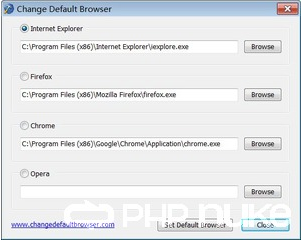
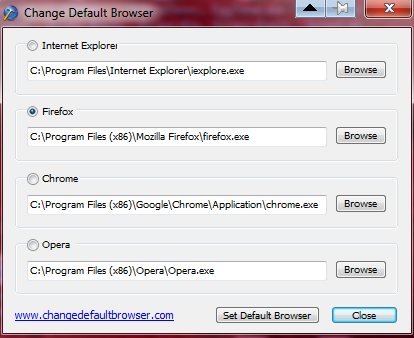
Change Default Browser 1.0

Contro

  • Supporting Member
  • Joined in 2007
  • **
  • Posts: 3,947
Re: Change default browser script
« Reply #8 on: February 01, 2014, 05:36 PM »
I have installed from
http://www.changedefaultbrowser.com/

Recognises the browsers i have installed. But not the portables ones.
And only four browsers predefined obvously

:-* :-\

Contro

  • Supporting Member
  • Joined in 2007
  • **
  • Posts: 3,947
Re: Change default browser script
« Reply #9 on: February 01, 2014, 05:37 PM »
Nevertheless with this script we can't automate the change. Only make faster the change.
:P

skwire

  • I eat Coding Snacks for breakfast...
  • Global Moderator
  • Joined in 2005
  • *****
  • Posts: 5,297
    • Participated in NANY Challenge Seventeen Times
    • Coding Snacks
    • Superboy Coder
    • Cody Award
    • Volunteers/Staff
    • Gathering Badge
Re: Change default browser script
« Reply #10 on: February 01, 2014, 05:40 PM »
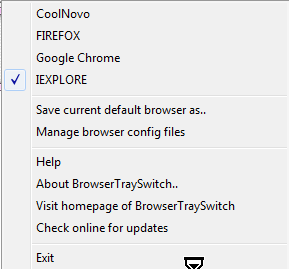
There is also mouser's own BrowserTraySwitch:

https://www.donationcoder.com/Software/Mouser/browsertray/index.html

MilesAhead

  • Supporting Member
  • Joined in 2009
  • **
  • Posts: 7,736
    • Coding Snacks
Re: Change default browser script
« Reply #11 on: February 01, 2014, 09:25 PM »
You can get some files pointed to a portable browser by using a dummy html file.  I have one in BrowserBunch just to call FindExecutable() to see which browser opens .html web pages. (Right click, open with, then select the exe file using file open dialog.)

I think PortableApps may have a "hack" for making a portable browser the default.  But it's not smooth. Once it is in the Registry then it's not totally "portable" anymore.

Contro

  • Supporting Member
  • Joined in 2007
  • **
  • Posts: 3,947
Re: Change default browser script
« Reply #12 on: February 01, 2014, 09:46 PM »
There is also mouser's own BrowserTraySwitch:

https://www.donationcoder.com/Software/Mouser/browsertray/index.html

Mouser !!!!!!!!!!!!!. Running to try
:-*

Contro

  • Supporting Member
  • Joined in 2007
  • **
  • Posts: 3,947
Re: Change default browser script
« Reply #13 on: February 01, 2014, 11:17 PM »
Súper !!!!!!. Dinamically configurable.
Obviously we can't configurate portable Torch as the default browser.....
But for a "rara avis" the portable coolnovo seems well configured. ....

Perhaps is only a Chrome...
I have opera as portable and not portable installation.
A great program !!!!!!

the configurations files are really editable with notepad
FIREFOX.btsregfile

and contains a lot of codes from the windows registry or to me seem so.
And have a manual configuration mode from the command line.....

:P

Original address: https://www.donationcoder.com/forum/index.php?topic=37127.0