DonationCoder.com forum
 
Read-only archive. This is a static copy of the DonationCoder.com forum. Reading and searching work as before; logging in, posting and private messages do not.
Archive of 2026-10-21 · About this archive · Main site

Last post Author Topic: Automate options in windows 7  (Read 25,786 times)

Contro

  • Supporting Member
  • Joined in 2007
  • **
  • Posts: 3,947
Automate options in windows 7
« on: January 26, 2014, 02:39 AM »
Automate options in windows 7

I would like to access quickly to folder options in the windows explorer.

Tools-Folder Options-View

How can I do that with a script recorder or a designed script ?

Best Regards

skwire

  • I eat Coding Snacks for breakfast...
  • Global Moderator
  • Joined in 2005
  • *****
  • Posts: 5,297
    • Participated in NANY Challenge Seventeen Times
    • Coding Snacks
    • Superboy Coder
    • Cody Award
    • Volunteers/Staff
    • Gathering Badge
Re: Automate options in windows 7
« Reply #1 on: January 26, 2014, 03:53 AM »
Bring up the Control Panel folder and then simply drag the "Folder Options" link to your Desktop (or wherever).

Contro

  • Supporting Member
  • Joined in 2007
  • **
  • Posts: 3,947
Re: Automate options in windows 7
« Reply #2 on: January 26, 2014, 03:55 AM »
Bring up the Control Panel folder and then simply drag the "Folder Options" link to your Desktop (or wherever).
Running to try.
Best Regards

Vurbal

  • Mostly harmless
  • Supporting Member
  • Joined in 2012
  • **
  • Posts: 653
    • Writer
Re: Automate options in windows 7
« Reply #3 on: January 26, 2014, 03:57 AM »
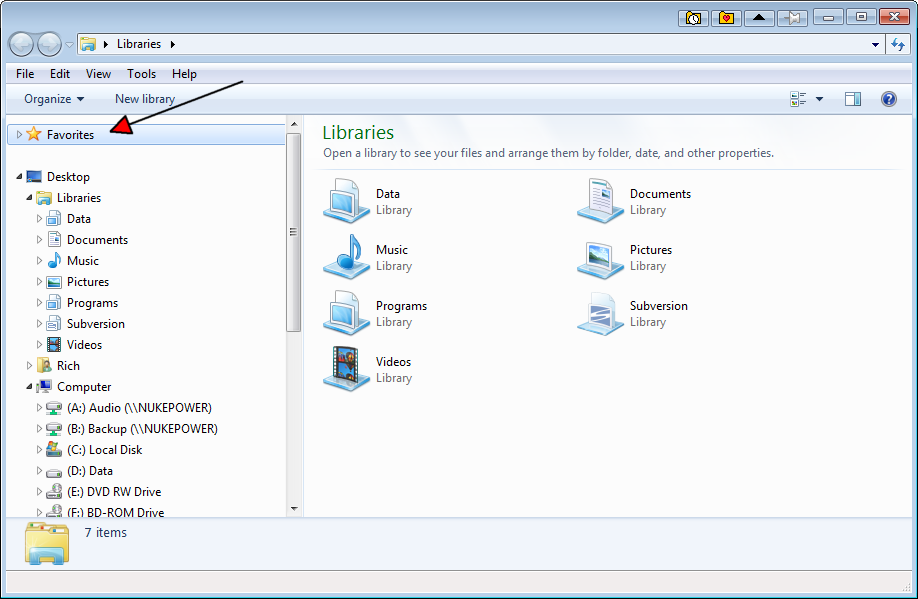
Alternatively of you want to access it quickly from within Windows Explorer you could drag it to the Favorites list at the top of the tree pane.
I learned to say the pledge of allegiance
Before they beat me bloody down at the station
They haven't got a word out of me since
I got a billion years probation
- The MC5

Follow the path of the unsafe, independent thinker. Expose your ideas to the danger of controversy. Speak your mind and fear less the label of ''crackpot'' than the stigma of conformity.
- Thomas J. Watson, Sr

It's not rocket surgery.
- Me


I recommend reading through my Bio before responding to any of my posts. It could save both of us a lot of time and frustration.

Contro

  • Supporting Member
  • Joined in 2007
  • **
  • Posts: 3,947
Re: Automate options in windows 7
« Reply #4 on: January 26, 2014, 04:00 AM »
Done, but I don't see the path to that option to put in Goldmine as a link.

How can i do that ?

:-*

Contro

  • Supporting Member
  • Joined in 2007
  • **
  • Posts: 3,947
Re: Automate options in windows 7
« Reply #5 on: January 26, 2014, 04:01 AM »
Alternatively of you want to access it quickly from within Windows Explorer you could drag it to the Favorites list at the top of the tree pane.

Running to try. I am using FileBox eXtender for favorite folders.
:P

sorry : I don't see the favorites list at the top of the tree pane. Where is it ?
Best Regards
:-[

Contro

  • Supporting Member
  • Joined in 2007
  • **
  • Posts: 3,947
Re: Automate options in windows 7
« Reply #6 on: January 26, 2014, 04:22 AM »
;D

I tried this :
C:\Users\JOSE\Desktop\AccesosW7\AD SISTEMA\Opciones de carpeta - Acceso directo.lnk

good results in my case

In english :

c:\users\<USER>\Desktop\AccesosW7\AD Sistema\  is a folder I create for this purpose.
I only copy the direct links and then I can put the link in Goldmine


Best Regards

Vurbal

  • Mostly harmless
  • Supporting Member
  • Joined in 2012
  • **
  • Posts: 653
    • Writer
Re: Automate options in windows 7
« Reply #7 on: January 26, 2014, 04:50 AM »
Alternatively of you want to access it quickly from within Windows Explorer you could drag it to the Favorites list at the top of the tree pane.

Running to try. I am using FileBox eXtender for favorite folders.
:P

sorry : I don't see the favorites list at the top of the tree pane. Where is it ?
Best Regards
:-[

Should be right at the top.
WindowsExploderFavorites.png

And I use FileBox Extender for that too - plus I get a lot of mileage from pinning and rolling up windows. I've thought about getting a commercial program for it (don't remember the name) but the minor glitches aren't quite annoying enough for that.
I learned to say the pledge of allegiance
Before they beat me bloody down at the station
They haven't got a word out of me since
I got a billion years probation
- The MC5

Follow the path of the unsafe, independent thinker. Expose your ideas to the danger of controversy. Speak your mind and fear less the label of ''crackpot'' than the stigma of conformity.
- Thomas J. Watson, Sr

It's not rocket surgery.
- Me


I recommend reading through my Bio before responding to any of my posts. It could save both of us a lot of time and frustration.

Contro

  • Supporting Member
  • Joined in 2007
  • **
  • Posts: 3,947
Re: Automate options in windows 7
« Reply #8 on: January 26, 2014, 05:06 AM »
Understood
:)

Best Regards Vurbal

Josh

  • Charter Honorary Member
  • Joined in 2005
  • ***
  • Posts: 3,411
    • Gathering Badge
    • Official Forum Clown
    • Coding Snacks
    • Plugin Coding Medal
    • Volunteers/Staff
    • Military Service Badge - US Army
    • Furry Fandom Badge - Furry Fandom
    • Linux User
Re: Automate options in windows 7
« Reply #9 on: January 26, 2014, 05:15 AM »
Make a batch file to call: RunDll32.exe shell32.dll,Options_RunDLL 7
Strength in Knowledge

Contro

  • Supporting Member
  • Joined in 2007
  • **
  • Posts: 3,947
Re: Automate options in windows 7
« Reply #10 on: January 26, 2014, 05:52 AM »
Make a batch file to call: RunDll32.exe shell32.dll,Options_RunDLL 7

How can i do this ?

Josh

  • Charter Honorary Member
  • Joined in 2005
  • ***
  • Posts: 3,411
    • Gathering Badge
    • Official Forum Clown
    • Coding Snacks
    • Plugin Coding Medal
    • Volunteers/Staff
    • Military Service Badge - US Army
    • Furry Fandom Badge - Furry Fandom
    • Linux User
Re: Automate options in windows 7
« Reply #11 on: January 26, 2014, 06:04 AM »
Rename the attached file to temp.bat instead of temp.bat.txt. Then all you have to do is double click it :)
Strength in Knowledge

Contro

  • Supporting Member
  • Joined in 2007
  • **
  • Posts: 3,947
Re: Automate options in windows 7
« Reply #12 on: January 26, 2014, 06:10 AM »
Rename the attached file to temp.bat instead of temp.bat.txt. Then all you have to do is double click it :)

Running to try !!!!
:-*

Contro

  • Supporting Member
  • Joined in 2007
  • **
  • Posts: 3,947
Re: Automate options in windows 7
« Reply #13 on: January 26, 2014, 06:13 AM »
It workssssss !!!!!!!!!!!!!!!!!! it's worksssssss !!!!!!!!!!!!!!!!

:-*

Josh

  • Charter Honorary Member
  • Joined in 2005
  • ***
  • Posts: 3,411
    • Gathering Badge
    • Official Forum Clown
    • Coding Snacks
    • Plugin Coding Medal
    • Volunteers/Staff
    • Military Service Badge - US Army
    • Furry Fandom Badge - Furry Fandom
    • Linux User
Re: Automate options in windows 7
« Reply #14 on: January 26, 2014, 03:48 PM »
Happy to do it!
Strength in Knowledge

Contro

  • Supporting Member
  • Joined in 2007
  • **
  • Posts: 3,947
Re: Automate options in windows 7
« Reply #15 on: January 26, 2014, 04:58 PM »
Happy to do it!

Josh your indication gives me the possibility to go further that with the icon of an election.
Where can I find simmilar commands for this purpose ?

Best Regards
:-*

Josh

  • Charter Honorary Member
  • Joined in 2005
  • ***
  • Posts: 3,411
    • Gathering Badge
    • Official Forum Clown
    • Coding Snacks
    • Plugin Coding Medal
    • Volunteers/Staff
    • Military Service Badge - US Army
    • Furry Fandom Badge - Furry Fandom
    • Linux User
Re: Automate options in windows 7
« Reply #16 on: January 26, 2014, 06:08 PM »
http://www.thewindowsclub.com/rundll32-shortcut-commands-windows

That is just a few of them. The sad part is, I have most of these memorized :-/
Strength in Knowledge

Contro

  • Supporting Member
  • Joined in 2007
  • **
  • Posts: 3,947
Re: Automate options in windows 7
« Reply #17 on: January 26, 2014, 06:14 PM »
http://www.thewindowsclub.com/rundll32-shortcut-commands-windows

That is just a few of them. The sad part is, I have most of these memorized :-/

The sad part ?????. You are a genious !!!!!!!!!!!!!!!!
Running to learn
:P

Contro

  • Supporting Member
  • Joined in 2007
  • **
  • Posts: 3,947
Re: Automate options in windows 7
« Reply #18 on: January 26, 2014, 06:38 PM »
Thanks you very much. I am organizing all the bat's files.
And I will try to memorize the more used frequently.

Best Regards
:-*

Josh

  • Charter Honorary Member
  • Joined in 2005
  • ***
  • Posts: 3,411
    • Gathering Badge
    • Official Forum Clown
    • Coding Snacks
    • Plugin Coding Medal
    • Volunteers/Staff
    • Military Service Badge - US Army
    • Furry Fandom Badge - Furry Fandom
    • Linux User
Re: Automate options in windows 7
« Reply #19 on: January 26, 2014, 06:53 PM »
I love scripting :) I had a menu back in my XP days that had a listing of all of the rundll32 commands I frequently used and let me press 1-40 to launch them :)
Strength in Knowledge

Contro

  • Supporting Member
  • Joined in 2007
  • **
  • Posts: 3,947
Re: Automate options in windows 7
« Reply #20 on: January 26, 2014, 07:19 PM »
I love scripting :) I had a menu back in my XP days that had a listing of all of the rundll32 commands I frequently used and let me press 1-40 to launch them :)

:-[
Perhaps do you know where is that splendid multilauncher ?
:P

Josh

  • Charter Honorary Member
  • Joined in 2005
  • ***
  • Posts: 3,411
    • Gathering Badge
    • Official Forum Clown
    • Coding Snacks
    • Plugin Coding Medal
    • Volunteers/Staff
    • Military Service Badge - US Army
    • Furry Fandom Badge - Furry Fandom
    • Linux User
Re: Automate options in windows 7
« Reply #21 on: January 26, 2014, 07:49 PM »
That is long gone, but I can generate a shell batch file, or perhaps skwire might generate a shell autohotkey script for you :) Autohotkey is the more modern way
Strength in Knowledge

Contro

  • Supporting Member
  • Joined in 2007
  • **
  • Posts: 3,947
Re: Automate options in windows 7
« Reply #22 on: January 26, 2014, 08:36 PM »
Don't worry. That's the idea.
I remember I have somewhere special and simple menus made with AHK or similar. Definible. That is the number or rows and files.
I have that menues created, but finally there are so many launchers tools that I finish with my beloved Goldmine.
but i will put the link.
I must have somewhere.
:-[

Vurbal

  • Mostly harmless
  • Supporting Member
  • Joined in 2012
  • **
  • Posts: 653
    • Writer
Re: Automate options in windows 7
« Reply #23 on: January 26, 2014, 08:42 PM »
I love scripting :) I had a menu back in my XP days that had a listing of all of the rundll32 commands I frequently used and let me press 1-40 to launch them :)

rundll32 can do some really cool things if you have the patience to find the right arguments - or at least the forethought to keep notes when you find them.
I learned to say the pledge of allegiance
Before they beat me bloody down at the station
They haven't got a word out of me since
I got a billion years probation
- The MC5

Follow the path of the unsafe, independent thinker. Expose your ideas to the danger of controversy. Speak your mind and fear less the label of ''crackpot'' than the stigma of conformity.
- Thomas J. Watson, Sr

It's not rocket surgery.
- Me


I recommend reading through my Bio before responding to any of my posts. It could save both of us a lot of time and frustration.

Contro

  • Supporting Member
  • Joined in 2007
  • **
  • Posts: 3,947
Re: Automate options in windows 7
« Reply #24 on: January 26, 2014, 08:56 PM »
;D
I found it !!!!!!!!!!!!!!!!!!!!!!!! incredible

Incredible !!!!!!!

its very simple.
Un pack the files in a folder
the launch.ini file is for configuration. You can configure so may rows and columns you need. I recommend not so many because is you have a tiny screen may have problems to locate the options.
You can edit the paths to be launched even from the executable file .ahk extension.
Yo you will need to have installed the wonderful autohotkey_L or similar. Exist a similar version for Autoit i have too. but at the past moment i selected the ahk option.

:-*

Original address: https://www.donationcoder.com/forum/index.php?topic=37083.0