
| Originally posted: | 2013-12-31 |
| Last updated | 2013-12-31 |
Basic Info
| App/Service Name | [attach] |


 Topic: WizNote (a PIM from China) - Mini-Review + Provisional User Forum (Read 116,217 times)


| Originally posted: | 2013-12-31 |
| Last updated | 2013-12-31 |
| App/Service Name | [attach] |
 WizNote - 00 logo.png
(4.2 KB, 83x85 - viewed 6505 times.)
WizNote - 00 logo.png
(4.2 KB, 83x85 - viewed 6505 times.)_page.png) WizNote - 01 Main opening (start) page.png
(366.5 KB, 1366x768 - viewed 6227 times.)
WizNote - 01 Main opening (start) page.png
(366.5 KB, 1366x768 - viewed 6227 times.)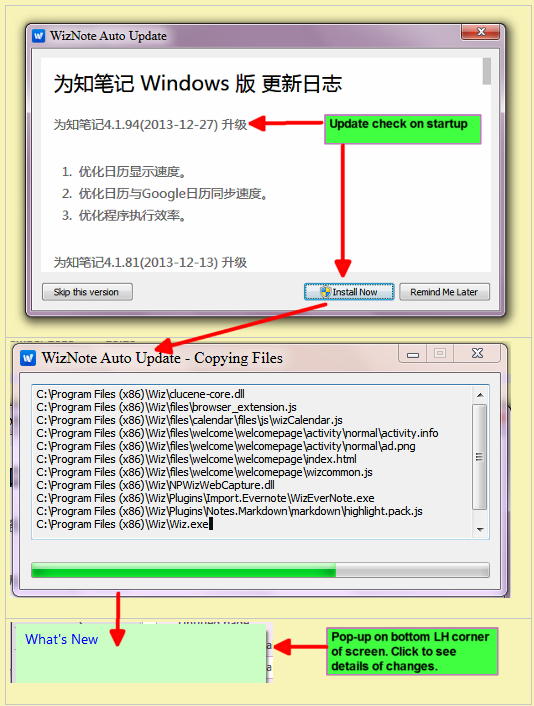 WizNote - 02 Update check + install.png
(148.3 KB, 534x706 - viewed 7930 times.)
WizNote - 02 Update check + install.png
(148.3 KB, 534x706 - viewed 7930 times.)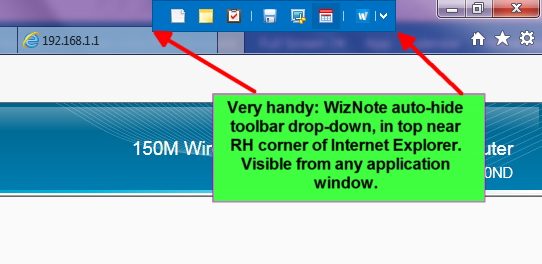 WizNote - 03 auto-hide toolbar deop-down.png
(94.5 KB, 542x264 - viewed 4293 times.)
WizNote - 03 auto-hide toolbar deop-down.png
(94.5 KB, 542x264 - viewed 4293 times.)


When you say "flexible Cloud-based and Client-based PIM" -- it looks like it is all cloud-based because it requires a login from the Windows client. Was hoping something else, but that's OK, it still may be good.No, it can run from your client and will do so quite happily if no Internet connection. Just no collaboration functionality then, that's all - at least, not until the Internet connection is restored. This is similar to OneNote - in fact, it seems to share several features in common with OneNote. I suspect that is no accident but is by design.
Much faster now
I haven't messed about with the plugins at all (not trialled them yet)

I so wish there was an English translation for everything.There is. Open up any Chinese text HTML in Google Chrome and it will autotranslate for you. That's how I read every blog post re WizNote. I think you might be able to do the same with Bing, but have not tried it yet.


Offline reading capabilities
2014-02-18 Features
Anytime you want to see good travel plans, travel Raiders do? Before starting to put these data into knowledge under the notes and offline download, so smooth travel all the way!
Want to travel on the road quickly see teams share information? There are notes of data synchronization network environment, people are not together, they can work together!
Want in the other car, queuing, car and other piecemeal time to read their own tidied learning item? Before work in a network environment, save offline download notes for known learning materials, to improve their grasp of fragmented time!
Offline reading feature is completely free, all users can enjoy using.
No network, can still work, study. Data roaming can not afford injuries, no google, Baidu, e-mail, then use the knowledge that your notes offline reading capabilities, view, search correct. I remember in the case of networks, the need to download offline viewing notes oh.
Offline environment as usual create, edit notes, there will be automatically synchronized to the server under the network environment .
Do not know how to use offline reading capabilities? Just following a few simple steps
Open the phone side is known notebook (iPhone, iPad, Android) client
Find the setting options for the known notes
Find the "personal data offline download" or "group data offline download"
Select the data you want to download offline viewing
Click the Sync button
After the end of the synchronization, notes data download is successful, you can under no circumstances offline viewing notes the network .
Do not know how to use offline reading capabilities? Just following a few simple steps
Open the phone side is known notebook (iPhone, iPad, Android) client
Find the setting options for the known notes
Find the "personal data offline download" or "group data offline download"
Select the data you want to download offline viewing
Click the Sync button
After the end of the synchronization, notes data download is successful, you can under no circumstances offline viewing notes the network.
With the knowledge that your notes offline reading capabilities, allowing you to live, work experience in all aspects of unexpected harvest!
From WizNote
Does anyone know how to operate with markdown?
I see a plugin in the list, but how does it work?
More Features
2014-02-18 Features
1, support markdown rendering
Support for the knowledge notes Windows, iPhone, iPad, Android, Mac Edition
Not only can create notes, you can also create a beautiful note with a simple syntax
2, @ save to note is known, the permanent collection of micro-blog content
Support for the knowledge notes Windows, iPhone, iPad, Android, Web, Mac Edition
See the valuable content you want to save microblogging down, or comment directly forwarded microblogging and @ save notes to know the content will be automatically saved to the knowledge that the note "microblogging Favorites" folder.
3, the micro-channel public accounts, the contents of the permanent collection of micro-channel
Support for the knowledge notes Windows, iPhone, iPad, Android, Web, Mac Edition
Prefer typing notes directly and is known to dialogue; trying to micro-letter valuable content preserved; directly send text, audio, links, address, location is known to the notes of the micro-channel public accounts, the content will be automatically saved to the notes to know is known to "micro letter Favorites" directory notes.
4, page save page content
Support for the knowledge notes Windows, Web, Mac Edition
How Web content pages, but want to preserve the entire page content, to the right to know just save notes, select the page to save the contents of several pages of notes will be saved to know.
Page contains links to web content will be saved to the knowledge of notes.
5, squared diary
Support for the Windows version known notes
Without having to think too much about the format, content to simply lose
6, support for external editors
Support for the Windows version known notes
Notes can be used directly for the known word, vim and other external editor, think what kind of format, to know the notes can be found.
7, a variety of notes template
Support for the Windows version known notes
Daily Review, meeting notes, Cornell notes template, etc., do not take the time to consider the format, directly brought on by.
8, photo editing
Support for the knowledge notes Windows, Android version
Want to note in the picture little circle at the end and Android client pc can be achieved
9, support the notes posted to various blog
Support for the Windows version known notes
Can be sent to Netease blog, Sina blog, etc., you can also publish directly to wordpress, quickly share notes to more people
10, desktop notes, task lists and calendar events
Support for the Windows version known notes
You can easily add desktop notes, task lists and calendar events, also supports synchronization with Google Calendar.
11, the lock is known notes
Support for the knowledge notes Windows, iPhone, iPad, Android version
Short-term leave, locked to know notes, to prevent others peeping.
12, a network management
Support for the Windows version known notes
Can create a new contact, you can also import contacts installed plug directly into contact.
Constantly updated. . .
From WizNote

...I still don't get how to use markdown with wiznote though...Well, I'm not sure I understand what "markdown" is, other than an alternative non-html method of changing font styles and font weighting, but have you - for example - saved a web page into WN and then gone into it and edited it? I have, and it's amazingly easy. Is that "markdown"?
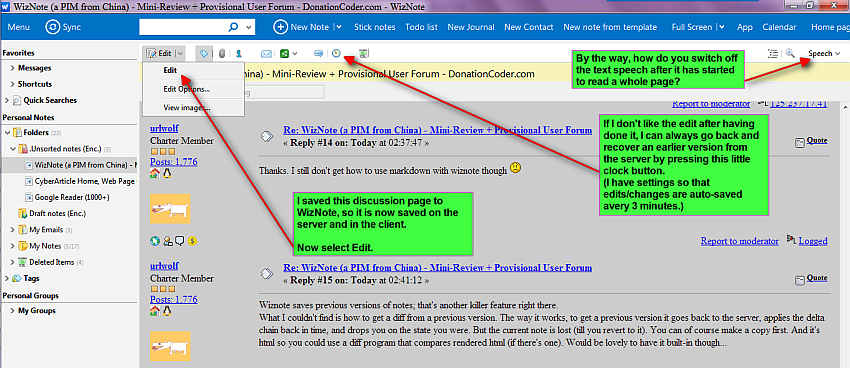 WizNote edit - 01a original urlwolf + edit menu.png
(229.3 KB, 850x368 - viewed 6448 times.)
WizNote edit - 01a original urlwolf + edit menu.png
(229.3 KB, 850x368 - viewed 6448 times.)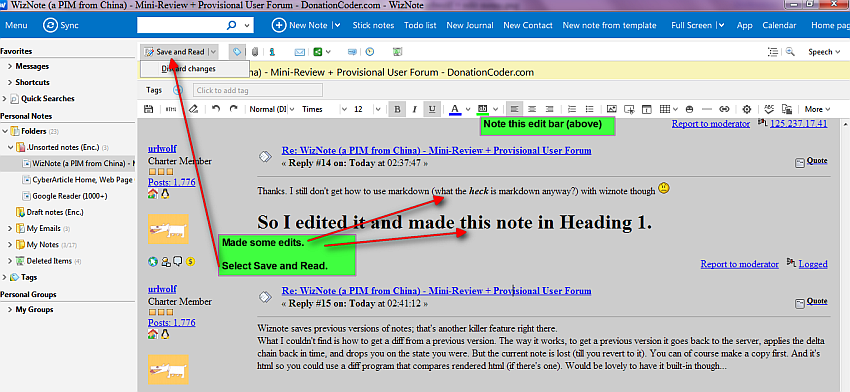 WizNote edit - 02a urlwolf.png
(207.1 KB, 850x392 - viewed 6124 times.)
WizNote edit - 02a urlwolf.png
(207.1 KB, 850x392 - viewed 6124 times.)thanks for those screenshots ianb! that helps convince me even more how great this program is. i had my doubts for a while.I am very pleased if they were of help/use. I would suggest that one of the best ways of establishing whether the program itself is of real use would be to find out first-hand, taking the engineer's systematic "suck-it-and-see" approach.

Original address: https://www.donationcoder.com/forum/index.php?topic=36909.0