DonationCoder.com forum
 
Read-only archive. This is a static copy of the DonationCoder.com forum. Reading and searching work as before; logging in, posting and private messages do not.
Archive of 2026-10-21 · About this archive · Main site

Author Topic: Printer network  (Read 6,250 times)

dMbTiger

  • Member
  • Joined in 2007
  • **
  • Posts: 22
Printer network
« on: December 31, 2013, 04:19 AM »
I have 7 PCs running various versions of windows 7 and one running windows 8. They are all networked WI-FI in various locations in my home. I have an HP printer hardwired to one of the W7s.  I'd like all of the PCs to be able to print to the one printer. Cost is a major factor, so I need a cheap solution The only two ways I've been able to ID to do this is either through a Microsoft Homegroup network or Google Cloud Print.  My printer is not one that's on the Google list of compatible printers, and assuming I went out and bought one, I have no assurance that I could get that approach to work.   I tried setting up a Homegroup and got as far as getting the PC the printer is on to recognize two of the other PCs.  Even so, I can't any of the PCs to talk to each other.  I spent several days wandering around on various forums, and none of the posts I found there were helpful.   Mostly they appeared to be single responses thrown out by people making dumb wild guesses for the sake of scoring ego points.  I need someone (or one +) knowledgeable enough to stick with me until I work through the problem.  If I go the Google approach, I'm willing to buy one of the cheaper compatible printers, but I'd rather not since I'm on a fixed income with a negative cash flow.   The Homegroup road looks to be very, very messy from what I saw on the forums, and Microsoft has nothing useful that I could find in their Knowledgebase.  They seem to pretty much steer clear of the whole Homegroup subject.  

So would someone open a discussion with me....please!                   Dan
Dan

mouser

  • First Author
  • Administrator
  • Joined in 2005
  • *****
  • Posts: 40,931
    • Gathering Badge
    • Plugin Coding Medal
    • Participated in NANY Challenge Seventeen Times
    • Cody Award
    • Coding Snacks
    • Volunteers/Staff
Re: Printer network
« Reply #1 on: December 31, 2013, 04:49 AM »
Quote
an HP printer hardwired to one of the W7s

Connected how? USB or traditional printer port?

I don't have much experience with such things, but as you say, it should be possible to do what you want using workgroup stuff -- that's how things used to be done in the early days before networked printers.


HOWEVER, my impression is that going the workgroup route or otherwise trying to print from one computer through another, is bound to be frustrating and flakey.


What i would do if i were in your place is EITHER buy a new network-capable printer.  Whether that's a printer that can use wi-fi or one that connects directly to your router via ethernet, same deal.

That way the printer is a first class part of your network that all computers can see.

Actually however, that reminds me that i think if your printer is a USB printer, you can probably buy a router with usb printer support that would also make your printer a first class citizen in your network.  So you might be able to buy a new router instead of a new printer -- choose the one that is oldest/cheapest.
« Last Edit: December 31, 2013, 05:03 AM by mouser »

Stoic Joker

  • Honorary Member
  • Joined in 2008
  • **
  • Posts: 6,652
    • Cody Award
    • Participated in NANY Challenge Five Times
Re: Printer network
« Reply #2 on: December 31, 2013, 06:02 AM »
In addition to the above. (Very important) What model HP printer do you have? Because if it uses a host based driver it can be a real PITA trying to get it to behave properly on the wire.

Also there are small print server devices that are fairly cheap ($20-30) if your router doesn't have one built in. Or the option of adding a network card (More specifically one of HP's EIO JetDirect cards) directly to the printer depending on what model it is.

Did I mention it would be like super handy to know what the exact HP model number was...? ;)

Shades

  • Member
  • Joined in 2006
  • **
  • Posts: 2,954
Re: Printer network
« Reply #3 on: December 31, 2013, 12:35 PM »
Never had (major) problems with sharing an 8-year old HP Laserjet 1020 (USB, attached to a computer) through a workgroup consisting of 12 (wired) computers.

The printer ran fine with XP based Workgroup, Windows 7 based Workgroup and there is not even sharing the printer now the PC that it is attached to runs an evaluation copy of Windows 2012.

What I found is that you want to download the most basic driver you can get from HP. These keep working in a multitude of OS's. However, I never had too much luck with the all-in-one's of HP...or any other brand for that matter.

The advice given earlier is the best way to go, though. Turning any kind of printer into a network printer is always preferable.

And one more bit of advice: drop Homegroup and just use a Windows work group. Go to the advanced settings of your computer (where you can set the name of your computer) and adjust the name of the workgroup to whatever name you like. Just make sure it is the same on each computer in your network.

Homegroup should make networking easier, but it is sheer misery in my experience and expect to lose 10 to 15% of overall network speed, if you do decide to keep using it.

From your description I understand that you have a lot of trouble getting computers to "see" each other over your network. How are the required IP numbers (one for each PC) distributed? You have a router/switch that supports DHCP?
When that is not the case, buy a router/switch that does. You have models that do this and support a USB printer as well. Products intended for SOHO's (Small Office, Home Office) are likely your best bet. SOHO equipment is usually not that expensive and make your life (you know, the part that has to handle your computer network) often a lot easier.

Sharing a printer over a network, while the network itself isn't setup properly...expect a lot of "sudden and acute discomfort" in the the area where your rear end resides.


The easy path is usually downhill...

dMbTiger

  • Member
  • Joined in 2007
  • **
  • Posts: 22
Re: Printer network
« Reply #4 on: January 01, 2014, 06:55 PM »
My printer is an HP PSC 1510 USB connected to an ASUS tower running Windows 7 Home Premium.  The other 7 PCs are scattered all over my house on two floors.  Three are laptops and the rest are towers, so I can't really set up a hardwired network. As I said, money is very scarce, but I could replace the printer as long as it was an inexpensive one.  I've never set up a network before, but I already know Windows Homegroup is bad news. I've got one tower running W7 Ultimate hardwired to a Verizon FIOS M1424WR (?) router: the rest are WIFI. The printer and the router are on different floors.
Thanks.
Dan

Shades

  • Member
  • Joined in 2006
  • **
  • Posts: 2,954
Re: Printer network
« Reply #5 on: January 01, 2014, 09:05 PM »
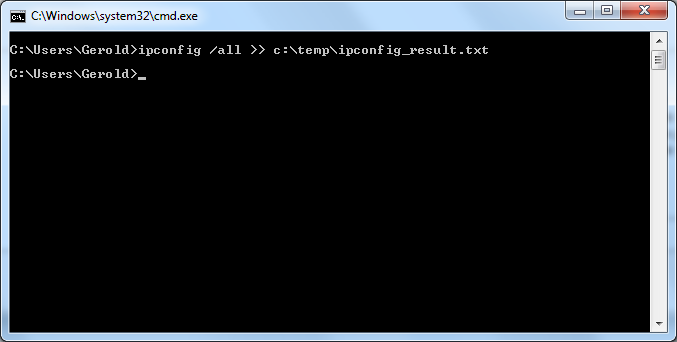
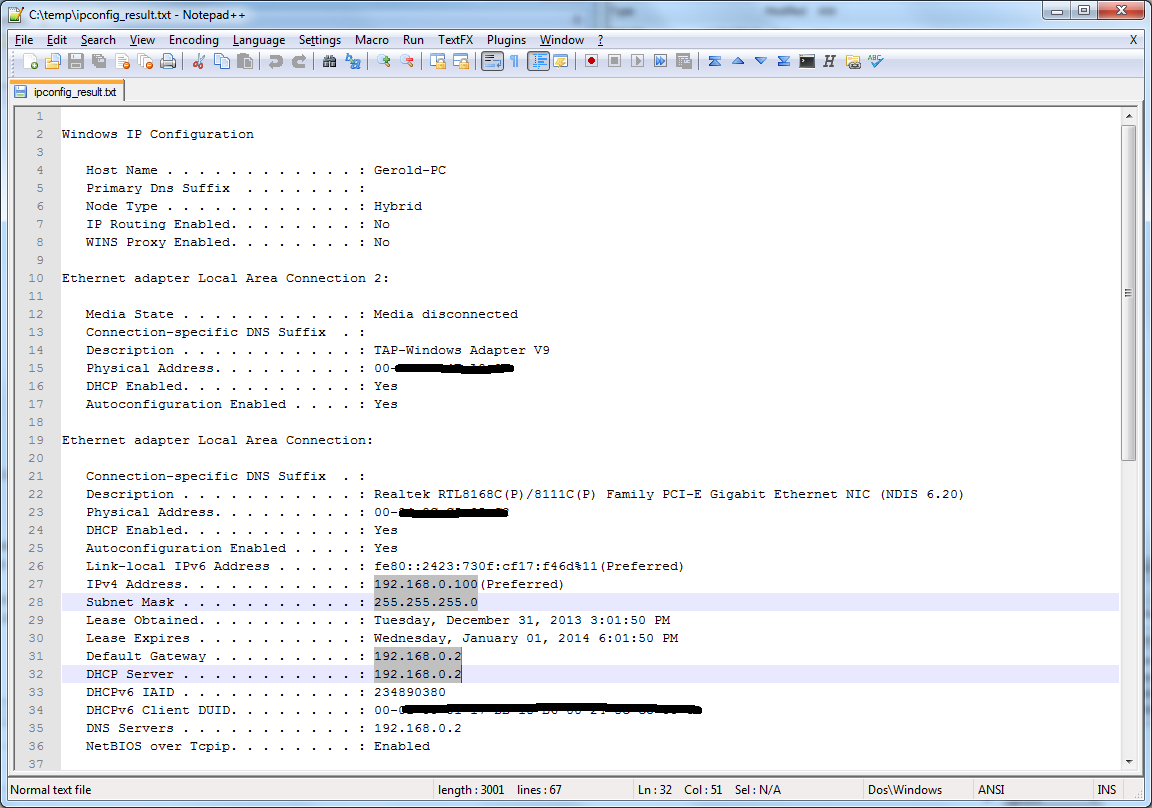
On any of your computers you should open the command line, just to see if that computer receives a proper IP nuimber. Use the Windows key + R to open the Run window. type inside this window 'cmd' and hit the Enter key. A new window should appear where you can type 'ipconfig /all >> c:\temp\ipconfig_result.txt'.
[attach]
The easy path is usually downhill...

40hz

  • Supporting Member
  • Joined in 2007
  • **
  • Posts: 11,861
Re: Printer network
« Reply #6 on: January 01, 2014, 10:56 PM »
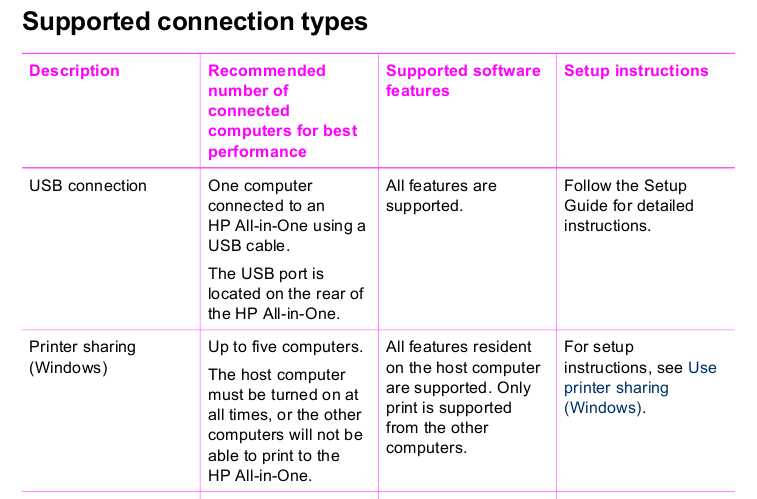
HP's docs say that this particular printer model will only support 5 PC clients under Windows P2P network sharing. Odd in that Win 7 itself allows up to 10 PCs for file & print sharing.

[attach]

Stoic Joker

  • Honorary Member
  • Joined in 2008
  • **
  • Posts: 6,652
    • Cody Award
    • Participated in NANY Challenge Five Times
Re: Printer network
« Reply #7 on: January 02, 2014, 01:08 PM »
HP's docs say that this particular printer model will only support 5 PC clients under Windows P2P network sharing. Odd in that Win 7 itself allows up to 10 PCs for file & print sharing.

This is caused by the immense amount of bloated BFF software that wants to display ink levels, job status (and etcetera ad nauseam) information to the user from the system tray. 90% of this software is totally pointless, and the rest is just junk.

Unfortunately there is no set procedure as HP changes the installer UI constantly. But with a bit of exploring there should be an option to install only the driver (minus the crapware) so that more (7-10) machines can be comfortably added.

Original address: https://www.donationcoder.com/forum/index.php?topic=36903.0