I would like to find a text editor where I can personalyze the background colour of the lines.
By example each four lines change the colour.
Best Regards.

By example each four lines change the colour.
Best Regards.

 Topic: text file editor personalyzable (Read 16,885 times)


to my limited knowledge no text editor can do that,
but any rich text editor can do it.
In SoftMaker TextMaker 2012 it is called (mark/select text) > Format > Paragraph > Shading > Background > (select colour)
-but no batch that I know of; you will have to do it manually.
to my limited knowledge no text editor can do that,
but any rich text editor can do it.
In SoftMaker TextMaker 2012 it is called (mark/select text) > Format > Paragraph > Shading > Background > (select colour)
-but no batch that I know of; you will have to do it manually.
... Not yet.
But see my "components for NANY", it's a modular text editor that *could* do this. Because the programming for it is a snap. Any ten of you could do it. But we feel trapped that "no one HAS done it".
It's just supply and demand.
to my limited knowledge no text editor can do that,
but any rich text editor can do it.
In SoftMaker TextMaker 2012 it is called (mark/select text) > Format > Paragraph > Shading > Background > (select colour)
-but no batch that I know of; you will have to do it manually.

to my limited knowledge no text editor can do that,
but any rich text editor can do it.
In SoftMaker TextMaker 2012 it is called (mark/select text) > Format > Paragraph > Shading > Background > (select colour)
-but no batch that I know of; you will have to do it manually.
... Not yet.
But see my "components for NANY", it's a modular text editor that *could* do this. Because the programming for it is a snap. Any ten of you could do it. But we feel trapped that "no one HAS done it".
It's just supply and demand.
Please put the link.


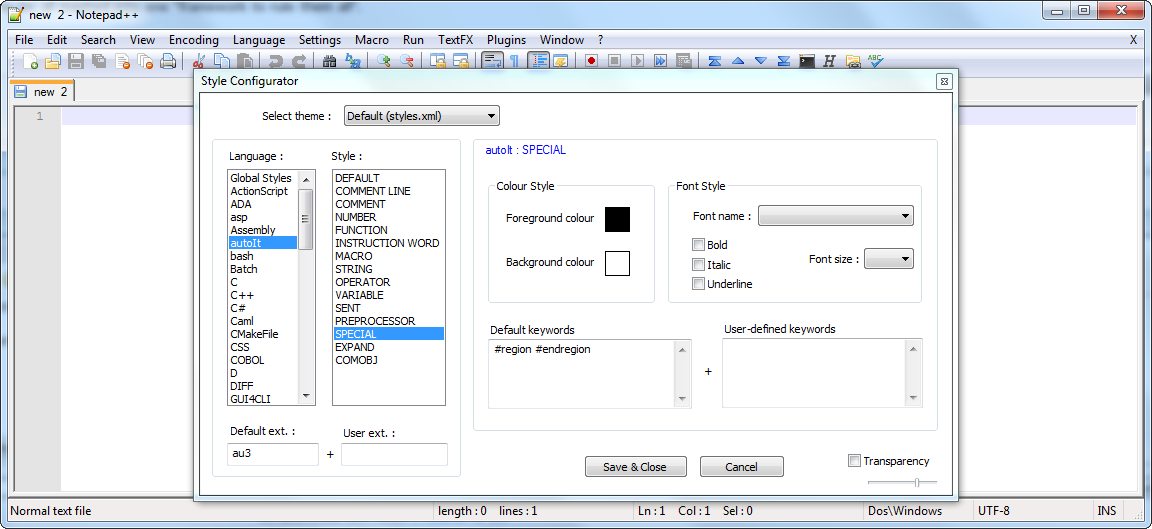
My suggestion would be to take a look into the Style configurator from Notepad++.
(see attachment in previous post)You can set the background color for different sections of text inside a text file. It doesn't seem that easy, but also not that difficult.

I would like to find a text editor where I can personalyze the background colour of the lines.
By example each four lines change the colour.
I would like to find a text editor where I can personalyze the background colour of the lines.
By example each four lines change the colour.
You can do that in Kedit if you are sufficiently proficient in REXX (which I am not).
I knew someone many years ago who did just that to make printouts look like they came off a mainframe on old-fashioned green bar computer paper.


I would like to find a text editor where I can personalyze the background colour of the lines.1. Could 'greenbar paper' be a help? Free samples in PDF form are downloadable at www.printablepaper.net/ . I don't know much about PDF. Greenbar has 1/2 inch wide rows that could be used to print 4 lines at 8 lines per inch.
By example each four lines change the colour.
Best Regards.
running to try TaoPhoenix


I would like to find a text editor where I can personalyze the background colour of the lines.1. Could 'greenbar paper' be a help? Free samples in PDF form are downloadable at www.printablepaper.net/ . I don't know much about PDF. Greenbar has 1/2 inch wide rows that could be used to print 4 lines at 8 lines per inch.
By example each four lines change the colour.
Best Regards.
2. Some have achieved a similar ability by using a transparent 'watermark' and entering text over it.
3. Others have used a scanned copy of a 'form', that might use 1/2 inch shaded bars. and using this as a graphic image for use under printing.
4. You could design, depending on the editor capabilities, a table with transparent lines and a background fill color of your choice for four rows, alternating with another plain four rows, etc.
5. WordPerfect can easily employ 'watermarks' for use as mentioned above. It also has a macro available that automates the process: greenbar.zip that I have not used.
6. 'Database Pro', my copy was about circa 2002, had the ability to design forms and enter text over shaded background areas.
running to try TaoPhoenix
Hi Contro,
My TurboProcessor does not do what you need yet. I was only saying that the project was designed so that one day a developer could *make it* do that as one example of combining both text editing and special features.
However, I am not a programmer!
I doubt you can program the background color line by line, but looking at vim you can do pretty much anything with the text. It's a totally programmable scripting editor. It may take time to adapt to the syntax, but once comfortable with it I don't think you would need all these external tools. Plus there are scripts around for it already debugged. Not bad for freeware.

Once I take the plunge I'm going to get into it myself. I just have to commit the time to overcoming the learning curve. Plus I don't think it will go away any time soon.
Once I take the plunge I'm going to get into it myself. I just have to commit the time to overcoming the learning curve. Plus I don't think it will go away any time soon.
Owww the terrorific learning cuuuuurrrveeeeee

Original address: https://www.donationcoder.com/forum/index.php?topic=36902.0