
I have an idea. How about a naming contest? The winner gets a free DonationCoder Flannel Shirt. 


 Topic: So, about wallpaper changers... (Read 30,217 times)


1) is it possible to add the option "Fit"? This reduces larger images to screen size - but doesnt enlarge anything.Windows 7's Fit option does enlarge pictures which are smaller than the desktop, and that's exactly what the Scale option does in this program.
(The Windows 7 options are Fill / Fit / Stretch / Tile / Center.)
2) would it be possible to change the browse dialogue, to an open file type one. More info here:[…]Even with the additional info I don't quite get the point, but I shall let skwire decide about it.


1) is it possible to add the option "Fit"? This reduces larger images to screen size - but doesnt enlarge anything.
(The Windows 7 options are Fill / Fit / Stretch / Tile / Center.)
2) would it be possible to change the browse dialogue, to an open file type one. More info here:
3) I'm wondering would it be possible to disable a folder rather than have to delete it. If #2 above is implementable, this would not be of such big interest :-)
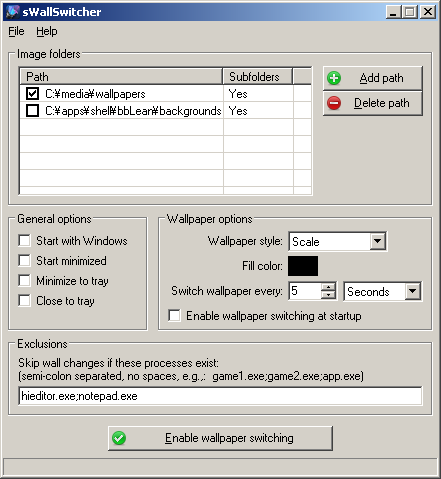



Windows 7's Fit option does enlarge pictures which are smaller than the desktop, and that's exactly what the Scale option does in this program.
How does Fit differ from the Scale option already in the app? If I choose an image smaller than my screen resolution, and have Windows apply it using the Fit option, the image is enlarged.-
The option I wanted doesnt seem to exist at all for windows: Dont enlarge, but reduce if necessary.

Original address: https://www.donationcoder.com/forum/index.php?topic=36868.0