


I have finally  managed to finish a working script to accomplish a task that I have to run several times a week. It was something that had always been done by hand due to the specific nature of the needs. Now that I have a working script that outputs to a dated filename, I have a few final cleanup tasks that I am still doing in notepad that could be added to the script if I knew how to do it through command line.
The output is a list of file paths as they exist relative to the directory on the server. In their final form, they are all really hyperlinks. To get there, I have to:
1: change all "\" to "/".
2: change all occurrences of "c:/1st level/2nd level/" to "http://www." (note that this shows the already been changed slashes)
3: I need to remove a folder referenced in the physical local path as it doe not exist in the hyperlinks ie: Remove all instances of "/webroot"
4: And finally. the tricky one. If any of the created hyperlinks ends up being a link with less than 5 "/"'s I need to delete it as it is not a working link.
And there are always going to be several of these. This part I have to just manually do as notepad is no help in making it any easier.
The others are all simple functions done in notepad but I cannot find the corresponding command line references to accomplish them.
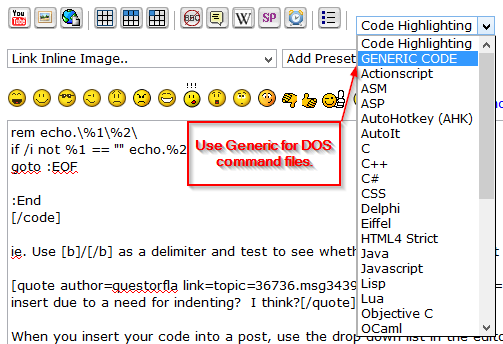
I am going to try to paste in the code below as it currently exists. The last time I tried this it would not insert due to a need for indenting? I think?
I hope this comes through. I am sure someone out there probably know exactly what I am missing.
Thanks for any pointers
managed to finish a working script to accomplish a task that I have to run several times a week. It was something that had always been done by hand due to the specific nature of the needs. Now that I have a working script that outputs to a dated filename, I have a few final cleanup tasks that I am still doing in notepad that could be added to the script if I knew how to do it through command line.The output is a list of file paths as they exist relative to the directory on the server. In their final form, they are all really hyperlinks. To get there, I have to:
1: change all "\" to "/".
2: change all occurrences of "c:/1st level/2nd level/" to "http://www." (note that this shows the already been changed slashes)
3: I need to remove a folder referenced in the physical local path as it doe not exist in the hyperlinks ie: Remove all instances of "/webroot"
4: And finally. the tricky one. If any of the created hyperlinks ends up being a link with less than 5 "/"'s I need to delete it as it is not a working link.
And there are always going to be several of these. This part I have to just manually do as notepad is no help in making it any easier.
The others are all simple functions done in notepad but I cannot find the corresponding command line references to accomplish them.
I am going to try to paste in the code below as it currently exists. The last time I tried this it would not insert due to a need for indenting? I think?
I hope this comes through. I am sure someone out there probably know exactly what I am missing.
Thanks for any pointers
Code: (generic)
@echo off
for /f "delims=" %%a in ('wmic OS Get localdatetime  ^| find "."') do set dt=%%a
set dt=%dt:~0,4%-%dt:~4,2%-%dt:~6,2%_%
setlocal
set currentLevel=0
set maxLevel=%2
if not defined maxLevel set maxLevel=2

:procFolder
pushd %1 2>nul || exit /b
if %currentLevel% lss %maxLevel% (
for /d %%F in (*) do (
echo %%~fF >>c:\Hyperlinks\Working-%dt%.txt
set /a currentLevel+=1
call :procFolder "%%F"
set /a currentLevel-=1
)
)
popd

 test.7z


 Every time I get something to where I think it is right, hit Post and with for an Instant Retract That button
