DonationCoder.com forum
 
Read-only archive. This is a static copy of the DonationCoder.com forum. Reading and searching work as before; logging in, posting and private messages do not.
Archive of 2026-10-21 · About this archive · Main site

Author Topic: Out of System Resources error ONLY when trying to grab Selected Region  (Read 6,931 times)

selt

  • Participant
  • Joined in 2012
  • *
  • Posts: 5
Hi All,

I started to get this issue on the previous version but then I still have it with latest 4.8, so I really need some help.

ONLY when i try to grab Selected Region i get error "Out of System Resources" and then SC is stuck. Just shows red icon and that's it. You have to exit and restart it to recover.

However, if i try to grab entire space, current screen, active window, fixed size... all that WORKS!

Now, of course, I really need SELECTED REGION to work as that was the exact point I started to use SC in the first place...

Any help to make this work again is appreciated!

Thanks in advance!

selt

  • Participant
  • Joined in 2012
  • *
  • Posts: 5
I think Mouser once already asked me this (i just found out since didn't get email reminders):

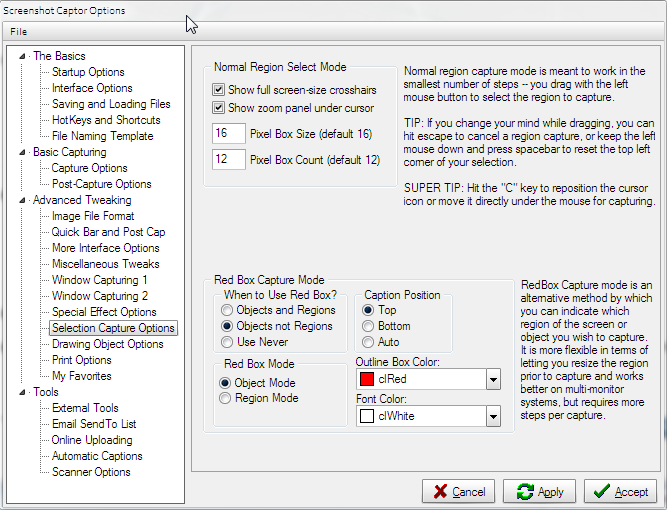
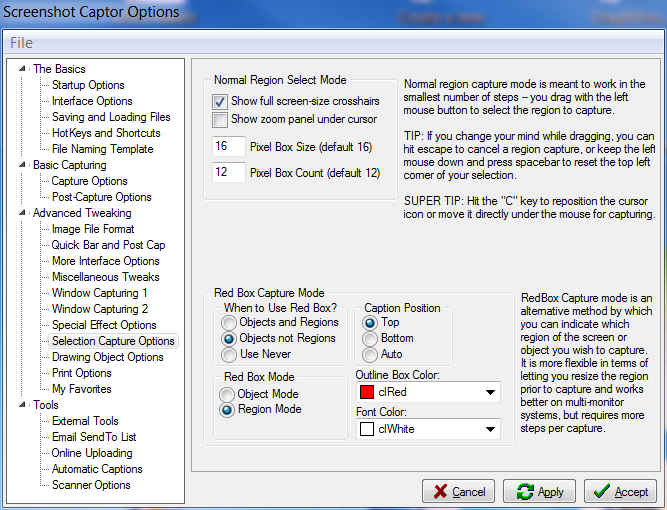
On your tab for "Selection Capture Options", what do you have checked for "When to Use Red Box"?

So, I checked now and I see for Option Red Box Capture Mode there are 2 parameters:
When to User Red Box - Objects NOT Regions
Red Box Mode - Object Mode


I also tried this but it still didn't work - the same error:
When to User Red Box - User Never

If I set this:
When to User Red Box - Objects AND Regions
Red Box Mode - Object Mode

I click apply and accept
I try selected region and I get the red box and when i check settings it changes back to Region Mode.


If I set this:
When to User Red Box - Objects AND Regions
Red Box Mode - Region Mode

Then I get red box window that needs resizing each time but that is not what I want.

I want to get, like it used to be before, just a position of mouse from which I will drag my region and after i release mouse button it will take the screenshot.

tomos

  • Charter Member
  • Joined in 2006
  • ***
  • Posts: 11,970
    • Gathering Badge
    • Participated in NANY Challenge Once
Dont know if this any help to mouser diagnosing:

it works here (Win7 64bit / SC 4.8), no matter how I trigger it, with the settings:

Quote
When to User Red Box - Objects NOT Regions
Red Box Mode - Object Mode

[attachthumb=#]
Tom

selt

  • Participant
  • Joined in 2012
  • *
  • Posts: 5
Nope, doesn't work for me.

I have downloaded now Greenshot and that one works with making Selected Region screenshots without hassle.

But definitively I would like to see ScreenshotCaptor doing the same for me so that i don't need to change to Greenshot.

Ath

  • Supporting Member
  • Joined in 2006
  • **
  • Posts: 3,649
    • Participated in NANY Challenge Eleven Times
    • Coding Snacks
    • Linux User
    • Hardware Hacker
Nope, doesn't work for me.
Could it be that you have a conflict in the hotkeys, that starts 2 applications, SSC and something else?
/Ton
Ath's software collection, Quote: "A problem well stated is a problem half-solved." (Charles Kettering)

wraith808

  • Supporting Member
  • Joined in 2006
  • **
  • Posts: 11,205
    • Participated in NANY Challenge Fourteen Times
    • Coding Snacks
    • Writer
    • Hardware Hacker
Are you sure you are running the latest?  I was getting that with one of the versions- updating to the latest stopped that.

cmpm

  • Charter Member
  • Joined in 2006
  • ***
  • Posts: 2,026
I would reinstall with a fresh download and click the reset to default option in the setup dialog.

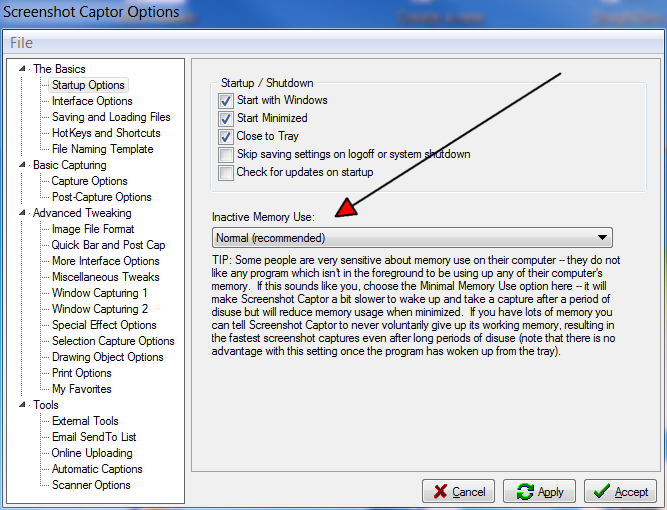
Here is my settings for 'selection caption' and 'startup' might help.

Original address: https://www.donationcoder.com/forum/index.php?topic=36693.0