DonationCoder.com forum
 
Read-only archive. This is a static copy of the DonationCoder.com forum. Reading and searching work as before; logging in, posting and private messages do not.
Archive of 2026-10-21 · About this archive · Main site

Author Topic: Why is my Firefox searching for updates when aut. updating not is enabled?  (Read 15,682 times)

Curt

  • Supporting Member
  • Joined in 2006
  • **
  • Posts: 7,565
First title was: "How can Firefox search for updates when aut updating not is enabled?", but I think this new title is more accurate.
----------------------

My Outpost Security Suite Pro 8 popped up a warning basically saying "mozilla firefox/Updater.exe is trying to do something...", and blocked the updater. I went to check my settings, because I never have auto-updating enabled in Firefox, and surely it was disabled => "Never search for updates".

But how can Firefox (24) search for updates when auto updates not is enabled?  :tellme:  
And are there other forms of "contacts" Mozilla also is lying about?

This is the first time I have this problem with Firefox. A scanning revealed no problems.
« Last Edit: November 26, 2013, 08:01 AM by Curt »

erikts

  • Supporting Member
  • Joined in 2007
  • **
  • Posts: 227
Re: How can Firefox search for updates when aut updating not is enabled?
« Reply #1 on: November 26, 2013, 02:16 AM »
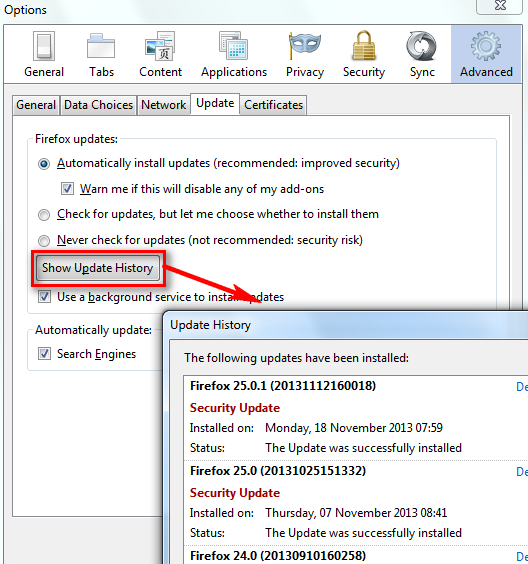
Perhaps you could check update activity via menu Tools|Option|Advanced|Update|Show Update History.
[attachthumb=#]


Curt

  • Supporting Member
  • Joined in 2006
  • **
  • Posts: 7,565
-thanks, erikts, but
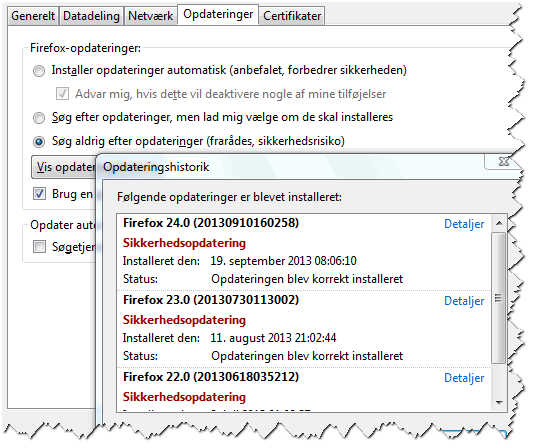
My Firefox Update History is of course reflecting that, automatic updating is disabled.
I have updated it 3 times: July (v22), August (v23), September (v24):

[attachimg=#]


so why did Firefox suddenly try to update nevertheless?  :tellme:
« Last Edit: November 26, 2013, 08:02 AM by Curt »

tomos

  • Charter Member
  • Joined in 2006
  • ***
  • Posts: 11,970
    • Gathering Badge
    • Participated in NANY Challenge Once
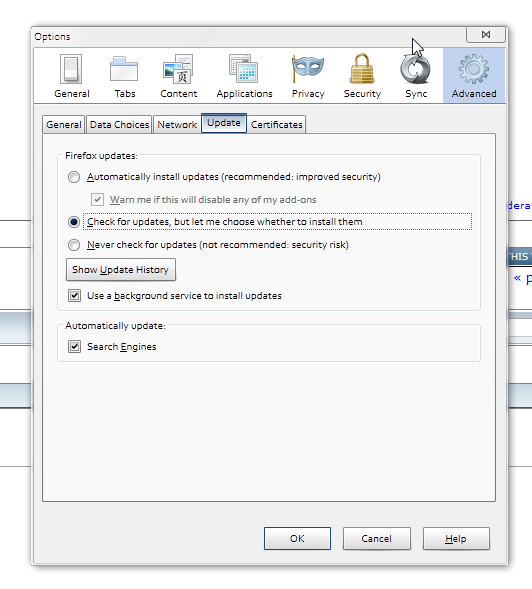
What are your settings exactly?
I get notification - have you that option enabled?

[attachthumb=#]

if so, I would presume it's simply checking what's available.
If not...

[edit] sorry I missed that in your screenshot there Curt [/edit]
Tom
« Last Edit: November 27, 2013, 08:27 AM by tomos »

Curt

  • Supporting Member
  • Joined in 2006
  • **
  • Posts: 7,565
as my picture shows... I don't ask for notifications

So, "not..."  ;-)

erikts

  • Supporting Member
  • Joined in 2007
  • **
  • Posts: 227
Okay. If you don't block \Mozilla Firefox\updater.exe, perhaps you can inspect the activity via Show Update History menu or firewall log.

An old-locked thread in Mozillazine is similar to your case, OP has disable update but still saw Updater.Exe activities.

I don't know ... may be Mozilla forced you to upgrade.  :-\

clk4suport

  • Participant
  • Joined in 2013
  • *
  • Posts: 12
Hi there,

As per me, don't look in firefox settings, you have to look for your PC settings.
There is an option in PC control panel. there is find auto update option.

Curt

  • Supporting Member
  • Joined in 2006
  • **
  • Posts: 7,565
... A scanning revealed no problems.

-rubbish. Back then I was only thinking about scanning, but I didn't take the time to actually do it!  :-[

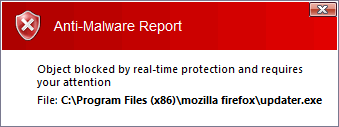
Now this has turned up again:

[attachimg=#]


Please check & tell if you have a updater.exe in your Mozilla Firefox folder?  :-[

mouser

  • First Author
  • Administrator
  • Joined in 2005
  • *****
  • Posts: 40,931
    • Gathering Badge
    • Plugin Coding Medal
    • Participated in NANY Challenge Seventeen Times
    • Cody Award
    • Coding Snacks
    • Volunteers/Staff
yep, i do.

Curt

  • Supporting Member
  • Joined in 2006
  • **
  • Posts: 7,565
thanks, mouser. Is it 266 KB (273304 byte) ?

btw:

Quote from: update-settings.ini
; If you modify this file updates may fail.
; Do not modify this file.

[Settings]
ACCEPTED_MAR_CHANNEL_IDS=firefox-mozilla-release

Curt

  • Supporting Member
  • Joined in 2006
  • **
  • Posts: 7,565
I have updated to version 25, so I expect the problem will be gone for a few weeks.


MilesAhead

  • Supporting Member
  • Joined in 2009
  • **
  • Posts: 7,736
    • Coding Snacks
I had a similar thing with Opera x64 12.14.  It has check for updates on by default.  It asks me if I want to update to 12.16.  Like an idiot I click OK.  Then I cancel.  So now I have to delete the temp folder with the update or it will pop up a dialog every time I start it asking to install the downloaded update.

Anyway, I do the update, then change the setting to never check for updates.  It puts all the crap advert bookmarks I just cleaned off the toolbar back on.  Then it changes the update setting back to Check For Updates.

I see why they are going away.  The sad part is, it's the only browser out of Firefox, Waterfox or Opera that has snappy resonse on my Windows8 Laptop.

btw the editing trick still works in the bookmarks.adr file.  If you import bookmarks from Firefox, just go into bookmarks.adr and delete the entry that says Firefox folder at the top.  Now the Firefox bookmarks will be at the root.

IainB

  • @Slartibartfarst
  • Supporting Member
  • Joined in 2008
  • **
  • Posts: 7,544
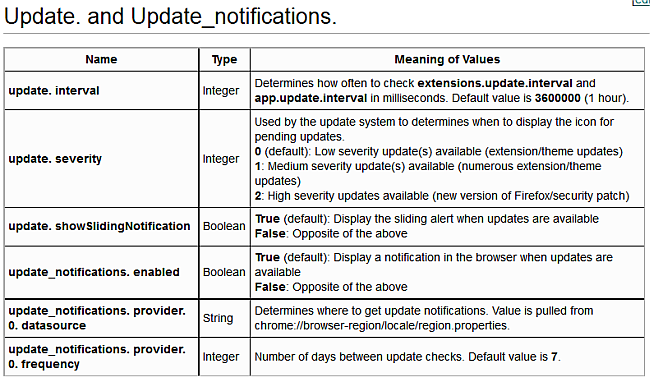
Just in case you have not already checked these fields in about:config ...
it's item 34 on this page - About:config entries - MozillaZine Knowledge Base.

[attach]

Curt

  • Supporting Member
  • Joined in 2006
  • **
  • Posts: 7,565
Thanks, IainB. But I don't have any "update".
Has it been replaced by app.update?

tomos

  • Charter Member
  • Joined in 2006
  • ***
  • Posts: 11,970
    • Gathering Badge
    • Participated in NANY Challenge Once
But I don't have any "update".

me neither FWIW
Tom

IainB

  • @Slartibartfarst
  • Supporting Member
  • Joined in 2008
  • **
  • Posts: 7,544
^^ Sorry about that. Maybe the clip is for an earlier (older) version of Firefox(?).

I run on the FF beta channel, and it always automatically uploaded and installed the latest ß version, but then recently the ßs started crashing a lot, so I searched for a way to block the installs, and came across a post that showed how if I changed the settings for 2 fields in about:config, then the auto-install would become "manually accept". So I did that and it worked.
However, I can't for the life of me recall what the specific settings were.    :-[
So the settings I copied above were the best that I could come up with.

4wd

  • Pedantic Old Bastard
  • Supporting Member
  • Joined in 2006
  • **
  • Posts: 5,652
    • Coding Snacks
Has it been replaced by app.update?

Yes, app.update.* - see here.

Check:
app.update.auto
app.update.enabled
app.update.silent

And remember, there's also:
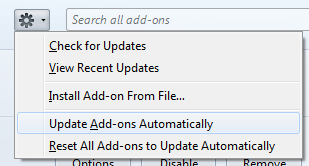
extensions.update.enabled

Which is set from the Add-ons Manager:

2013-11-29 09_57_36-Add-ons Manager - Pale Moon.png
"I will not follow where the path may lead, but I will go where there is no path, and I will leave a trail." - Muriel Strode, 1903
« Last Edit: November 28, 2013, 10:59 PM by 4wd »

Curt

  • Supporting Member
  • Joined in 2006
  • **
  • Posts: 7,565
-wow, that was thorough answer! Thank you, 4wd!

As my above screenshot shows, my personnal setting was "NEVER search for updates", yet app.update.auto was "True", which can explain a lot. I have changed it to "False", now time will tell if that's all that's needed.

Thanks again, 4wd, your answer was way beyond what any one could ask for! :Thmbsup:

clk4suport

  • Participant
  • Joined in 2013
  • *
  • Posts: 12
Hi,

i am new here. but i trying to find some info regarding some issues.

Thank You allow me to join this community.

Original address: https://www.donationcoder.com/forum/index.php?topic=36613.0