Ok, added this to my TO-DO list.
Re: New program: FileSearchy Beta - Quick file search utility (freeware)
« Reply #25 on: December 18, 2013, 01:38 PM »


 Topic: New program: FileSearchy - Quick file search utility (freeware) (Read 83,359 times)


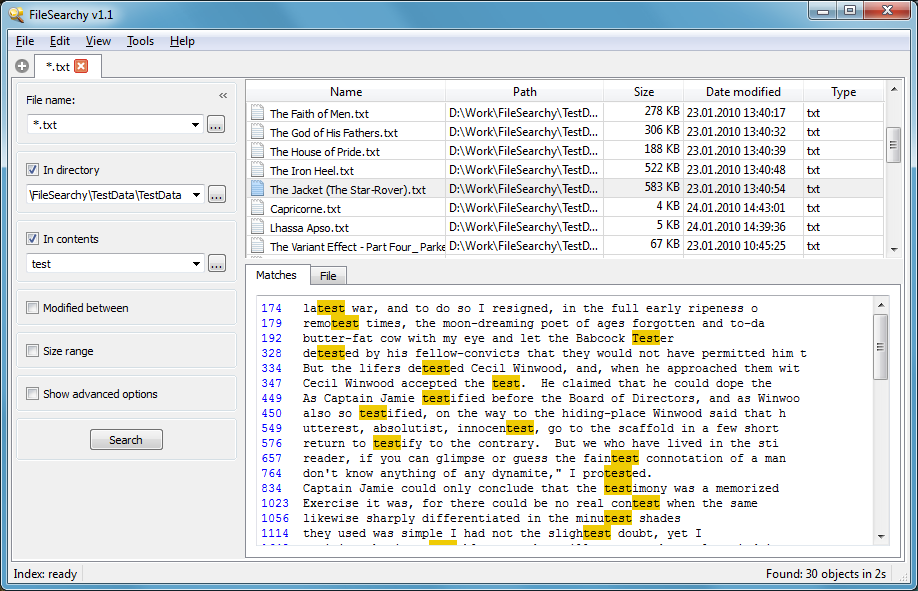
Do you plan to add some type of filtered results (as you did in MultiFind)? I have to agree with the comments of dr_andus that searching many content results is too time-consuming. A filtered/outline view which displays only the searched-for text would enhance the user experience.
So there is currently no hotkey or other expedited method of navigation? This is a real limitation of FileSearchy as it's very cumbersome to click each highlighted line (in the lower pane) to navigate found text. BTW clicking on a highlighted line marker doesn't shift focus to the bottom pane as one might expect.
I also agree with stewcam that folder exclusion should be implemented. For example, I would like to exclude FileSearchy's log file and various temp files.Folder exclusion is in my to-do list. But not a top priority.
IMO there should be a recognition of matches and there should be a column along with found files which enumerates matches in each found file. It would also be very helpful to see a summary of matches and files found/files searched. For example, the summary "103 matches in 20 files of 35 searched" provides significantly more information than FileSearchy 1.0 provides.


BTW is there any quick navigation between the two tabs? IIRC MultiFind could jump from Matches to an exact location in the File tab. Just wondering as that was quite a nice feature.
Is there a way to rank search results by relevance (e.g. the number of times a search term occurs within a file)?
@Cashper
Does a german translation already exist?
Search by a number of matches is not hard to implement, but i don't see a use case that shows when it is needed.
I'm not able to show number of matches in all the found files because when FileSearchy finds the first match in a file is stops and moves to next file. Scanning for all matches is too excessive and will slow down the search.
To me that is an important basic measure of relevance. The more a search term occurs in a document (especially with some Boolean operator), the more likely that it is relevant. In some applications search results are automatically ranked in such a way, and in most cases the top-ranked search results do turn out to be more relevant ones. Obviously one needs to pick the search terms strategically (I mostly know what the search terms are that are likely to return the results I'm looking for in my collection of documents).
Cashper, sorry if this is a stupid question, but apparently I'm not understanding what you are saying here. If FileSearchy moves on after the first match, how then does it list every match in each file? I mean, it appears that it is listing everything correctly in both the File tab and the Matches tab (even including line number).
Anyway, I ask because I agree with dr_andus that counting matches is important. Counting objectively quantifies the findings of the content search. IMO any type of search should attempt to find, display, and quantify findings.
Also, the context menu integration remains a bit buggy. I have it disabled in options but "Search with FileSearchy" always shows after a few content searches.
Cashper, a couple more questions...
In the event of more than 100 matches in a file, I have noticed that FileSearchy indicates (in The Matches tab) "Only the first 100 matches are shown". Huh...why that limitation? What if there were 500 matches in a file? Then FileSearchy wouldn't show 400 matches in the Matches tab?
I would also like to ask about a "File/Save Parameters" and "File/Open Parameters" feature. This would function to preserve active fields for future searches. Also, it would help to avoid repetitive data entry (of multiple file type/delimiter configs) each time history is cleared. Settings and tabs are saved, so maybe parameters could be also?Sound useful and easy to implement. I will add this soon.

High CPU usage is a bug, that is fixed in the latest version 1.11.


I like that Advanced mode retains search terms and the last used fields. However, Instant mode takes a different approach -- it remembers nothing. Even if the user moves from Instant to Advanced and then back, search terms are not remembered.
Original address: https://www.donationcoder.com/forum/index.php?topic=36587.0