DonationCoder.com forum
 
Read-only archive. This is a static copy of the DonationCoder.com forum. Reading and searching work as before; logging in, posting and private messages do not.
Archive of 2026-10-21 · About this archive · Main site

Last post Author Topic: Clever screenshot - automatical selection  (Read 21,650 times)

Contro

  • Supporting Member
  • Joined in 2007
  • **
  • Posts: 3,947
Re: Clever screenshot - automatical selection
« Reply #25 on: November 05, 2013, 04:16 AM »
My ScreenShot Captor configuration is
Mozart-%datetime%
but the name appear to be of the new image as
Mozart-%datetime%raymond-loewys-120th-birthday-ca-fr-us-nl-uk-ie-6388231276855296-hp.jpg
so the variable %datetime% is not recognized.

How can I do that ?
all I need is the prefix Mozart-%datetime%
and save the image as png .

:P


Note : the png extension is not important. Save as image I supposed logical to save in the format is in internet.
« Last Edit: November 05, 2013, 04:30 AM by Contro »

cmpm

  • Charter Member
  • Joined in 2006
  • ***
  • Posts: 2,026
Re: Clever screenshot - automatical selection
« Reply #26 on: November 05, 2013, 04:55 AM »
Nice addon find cmpm  :up:

I think I found it due to a post by Curt, some years ago.

mouser

  • First Author
  • Administrator
  • Joined in 2005
  • *****
  • Posts: 40,931
    • Gathering Badge
    • Plugin Coding Medal
    • Participated in NANY Challenge Seventeen Times
    • Cody Award
    • Coding Snacks
    • Volunteers/Staff
Re: Clever screenshot - automatical selection
« Reply #27 on: November 05, 2013, 05:35 AM »
Contro, make sure you have the latest version of Screenshot Captor, and then tell me what you are doing to save the file that the %datetime% in the filename is not being expanded.

Contro

  • Supporting Member
  • Joined in 2007
  • **
  • Posts: 3,947
Re: Clever screenshot - automatical selection
« Reply #28 on: November 05, 2013, 10:16 AM »
Contro, make sure you have the latest version of Screenshot Captor, and then tell me what you are doing to save the file that the %datetime% in the filename is not being expanded.

Mouser is not Screenshot Captor. Is the new program. That variable goes well in SC.
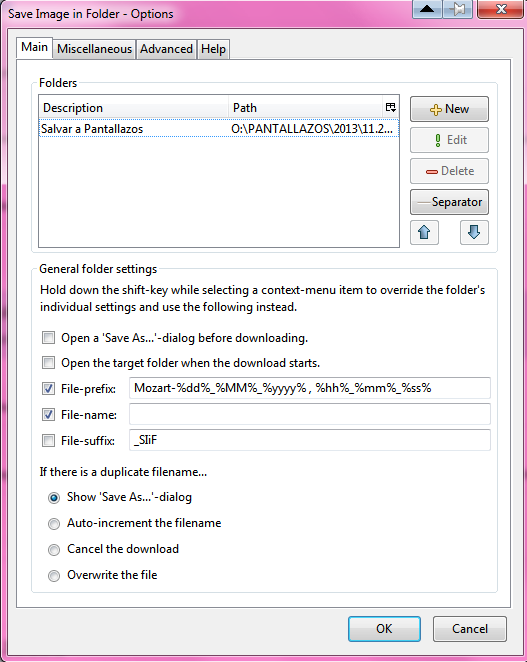
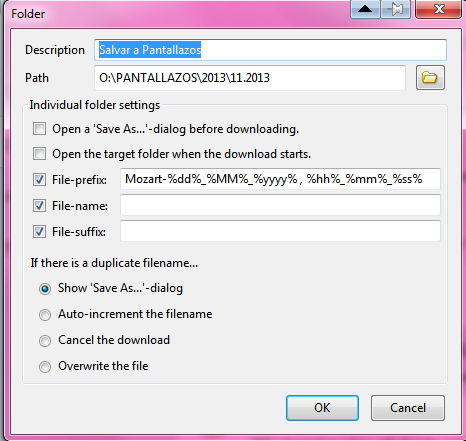
I am trying this with Save Image in Folder

Mozart-05_11_2013 , 10_14_25image.jpg

Mozart-%dd%_%MM%_%yyyy% , %hh%_%mm%_%ss%

But I don't get take off the word image....

Save Image in Folder seems to use only certain regular expressions and the help is not very appropiated for a dummy like me.


:-*
« Last Edit: November 05, 2013, 10:23 AM by Contro »

Contro

  • Supporting Member
  • Joined in 2007
  • **
  • Posts: 3,947
Re: Clever screenshot - automatical selection
« Reply #29 on: November 05, 2013, 10:22 AM »
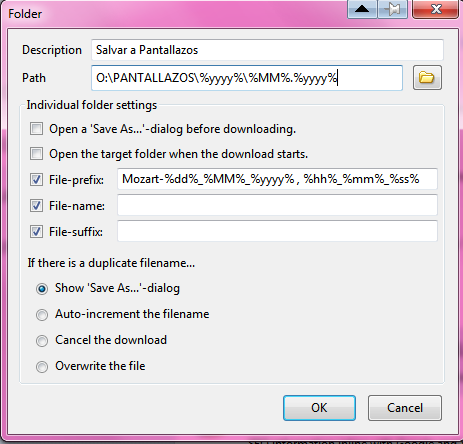
I tried use regex in the folder field (Path) , but are not accepted .

« Last Edit: November 05, 2013, 10:29 AM by Contro »

cmpm

  • Charter Member
  • Joined in 2006
  • ***
  • Posts: 2,026
Re: Clever screenshot - automatical selection
« Reply #30 on: November 05, 2013, 11:28 AM »
Maybe take out the "-" after Mozart and use a space instead of the dash.
And if that will not work, try "_" an underline.

Contro

  • Supporting Member
  • Joined in 2007
  • **
  • Posts: 3,947
Re: Clever screenshot - automatical selection
« Reply #31 on: November 05, 2013, 01:28 PM »
Maybe take out the "-" after Mozart and use a space instead of the dash.
And if that will not work, try "_" an underline.

I have investigate a little. the addon don't admit many regular expressions :

Only these ones :

list of variables admitted by the firefox addon

Contro

  • Supporting Member
  • Joined in 2007
  • **
  • Posts: 3,947
Re: Clever screenshot - automatical selection
« Reply #32 on: November 05, 2013, 01:29 PM »
I am trying to configurate the path with a variable expression :

http://mozext.achimonline.de/todo.php

personal advanced configurations :

http://mozext.achimonline.de/saveimageinfolder_hidden_prefs.php

Contro

  • Supporting Member
  • Joined in 2007
  • **
  • Posts: 3,947
Re: Clever screenshot - automatical selection
« Reply #33 on: November 05, 2013, 01:32 PM »
I really don't understand how to create a variable path with the addon
:-[

Contro

  • Supporting Member
  • Joined in 2007
  • **
  • Posts: 3,947
Re: Clever screenshot - automatical selection
« Reply #34 on: November 05, 2013, 01:34 PM »
Understood.
It's is not possible with the program until now. It's a future feature :
The items listed here could also just be user-submitted suggestions which are still under consideration. ;-)
Directory Creation
automatically create subdirectories based upon variables (pending feature)
:-*

Contro

  • Supporting Member
  • Joined in 2007
  • **
  • Posts: 3,947
Re: Clever screenshot - automatical selection
« Reply #35 on: November 05, 2013, 01:36 PM »
I think is possible use only a unique prefix like in SC , but I don't know how to do :

http://mozext.achimonline.de/saveimageinfolder_hidden_prefs.php

It's a little complicated for me.

Can anyone help me ?

Best Regards

Original address: https://www.donationcoder.com/forum/index.php?topic=36462.0