DonationCoder.com forum
 
Read-only archive. This is a static copy of the DonationCoder.com forum. Reading and searching work as before; logging in, posting and private messages do not.
Archive of 2026-10-21 · About this archive · Main site

Last post Author Topic: How to avoid creating/using a Microsoft Account when upgrading to Win 8.1  (Read 38,579 times)

tomos

  • Charter Member
  • Joined in 2006
  • ***
  • Posts: 11,970
    • Gathering Badge
    • Participated in NANY Challenge Once
While they maintain they did "nothing..."
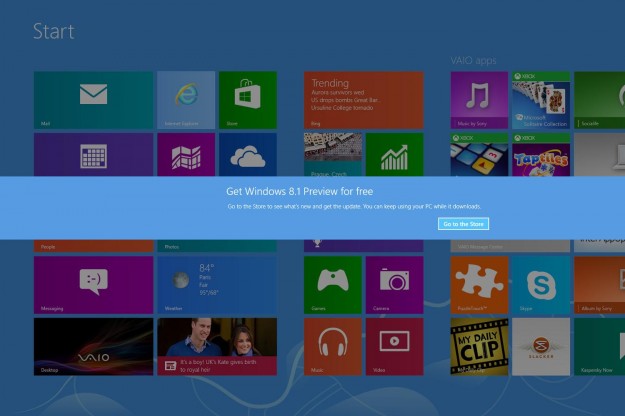
MS put up a banner across my wife's screen urging her to upgrade

There was something to that effect mumbled in passing.

Still, it's a hell of a bind to put someone in since they were traveling by car when the whole thing kicked off.

yeah, I got a banner the other day (similar to the one you get when the battery is low). The only choice given is to upgrade. The only button says upgrade. Now, I got out of it somehow, but it was late or early and I was in a rush and I cant remember exactly how I got around it :-\ :-[
Tom

Stoic Joker

  • Honorary Member
  • Joined in 2008
  • **
  • Posts: 6,652
    • Cody Award
    • Participated in NANY Challenge Five Times
*Sigh* Well in the bright side since the 3.6GB download only took about an hour while driving down the highway with their Verizon wireless card...apparently the delivery system is working well. <facepalm>

...But option to say 'now is kind of a bad time' sure would be nice.

Thanks guys.

tomos

  • Charter Member
  • Joined in 2006
  • ***
  • Posts: 11,970
    • Gathering Badge
    • Participated in NANY Challenge Once
...But option to say 'now is kind of a bad time' sure would be nice.
+1

I remember now how I got rid of it - first here's what the banner looks like:

[attachimg=#]

the only option given is: [Go to the Store]
I went to the store and somewhere in there found the option to cancel.

I presume it will come back though, so did a search and found this regristry workaround (disclaimer - haven't tried it):
"How to dismiss the Windows 8.1 Upgrade banner?"
http://superuser.com/questions/670173/how-to-dismiss-the-windows-8-1-upgrade-banner
Tom

Stoic Joker

  • Honorary Member
  • Joined in 2008
  • **
  • Posts: 6,652
    • Cody Award
    • Participated in NANY Challenge Five Times
Okay, so after you install KB2885699:
Quote
•The notification is displayed according to a schedule and is not displayed immediately after you install this update. After you install this update, the notification is typically displayed the first time that you unlock or log on to the computer after 8:00 P.M. local time on Mondays.

Really..? :wallbash: That is just (freaking stupid) enough time to forget about it and get involved in something that you'd rather not be interrupted during.

So you worked on a presentation all night Monday, and when getting ready to present it to the client Tuesday morning...

(Yeper, that's how it happened. Client was out of state running down the highway on a Tuesday morning and booted their laptop (yes they had a driver) for some last minute checks before going in to give a presentation ... And boom went the Dammer)


@tomos - Thanks for the link!

mwb1100

  • Supporting Member
  • Joined in 2006
  • **
  • Posts: 1,645
I don't think  this article has much in the way of new information, but it seems to be a pretty good step-by-step summary of how to upgrade to 8.1 without a Microsoft account and why you might not see an offer to upgrade to 8.1 in the Windows Store (bottom line: you have to have all updates to 8 installed before the store will show you the 8.1 upgrade offer).

  - http://windowssecrets.com/newsletter/moving-up-to-windows-8-1-without-an-ms-account/

Original address: https://www.donationcoder.com/forum/index.php?topic=36379.0