DonationCoder.com forum
 
Read-only archive. This is a static copy of the DonationCoder.com forum. Reading and searching work as before; logging in, posting and private messages do not.
Archive of 2026-10-21 · About this archive · Main site

Author Topic: Find and Replace Preset  (Read 4,981 times)

krcc18a

  • Supporting Member
  • Joined in 2013
  • **
  • Posts: 7
Find and Replace Preset
« on: October 16, 2013, 11:07 PM »
In Excel:

I need to copy part of a column (several cells), and then paste the contents of those cells into one single other cell with the ALT-ENTER character between the value taken from each cell.

So if I had
A
B
C
in three cells, I need to paste A ALT-ENTER B ALT-ENTER C into a single cell.

Am I replacing a {TAB} character? And what would the ALT-ENTER character be?

Thanks,
Marty
dcwul62

  • Supporting Member
  • Joined in 2013
  • **
  • Posts: 336
Re: Find and Replace Preset
« Reply #1 on: October 20, 2013, 05:17 AM »
Hello,
up front, I am not an Excel expert...

am not sure if this can be solved within the current Clipboard Help and Spell.
under "Modfy Format/Case" one can add \n to lines but not to words.


Anyway, a suggestion only...

I would download a named ASAP Utilities at: http://www.asap-utilities.com/
basically it is free
".. you are hereby licensed to use the SOFTWARE without charge in a non-commercial organization or for home-use.
To avoid the use of obsolete SOFTWARE each unregistered version will display an update notice 6 months and expires 9 months after its release
."

It installs a plug-in with a lot of handy features.

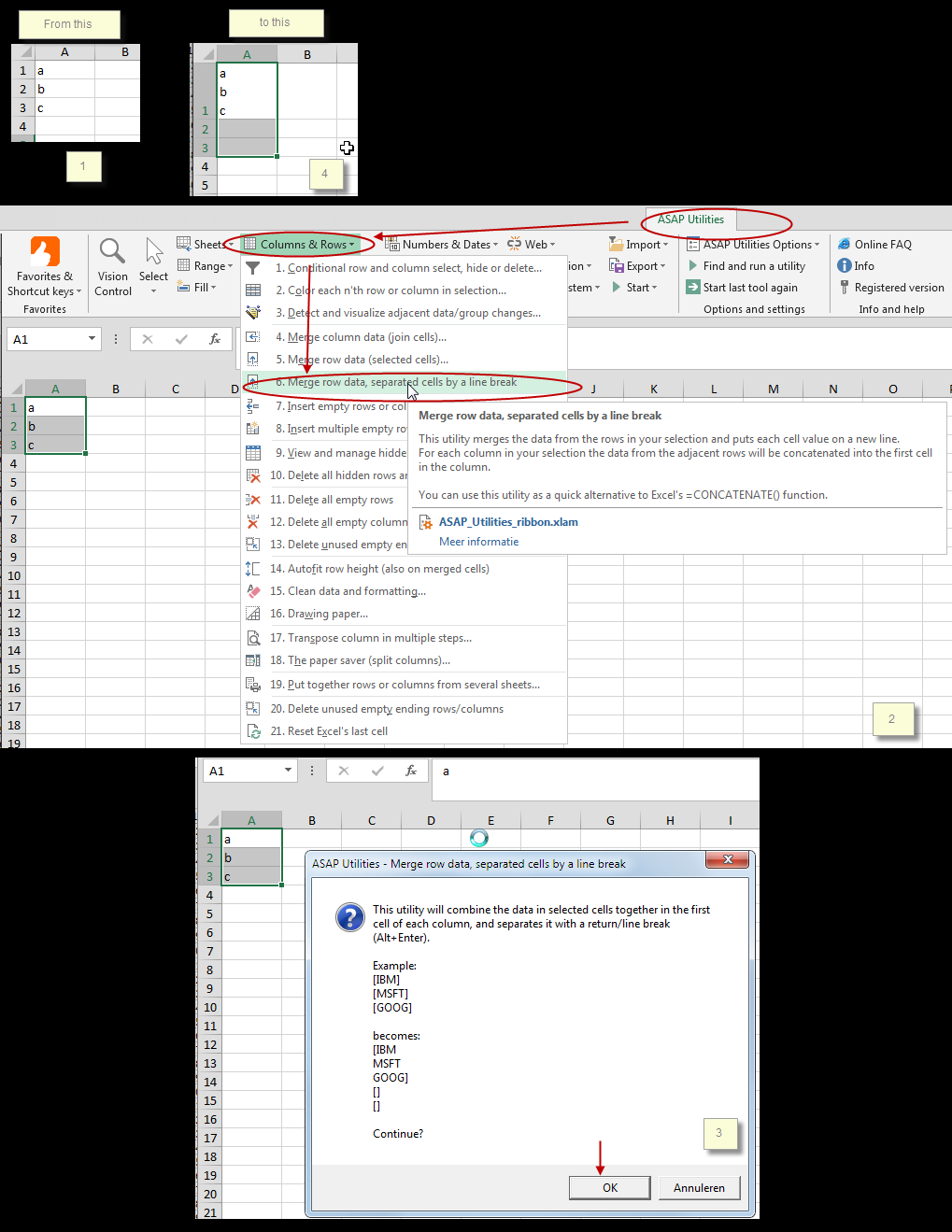
Within ASAP this is really a piece of cake:
Click ASAP tab, then select Columns & Rows  and then  Merge row data, separated cells by a line break

See below.

Maybe this is what you are looking for?

Good luck!
=
[attachthumb=#]
=


krcc18a

  • Supporting Member
  • Joined in 2013
  • **
  • Posts: 7
Re: Find and Replace Preset
« Reply #2 on: October 24, 2013, 12:22 AM »
Many thanks, but I am still inclined to think that there should be a way to do this within CHS.

I thought perhaps SENDKEYS and trim line ends.

I tried a custom script tool to include a char(10) which ran after trimming line ends.

Marty

Original address: https://www.donationcoder.com/forum/index.php?topic=36350.0