DonationCoder.com forum
 
Read-only archive. This is a static copy of the DonationCoder.com forum. Reading and searching work as before; logging in, posting and private messages do not.
Archive of 2026-10-21 · About this archive · Main site

Author Topic: Suggestion: Updated Find and Replace  (Read 4,839 times)

dcwul62

  • Supporting Member
  • Joined in 2013
  • **
  • Posts: 336
Suggestion: Updated Find and Replace
« on: October 08, 2013, 07:56 AM »
I am not sure if I brought this up already before.

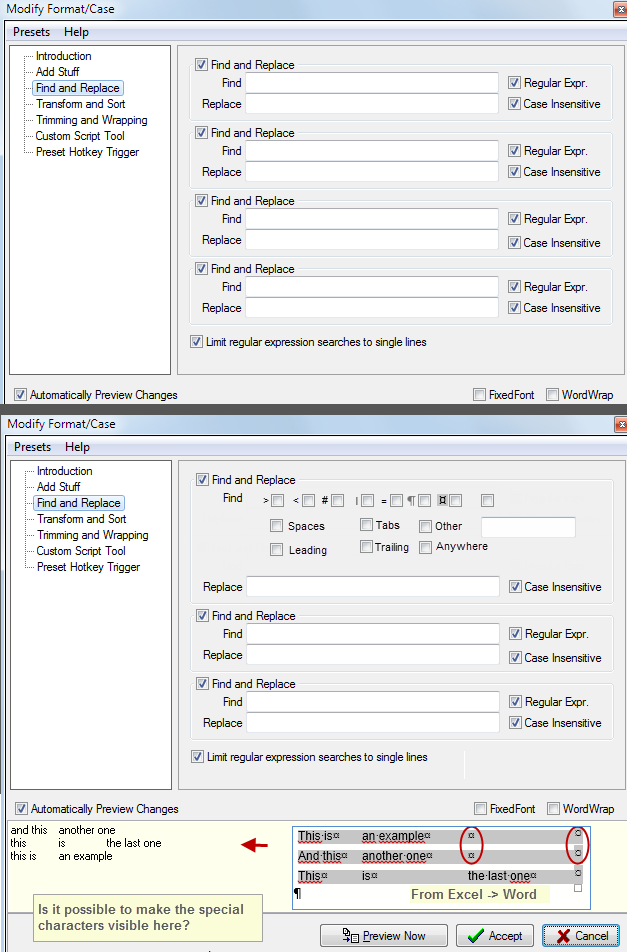
Suggestion to add special characters in the "Find and Replace" panel.


Like this  - just an idea

=
[attachthumb=#]

=

I got to this because I wanted to replace tabs with spaces, but have forgotten about what (regex?) code I should use for tabs.

This idea provide users with a number of preset special characters (such cell-seperators  from Excel, but also:   >  <  #  |  =  and (Carriage return=hard return=line return)
as well as leading and trailing tabs and spaces and user defined characters.

Thanks
=
bump: hopefull this will be considered..
=
« Last Edit: October 23, 2013, 05:53 AM by dcwul62 »

dcwul62

  • Supporting Member
  • Joined in 2013
  • **
  • Posts: 336
Re: Suggestion: Updated Find and Replace
« Reply #1 on: October 23, 2013, 05:57 AM »
@mouser - did you have the chance to look at this?
maybe it is too complicated, in which case, forget it  :)
Thanks!
=

mouser

  • First Author
  • Administrator
  • Joined in 2005
  • *****
  • Posts: 40,931
    • Gathering Badge
    • Plugin Coding Medal
    • Participated in NANY Challenge Seventeen Times
    • Cody Award
    • Coding Snacks
    • Volunteers/Staff
Re: Suggestion: Updated Find and Replace
« Reply #2 on: November 16, 2013, 10:58 PM »
Making special characters visible is not a bad idea.. As for adding special characters to the search and replace, i think this may be a case where the best solution is to just ask people to look up how to do it using regular expressions.  (you can also use \t and \n in NON-REGULAR EXPRESSION).  Perhaps just having a button that will open a web page showing help on regular expressions would be a good compromise.

dcwul62

  • Supporting Member
  • Joined in 2013
  • **
  • Posts: 336
Re: Suggestion: Updated Find and Replace
« Reply #3 on: November 19, 2013, 08:52 AM »
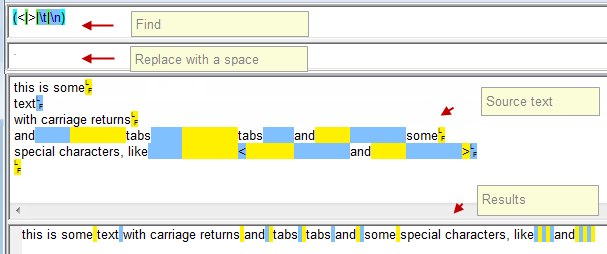
My idea behind the layout was that users who are not acquainted with regular expressions and above all, who are not interested in getting acquainted with it, simply because they will never use it for any other purpose, or simply because it is not 'their cup of tea' so to say, those people will forget what strings to use or how to use it. In my layout, they simply need to tag items.
They cud tag [Tab] and [Carriage Return] and maybe some other symbols altogether and then run it and all this stuff would then be stripped. Oh, there should be a reset button, or ctrl-Z to 'undo' the action.


If you wish to use a webpage with regex examples, I would rrreally suggest to have an very simple example page in the F1-Help, meaning to say, if the user is on that specific CHS find and replace section and hit F1, then it short page to show up (not external, but from CHS Help)
with e.g.
\t  = tab
\n = new line
\r = carriage return
\s = space

and an example like: remove all tabs, new lines and symbols < and > for instance: (<|\n|>|\t)


=
[attachimg=#]
=

Original address: https://www.donationcoder.com/forum/index.php?topic=36303.0