Sorry for the length, but I need to explain this in context and in some kind of sequence for it to make sense.
The question I have at the end is:
The question I have at the end is:
Quote
How could one make best/optimum use of the potential for bulk copying (as opposed to the current piecemeal capability) to capture OCRed "Alternative Text" in a more readily accessible form than the present Clipstory html files seem to offer?
- 1. How I came to be using ClipStory: (bear with me; this is relevant)
On 2012-02-18 I posted a Feature request for CHS - "Detritus" database(s)
It was not of pressing importance, and I didn't know if/how the request could be met, but it was at the back of my mind when I discovered that my can't-live-without clipboard information management tool - CHS - had somehow, without my knowing, deleted the bulk of my hard-earned Favorites that it held in its database. Fortunately my backup cycles meant that I was able to find older CHS database backups that were much larger in size than the more recent shrunken CHS database.
Lesson learned: Monitor your critically important databases for any significant changes in size.
However, because it was likely to be such a chore, I have procrastinated and not given myself the time to go back and see if/how I might be able to recover the Favorites from those older backups.
So, with the "detritus" idea at the back of my mind, and having also by that stage spent some time experimenting with NirSoft's InsideClipboard, when BitsDuJour announced they were giving away Clipstory, I got a free, licensed copy. I installed it and am still using/trialling it. This was to be my de facto detritus collecting tool. I have it set up to save all stuff copied into folders (which are backed up), thus:- ClipStory audio files
- ClipStory files
- ClipStory images
- ClipStory text
- ClipStory webpages
Essentially, anything you copy/cut gets saved into Clipstory (there's a max limit on file size though). The "webpages" folder saves anything copied from an html source. This means there's some doubling-up - e.g., a snippet of text copied from a web page apparently goes into the Clipstory text folder and the webpages folder - but that's OK by me as I periodically empty all the folders except the text one.
There is also some duplication with CHS, which retains in its database the same text and images as Clipstory. However, again, that's OK by me as I periodically empty out all the images and all the text in the CHS databases - except for that text that I wish to retain, which gets flagged as "Favorite" and is kept for good and for easy access via CHS. - 2. How MS OneNote OCRs/captures text from images:
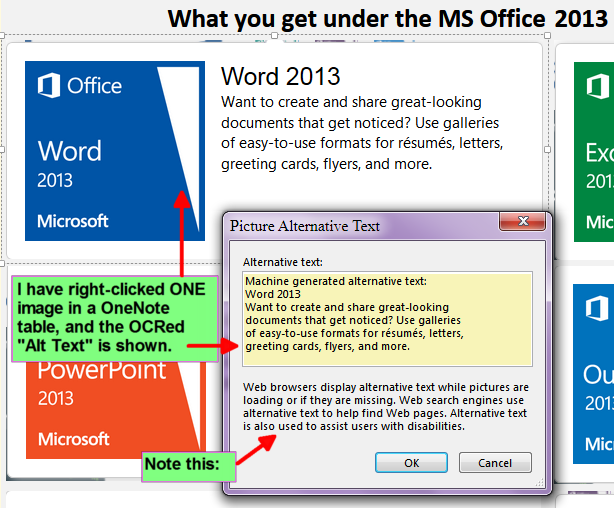
If you paste/drag an image into OneNote, or if you capture a screenclip image using its superb built-in screen-clipping tool, or if you paste/drag content containing images from a web browser, into OneNote, each image gets immediately OCR-scanned and any text found by OCR is made available almost instantly in the form of copyable (and search-indexed) text - what OneNote calls "Alternative Text" or "Alt Text". This is tedious when you want to copy text from multiple images, as it needs to be done on a per image basis.
Here's a picture of the "Alt Text" that you get if you right click-such an image: (this was a single image in a OneNote table that had several text-containing images pasted into it)
[attach]