DonationCoder.com forum
 
Read-only archive. This is a static copy of the DonationCoder.com forum. Reading and searching work as before; logging in, posting and private messages do not.
Archive of 2026-10-21 · About this archive · Main site

Author Topic: PDF Combiner, PDF Binder  (Read 22,317 times)

Contro

  • Supporting Member
  • Joined in 2007
  • **
  • Posts: 3,947
PDF Combiner, PDF Binder
« on: September 20, 2013, 08:48 AM »
I am searching for alternatives to an easy application for compose pdf files , able to merge, split, combine easily in the way you see in this video

http://www.youtube.com/watch?v=8I4eKvQzikI 

I began this post here :
http://www.donationcoder.com/forum/index.php?topic=36144.0

But I haven't found a confortable application for this purpose.

What I would like is a drag and drop alternatives applications able to extract in interactivity, compose , insert, extract, merge, split pdf files. Just in the way you see in the you tube video. Best Regards

Contro

  • Supporting Member
  • Joined in 2007
  • **
  • Posts: 3,947
Re: PDF Combiner, PDF Binder
« Reply #1 on: September 20, 2013, 09:12 AM »
This one Ultra PDF Merger v1.3.5 don't have the interactibility required because is a simple linear window where you can insert pdf, while the ideal is a multiple address window where any pdf is initially split in pages and then you are able with the drag and drop system to group, ungroup pages, move pages from one pdf to another, etc.
:-*

Contro

  • Supporting Member
  • Joined in 2007
  • **
  • Posts: 3,947
Re: PDF Combiner, PDF Binder
« Reply #2 on: September 20, 2013, 09:23 AM »
This one PDF Split Merge Extract don't offer a friendship environment and you have to elucubrate the way you want the final pdf, not in an interactive and simple drag and drop system. Not with enough flexibility.
:-\

Contro

  • Supporting Member
  • Joined in 2007
  • **
  • Posts: 3,947
Re: PDF Combiner, PDF Binder
« Reply #3 on: September 20, 2013, 09:39 AM »
Adobe Acrobat utility PDF Binder is not enough flexible and quick
Offer additionally the possibility to merge from doc and xls, but not deeply inside just because uses a plane matrix o linear matrix. You can change the order the files are inserted, but not select a part of each one component like in the you tube video of the first post.
:-[

Contro

  • Supporting Member
  • Joined in 2007
  • **
  • Posts: 3,947
Re: PDF Combiner, PDF Binder
« Reply #4 on: September 20, 2013, 10:21 AM »
Another example of a complicated program with no what you see is what you get way :
Advanced PDF Combiner 1.8

Offer a complicated window with multiple options you decide and limit to two pdf.
:-[

tomos

  • Charter Member
  • Joined in 2006
  • ***
  • Posts: 11,970
    • Gathering Badge
    • Participated in NANY Challenge Once
Re: PDF Combiner, PDF Binder
« Reply #5 on: September 20, 2013, 10:45 AM »
Tom

Contro

  • Supporting Member
  • Joined in 2007
  • **
  • Posts: 3,947
Re: PDF Combiner, PDF Binder
« Reply #6 on: September 20, 2013, 11:26 AM »
http://angusj.com/pdftkb/#pdftkbuilder
I know and use, but is linear interactive. You can merge , you can split. If not so easy. I am trying now with other trials merely don't give note.
I put that program in the first post in the other post related to this one.
Thanks a lot tomos
Best Regards
:-[

By example : Okdo All to PDF Converter Professional
fails me with one of my excel files trying. And is only an aproximation to the target.
They have free the merge/split tool

Contro

  • Supporting Member
  • Joined in 2007
  • **
  • Posts: 3,947
Re: PDF Combiner, PDF Binder
« Reply #7 on: September 20, 2013, 11:38 AM »
Some programs are simple a headache or even a fake when paid. A fellow told us of the buggy question and seems habitual in this type of software. It's a mere opinion after trying a lot and no need to give names....
:P

tomos

  • Charter Member
  • Joined in 2006
  • ***
  • Posts: 11,970
    • Gathering Badge
    • Participated in NANY Challenge Once
Re: PDF Combiner, PDF Binder
« Reply #8 on: September 20, 2013, 01:18 PM »
http://angusj.com/pdftkb/#pdftkbuilder
I know and use, but is linear interactive. You can merge , you can split. If not so easy.

moar details! :P
What do you mean by linear?
I find it works very quickly, but you need to know what pages of the document you want. No preview. Otherwise very good and effective.
Also, you can change the sort order of documents.
Tom

Attronarch

  • Supporting Member
  • Joined in 2012
  • **
  • Posts: 148
Re: PDF Combiner, PDF Binder
« Reply #9 on: September 20, 2013, 05:35 PM »
http://angusj.com/pdftkb/#pdftkbuilder

No need to use that one since pdftk* now has official GUI - http://www.pdflabs.com/tools/pdftk-the-pdf-toolkit/

* the tool you linked to is GUI for old pdftk command-line tool

tomos

  • Charter Member
  • Joined in 2006
  • ***
  • Posts: 11,970
    • Gathering Badge
    • Participated in NANY Challenge Once
Re: PDF Combiner, PDF Binder
« Reply #10 on: September 20, 2013, 06:15 PM »
^thanks for that tip Attronarch :Thmbsup:

There is now a pro version ($3.99 :up:) - it looks like you need the pro version if you want to select just part if the PDF's.
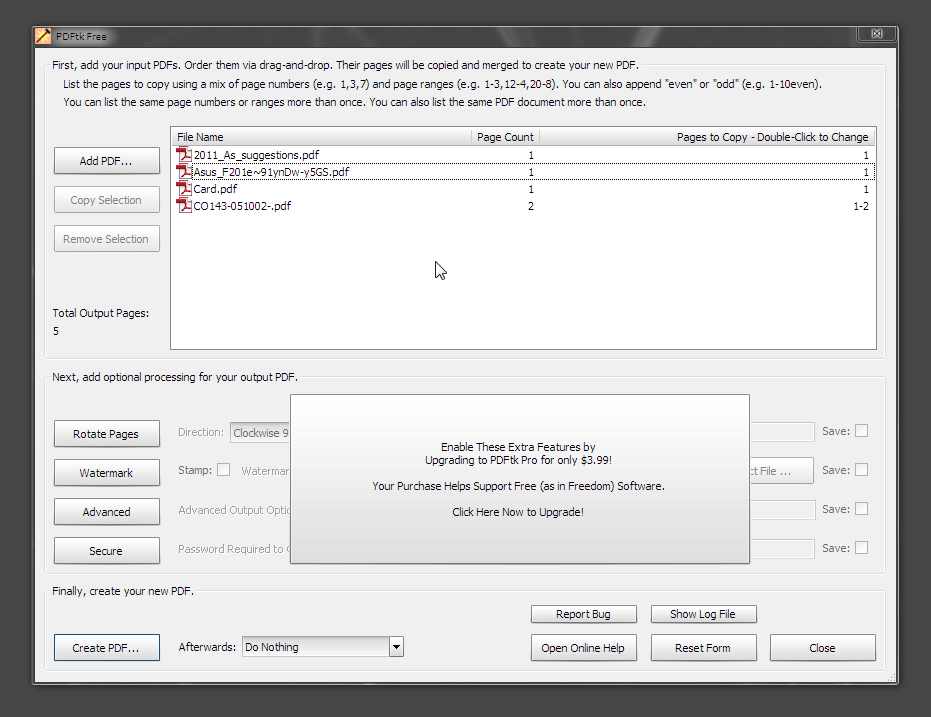
Strangely, they partially hide what the pro version does (see below) - and dont seem to do any straight-forward comparision on the site, but Pro obviously includes Rotate/Watermark/Secure (and I *think* selecting pages from PDF).

[attachthumb=#]
Tom

Contro

  • Supporting Member
  • Joined in 2007
  • **
  • Posts: 3,947
Re: PDF Combiner, PDF Binder
« Reply #11 on: September 20, 2013, 06:43 PM »
Running to learn

both  :P

Contro

  • Supporting Member
  • Joined in 2007
  • **
  • Posts: 3,947
Re: PDF Combiner, PDF Binder
« Reply #12 on: September 20, 2013, 06:56 PM »
^thanks for that tip Attronarch :Thmbsup:

There is now a pro version ($3.99 :up:) - it looks like you need the pro version if you want to select just part if the PDF's.
Strangely, they partially hide what the pro version does (see below) - and dont seem to do any straight-forward comparision on the site, but Pro obviously includes Rotate/Watermark/Secure (and I *think* selecting pages from PDF).
(see attachment in previous post)

What I had was an old version and free version of the GUI version.
I have installed the free version and you can extract pages with the free version.
:-*

In my old version you only can join or split, but not extract
In the new the novelty is that you can extract

Unfortunately is not so powerful like gDoc. but It's very useful indeed.
I have trying this afternoon the powerful libreoffice

There is a lot of solutions but I haven't find the one similar to gDoc

superboyac

  • Is your software in my list?
  • Charter Member
  • Joined in 2005
  • ***
  • Posts: 6,347
Re: PDF Combiner, PDF Binder
« Reply #13 on: September 20, 2013, 07:27 PM »
I recently was working with a lot of contracts and stuff that were being revised constantly, with multiple sets of documents that needed to be merged and inserted, etc. all the time.  I used this program:
http://www.debenu.com/

It basically allows you to create methods of batch processing a bunch of pdf operations.  For example:
--open document 1
--insert pages 3-5 of document 2 after page 40 of document 1
--merge this new document with document 3

etc

very handy, very speedy.  saved me a lot of headaches.  a little quirky and buggy at times (sometimes it would just crash).  but overall i was very excited about it.

Attronarch

  • Supporting Member
  • Joined in 2012
  • **
  • Posts: 148
Re: PDF Combiner, PDF Binder
« Reply #14 on: September 20, 2013, 07:59 PM »
^thanks for that tip Attronarch :Thmbsup:

There is now a pro version ($3.99 :up:) - it looks like you need the pro version if you want to select just part if the PDF's.
Strangely, they partially hide what the pro version does (see below) - and dont seem to do any straight-forward comparision on the site, but Pro obviously includes Rotate/Watermark/Secure (and I *think* selecting pages from PDF).
(see attachment in previous post)

To be honest I immediately bought pro version since I've been using the tool for long time. It has several quirks that should be addressed soon. The author is receptive to feedback, and I believe that the GUI will be even better when he updates it. Anyway, I don't think that you need pro version to change which pages you want to work with - just double click on the pages in the right column.

I recently was working with a lot of contracts and stuff that were being revised constantly, with multiple sets of documents that needed to be merged and inserted, etc. all the time.  I used this program:
http://www.debenu.com/

It basically allows you to create methods of batch processing a bunch of pdf operations.  For example:
--open document 1
--insert pages 3-5 of document 2 after page 40 of document 1
--merge this new document with document 3

etc

very handy, very speedy.  saved me a lot of headaches.  a little quirky and buggy at times (sometimes it would just crash).  but overall i was very excited about it.

I've tried using Debenu products, but with little success. They were slow, they would crash, and sometimes they just couldn't deliver what they advertised. But I might revisit their products, who knows maybe they are better now.
« Last Edit: September 20, 2013, 09:57 PM by Attronarch »

tomos

  • Charter Member
  • Joined in 2006
  • ***
  • Posts: 11,970
    • Gathering Badge
    • Participated in NANY Challenge Once
Re: PDF Combiner, PDF Binder
« Reply #15 on: September 20, 2013, 08:02 PM »
Anyway, I don't think that you need pro version to change which pages you want to work with - just double click on the pages in the right column.

well, I'm glad you told me that - I was just going to report that you couldn't select pages to use with the pro version either...
Tom

Contro

  • Supporting Member
  • Joined in 2007
  • **
  • Posts: 3,947
Re: PDF Combiner, PDF Binder
« Reply #16 on: September 20, 2013, 08:34 PM »
I recently was working with a lot of contracts and stuff that were being revised constantly, with multiple sets of documents that needed to be merged and inserted, etc. all the time.  I used this program:
http://www.debenu.com/

It basically allows you to create methods of batch processing a bunch of pdf operations.  For example:
--open document 1
--insert pages 3-5 of document 2 after page 40 of document 1
--merge this new document with document 3

etc

very handy, very speedy.  saved me a lot of headaches.  a little quirky and buggy at times (sometimes it would just crash).  but overall i was very excited about it.

I think that the speedy method is the not interactive method as gDoc.
There are similar programs to this.
Able to insert or determine what pages indicating its numbers. But is not really in the drag and drop method.
I think
:P

Contro

  • Supporting Member
  • Joined in 2007
  • **
  • Posts: 3,947
Re: PDF Combiner, PDF Binder
« Reply #17 on: September 20, 2013, 08:45 PM »
;D
I am very surprised with this about pdf editor and libreoffice

http://en.wikipedia.org/wiki/List_of_PDF_software

Editors

These allow users to modify an existing PDF file.
Name                   License Platforms                                 Description
LibreOffice                   GNU LGPL Windows, Mac OS, Linux native PDF opening and saving
OpenOffice Draw           GNU LGPL Windows, Mac OS, Linux PDF import via OpenOffice.org software, or extensions[1]
Inkscape                     GNU GPL Windows, Mac OS, Linux Open, edit and export documents, but only one page at a time (pages can be later combined using PDF printer)
PDFedit                   GNU GPL         Windows, Linux, BSD         Software to view or edit the internal structures of PDF documents, and merge them
Pdftk                           GNU GPL         Windows, Mac OS, Linux, FreeBSD, Solaris Command-line tools to edit and convert documents; supports filling of PDF forms with FDF/XFDF data. GUI front-end exists
PDFSaM                   GNU GPLv2 Windows, Mac OS, Linux, FreeBSD, Solaris GUI and command-line tools to split and merge PDF documents, rotate and rearrange pages; supports encrypting/decrypting of PDF documents, setting permissions, adding front or back cover, extracting attachments, filling the metadata
Nitro PDF                   Proprietary Windows                           Rich UI, allows combining PDFs, converting to other formats, editing (add images, shapes, text, etc.)
PDF Studio                   Proprietary Windows, Mac OS, Linux   Full feature PDF editor
Karbon                   LGPL and GPL Windows, Mac OS X, Linux, BSD, Solaris/Illumos Import PDF with multiple pages as layouts, export as a one page PDF. All standard vector graphics editor features.


Original address: https://www.donationcoder.com/forum/index.php?topic=36170.0