Eh ...
Surely there is a simple solution..
Say I want to copy only a part from the clipboard main window, which may be handy in some cases, e.g. type/serial/phonenumbers,
How to save that to a new clip?
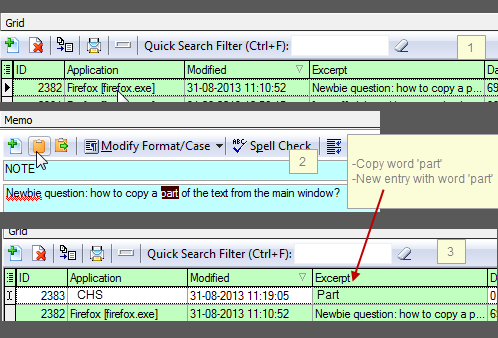
Example: in the below I select the word 'part' - click on copy to clipboard - then a new entry to show up with just that word, which may then be used for future purposes
a) easier to find in the list
b) no need select it from the original clip where the word might be somehwere in a longer text (no need to search)
TIA
=
=
[attach=#]
=
Surely there is a simple solution..
Say I want to copy only a part from the clipboard main window, which may be handy in some cases, e.g. type/serial/phonenumbers,
How to save that to a new clip?
Example: in the below I select the word 'part' - click on copy to clipboard - then a new entry to show up with just that word, which may then be used for future purposes
a) easier to find in the list
b) no need select it from the original clip where the word might be somehwere in a longer text (no need to search)
TIA
=
=
[attach=#]
=