DonationCoder.com forum
 
Read-only archive. This is a static copy of the DonationCoder.com forum. Reading and searching work as before; logging in, posting and private messages do not.
Archive of 2026-10-21 · About this archive · Main site

Author Topic: DONE: change system volume to a desired level (like 20% OR 30%) on system start.  (Read 23,724 times)

thecensor

  • Participant
  • Joined in 2009
  • *
  • Posts: 10

I would like an application that would change system volume to a desired level (like 20% OR 30%) on system startup.
and bring up a window telling me it did that and enable to easily change to another level.

thanks

c.gingerich

  • Supporting Member
  • Joined in 2011
  • **
  • Posts: 748
    • Participated in NANY Challenge Six Times
    • Coding Snacks
I think I got you covered. Give me a few.  :)

c.gingerich

  • Supporting Member
  • Joined in 2011
  • **
  • Posts: 748
    • Participated in NANY Challenge Six Times
    • Coding Snacks
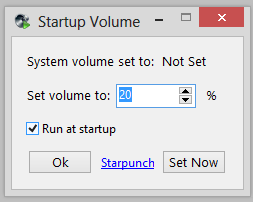
Start Volume is ready to download :-) HERE

To Use:

1. Run Start Volume.exe
2. Select your volume %
3. Check Run At Startup (if you wish)
4. Click OK

Image 2013-08-24 at 11.41.12 AM.png

thecensor

  • Participant
  • Joined in 2009
  • *
  • Posts: 10

Works,


Thanks  ;D

c.gingerich

  • Supporting Member
  • Joined in 2011
  • **
  • Posts: 748
    • Participated in NANY Challenge Six Times
    • Coding Snacks
Great!  :Thmbsup:

MilesAhead

  • Supporting Member
  • Joined in 2009
  • **
  • Posts: 7,736
    • Coding Snacks

I would like an application that would change system volume to a desired level (like 20% OR 30%) on system startup.
and bring up a window telling me it did that and enable to easily change to another level.

thanks

I'm just curious.  Are you running XP?  I ask because I looked at a few functions of scripting languages(autohotkey and autoit) and they noted there is no global volume call for Vista and later in either.

c.gingerich

  • Supporting Member
  • Joined in 2011
  • **
  • Posts: 748
    • Participated in NANY Challenge Six Times
    • Coding Snacks
I have tested it on XP, Win 7, and Win 8 64bit. Works on all 3.  :Thmbsup:

MilesAhead

  • Supporting Member
  • Joined in 2009
  • **
  • Posts: 7,736
    • Coding Snacks
I have tested it on XP, Win 7, and Win 8 64bit. Works on all 3.  :Thmbsup:

I take it you used a different programming language?  Or you came up with your own work-around?  I'm just curious because I don't have a laptop yet so I can start programming again.  Right now I'm stuck on public library machines.  I can't even right click a link, nevermind open Control Panel or (gasp) change a setting!!  Geez!!!  :)

skwire

  • I eat Coding Snacks for breakfast...
  • Global Moderator
  • Joined in 2005
  • *****
  • Posts: 5,297
    • Participated in NANY Challenge Seventeen Times
    • Coding Snacks
    • Superboy Coder
    • Cody Award
    • Volunteers/Staff
    • Gathering Badge
@MilesAhead: The more recent AHK builds can do global volume control in Vista/W7.

4wd

  • Pedantic Old Bastard
  • Supporting Member
  • Joined in 2006
  • **
  • Posts: 5,652
    • Coding Snacks
There's also a UDF available for AutoIt.
"I will not follow where the path may lead, but I will go where there is no path, and I will leave a trail." - Muriel Strode, 1903

MilesAhead

  • Supporting Member
  • Joined in 2009
  • **
  • Posts: 7,736
    • Coding Snacks
4wd and skwire: thank you for the info.  :)

skwire

  • I eat Coding Snacks for breakfast...
  • Global Moderator
  • Joined in 2005
  • *****
  • Posts: 5,297
    • Participated in NANY Challenge Seventeen Times
    • Coding Snacks
    • Superboy Coder
    • Cody Award
    • Volunteers/Staff
    • Gathering Badge
@MilesAhead: You are welcome.

@c.gingerich: Nice work.  :Thmbsup:

I'm going to mark this thread done and move it.

c.gingerich

  • Supporting Member
  • Joined in 2011
  • **
  • Posts: 748
    • Participated in NANY Challenge Six Times
    • Coding Snacks
Thanks no prob. :-)

thecensor

  • Participant
  • Joined in 2009
  • *
  • Posts: 10

I would like an application that would change system volume to a desired level (like 20% OR 30%) on system startup.
and bring up a window telling me it did that and enable to easily change to another level.

thanks

I'm just curious.  Are you running XP?  I ask because I looked at a few functions of scripting languages(autohotkey and autoit) and they noted there is no global volume call for Vista and later in either.

Windows 8 pro 64bit

thecensor

  • Participant
  • Joined in 2009
  • *
  • Posts: 10
Not working anymore. I reboot a few times. The app starts and it says "system volume set to 40%" but the volume is really 100%.

c.gingerich

  • Supporting Member
  • Joined in 2011
  • **
  • Posts: 748
    • Participated in NANY Challenge Six Times
    • Coding Snacks
Hmm. That's odd. Did you do any windows updates, install anything new, anything like that?

thecensor

  • Participant
  • Joined in 2009
  • *
  • Posts: 10
Hmm. That's odd. Did you do any windows updates, install anything new, anything like that?

I may have.  I might have run some cleaning apps like Wise cleaner or slim cleaner.

c.gingerich

  • Supporting Member
  • Joined in 2011
  • **
  • Posts: 748
    • Participated in NANY Challenge Six Times
    • Coding Snacks
ok. ill take a look and see wha i can do.

c.gingerich

  • Supporting Member
  • Joined in 2011
  • **
  • Posts: 748
    • Participated in NANY Challenge Six Times
    • Coding Snacks
I made some changes, please download from here http://starpunch.blogspot.com/2013/08/start-volume.html and let me know if it is working again.

thecensor

  • Participant
  • Joined in 2009
  • *
  • Posts: 10
I made some changes, please download from here http://starpunch.blogspot.com/2013/08/start-volume.html and let me know if it is working again.

Thanks, I'll test it

Original address: https://www.donationcoder.com/forum/index.php?topic=35882.0